Toshiba Z10t – A Windows 8 Tablet/Convertible Ultrabook For The Business User

It wasn’t until I saw the spec of the new Toshiba Z10t that I realised all of the pro-style Windows 8 tablets were missing something: an RJ45 port that supports PXE boot.  Without it, how exactly are you going to deploy a Windows image to the PC over a PXE (network) boot?

A few months ago we saw the first photos and specs of the Toshiba Z10T, which they are sensibly describing as a convertible ultrabook.  Sure, a “tablet”, that is similar to the Surface Pro and others, undocks from the keyboard and it features a stylus (on select models) and multitouch and all that jazz that you expect.  However, calling something that costs $1000 or more a tablet and then expecting it to compete against $300 offerings from Samsung and the rest … that’s just insanity as we all now know.

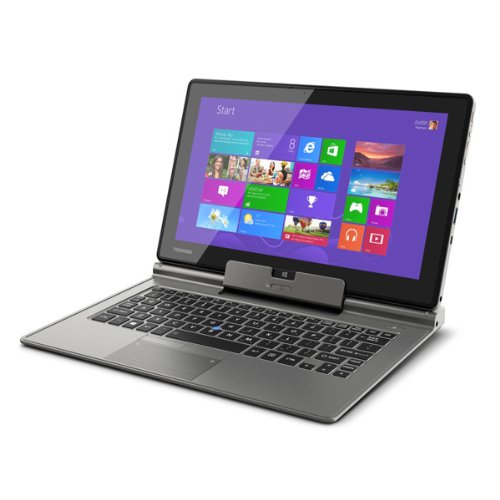
The device has all the usual features on the “tablet” and features full sized HDMI (hallelujah!) on the keyboard as well as an RJ45 network port.  I got my hands on one for a few seconds today, booted it into the settings, and a LAN boot was one of the options, OSD fans will be happy to hear.

The model I played with was an i5, with 4 GB RAM and 128 of storage, and 1920 x 1080 screen resolution.  Typing enthusiasts: there is a backlit keyboard.  Like the Surface Pro, the battery is on the lighter side supporting just over 5 hours; it does not have a Haswell CPU.  There are USB 3.0 and SD (full) card slots.  Presentation fans: there is a real VGA port so no more dongles that work 50% of the time in hotel meeting rooms.

The machine is not going to win <insert country here> Top Model.  It is not pretty.  But this is a tool designed to do a job.  The material on the back is a tough textured plastic.  It’s feels like it will last over time.

This is an ultrabook first, tablet second.  It’s intended to be a replacement device and not a companion device. This is the machine you use at your desk, on the road, and for presentations.  There is also an i7 model.  These machines are not cheap.  They’re not to be confused with consumer machines; they are business machines, in my opinion.

WS2012 Hyper-V Networking On HP Proliant Blades Using Just 2 Flex Fabric Virtual Connects

On another recent outing I got to play with some Gen8 HP blade servers.  I was asked to come up with a networking design where (please bear in mind that I am not a h/w guy):

  • The blades would have a dual port 10 Gbps mezzanine card that appeared to be doing FCoE
  • There were 2 Flex Fabric virtual connects in the blade chassis
  • They wanted to build a WS2012 Hyper-V cluster using fiber channel storage

I came up with the following design:

The 2 FCoE (I’m guess that’s what they were) adapters were each given a static 4 Gbps slice of the bandwidth from each Virtual Connect (2 * 4 Gbps), which would match 4 Gbps Fiber Channel (FC).  MPIO was deployed to “team” the FC HBA’s.

One Ethernet NIC was presented from each Virtual Connect to each blade (2 per blade), with each NIC getting 6 Gbps.  WS2012 NIC teaming was used to team these NICs, and then we deployed a converged networks design in WS2012 using virtual NICs and QoS to dynamically carve up the bandwidth of the virtual switch (attached to the NIC team).

Some testing was done and we were running Live Migration at a full 6 Gbps, moving a 35 GB RAM VM via TCP/IP Live Migration in 1 minute and 8 seconds.

For WS2012 R2, I’d rather have 2 * 10 GbE for the 2 cluster & backup networks and 2 * 1 or 10 GbE for the management and VM network.  If the VC allowed it (didn’t have the time), I might have tried the below.  This would reduce the demands on the NIC team (actual VM traffic is usually light, but assessment is required to determine that) and allow an additional 2 non-teamed NICs:

Leaving the 2 new NICs (running at 4 Gbps) non-teamed leaves open the option of using SMB 3.0 storage (without RDMA/SMB Direct) on a Scale-Out File Server.  However, the big plus of SMB 3.0 Multichannel would be that I would now have a potential 8 Gbps to use for Live Migration via SMB 3.0 Open-mouthed smile But this is assuming that I could carve up the networking like this via Virtual Connects … and I don’t know if that is actually possible.

Comparing The Costs Of WS2012 Storage Spaces With FC/iSCSI SAN

Microsoft has released a report to help you “understand the cost and performance difference between SANs and a storage solution built using Windows Server 2012 and commodity hardware”.  In WS2012, they are referring to Storage Spaces and Scale-Out File Server.

From my own perspective, we’ve found the JBOD + Storage Spaces solution to be much cheaper than SAN storage, both on the upfront side (initial acquisition) and long term.  Adding disks and trays is cheaper – you get any manufacturer’s disk on the JBOD’s HCL rather than the 60% more expensive Dell/HP/etc disk from the same factory but with a “special” (lockdown) firmware.

ESG Lab tested the performance readiness and cost-effectiveness of Microsoft’s new storage solution and compared the results with two common storage solutions: an ISCSI and FC SAN. For performance testing, ESG Lab tested a tier-1 virtualized Microsoft SQL Server 2012 application workload and witnessed a negligible performance difference between all the tested storage configurations. In fact, when testing with as close to the exact same storage configuration as possible across each of the tested configurations, ESG Lab witnessed a slight performance benefit with Microsoft’s storage solution over iSCSI and FC SAN solutions.

ESG Lab also calculated what organizations could expect to spend when initially purchasing each storage configuration. The price difference was impressive. ESG Lab found that Microsoft’s storage solution can save organizations as much as 50% when compared with traditional iSCSI and FC SAN solutions. Another eye-opener for ESG Lab was around a features comparison between the storage configurations. With the upcoming release of Windows Server 2012 R2, Microsoft’s storage configuration is beginning to match traditional storage offerings feature for feature.

With similar performance, a matching feature set, less management complexity, and 50% cost-savings over a SAN, Microsoft’s Windows Server 2012 file server cluster with Storage Spaces over SMB 3.0 introduces a potentially disruptive storage solution to address any customer’s needs.

image

Getting Started With DataOn JBOD In WS2012 R2 Scale-Out File Server

Yesterday we took delivery of a DataOn DNS-1640D JBOD tray with 8 * 600 GB 10K disks and 2 * 400 GB dual channel SSDs.  This is going to be the heart of V2 of the lab at work, providing me with physical scalable and continuously available storage.

The JBOD

Below you can see the architecture of the setup.  Let’s start with the DataOn JBOD.  It has dual controllers and dual PSUs.  Each controller has some management ports for factory usage (not shown).  In a simple non-stacked solution such as below, you’ll use SAS ports 1 and 2 to connect your servers.  A SAS daisy chaining port is included to allow you to expand this JBOD to multiple trays.  Note that if scaling out the JBOD is on the cards then look at the much bigger models – this one takes 24 2.5” disks.

I don’t know why people still think that SOFS disks go into the servers – THEY GO INTO A SHARED JBOD!!!  Storage inside a server cannot be HA; there is no replication or striping of internal disks between servers.  In this case we have inserted 8 * 600 GB 10K HDDs (capacity at a budget) and 2 STEC 400 GB SSDs (speed).  This will allow us to implement WS2012 R2 Storage Spaces tiered storage and write-back cache.

image

The Servers

I’m recycling the 2 servers that I’ve been using as Hyper-V hosts for the last year and a half.  They’re HP DL360 servers.  Sadly, HP Proliants are stuck in the year 2009 and I can’t use them to demonstrate and teach new things like SR-IOV.  We’re getting in 2 Dell rack servers to take over the role as Hyper-V hosts and the HP servers will become our SOFS nodes.

Both servers had 2 * dual port 10 GbE cards, giving me 4 * 10 GbE ports.  One card was full height and the other modified to half height – occupying both ports in the servers.  We got LSI controllers to connect the 2 servers to the JBOD.  Each LSI adapter is full height and has 2 ports.  Thus we needed 4 SAS cables.  SOFS Node 1 connects to port 1 on each controller on the back of the JBOD, and SOFS Node 2 connects to port 2 on each controller.  The DataOn manual shows you how to attach further JBODs and cable the solution if you need more disk capacity in this SOFS module.

Note that I have added these features:

  • Multipath I/O: To provide MPIO for the SAS controllers.  There are rumblings of performance issues with this enabled.
  • Windows Standards-Based Storage Management: This provides us with with integration into the storage, e.g. SES

The Cluster

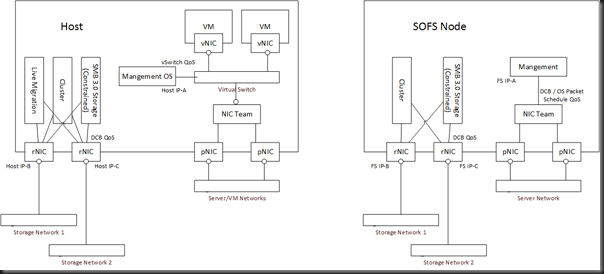
The network design is what I’ve talked about before.  The on-board 1 GbE NICs are teamed for management.  The servers now have a single dual port 10 GbE card.  These 10 GbE NICs ARE NOT TEAMED – I’ve put them on different subnets for SMB Multichannel (a cluster requirement).  That means they are simple traditional NICs, each with a different IP address.  I’ve used NetQOSPolicy to do QoS for those 2 networks on a per-protocol basis.  That means that SMB 3.0 and backup and cluster communications go across these two networks.

Hans Vredevoort (Hyper-V MVP colleague) went with a different approach: teaming the 10 GbE NICs and presenting team interfaces that are bound to different VLANs/subnets.  In WS2012, the dynamic teaming mode will use flowlets to truly aggregate data and spread even a single data stream across the team members (physical interfaces).

Storage Spaces

The storage pool is created in Failover Clustering.  While TechEd demos focused on PowerShell, you can create a tiered pool and tiered virtual disks in the GUI.  PowerShell is obviously the best approach for standardization and repetitive work (such as consulting).  I’ve fired up a single virtual disk so far with a nice chunk of SSD tiering and it’s performing pretty well.

image

First Impressions

I wanted to test quickly before the new Dell hosts come so Hyper-V is enabled on the SOFS cluster.  This is a valid deployment scenario, especially for a small/medium enterprise (SME).  What I have built is the equivalent (more actually) of a 2-node Hyper-V cluster with a SAS attached SAN … albeit with tiered storage … and that storage was less than half the cost of a SAN from Dell/HP.  In fact, the retail price of the HDDs is around 1/3 the list price of the HP equivalent.  There is no comparison.

I deployed a bunch of VMs with differential disks last night.  Nice and quick.  Then I pinned the parent VHD to the SSD tier and created a boot storm.  Once again, nice and quick.  Nothing scientific has been done and I haven’t done comparison tests yet.

But it was all simple to set up and way cheaper than traditional SAN.  You can’t beat that!

Building Storage Spaces On My PC

Currently at home I use a HP MicroServer with Windows Home Server on it to store all my media (music, video, and photos).  I do all my photo editing on a HP tower PC with a nice Samsung monitor.  My camera is a 16 MP DSLR so the RAW files that I am editing are pretty big (around 21 MB each).  It takes quite a while for the thumbnails to load when I browse a folder, and it takes an age to open a RAW file or to save an edited PSD file over the network to the WHS.

I’ve decided to migrate my content from the WHS to my PC.  But the PC only has a 465 GB drive.  That’s too small and it’s a single point of failure.

What I’ve decided to do is deploy Storage Spaces using USB 3.0 drives on the tower PC.  The PC doesn’t have USB 3.0 ports.  So what I did was use some Amazon.co.uk store credit and bought some USB 3.0 ports.  I bought 2 * StarTech.com 2 Port PCI Express SuperSpeed USB 3.0 Card Adapter, available from:

That gives me a total of 4 * USB 3.0 ports on the back of the tower PC.  The cards come with optional power supply leads for devices that draw power from the ports.  They are plugged into the hard drive power lead in the PC. 

Next I’ll be getting myself 2 * 3TB USB 3.0 drives, and plugging one into each USB 3.0 card.  With 2-way mirroring I’ll get just under 3 TB of storage, enough to keep me going for a while, and with room to expand again in the future.

Data access will be much faster than it currently is and I can look at recycling the WHS, possibly turning it into SMB 3.0 storage for my home lab.

Technorati Tags: ,

Build 2013 Keynote

Steve Ballmer

An estimated 60,000 watching via webcast.  They’re going to show lots of Windows 8.1, Windows Phone, and Windows Azure.

Windows 8.1 Preview is out now on http://preview.windows.com.  You can do an online update or you can download the ISOs.  I just saw that MSDN has the ISO downloads and one for .NET 4.5.1 Preview.

Steve Ballmer shows some Windows Phone handsets.  They are going to show small tablets.  MSBuild attendees are getting the Acer 8” tablet.  More are on the way.  Ballmer “wouldn’t call them PCs”. 

He admits that most PCs last XMas didn’t have the touch that was emphasised in Windows 8.  Since then, touch has become the norm.  True enough, for mobile devices, for most brands.  Some Asian brands have still been slow to catch up.  Hmm, Windows 8 customers on touch devices are “happier than Windows 8 customers on non touch devices” and “even happier than Windows 7 customers”.

He talks up the hybrid device.  That’s what I use … great for work and play.

He then talks about apps.  To be honest, apps are improving.  The quality of games is up too.  Facebook are bringing out a Windows 8x app.  The NFL is bringing out a fantasy app for Windows 8.  That’s a huge international market.  Tesco (UK version of Wallmart) have an app too. 

Microsoft “pushed boldy in Windows 8” and desktop application users told Microsoft to “refine the blend” (in his coffee terms). 

He reminds us that the Start Button (not menu) is back.  You can choose to boot to desktop.  You can quickly get to your apps.  There are more multitasking options with how apps share screen space.

Bing is built into Windows rather than being an app.  It’s there for devs to build on, just like Google is in Android (for the DoJ and EU Commission Smile).

Julie Larson Green

Here comes the worst presenter in the Microsoft executive level, in my opinion.  She starts the demo on an Acer.  First up … Nook … Ouch, Barnes and Noble.  Twitter looks decent in portrait mode … Oh, it was designed for this form factor apparently.  Oh nice feature, swiping on the space bar seems to autocomplete or something.  Now we can slide up on the top qwerty row to enter numbers.  Very nice – others will copy this. 

The Mail app now includes social features, e.g. Facebook updates.  It appears (it is a demo) that you can easily delete a common selection of junk mail with a swipe. 

Search can bring results from everywhere using Bing.  No need to explicitly select a Bing app.  In the demo, finds a restaurant, maps it, selects it, and can book a table.  A search of a band finds loads of info, and can quickly start playing music via a completely redesigned XBox music.  Redesigned for playing instead of the previous searching emphasis.  Goes to a regular music webpage.  Lists all the bands of a festival.  Shares via charms to the Music app.  The Music apps creates a playlist from the band list on the site.  Very impressive example of app contracts.

The Start Screen is more customizable.  You can now get to All Programs by swiping up in the Start Screen.  You can sort the apps, e.g. by date installed.

I looked away, I think I saw JLG swipe a screen without touching.  The Start Screen tiles smoothly appear on your desktop wallpaper, reinforcing the Start Menu “plus” functionality.

We get a demo of 50/50 snapping of apps.  The split can be any size you want by sliding the splitter.  You can right-click on a link to open a new window … now it’s 3 apps on screen!  Apps on more than one screen at once.  Was surprised this wasn’t on Windows 8 tbh.

A preview version of PowerPoint running on Windows RT.  Browses Skydrive to get a file (default location).  Smooth transitions and video on Windows RT.  This is a PowerPoint app

“Windows 8.1 is Windows 8 refined” appears to be the mantra.

Antoine Leblond.

Boring developer stuff.  Am going into hibernation for a while.

The Windows Store is updated to make it easier for people to find and download/buy apps.  Apps are now updated automatically.  Thank God!  The spotlight rotates.  Lots more apps are on the main screen via better use of space.  Your app history/ratings are used to prepare “Apps for you”.  The screenshots are bigger.  Related apps are shown in the description info.  You can change categories, etc by swiping from the top.

Hmm, the app bar seems to allow much more controls now.

Each monitor can have it’s own scaling factor to make the most of the space.  This is done by Windows and has no app requirement.

Tiled resources is a programmable page table for graphics acceleration.  In other words, be able to render huge objects that don’t fit into the memory of your GPU.  Games can run with unprecedented level of detail.  They show a video of an object with 9 GB of data on a retail DX11 GPU.  They zoom in, and you can see the rivet detail of a glider in flight.  This feature is also in Xbox One apparently.

A 3D printer is appearing in MSFT stores soon.  Another one coming to Staples for under $1300.  Out comes a Lego Mindstorms robot.  He uses a Windows tablet to communicate with a tablet in the robot.  The on-robot tablet controls the robot by USB interface. 

The crazy 3200 * 1800 Samsung something something something ultrabook with Haswell processor is shown.  It gets 12 hours from a single charge allegedly.  The Lenovo Helix convertible is next.  Acer Aspire P3 (1.74 lbs) with Core i5 CPU with a detachable protective cover keyboard.  A sub $400 touch Acer laptop with dual core AMD CPU. 

JLG Comes Out With Surface Pro

And there’s the 2nd giveaway … Surface Pro with Windows 8.1 Preview and Visual Studio Preview.

And the webcast fails because it “has not yet started”.

And that is that. 
Is Microsoft Pulling A “Windows 8” With Xbox One?

Go online after Monday’s revelations and have a look around at the news on the Xbox.  Headlines in all the general media say that the PS4 has beaten the Xbox One, months before the Xbox One is out.  You’ll see terms like “XBone” to demean the new MSFT console, or “Ex-Box” from people who are claiming that they are switching brands. 

A number of things have either concerned or enraged current Xbox users.

24 Hour Activation

I haven’t read the source or watched a briefing so I don’t know the facts on this one.  People are saying that your Xbox needs to call home every 24 hours to activate (like Windows KMS but more often).  If there’s no connection after 24 hours then the Xbox stops working, allegedly.

Uh … that aint good.  Not everyone lives in a connected world.  Requiring a net connection (or even a decent/reliable one) drastically reduces the potential market.

Second Hand Games

Once again, I don’t know the facts, but people are claiming the new licensing of Xbox One games will kill the 2nd hand market.  This does concern me – most of my games are 2nd hand that I’ve bought legitimately in a store.  I think a lot of gamers play until they are bored, and then trade in for something new.  And what they hell are you to do when Granny buys you Kinectimals for Christmas?  You’ll definitely want to get rid of that before your friends see it on a shelf.

Price

Price matters.  In Ireland, the price difference between the platforms is EUR100, in favour of the Sony machine.  That’s roughly $130, nearly the price of an 8” tablet from the likes of HP, Lenovo, or Samsung.  From the sounds of the rumours, it’s also roughly the price of an Xbox One game.  Surely Microsoft has learned from the tablet “wars” that being expensive doesn’t give you the “Apple desirable affect”, it just makes you expensive.  I have no doubt that the EUR499 price is the traditional bleeding edge bleed-em-while-you can marketing price, and that it’ll come down quite a bit in February 2014.  But will the critical lead be lost by then … friends want to be on the same platform and they’ll follow the early leader.

Loyalty

There is no loyalty when it comes to acquiring a new generation of consoles.  The games on the Xbox 360 are incompatible with the Xbox One.  So there is no reason to stick to a brand – moving to this new generation of consoles for Xbox customers is a leap to an incompatible platform, no matter what.  Your new copy of Grand Theft Auto 5 (not announced for Xbox One) will work fine on Xbox 360 but not on Xbox One.  There’s nothing to stop you from buying a Sony PS4 (cheaper, no net dependency, and supporting unlimited trade market) where you will have the exact same compatibility with your Xbox 360 (that is, none). 

Microsoft’s Reputation In The Consumer Space

There has been a huge negative reaction to the controversial features of Xbox One.  Have we seen this before from Microsoft?  Yes: Windows 8.  Sinofski, Julie-Larson Green, et al, all refused to listen to the feedback that started on the week of Build, September 2011, and that deafness to critique (“We’re right, and you’re wrong”) continued right up to and after GA in October 2012.  Now that sales are well and truly down in the consumer space, and Windows tablets have made no more than a dent (nothing more) in sales (the sub EUR200 Android tablet rules), they’re bringing us the changes we wanted in Windows 8.1.

Am I the only one to notice the same thing is happening with Xbox One?  The “always on” scandal, higher price than the competition, killing the trade market, a focus on stuff (entertainment) that the core market doesn’t care for (and 6.7 billion of us probably won’t get access to).  Is Microsoft telling us that “they’re right and we’re wrong” all over again?  Is this really going to be the era of Ex-Box?  Surely Microsoft employs someone with a backbone in marketing and can see that they’ve already lost to Sony on the next gen console wars.  You only have to look at any forum or news (not even IT news) site.

What Am I Doing?

I have been an Xbox 360 user for years. Before that I had a PS2 and first gen Xbox.  I’m not a hardcore gamer, but I enjoy creating chaos in the streets of Liberty City as much as anyone can.  I used to use my Xbox for entertainment, until I realised it was a pain in the hole and switched to the much simpler (and quieter) Roku for watching movies from my PC or Netflix.  I have pre-ordered an Xbox One, but I’m not committed.  Like I said, I prefer to let others pay the premium for new games so I can get them for less later.  And there’s no GTAV to reel me in.  I can always cancel the pre-order – I’m 75/25 in favour of doing that because there is no game there that I want.  Or if I find supply is low in December, I could always sell the device at a profit so someone’s little Johnny can be one-up on the Jones’s next door  Or maybe I can sell an Xbox One “Package” on Ebay Smile

Technorati Tags:

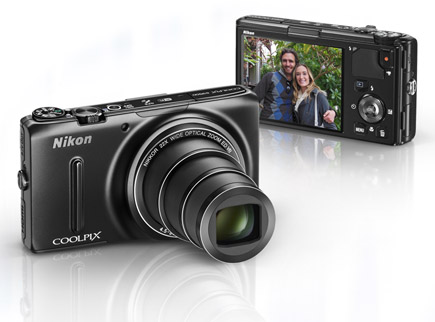
Putting The Nikon S9500 To The Test

I mentioned last week that I was using the Nikon Coolpix S9500 at TechEd NA 2013 – which the office kindly loaned to me for my recent travels.  I went with it instead of my usual DSLR kit because I wanted convenient.  And that it was … plus this 18.1 MP fits-in-your-pocket camera has a 22x optical zoom – the lens is like something out of Iron Man or Transformers, appearing out of nowhere.

I spent my time working with the camera as … as camera.  It’s has some other tricks like built-in GPS (for tagging locations) and Wi-Fi.  I wanted to take pictures.  And that’s what I did last week.

On Saturday night I went to see The Who playing in the O2 in Dublin.  It was a great gig, and I also thought it would be a cool place to bring a camera.  Let’s see how a compact would do in low light from the “cheap” seats.

Turning off the flash was easy – on-board strobes are useless with a range of more than a couple of feet so all they do is tick people off and waste battery.  The first challenge was to deal with the low light. I was getting blurry shots so I took control of ISO, starting at 1600, but found that 800 would do the trick.  Configuring ISO was easier than I expected on a camera with just a few buttons on it – everything was easily found in the menu system.  Then I discovered (I didn’t have a manual – and it didn’t matter because the controls were intuitive) that the Scene setting allowed me to instantly edit a photo in the camera.  I love high contrast B&W rock photos … here’s one of the opening act, Vintage Trouble, at nearly full zoom.

image

Then on came the main event.  Quite honestly, The Who rocked.  I am not a big fan – I know the CSI themes and a few others, but those old dudes can still tear it up.  The matrix metering did a nice job at catching detail in the exposure:

image

What about full zoom and colour?  Here is a full 22x zoom with natural colour.  In these spotlight situations I switched from matrix metering to center metering to give the camera a shot at catching the highlights and leaving the shadows black.

image

Obviously the shots are not as sharp as a DSLR – that is why DSLR’s and their big lenses are so expensive.  And I was hand-holding with my arms extended; I reckon the shots could be better on a tripod.  But the normal person who isn’t mental like I am for photography should be dead happy with camera performance like this.  I’m not disappointed at all.

Note: The only Photoshop work done was to resize the images from a huge 18.1MP to a more web-friendly 500 x 375 pixels.  No color correction, sharpening, etc was done, other than what a camera does when it stores the digital capture as a JPEG.  The B&W conversions were done using a menu in the camera – I pre-selected “high contrast B&W” and pressed OK when the review shot appeared after taking it.

You can find the Nikon S9500 on:

Technorati Tags:

TechEd NA 2013: Some Sights From The Expo Floor

Today was the first time I really had a session gap and time to wander about the expo floor.  I had a chance to talk to some vendors.  I took the opportunity to take a few photos with a fab little Nikon Coolpix S9500 that I borrowed from the office.

In the Surface section was a Windows sponsored “NASCAR” stock car.  It was a cracking looking machine.  A few people tried to rock it … there was no give in the suspension.  I doubt it’s a comfy street machine Smile

DSCN0090

Inside, you can see that this is not quite a family machine, and the stereo system and bluetooth appear to be additional extras.

DSCN0092

DataOn are one of the big players in the Storage Spaces story of Windows Server 2012/R2.  They have certified JBODs for Storage Spaces.  This week they launched two Cluster-in-a-Box (CiB) appliances.

The first takes 70 drives.  See those loops at the front/bottom?  Those are easily removable backplanes – that makes all disk-related maintenance easy.  At the back are 2 blade servers, with IPMI BMCs and 2 * SFP+ iWARP NICs.  They’re dual E5 CPU powered with onboard RAID1 drives.

DSCN0093

There’s also a CiB the SME.  It takes 12 drives.  There are 2 blades with IPMI and E5 CPUs, with 1 GbE networking.

DSCN0096

I also saw the new Dell PowerEdge VRTX CiB.  It comes with 2 blades by default, with 2 blade slots free.  I was told it does PCI RAID instead of Storage Spaces.  You can see that it takes 12 drives.

I also talked to the folks at F5.  They clarified their strategy for an NVGRE gateway.  The new software device is for their virtual Big-IP appliance.  Their long term strategy is to include the NVGRE gateway in an update to the physical Big-IP load balancer.  Why?  Because combining NVGRE with the NLB allows them to intelligently do load balancing for VMs in VM Networks.

You know what disappointed me with the Expo floor?  The lack of swag.  Why should I talk to any sponsor if they don’t have something to make me talk to them.  And what the hell am I meant to wear in the office now?  My MMS 2012 t-shirts are starting to fall apart!!!

I wrapped up the afternoon by hanging outside the Channel 9 studio while Mark Minasi was being interviewed by MSFT’s Joey Snow.  And I was chuffed that Mark gave me a plug.

DSCN0098

Technorati Tags: ,

The First 8” Windows 8 Tablet On Pre-Order

Acer has launched the first 8” Windows tablet, available on pre-order on Amazon now.  The spec is:

  • Screen Size 8.1 inches
  • Max Screen Resolution 1280 x 800 pixels
  • Processor 1.5 GHz Atom Z2760 
  • RAM 2 GB SDRAM 
  • Graphics Coprocessor Intel Graphics Media Accelerator
  • Graphics Card Ram Size 64 MB
  • Wireless Type 802.11bgn
  • Number of USB 2.0 Ports  1
  • Average Battery Life (in hours)  8 hours

image

According to Engadget it will be:

… priced at 329 euros for 32GB and 379 euros for 64GB

No dates have been shared.

Technorati Tags: ,