TEE14–Software-Defined Compute In Windows Server vNext

Speaker: Ben Armstrong

Almost everyone in the room using Hyper-V. Large number also using VMware. About 1/3 using public cloud. Maybe 20% doing hybrid cloud.

Hybrid Cloud

Microsoft believes that hybrid cloud is the endpoint – seamless movement between on-premises and the public cloud.

Hyper-V scales. Azure runs on stock Hyper-V. It required a lot of work for WS2012, but it’s stock Hyper-V and that’s over 1 million servers running Hyper-V. If 1 in 10,000 installs shows a bug, and you run a hypervisor on that many host deploying 500m VM per day, then you test the product heavily. We benefit from this with our on-premises deployment.

image

What have Microsoft learned from Azure: Standardize your build – Keep the hosts simple and standardized. Don’t vary. Change does not scale.

Private Cloud Improvements

  • Large scale VMs and clusters
  • Accelerated live migration
  • Dynamic memory with hot add
  • Comprehensive host and guest clustering support
  • Rolling upgrades
  • Mixed mode cluster support
  • VM compute resiliency
  • Cluster-aware updating
  • Broad linux distro support
  • In-guest vRSS support
  • hot add and online resize virtual disk storage
  • Live backup
  • Comprehensive management

Hybrid Cloud

Hybrid Cloud is about extending your data centre, not replace it. In the MSFT Cloud OS, that’s Hyper-V, with SysCtr/WAP for private cloud, and Azure/partner run hosting cloud for public cloud. MSFT makes it seamless.

Right now, only Microsoft is listed as a leader in 4 categories of hybrid cloud computing by Gartner.

Linux and Windows parity on Hyper-V

Run Linux without compromises on a single host: Hyper-V. you don’t have to partition hosts. A single UI for managing Linux. Backup, monitoring, capacity planning, etc. All too often, the Linux people want to run their own virtualization, and it makes no sense. It’s a waste of time, effort, and importantly, money.

Open Source

Yes, Hyper-V is supported in OpenStack. And it’s supported in something called Vagrant. Microsoft has been working closely with them.

USP

Only company offering on-premises IaaS, public IaaS, public PaaS, and Public SaaS.

Change

People are running more VMs on:

  • More hardware
  • Less hardware

Hmm! How we scale is different now. Half a rack can run thousands of VMs. And in hyper scale clouds, you see a lower density for cost effectiveness and performance SLA. In private cloud, we focus on smaller clusters.

Virtualization is now assumed. Physical is no longer the default.

Workload mobility is assumed: People expect Live Migration or vMotion.

Secure isolation is assumed. Customers in different VMs expect that they are secure from other tenants’ VMs.

Hardware failure fault tolerance is assumed.

“I am the fabric administrator”. This is a new job title for the person who runs virtualization, network, and storage. What happens inside the VMs is not their worry. MSFT hearing from businesses that they want fabric admins have no access to data in the VMs. No solution to that today. In contradiction to this, that person used to be the domain admin that fixed everything. But now, it’s not uncommon that they don’t have sign-in credentials for the tenants’ VMs and cannot provide support.

Cluster Rolling Upgrades

Hyper-V upgrades are frequent. Downtime is hated by admins and tenants alike. Admins want to hide the fact that an upgrade is happening. This new process allows mixed mode clusters and Live Migration so you can rebuild nodes in a cluster with a new OS and LM VMs around without anyone noticing. Yes: you keep the cluster – it’s a host rebuild within the cluster and not a cluster migration of the past.

Compute Resiliency

Hyper-V failure are nearly always caused by hardware, drivers, firmware by OEMs. Big area of investment for Microsoft, including transient failures.

Backup

I know that this has been a focus point for Ben. Hyper-V is decoupling VM backup from the underlying storage. File based backup is the way forward, with efficient change tracking for backup. Provides reliability, scale, and performance. This session is on right now (Taylor Brown) so watch the recording in 24 hours.

Many more changes

  • Delayed VM upgrade
  • New IC servicing model
  • Secure boot for Linux Generation 2 VMs
  • Distributed Storage QoS
  • Resilienvt VM Configuration
  • And more.

Demo: Compute Resiliency

Clustering saves people over and over. But clustering is complex and it can break. Often caused by a transitory error, such as a cable being unplugged, etc. When there is a heartbeat failure, then you get a 30 second outage while VMs are failed over, and then there’s a wait time for the VMs to boot.

Ben demos with 3 nodes. A script will kill the cluster service on one of the nodes. In 2012 R2, the cluster would panic and do a failover. In vNext, the server is marked as isolated – there’s a problem. VMs are still “running” but market as unmanaged. A failover won’t happen immediately in case the node comes back online. The wait time is 4 minutes by default, but it is configurable. This behaviour is only applied to running VMs.

Another new feature is quarantine. When a host is frequently going in and out of isolated state, then it will be quarantined. It’s a disruptive server that causes a lot of churn. It is quarantined. VMs are migrated off (green quarantine) and then moved into red quarantine. Now it’s persona non-grata (no new workloads placed there) until you resolve the intermittent issue. There is a time for automatic quarantine so a host can come out of quarantine automatically.

Microsoft Were The First to Do Lots in Virtualization

  • Hardware assisted live migration for balzing performance.
  • SR-IOV with Live Migration
  • Fibre Channel in VMs with Live Migration.
  • TRIM and UNMAP

Is VMware really the market leader and inniovator?

Ben goes into Q&A.

Question: Is Hyper-V Manager going away? No. Emphatically. It’s used even by the happiest SysCtr and fabric controller admins, especially when things go wrong.

That’s a wrap!

TEE14–Optimizing Your Data Centre With Windows Server, System Center, and Microsoft Azure

Speakers: Jeff Woolsey and Matt McSprit.

I am bursting – and I don’t just mean to use the toilet. Here comes the grand reveal for Windows Server & System Center vNext.

image

Here we go with a video: your data centre is an orchestra and you are the conductor. Left: compute. Right: networking. In front: storage. Keeping everything is the rhythm of management. Software-define all of it, make it possible in your data centre with Windows Server & System Center. Extend it with Azure.

Jeff Woolsey starts things off. We get the 3 clouds in one obligatory slide. Hundreds of new features that couldn’t be shown in the keynote. This foundation session will dive a little deeper. Jeff talks about “software-defined everything”.

MSFT Cloud OS hybrid cloud:

  • Empower enterprise mobility
  • Create internet of things
  • Enable application innovation
  • Unlock insights on any data
  • Transform the data center

Ugh: CPS. Yawn IMO.

More on WAP. You can run an Azure-consistent cloud on premises. Use this internally or as a service provider. Expect big pushes on WAP: it’s the front-end for enterprise deployments of Hyper-V/System Center for vNext onwards.

MSFT not bothering to change the scalability figures for Hyper-V because they haven’t had a customer hit the WS2012 numbers yet. The numbers were Top Gear numbers – big whoah but so high that they aren’t a blocker.

There is a major emphasis on guest clustering in Hyper-V. No artificial scale limitiations. You can do in-place or rolling upgrades of clusters in vNext from WS2012 R2. This includes mixed mode and live migration within the cluster.

Linux is getting vRSS support for network scalability.

Networking

Software-defined networking still puzzles people. Decouples the application/service from the underlying network. Doing lots to increase reliability and manageability.

Now RDMA to be added in network virtualization. Supporting VXLAN and NVGRE for SDN.

A new Netwrok Controller from Azure is being added to Windows Server.

A software load-balancer based on Azure is being added in the box in vNext.

Distributed firewall and cloud-scale network traffic management.

Storage

There is no such thing as a happy storage customer – Jeff Woolsey.

2012 gave us storage spaces. 2012 R2 added auto scaling. In vNext you get more. Microsoft does not use proprietary storage from the usual names. They use software-defined storage.

Storage Replica is synchronous replication in the box that works with any storage – you can even do it with a couple of laptops (allegedly).

Storage QoS is a killer feature for service providers.

Patrick Lang comes on stage to do Storage QoS demo. Perfmon is running, showing storage throughput from a bunch of VMs. VM1 is dominating.

He creates SLAs and applies them to VMs. Note: all PowerShell. He starts a bunch of more VMs. Some rogue ones try to take the storage bandwidth but the heavy user (a file server)  gets the throughput that it needs for its SLA.

In 2012 they demod 1m IOPS from a single Hyper-V VM. Last year, they did it with 1.6m IOPS. In Server vNext, right now, they can do 2 millions IOPS from a single Hyper-V VM.

something Winter comes in to talk System Cetner. About 1/3 using SysCtr 2012. One or two hands using older. 2/3 of the room NOT USING SYSTEM CENTER.

MSFT will “ship another version of System Center in the Summer along with Widows Server”.

Making CPS work was an eye opener for System Center. They took over 500 improvements into SysCtr 2012 R2 and vNext. It was too complex to install/integrate the suite.

There is a cultural shift happening. Cloud is now. Users want services now, not in 4 hours or tomorrow. Do on-premises cloud or they’ll do it directly in public cloud. The solution is WAP offering service, SysCtr offering management, and Windows Server/Hyper-V offering compute, networking and storage.

You can do Azure Operational Insights with or without System Center:

image


Matt McSpirit comes on. He’s between us and lunch.

Azure Site Recovery now manages DR replication for:

  • Between Hyper-V and Azure
  • Between two Hyper-V sites
  • Between two VMware sites using InMage
  • Between two Hyper-V sites using array replication (just gone into preview)

Coming soon: From VMware to Azure DR replication using Azure Site Recovery Services.

Matt demos the setup of ASR and configuring a one-click failover plan.

Lunch time!

Summary: Azure is more than just cloud. It’s tricking down to on-premises infrastructure.

TEE14 – Keynote

Welcome to TechEd Europe 2014, blogged live to you by me from Barcelona, Spain. It’s early, I got in to near of the front of the hall, and the crowd is streaming in as a DJ Joey Snow mixes.

image

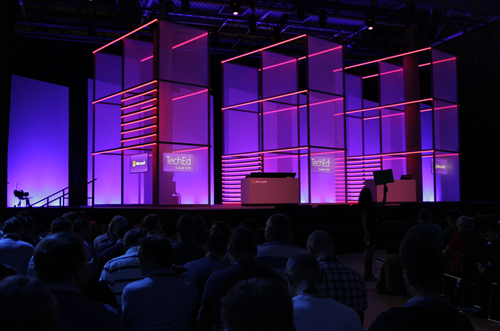
The stage is lit blue and purple, with the press sitting front and centre.
image

The crowd is awaiting the show to start.

image

Cameras are rolling.

image

And here we go ….

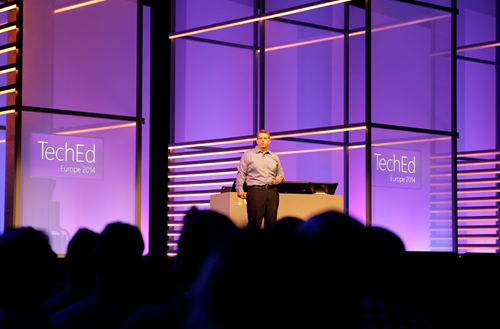
Alex Zander VP of Azure comes out. He starts on the pitch about the number of devices. The number of connected devices now outnumbers the number of humans on the planet. This brings up IoT. Here comes mobile-first, cloud-first.
image


What are Microsoft enabling in enterprise devices to expand your digital work and personal lives?

Here comes Joe Belfiore to talk about Windows 10 in the Enterprise.

image

1) Windows 10 delivers a single platform across a wide range of devices to ensure your investment covers a wide array of devices

2) Provide users with a platform that they will love to use.

3) Provide protection against modern security threats.

4) A way to manage all devices in a way that makes sense for businesses

Breadth of Devices

This covers everything from sensors in a jet plan to PCs, to tablets, to phones, to giant computing systems.

Love to Use

Interesting topic: Windows 8 has some “mixed response”. Customer satisfaction for keyboard/mouse users of Windows 8 was lower than that for touch users. Now they are making non-touch and emphasis point.

They have focused on that large group of Windows 7 users on classic PCs. The Start Menu is shown. Search is now a part of the Start Menu and is shown – this includes web searches so they are adding value to “Windows 7 features”. Windows 8 Live Tiles are added to the familiar start menu – adding value to familiar features. So this isn’t a big disruptive change for users – it’s more evolutionary.

Live Tiles add personalisation to a work environment – to make Windows more enjoyable for users.

Now he starts on the apps and the store. Today, they are not being used as much as MSFT would like because “the apps behave so differently”. Apps of all kinds are in the start menu and launch in Windows that run on the desktop.

And then he gets a big round of applause for CTRL+V at the command prompt:

image

Two more power user features coming in the next flight of Windows Insiders releases.

He has a multiple monitors display set up. Right now you cannot snap a window to the joining edge of a multi-monitor display. But Snap in Windows 10 allows you to snap a window to the “join”.

Now he moves over to the Surface Pro. Touchpads are all differently by the OEMs. MSFT are adding their own multi touch gestures on Windows 10 for the touchpad. 3 finger up/down hides/reveals all windows. Left/right does alt-tab with 3 finger swipe.

End user/consumer stuff will come in the new year. Then he shows the Continuum UI for hybrid devices (see previous posts).

Protecting Corporate Data

IT can control the PC’s apps that are used on the corporate network – allegedly.

Demo: Windows 10 PC that the user logs into. The company authorizes some apps to use company data and appear in the Start Menu. The user can also run non-authorized apps (including 3rd party). When she hits save as in Word she has Personal and Company stores that she can see. The user cannot save company data into a non-corporate store. For example, she cannot paste from Word (company app) into Twitter (non-company app). Policy allows a user override … assuming that the user enters a reason, and this goes into an audit log that IT is managing.

You’ll see this in Windows Phone too – one OS, remember?

Protecting User ID

Lots MSFT thinks they can do to protect against modern security threats. Today you can do 2 factor authentication but it’s cumbersome to deploy. They are going to enable cheaper two factor auth and fingerprint biometrics.

They user the Windows Phone as a second factor. When you log into the PC, the phone prompts you to enter a pin on the phone via Bluetooth. Do that, and now your log in on the PC is completed. No additional devices – just the company phone that you might have been buying anyway.Demo was done with Windows Phone.

Windows 10 Management for continuous Innovation

Improving the app store so you can use it to deploy your own or your licensed s/w. Hmm, SCCM? You’ll have a choice of GPO or MDM to manage all kinds of devices – “it’s your choice” – MSFT will faciliate 3rd party MDM.

Volume License support is coming via license claim and reuse in the Store. No MSA is required to use the Store infrastructure in the future. You can set up your own company store to manage your licensing.

Managed in-place upgrades are coming. They are ending the era of wipe and reload. Making OOBE more user friendly in the biz: a user gets a PC, goes through OOBE and corporate policy will be applied. There’s a “my organization owns it” option in OOBE. There’s a sign-in (looks like workplace join) dialog and policy is then applied accordingly. There will be 2 factor auth via Admin managed SMS. Now policy and pre-assigned apps are deployed. Custom data protection, authentication, security policy, etc are all deployed.

This is like a merger of SCCM and AD GPO into a cloud-based solution. I like the message. Lets see what the final product looks like.

Cloud

Back to Alex Zander again to talk cloud. Let’s watch the crowd to see what happens to them. It didn’t go well in Houston in May.

Asked to store more data and increase agility, security, and data privacy. Costs must be reduced while increasing flexibility for everyone. The pace of innovation is advancing at a dizzying rate. Businesses that adapt to this will thrive. Right now, SMEs are doing this.

image

MSFT cloud is more than Azure and O365. It’s also on-premises and with partner hosting companies. Three USPs to the cloud OS:

  • Hybrid
  • Enterprise grade
  • Hyper-scale

Key investments in Windows Server vNext in software-defined everything, such as the new Network Controller. This can run your software-defined networking.

Many are coming off of W2003 and are looking for new features, etc. MSFT wants to make that seamless: www.microsoft.com/ws2003eos.

A way to get started with the cloud is to just connect and extend functionalities using hybrid solutions, such as Azure Site Recovery Services for DR in the cloud.

Announcing: Azure Operational Insights. Install an agent on existing on-premises machines and start to log information into th cloud to do deep insights on how things are running and visualize that data. There are security, capacity planning and change management insight packs. You can do a fast search and fix incidents. See System Center Advisor *cough*

Bring Azure to your on-premises data centre. This is Windows Azure Pack (WAP). You get the same skin as Azure, powered by the same hypervisor (Hyper-V) and System Center.

Jeff Woolsey comes out to talk new stuff.

Storage Replica: Storage replication, storage agnostic, built into the box. Do replication between clusters or stretch clusters between sites.  Demo: 2 notes in NY and 2 nodes in NJ. Seemless failover with no data loss thanks to synchronous replication. A cloud witness gives you quorum with a virtual witness site. Doesn’t require SANs and it woks with standalone servers. SIMPLE to set up.

image

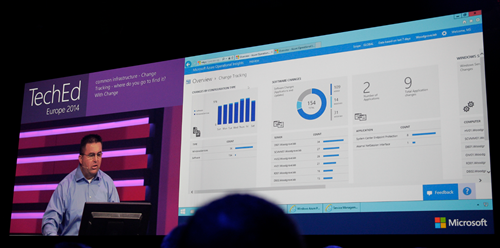
System Center Advisor has come a long way:
image

Capacity planning allows you to project future usage based on empirical data and usage. Lots of information presented in a nice layout with lots of graphs. All powered by search. You can create personalized dashboards.

Manage your infrastructure using WAP to create Azure consistent clouds on premises using Windows Server and System Center.

Back to Alex Zander. He’s now going to pitch CPS. This is MSFT sold hardware running pre-packaged on-premises cloud, based on Dell h/w with lots of custom work done on drivers and firmware. Only Fortune 100’s need apply.

Half of the Microsoft hosting partners running the Cloud OS are in Europe.

On to Hyper-Scale. Over the last few decades, the industry is defined by the scarcity of resources: we are always struggling to find more, squeeze in more, etc. What if that was flipped on its head and we could use a hyper scale cloud with effectivly infinite resources.

Australia went live yesterday – now there are 19 Azure regions. The immense scale of Azure makes them cheaper and we can deploy cheaper “infrastructure” and services. Over 30 trillion storage objects in Azure. Over 1.2 million SQL DBs. Over 140m WAAD users.

image

Reminder of the G series of large memory VMs – the largest available on the public market. Intended for data processing. Also announced durable SSD storage in Azume Premium Storage with 50K IOPS with <1 MS read latency. Intended for workloads that might have been on bare metal.

Azure Batch preview is a job scheduling service in the cloud at a massive scale. Rich API and simple portal. Do batch jobs more quickly with massive elastic compute scale. You might use it for batch scale our and in on a scheduled basis to reduce VM costs.

1/5 of VMs in Azure are running Linux. CoreOS is supported now – a containerized tiny Linux OS.

Mark Russinovich, CTO and Azure, comes out to demo Azure Batch. He demos an open source 3d rendering app called Blender. He has a basic model that he will ray trace to make complete. he shows it before batch and it’s like watching paint dry. Now he adds a plug in to submit work to Azure Batch. How many VM instances you want are entered ina  dialog. He uses 8 x A8 compute intensive VMs with 40 GBps Infiniband networking. submits the job and now he can track the job status via the plugin. The rendering accelerates. We get a nice picture. He compares with the non-optimized job and it’s barely got started.

He now starts to talk about Docker containers on CoreOS. Docker is normally managed from Linux We see Docker management from Windows for the first time:

image

He manages containers running in a Ubuntu VM. He creates a wordpress site from Windows, via the CoreOS management host, running in a container on the Ubuntu VM. Takes about 1 second to fire up.

Now he moves on to premium storage. There are 3 VMs, one on standard storage. IOMETER running in the VM to stress test the IOPS of the VM. Hits 500-600 IOPS (min guarantee is 500). The second is a D-Series VM with premium storage. Same test gives 4082 IOPS (single premium disk). 3rd VM has 16 disks on premium storage and they’re striped. Appears as 16 TB volume. IOMETER gives 61623 IOPS.

image

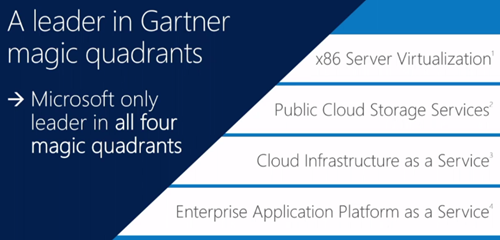
Microsoft are the only big 3 cloud vendor with enterprise grade, hyper scale, and hybrid cloud. Gartner has Microsoft as the leading cloud vendor in 4 key areas:
image

Amazon only has 12 MPLS WAN networked locations for hybrid cloud. Google has none.

Azure Marketplace offers ahuge collection of partner provided and curated VM services. See names like Kemp, Oracle, SAP, IBM, Riverbed, Dell, Symantec, Kaspersky, Barracuda, and many more.

Enterprise Productivity

Users expect to be connected from anywhere with access to resources with no IT-created complications. Workers coming into the workforce work very differently than my generation. Touch, connectivity, collaboration, discoverability of information are their norm. BYOD .. that’s a cultural thing that affects the USA more, according to IDC.

We go back to device management, applications, and identity.

Some old info here on MDM. Sleepy time.

New Windows Intune updates arriving in the coming months. Manage Office mobile apps, MDM for Office 365 so you can manage docs and email and do selective wipe of O365 data on lost devices.

Office 365

Julia White is out to demo. She shows the new Azure AD Connect Preview tool for linking on-premises AD to WAAD. Goal is to simplify a previous complicated process.

Azure AD app proxy allows you to bring all apps into a single control plane. She has a Sharepoint on-prem app that she adds to Azure AD. Users now go to one place for authentication and authorization. Is AD MOVING (not just extending) to the cloud? User logs into the app via an iDevice.

Feedback on Office for iPad is that IT wants to manage those apps and corporate data. Intune will enable this in near future. White sets up a configuration policy. Can set up so managed apps can only copy/paste to other managed apps. Can manage deployment of managed apps. Make available the app out from the admin portal. Back to the iPad. Runs Ourlook. There’s an email with an Excel attachment and opens that. The only app possible in the selection is Excel. That’s the only managed spread sheet tool so the unmanged ones are not available. Tries to copy/paste into the Apple email tool – cannot. But can paste into Word because it is managed.

There’s a new O365 SDK for iPad apps. Devs can reach into O35 data from the Apple tablet.

MSFT is the only global provider to be approved for Article 29 pan European data privacy. O365 data is encrypted at rest. DLP is a feature of the E3 plan that allows you to protect against data leakage. Users can see it in action and understand the purpose of it – therefore no excuse for trying to work around it.

Brings up a report to see amount of overrides on opt-in DLP policy. Too high, so she decides to change the policy. There’s a credit card DLP policy that’s being overriden. Modifies it, and adds an action for overrides. Adds and RMS policy to disable forwards when the policy is overridden. If it’s overriden, a notification can be sent to auditors.

Creates a new email with an attachment. Straight away Office detects the DLP rule and notifies the user. The user overrides. The recipient gets the doc in an email – RMS prevents snipit, forward, print, etc. os the credit card details are secure.

That’s a wrap, folks!


Microsoft News – 24 October 2014

This is the last of my news posts before TechEd Europe. Expect crazy flurries of news on Tuesday morning during the keynote. I’ll be live blogging so my updates will be there.

System Center

Azure

Miscellaneous

Here Comes TechEd Europe 2014

Life has been crazy for me lately. I’ve spent near 100% of the last 3 months at work (and a lot at home) working on material for lots of different Azure educational events. And in addition to that, I’ve been preparing my session for TechEd Europe, starting with the keynote at 08:30 in Barcelona (Spain, CET) on Tuesday morning.

I am there as a speaker this year, so I will not be in the media pit, and I might not even get into the keynote hall at all! I will be live blogging in any case, and I will also be attending lots and lots of sessions, mostly on Windows Server vNext Hyper-V, storage, and networking, and plenty of Azure too. I’ll be doing my best to live blog those sessions that I attend. I will also be covering virtualization and related content for Petri.com.

My tools of choice this time around are:

  • Toshiba KIRAbook (Windows 10 Technical Preview): The battery life is incredible in this machine.
  • OneNote: This is my preferred tool of choice for note taking.
  • Windows Live Writer: I’m blogging and this is how I publish to my site.
  • Canon 1D mk IV and 24-70 L IS mk II: A good camera is useful.

Of course, I am presenting, so that’s a big focus point for me. My session is all about squeezing the most our of Hyper-V. I’ve got information about features of Hyper-V that you might not know about or have been afraid to try. I’ll dive into some of the mechanisms used to enable some of those amazing demos of the recent past. And I have LOTS of demos (10 as it stands at the moment).

So come along to CDP-B329 From Demo to Reality: Best Practices Learned from Deploying Windows Server 2012 R2 Hyper-V – it’s a fine big room with 1100 seats to fill!!!! That’s pressure, but it’s nothing compared to competing in Speaker Idol (5 minutes is hell!).

Microsoft News – 23 October 2014

It’s the calm before the storm of announcements from TechEd Europe 2014.

Window Server

Desktop

Azure

Events

Microsoft News Summary – 22 October 2014

Hyper-V

Windows Server

Azure

System Center

Microsoft Partners

Miscellaneous

Microsoft Cloud Briefing October 20th 2014

I tuned in a minute or two late to see Satya Nadella rehashing his cloud first, mobile first thing that has started to bore people. Substance, not mantras, please.

image

It’ the same small room in San Francisco as the non-streamed Windows 10 announcement.  He starts off talking about the cloud being the most complete cloud:

  • Productivity with CRM Online and Office 365
  • Hyper scale cloud with hybrid and public and private cloud offerings

image


He starts to talk about San Franciso and San Jose governments that adopted Office 365 for supporting mobile workers. Not just big enterprise, but also government sector and small businesses. NBC does encoding and live streaming of events via Azure. German company ThyssenKrupp manages over 1 million elevators using a service they built on Azure.

Azure compute power and research tools are being made available to Ebola researchers.

Paul Smith stores are using Hyper-V and are using ASR for DR. Datacenters are in a constant purchase cycle for storage – here’s the push on a non-selling StorSimple (it’s virtually an EA benefit that customers pay the shipping/import costs of – and pay for the Azure storage).

image

At this point, there is nothing new here. This is like a marketing operation for the media.

Scott Guthrie comes out wearing read (read that as announcements coming). G-Series of huge VMs are announced. A new premium storage account offering is accounted with much greater scalability and performance:

image

This is unparalleled scalability in the cloud. This is stuff that on-premises VMs cannot do.

He goes on to talk about on-premises and hybrid solutions, supporting any infrastructure including bare metal, Linux, and vSphere:

image

Microsoft provides the only consistent experience across public and private cloud, thanks to Windows Azure Pack.

Here comes a new hardware plus software solution called Cloud Platform System to bring Azure to your datacenter (San Diego codename). You get WAP, management APIs (REST) and hypervisor, similar to Azure. This is a partnership with Dell, available starting in November. This will be a flop. Dell are clueless about their current massive portfolio, and they usually prefer to sell Dell-owned management products over System Center, not to mention their general lack of knowledge of Hyper-V.

Now he talks about Docker to enable greater densities and to allow app mobility to the cloud.

CoreOS Lunix is coming to Linux, to give a memory optimized memory footprint. It’s the fifth Linux distro on Azure.

A dude from Cloudera comes on stage. Cloudeera is announced on Azure. Here’s a demo of the new Azure preview portal running Windows 10. There’s a Cloudera Enterrpsei offering in Data, Services etc.

And that was that. Event over. I bet the media were glad that they travelled across a continent for all that.

New Security Vulnerability in ESXi

VMware posted this article where academic research has found a vulnerability with Transparent Page Sharing (TPS). Apparently they can use this to determine the “private” AES encryption key of another virtual machine. Woops … another “breakout attack” for VMware. I’m still waiting on the first one for Hyper-V.

TPS is one of those features that vFanboys cling to when attacking Hyper-V Dynamic Memory. Now VMware are turning if off by default (starting Q4 2014 for ESXi 5.1, and later for other versions). Hmm, this case raises questions about the security design of vSphere.

I agree with VMware that the vulnerability is impractical in terms of usefulness to an attacker. But what if you could use TPS to get the private SSL key of an application server in a multi-tenant cloud, and then use that to launch man-in-the-middle attacks? That would be a serious threat.

Choose your hypervisor carefully – breakout attacks are BAD.

I wonder what fresh hate will be vomited in my direction by the vFanboys 😀 Thanks to Flemming Riis (@FlemmingRiis) for the heads up.

Technorati Tags: ,,

Microsoft News Summary – 17 October 2014

This is the first of these since the 8th – my life consists of constant event/tradeshow/conference preparation at the moment so there’s little time for anything else.

Hyper-V

Windows Server

clip_image001

Azure

System Center Data Protection Manager

Windows Microsoft Intune

Office 365

Security

  • Signed Malware = Expensive “Oops” for HP: HP is revoking a digital certificate because the cert was used to sign malware in 2010. Nice one, HP!
  • And every retail chain in the US has been hacked. At least that’s what it seems like. Maybe the US banks will join the rest of us in the 21st century?

Miscellaneous