TechCamp 2013 Wrap Up

Yesterday we ran TechCamp 2013, the Irish community launch of Windows 8.1, Windows Server 2012 R2, System Center 2012 R2, and Windows Intune.  All the feedback I have heard has been positive – thankfully!  🙂

We kicked off with Dave Northey (Microsoft CAT Program Manager).  Dave was the IT Pro DPE in Ireland for quite some time and has spoken at every launch event since Windows NT.  It would have been wrong not to have Dave in to do the keynote.

 WP_20131128_09_55_43_Pro

After that we broke into two tracks.  I did the WS2012 R2 session and next door, Damian Flynn (MVP) did the Windows 8.1 in the enterprise session.  I wanted to attend Damian’s session – I hear it was excellent, covering the BYOD and mobile worker scenarios.

WP_20131128_13_57_10_Pro

In the desktop track, some speakers from Microsoft introduced the new generation of devices that the various OEMs are bringing to market for Windows 8.1 and Windows RT 8.1, and what Windows Intune now offers for distributed end users, mobile workers, and BYOD device/app management.

Back in the server & cloud track, Paul Keely (MVP) did a session on service automation.

 WP_20131128_12_11_47_Pro

Damian was back on stage in the server & cloud track talking about using SCVMM 2012 R2 and Windows Azure Pack to build a hybrid cloud on Azure and Windows Server 2012 R2.  Kevin Greene (MVP) wrapped up the track explaining how System Center can be used to manage service availability and quality.

WP_20131128_15_29_55_Pro

Niall Brady (MVP), an Irish man living and working in Sweden, wrapped up the desktop & devices track by talking about System Center Configuration Manager 2012 R2.

WP_20131128_15_27_17_Pro

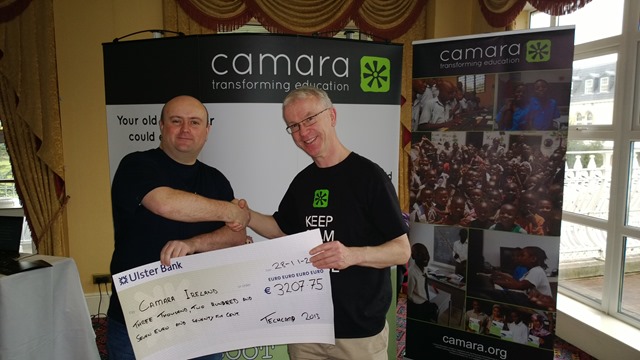
We asked for a small registration fee to encourage legitimate registrations and to get a higher turn-up rate.  That fee went to a good cause, an NGO called Camara.  We had Mark Fox in from Camara.  This gave Mark a chance to tell the audience (after the keynote) about the good work that Camara does.  They take unwanted PCs from businesses, securely wipe the PCs, track them, and reuse those machines to provide a digital education to needy kids.  Education is the best weapon against poverty and war, and Camara is on the frontline. Mark also staffed a stand in the exhibition room, and hopefully businesses found a way to get rid of machines in their drive to rid themselves of Windows XP, and make a difference in the world while doing it.
 WP_20131128_09_42_44_Pro

We have a whole bunch of sponsors to thank:

  • MicroWarehouse: My employers were the primary sponsor.  This event would not have happened without the huge effort by John Moran.  I would have been happy with a projector in a shed (with VPN access to my lab) but John made this a professional event.
  • Microsoft: Thanks for the support from Ciaran Keohane, the help from Michael Meagher.
  • Ergo: One of the leading Microsoft partners in Ireland, regularly winning Server partner of the year.
  • DataOn Storage: One of the manufacturers of certified Storage Spaces hardware
  • Savision: Creating dashboards for System Center that aid IT operations.
  • Toshiba: who had some devices on hand (including their new 8” Windows 8.1 tablet), most of which aren’t even on sale yet!

A big thank you goes out to each speaker who prepared 75 minute sessions (two of them in the case of Damian).  In case you don’t know, that’s probably a couple of days work in preparing slides, demos, and rehearsing, sometimes into the wee hours of the morning.

And finally, thanks to everyone who helped us communicate the event, and of course, came to the event to hear about these new solutions.  I hope the day proved valuable.

We had a number of people ask if we’ll run more events like this next year.  I believe that this is something that we will strongly consider.  There won’t be any launch stuff for us to cover for a while, so maybe we’d look at doing more “here’s how” content.  We’ll have to review and consider our options before we make any decisions.

Dell Management Packs Now Support Microsoft System Center 2012 R2

Thanks Florian Klaffenbach for the heads up on this.  Dell have announced that they support System Center 2012 R2:

  • Dell Server Management Pack Suite ― Discover, inventory and monitor Dell PowerEdge servers (agent-based option with Windows/OpenManage Server Administrator and agent-free option using WSMAN for 12th Generation of Dell PowerEdge Servers), Chassis Management Controllers using SNMP &  iDRACs using SNMP.   Download: version 5.1 , Documentation
  • Dell Client Management Pack –Discover, inventory and monitor Dell Client PCs running Windows and OpenManage Client Instrumentation (OMCI) ― Download: Dell Client Management Pack version 5.0 , Documentation
  • Dell Printer Management Pack –Discover, inventory and monitor Dell Printers using SNMP ― Download version 5.0, Documentation
  • •Dell MD Storage Array Management Pack Suite –Discover, inventory and monitor Dell PowerVault MD Storage arrays ― Download version 5.0, Documentation
  • Dell EqualLogic Management Pack Suite–Inventory and monitor Dell EqualLogic storage arrays using SNMP― Download version 5.0, Documentation
  • The latest releases of all the listed Dell Management Packs will work as-is for System Center 2012 R2 Operations Manager; the only exception is that the Chassis Modular Server Correlation feature of the Server MP Suite is not supported on R2 (110032 in the online Release Notes).
Technorati Tags: ,,

Launch Event – Learn From The Best; Not From The Rest

There are only hours now between now and the start of TechCamp 2013 in City West in Dublin, where Irish MVPs (and a couple of Microsoft folks) will be presenting on:

  • Windows Server 2012 R2
  • Service automation using System Center 2012 R2
  • Hybrid cloud using Hyper-V Network Virtualization, NVGRE, SCVMM 2012 R2 and Windows Azure Pack
  • Service level management using System Center 2012 R2
  • Windows 8.1 in the business
  • New Windows devices
  • BYOD, consumerisation of IT, and mobile device management
  • Enterprise desktop management using System Center 2012 R2

You could wait for a sales person come to town and tell you stuff that they’ve read about.

Or, you could make a little effort to come to TechCamp 2013 where some of the worlds leading experts independent experts (all with international followings and tech book credits to their names) on these technologies (who are Irish BTW) will be there to present an honest appraisal of this technology that they have worked with every day since the 2012 R2/8.1 previews were launched.

Update – My Lumia 1020 Experience

I managed to connect the phone to Office 365 last night.  I think I originally set up the phone during the DNS issue that impacted Microsoft last week and that if affected my configuration.

One of the problems that I’ve had with Windows Phone in the past is podcast management – The store only works in a few countries.  It’s a big deal for me.  Podcatcher is still as bad as ever.  I tried something different last night: i PodCast.  It’s not as good as Dogcatcher on Android but it works OK so far.  I’ll see how it goes after a few days.

The other issue that I had in the past was using the phone with my Parrot bluetooth car kit.  I managed to talk to a friend for about 20 minutes on the motorway this evening, so no complaints.

The camera got tested out by a few of my work colleagues today.  The image quality has impressed all so far.

Apps that are important to me are all there:

  • Aer Lingus
  • British Airways
  • TripIt
  • Yelp (spotting a theme yet?)
  • Audible
  • NFL Mobile
  • NFL Gamepass
  • Flickr (way better than Apple version)
  • Irish Times (best version on any platform)
  • Last Pass (can’t live without it)
  • Viber
  • And more

There are a few more that I’d like, such as Odeon Ireland, The Journal.ie, and more.  Maybe the folks in Microsoft Ireland can get something moving there ;)  Two more apps I’d like to see:

  • Scheduled do not disturb: I hate when I get called in the middle of the night.  iOS has this built in and there are several excellent apps on Android.
  • ProXPN: Not a deal breaker (because it’s more important on Windows and my Android tablet) but it would be nice for Netflix.

The Twitter app also needs some work.  I dislike how it doesn’t scroll to the oldest unread tweet, especially when you need it to load more older tweets.  And why oh why must it keep notifying me of stuff when I’ve disabled notifications?

Other things I am liking:

  • Syncing lots of calendars.  I’ve got my personal O365 calendar and my work calendar all in one place.  A quick look in the evening and I know what’s coming up tomorrow, without opening up 2 mail OWA and Outlook.
  • Nokia Here Drive+: I downloaded some maps last week and was able to navigate from the heart of Redmond to Fry’s in Renton while offline.  It worked perfectly.  I guess I’ll be able to keep my phone on charge while navigating now, instead of unplugging it to insert my GPS.  Winning!
  • Multiple mail accounts.  This is another time saver.  I have connected work mail and my personal O365 mail account to the phone.  Both have different tiles on the start screen, which I like, and I can quickly jump into either one.

Whoda thunk it – I’m being sort of positive about my Windows Phone 8 experience!!!!  Someone call a shrink!

And My Next Ultrabook Is …

I recently posted what I wanted in a new ultrabook to replace my nearly 2 year old, non-touch, Asus UX31E.  I’ve waited, watched the market, and even considered buying in the USA when I was over there.  But even a month after Windows 8.1 GA, the same disappointing spec and overpriced machines are all that are on the market.  If you want a non-touch Ultrabook, it appears that the MacBook Air is the most economical option, even if you upgrade the RAM and SSD.

The family of devices that has caught my attention is the Lenovo Yoga series.  In fact, it was when researching them that I found out about the (Android) Yoga Tablet 8.  I was going to hold out for the Lenovo Yoga 2 Pro but two things happened:

  • There is no supply anywhere of this convertible ultrabook.
  • I discovered the ThinkPad S1 Yoga

ThinkPad are more business oriented machines, built to last.  Sounds ideal for lugging around in a camera bag through airports.  The Yoga is also available in this family.  I customized the spec, meaning it will take an additional 1-2 weeks to build and ship:

  • Intel Core i5-4200U Processor (3MB Cache, up to 2.60GHz)
  • Intel HD Graphics 4400
  • 8GB PC3-12800 DDR3L on MB
  • Windows 8.1 64
  • Touch & Pen, FHD (1920 x 1080)
  • Backlit keyboard
  • ClickPad without NFC antenna & module
  • 1TB Hard Disk Drive, 5400rpm with 16GB M.2 Solid State Drive Double

I thought about going with the 256 GB SSD.  But then I considered that I’m tired of lugging around USB 3.0 caddies when I go on photo trips.  The capacity of a 1 TB drive is going to be useful to me, and that little bit of cache will boost performance a bit.

I went with the touch/pen option because I really do use a stylus.  I use a whiteboard app quite a bit when I’m teaching.  It’s a hell of a lot easier to explain Hyper-V Replica or SOFS data flow via a “white board” on the projector than on a “small” flipchart or animated PowerPoint slide.

I ordered this ultrabook on Friday night and should have it sometime before Christmas.  It’s not a perfect machine and I’ve had to make compromises.  I’ll not get the battery life promised by Haswell.  I’ll still have to carry a USB-VGA dongle.  But it does have Miracast (I hope to blog my experience soon).

FYI, I did consider:

  • A customized MacBook Air because of the battery but there’s no touch
  • An Asus or Samsung but they focus too much on uselessly high screen resolutions that increase price with undersized disks
  • Toshiba ultrabook but they don’t do touch on the new 13/14 inch models

I’ll let you know how the Lenovo goes once I have it and have had the chance to spend some time on it.

Technorati Tags: ,

Nokia Lumia 1020 – First Impressions

Uh oh!  Someone in Microsoft just shat themselves; Aidan has gone and started blogging about Windows Phone again.  FYI – it led to *ahem* interesting emails the last time around.

I had some credit on the Amazon.com store so I figured I’d use it to buy the Dell 8” tablet.  That all fell apart – it’s a longer story but suffice to say, Amazon didn’t have stock.  So I looked at the 1020, loved the pictures that I saw people posting, I’m a big photography enthusiast and I thought “that might be the hardware for me”.   In the end, it cost me very little to get a grey market model from Amazon.com while I stayed in Bellevue near MSFT HQ.

The phone was delivered on Wednesday afternoon.  It had a little bit of charge and it made it through to after midnight while I was out and about and constantly playing with the phone.

First off, the camera is as advertised.  I haven’t had too much opportunity to play – photography is justifiably banned on Microsoft campuses and that’s where I’ve spent most of my time this week.  Some test shots in low light reveal very high quality images, that even a compact camera don’t appear to rival – I need to spend more time testing and comparing on a full sized monitor rather than on small LCD screens.

image

The start of the Xbox One queues at Microsoft Store, Bellevue, WA, USA

This is not just a point and click camera phone.  When you see real camera controls such as ISO then you know that this is a serious camera that needs to be learned.  I’ve been living in the Canon DLSR world for years so I know my manual controls inside-out and they’re second nature to me when in the field.  I’ll need to learn the controls interface on this camera to make the most of it.

It’s a Nokia Lumia so the build and screen are superb.  They got that stuff very right in their re-invention process.  I like the button layout, with the power button being right under my finger when I hold the phone in my left hand.  The form factor is a little odd with the bulge.  This phone isn’t for everyone, but photography enthusiasts will accept it for wheat they get from the unusually large phone camera and 41 MP sensor.

The large camera requires a bulge on the back

The only hiccup that I’ve experienced has been surprising.  When connecting to my Office 365 account (P1 plan) the thing won’t just connect.  I’ve had to hack around with settings just as if it was an Android phone.  I got my email configured but Office 365 isn’t set up.

Edit: I connected to Office 365 with no problems a few days later.  Remember the Azure/DNS issue last week?  That probably affected me at the time.

The normal apps are mostly all there.  I’ve yet to dig into the edge stuff like scheduled do not disturb and so on.  Podcasts … that will decide if this phone becomes something I use just on travel or if it becomes my mainstream phone.  Right now, the HTC One rules.  Dogcatcher makes podcasting pretty easy (it’s not perfect) on Android.  The stupid policies of Microsoft hamper the podcast experience of Windows Phone users outside the big countries – – but Microsoft seem to use The Curse Of Zune to needlessly ruin lots of products.

Let’s see how I’m feeling in a few week’s time.

And in the meantime, if anyone in Microsoft wants to reach out then you can find my contact details pretty easily.  This is your opportunity to try shape my opinion.  I’d hate for you to go whining around on internal mail lists afterwards – yeah, I know all about it.

Technorati Tags:

Lenovo Yoga Tablet 8 – Mystical, Under-Promised & Over Delivered

I bought this €229 Android (4.2 Jelly Bean) tablet a few weeks ago and gave you my first impressions of it when it was delivered.  I thought it was good back then, and to quote 49ers head coach Jim Harbaugh, I think it is freakin’ mystical now.

This is not a product tablet.  This is a pure consumption tablet.  Lenovo’s designers sat down and decided to produce a lightweight device that was for surfing, social media, occasional emails, and for travel entertainment.  I think that last one was very important to them.

You’ll not that there’s an unusual cylinder along the edge of the device.  This is the battery.  It allowed Lenovo to do several things:

  • Put in a larger battery than usual (more later).
  • A mini kick stand rotates out of the back of the tablet for when you want to watch video or rest the device down.
  • The very thin device is formed to provide a comfortable hand grip for when you hold the device in portrait mode.

image

The form factor works perfectly.  I’ve had it resting on the kickstand almost all of the time since I got the tablet.  And it sits very nicely on an airplane tray/table allowing me to watch a movie even when I have a meal in front of me.

The build is an aluminium frame and lower half, and a high quality textured plastic (not tacky Samsung plastic) upper back.  The screen is excellent – 1280 * 800 is perfectly acceptable on an 8” device.  It’s all about pixels per inch rather than pixel counts when you are talking about display, as any professional printer will tell you.  device is solid.

The processor is running at just 1.2 GHz but that’s a deliberate choice by Lenovo to provide better battery life.  It runs Plants VS Zombies 2 perfectly fine and I am not planning on running AutoCAD on this thing.  It is a companion device designed for consumption, which Lenovo got 100% correct in my opinion.

Why did I buy this tablet when I was going to get a Windows tablet for work?  I had no plans on buying it.  But then I saw it on the Lenovo site and saw the battery life: “Up to 16 hours”.  That got me straight away.  Imagine flying to the USA west coast from Europe with a hop through London, without fearing that the battery would die half way there.  No running to find the 3 power sockets in the terminal at Chicago O’Hare.  No squeezing out the last drop of juice at the gate in Heathrow before boarding the 747.  The promise was too much. How did it do?

Last week I flew from Berlin to San Francisco via London Heathrow.  That’s a 1.5 hour hop followed by an 11+ hours flight, with 3 hours in London.  The battery was at 100% when I left the hotel in Berlin.  I used the tablet in airplane mode to watch video for almost every second of the flight, probably around 11 hours of video play time.  I did not go near a power socket on the journey.  I checked into my hotel in San Francisco and the battery was at 54%.  When you do the maths, the tablet would have played video for 23 hours!!!

What!!!!  23 hours of video play potential.  That promised 16 hours is a lie.  A good lie by marketing!!!!  I’ve talked with some of my fellow MVPs about this and we’re in agreement – we think Lenovo played it very safe, promising a still amazing “up to 16 hours” and delivering way beyond this.  Who would believe a statement of “up to 23 hours”?  Does this tablet drain power from dark matter in the cosmos?  By the way, the Yoga Tablet 10 has a bigger battery and promises “up to 18 hours”.

The only downside I can find are the speakers.  Every portable device will suck in comparison with the HTC One (Android phone) on this front.  I have no idea how HTC manage to do what they have done.  The speakers on the Yoga are tinny.  I cranked up the output using the supplied Dolby app.  But to be honest, my Bose headphones are plugged in most of the time, and the laptop’s volume only needed to be on 8/14 during a flight for perfect loudness.

I’ve been using the Yoga during my sleep deprived jetlag zombie hours while over here.  Surfing (Dolphin), social media (Facebook and Tweetcaster), media (Netflix and MX Player), all work superbly.  I’ve checked into flights, used the alarm, and kept up email.  Whatever I want, it’s there in the Google Play store.  And the tablet is siting on the kickstand by the bed whenever I wake up at the wee hours of the morning.

I am blown away by the Lenovo Yoga Tablet 8.  It contrasts 100% with my poor quality experience with the Dell Venue 8 Pro.  To me, the Lenovo Tablet 8 has set the bar for a mini consumption tablet.  The form factor, the quality, the build, don’t forget the huge Android app catalog, and the price make this a player in the market that you cannot overlook.

Technorati Tags:

Dell Venue 8 Pro – First and LAST Impressions

While in the USA, I picked up this Windows 8.1 8” tablet at Fry’s in Renton, just south of Bellevue/Redmond in Washington State.  My intention is to use a Windows 8.1 tablet as a presentation device for the next few years.  It would connect via Miracast to a Viewsonic WPG-370, which then outputs via VHA or HDMI to a display device such as a projector.

I got the tablet.  It’s a little thicker than a mid-level Android tablet, such as the Lenovo Yoga Tablet 8, or an iPad Mini, but I forgive that because it is a Bay Trail device running Windows 8.1 (not RT).  The texture of the back is nice for holding.  Performance seemed much better than Clover Trail devices of the previous generation.  The display seemed fine.  Battery is on the weaker side, promising up to 10 hours, but offering less than that if you turn off the ever annoying auto screen brightness.

And so that leads me to the problem.  You need to charge this device.  I tried to charge it on Wednesday morning.  Nothing.  No indications in Windows.  No lights.  In fact … the centre receiver in the micro/mini-USB port in the tablet felt a little loose.  I double checked everything by using another power socket, lead, and charger.  Nothing.  I had enough just left to run hardware tests and update the firmware.  Nothing.  This tablet already had an issue.

In the end, I had to sit in traffic for 2 hours to return the device on the Thursday night after my final meetings.  Luckily (I’ll get to that) Fry’s didn’t have any more of this model in stock and I got the credit returned to my card.

Why luckily?  In my experience, the hardware problem that I had indicates a manufacturing or design flaw.  I have seen this sort of thing before in disk caddies.  The central receiver in the port is not soldered sufficiently enough to the board to sustain normal wear and tear.  It becomes lose and then won’t pass power to the board.  This makes me think that the Dell Venue 8 Pro has a serious design/manufacturing flaw that will lead to lots of returned devices in the coming months.  This is bad for Windows because this was only the second device of this type to become generally available after the widely disliked Acer W3 tablet (awful screen).  This gives a false impression that Windows 8.1 mini tablets cannot be good hardware.  Fortunately for Microsoft, Dell are not yet shipping the Venue 8 Pro worldwide.  It was restricted to the USA (and in limited numbers) this time last week when I last checked.

As I said, I will be switching to a Toshiba Encore.  That device will be shipping very soon and is of a much higher spec.  Note the “up to 14 hours” battery life, meaning with non-adjusted screen brightness you might get 10-12 hours which is the sweet spot.  I know that Toshiba see this as a very important device and they have not rushed it out.  I look forward to spending some time on it.

Technorati Tags: ,

WS2012 R2 Hyper-V Manager Can Be Used With WS2012 Hyper-V

Most everything we get told at MVP Summit is under NDA, but this is an exception.  In fact, Ben Armstrong asked a few of us to blog about this last night at the Summit party.

The new generation of Hyper-V Manager (Windows Server 2012 R2 and Windows 8.1) can be used to manage Hyper-V of the most recent generation (Windows Server 2012 and Windows 8). 

This is a first for Hyper-V.  We’ve always needed to use a matching version of Hyper-V Manager on our PC.  For example, you needed RSAT for Windows 7 to manage W2008 R2 Hyper-V from your PC.  Windows Server 2012 R2 and Windows 8.1 introduced an anomaly; Windows 8.1 is a free upgrade from Windows 8 so it was expected that many administrators would upgrade their PCs.  However, Windows server is not a free upgrade and businesses are often slower to upgrade servers OSs, even on hosts.  This could lead to a situation where an IT department upgrades their PCs but could no longer use their shiny new 8.1 Hyper-V Manager to manage their recently new WS2012 hosts.

The new Hyper-V Manager won’t do anything noticeably different (with one tiny exception for the eagle-eyed) when you use it normally.  The GUI calls either the 2012 or the 2012 R2 binaries depending on the generation of the host you are configuring.  That teeny exception?  Hyper-V snapshots will appear as “snapshots” in the UI for 2012 hosts, and they’ll appear as “checkpoints” (the new term to cause less confusion) for 2012 R2 hosts.

There is one thing to be careful of and this will affect very few people.  A few people launch the connect tool by running the executable directly.  I’ve only ever done this by accident when searching for “Hyper-V” on Windows 8/8.1.  I normally launch connect from Hyper-V Manager or Failover Cluster Manager.  If you do run this tool directly, then you need to run VMCONNECT.EXE for the older host versions and run VMCONNECT.6.2.EXE for VMs running on Windows 8.1 or Windows Server 2012 R2 hosts.

Note that everything I have said here for Hyper-V Manager also applies to Failover Cluster Manager.  The clustering team used the same approach as the Hyper-V team.

And no, you cannot manage legacy versions such as W2008 R2.  This is because of significant changes to the underlying WMI; WS2012 introduced WMIv2.

And before you ask: you need VMM 2012 R2 to manage WS2012 R2 Hyper-V from System Center.

Learn About Generation 2 VMs – And How To Convert From Generation 1

Microsoft Hyper-V Program Manager, John Howard, has published a series of in-depth level 400 articles on the Generation 2 virtual machine hardware type that was added in WS2012 R2.  If you’ve read John’s geat series on SR-IOV then you know what to expect.

One of John’s very useful contributions in the past has been HVRemote, providing an easy way to configure remote administration of workgroup Hyper-V hosts.  He didn’t stop there.

After describing the lengthy process of how one could (and it is unsupported) convert a Generation 1 virtual machine into a Generation 2 virtual machine, John wrote and shared a PowerShell utility called Convert-VMGeneration to do the conversion process for you.  It is a free tool.  It is also unsupported.  But considering who wrote it, it should do the job very nicely.