Update Rollup 3 For DPM 2012 SP1 Is Fixed

It was widely reported that UR3 for System Center 2012 Service Pack 1 Data Protection Manager had problems.  This was yet another bad update from Microsoft, providing ample evidence that you should not download/approve MSFT updates until they are at least 1 month old; why should you be the sucker that tests for Microsoft?

A fixed version of UR3 for DPM 2012 SP1 was released.  Note that anyone who installed the original version of UR3 will need to deploy the documented workaround.

Technorati Tags: ,

Veeam Backup & Replication v7 Is Released

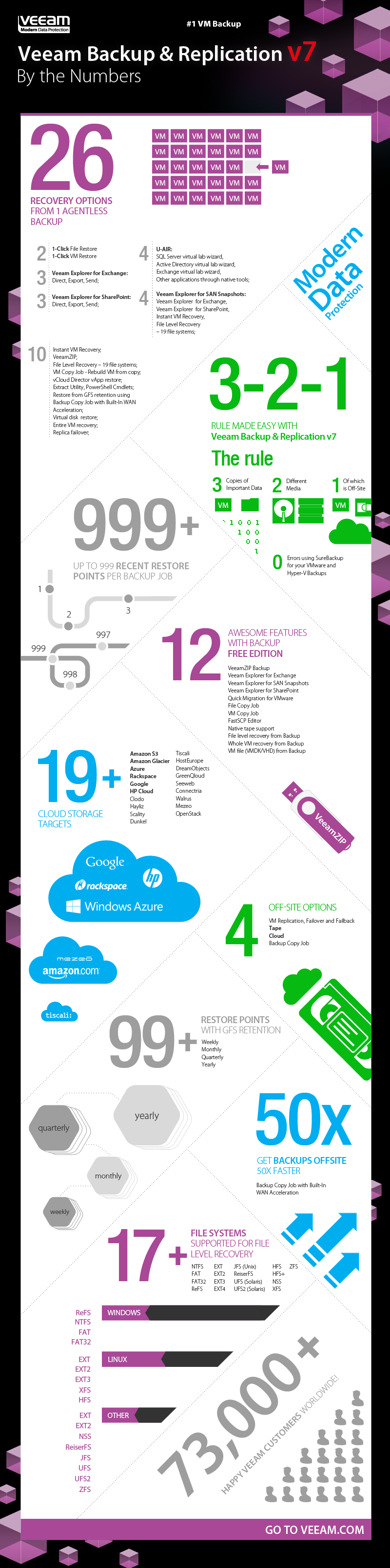
Veeam has announced the release of version 7 their Backup & Replication product, with support for both Hyper-V and vSphere.  According to Doug Hazelman:

… v7 brings two innovations: Built-In WAN Acceleration and Backup from Storage Snapshots … Our WAN acceleration is designed to help you save time and money when you need to get your backups offsite.

A graphic was shared to present Veeam Backup & Replication v7 by the numbers:

The Number 1 Support Call For WS2012 R2 Hyper-V Will Be …

… How do I enable remote desktop (Enhanced Session Mode) into a virtual machine on Windows Server 2012 R2 Hyper-V?

I just set up a host for the first time in a while and was trying to connect into a VM and was wondering why the hell this wasn’t working.  I checked the ICs in the guest OS, I patched, I rebooted … and then I realised that I was being an idiot. 

Enhanced Session Mode is enabled by default in Windows 8.1 and it is off by default on Windows Server 2012 R2.  I turned it on and got the experience I expected.

You’d think an MVP would realize this.  Another well known MVP just confessed to me on Skype that he made the exact same mistake Smile

Windows Server 2012 R2, System Center 2012 R2, Windows 8.1, and Windows Intune Release Dates

I was on vacation for a few days, but as was predicted by some in the media, the release date of WS2012R2, SysCtr2012R2, Win8.1, and Intune “Wave E” was announced during the week in two announcements, one for the desktop and one for the server & cloud products.

Windows 8.1 will be available online through the Windows Store to Windows 8 customers starting at 00:00 New Zealand time on October 18th – I think that is midday UK/Irish time on October 17th.  October 18th is the GA date, so that’s when you should be able to walk into stores and buy devices with Windows 8.1 already on them.  Ideally those will be designed-for-Windows 8.1 devices.  However, the Windows 8 release was underwhelming in retail stores around the world so I’m not holding my breath this time around – screw the political correctness, the manufacturers (including Microsoft Surface) did a shite job for the release of Windows 8.  The new devices listed in the Windows 8 announcement are already on the market (some less-so than others).

There is no news of TechNet & MSDN release dates for Windows 8.1 but I suspect Windows 8.1 will be made available universally on Oct 18th.  That’s because that is also the release plan for WS & SC 2012 R2 and Windows Intune “Wave E”.  Everything is happening all at once on Oct 18th.

Note that new VL purchases will be possible on November 1st when the price list is updated.

Testing SMB Live Migration on WS2012 R2 Hyper-V

Today I got “generation 2” of the lab functioning the way I want it to today.  The hosts are two Dell R420 12th generation servers, with 2 * 6 Core CPUs (24 logical processors each), 64 GB RAM and an extra Chelsio T440 CR quad port iWARP SFP+ NICs (for RDMA/SMB Direct).  The HP DL360 G7’s are now the nodes in my Scale-Out File Server.

2 of the iWARP NICs are used for the vSwitch NIC team.  The other two are not teamed (prevents RDMA) and are on different subnets to support Multichannel to the SOFS.

I have a script that tests the migration of a VM using the different WS2012 R2 options and times the movements.  I just compared TCP/IP Live Migration (over 1 * 10 GbE with some CPU impact) and compared it with SMB Live Migration which used 2 * 10 GbE.  This was done with a single VM with 56 GB of statically assigned RAM.  The results are in:

  • TCP Live Migration: using around 9.8 Gbps took 58 seconds (which is excellent)
  • SMB Live Migration: using nearly all of the available 20 Gbps took 35 seconds

Think about that … a Linux (did I mention that?) VM with 56 GM RAM moved between two hosts in 35 seconds … with no noticeable CPU impact on the hosts caused by Live Migration!

I actually moved 50 VMs concurrently yesterday and there was no noticeable CPU impact!

There was a little engineering required:

  • Jumbo Frames was configured on the NICs and (thanks to Didier Van Hoye, aka @workinghardinit) I verified it end-to-end using ping <IP> –l 8400 –f.  This gave me 10 Gbps on a single NIC.
  • The final piece was to update the driver … the out of box driver refused to use more than 5 Gbps on each NIC via SMB Multichannel, usually sitting at 2.4 Gbps most of the time.  Now I had 20 Gbps.
  • I verified that RDMA was kicking in almost immediately via PerfMon.  Multichannel is kicking in almost immediately too.

Microsoft Releases Windows Server 2012 R2 Licensing Information

You can now read about the changes and non-changes to Windows Server 2012 R2 licensing.  Microsoft has released three PDFs on the WS2012 R2 site:

I’ll follow up with a deeper dive in a day or two.

Here is my follow up on licensing the core editions of Windows Server 2012 R2.

Video: Me Talking About The Microsoft Cloud At E2EVC Copenhagen

I spoke about Windows Server 2012 Hyper-V, System Center 2012 SP1, and the Microsoft clouds at the recent E2EVC event in Copenhagen.  You can find the video of this here:

The event was before the 2012 R2 announcements at TechEd North America.

Event: Sept 10th, London –Transform The Data Centre

A number of MVPs will be talking about Windows Server and System Center 2012 R2, and how these technologies really can transform designing, deploying, configuring, and managing the cloud in the data centre.

Respond to changing business needs with the power of a hybrid cloud from Microsoft.

Today’s business runs on IT. Every department, every function, needs technology to stay productive and help your business compete. And that means a wave of new demands for applications and resources.

The datacenter is the hub for everything you offer the business, all the storage, networking and computing capacity. To ride the wave of demand, you need a datacenter that isn’t limited by the restrictions of the past. You need to be able to take everything you know and own today and transform those resources into a datacenter that is capable of handling changing needs and unexpected opportunities.

With Microsoft, you can transform the datacenter. You can take the big, complicated, heterogeneous infrastructure you have today and bring it forward into the new world of cloud. You can take advantage of the boundless capacity the cloud offers, while still meeting requirements for security and compliance. You can reduce cost and complexity with technology innovation in areas like storage and networking. And you can deliver services to the business faster with a platform that makes you more agile and more productive.

This free event (registration required) is on Tuesday 10th September at Microsoft Cardinal Place, SW1E 5JL London, United Kingdom.

  • 8:45am: Key Note.
  • 9:00am: Savision
  • 9:45am: Licensing and what is supported when virtualized with Windows 2012 and System Center? MVP David Allen explains licensing of Windows Server & System Center as well as what is supported when virtualized. This will be a great way to start the day and information that is often sort after by many customers.
  • 10:15am: Virtualization is the key element to your success and it starts with Networking. MVP Aidan Finn makes sense around Hyper-V networking including the new features in Windows 2012 R2 Hyper-V. Aidan will also clarify best practices for hardware that hosts your Virtual Machines and why Windows 2012 R2 Hyper-V will be the best Hyper Visor platform yet.
  • 11:15am: Break
  • 11:30am: How to manage your Virtual Environments effectively with System Center Virtual Machine Manager. MVP Damian Flynn will demonstrate the improved SCVMM 2012 R2 and how with the growing demand on Virtual servers SCVMM is a must in any data center or private cloud. Bring your level 400 tech guys for this one.
  • 12:45: Lunch
  • 1:45pm: Managing any size data centers is by no means an easy task. MVP Gordon McKenna will take us through will take us through SCOM 2012 R2. And how we can monitor any part of our environment effectively, including how System Center is with Microsoft Gold Partner Veeam the best tool for monitoring VMware.
  • 14:45pm: Break
  • 15:00pm: Let’s not forget the applications! MVP Simon Skinner will demonstrate how using System Center 2012 with service templates can get our clients to deploy complex solutions like SharePoint or SQL Server. Here we will see where automation becomes the norm.
  • 16:10pm: Where next? The future is already here today! MVP Gordon McKenna and MVP David Allen presents Windows Azure Pack which delivers Windows Azure technologies for you to run inside your datacenter, enabling you to offer rich, self-service, multi-tenant services that are consistent with Windows Azure. The Microsoft Cloud OS: One Consistent Platform. The Cloud OS is Microsoft’s vision of a consistent, modern platform for the world’s apps running across multiple clouds; enterprise datacenters, hosting service provider datacenters and Windows Azure. The Windows Azure Pack helps to deliver on this vision by bringing consistent Windows Azure experiences and services to enterprise and hosting service provider datacenters with existing investments in System Center and Windows Server.
  • 17:10: Question time with the UK/IE MVPs.

Don’t be one of those IT Pros that deserves to have their job outsourced or who shames the rest of us; keep up to date and learn what you could be doing for your employers … and your career.
A New Era For This Site

My site started having issues on Monday night.  The load became enough to start crashing the shared web host that it was running on.  Using a content distribution network (CDN) was one option.  Another option was to move the site onto a dedicated virtual machine.  The latter would cost more, but it would give me the option to do a few more things.

So that’s what I’ve done.  The performance sucked this morning.  I added WinCache for PHP (this is a WordPress site), tuned FastCGI, and upgraded WordPress and the plugins … the problem went away.

The site appears to be running fine now.