Windows 8 App Store Just Got Lots Of New Stuff

I’ve been building up an app collection for demo purposes, so I’ve been keeping track of what’s in the Windows Store on Windows 8 Release Preview. Nothing had appeared in a few days.  The calm before the storm I joke with myself.  How right I was.

I just logged in today and a lot of new stuff has appeared.  I’ve not see this much appear at once since the RP was released.

AppStore

Can you feel it?  It’s coming … the RTM that is.  I previously guess 6pm or 8pm GMT Irish time, 1st of August.  A pure guess.  I’m leaving work early today so I can be at home at 6pm Smile Nerd!

I’ve just noticed … none of the usual tech journalists are tweeting … hmm … Can a man read too much in between the lines, or can a man guess that even though we’re in the Sinofsky era, some things that happen around RTM time don’t ever change?

EDIT:

There is definitely a lot of new stuff. I’ve just been playing an “exercise” game where it uses your webcam to track your movement. A lot of new games, productivity, and social stuff.

EDIT:

And it happened at around 17:45.

Technorati Tags:

More “RTM” Documentation For Windows Server 2012 Appeared Overnight

You know that an RTM is coming when the trickle of final documentation becomes a stream out of Microsoft.  We had a few guides appear last week; 3 appeared overnight:

  • Microsoft Multipath I/O (MPIO) Users Guide for Windows Server 2012: This document details changes in MPIO in Windows Server 2012, as well as providing configuration guidance via the GUI, or via our new MPIO module for Windows PowerShell, which is new for Windows Server 2012.
  • Combined Active Directory Schema Classes and Attributes for Windows Server: his download contains the classes and attributes in the Active Directory schema for Windows Server. It contains the classes and attributes for both Active Directory Domain Services (AD DS) and Active Directory Lightweight Directory Services (AD LDS). There are individual text files in LDIF format, which are also bundled into an archive file for single download, if desired. Each file contains the classes or attributes, as appropriate, for the entire Active Directory schema, although system-generated (or instance-specific) properties have been removed to simplify machine parsing. The file names indicate the following: whether a file is for AD DS or AD LDS, whether it contains classes or attributes, and the version of Windows Server for which the file is intended.
  • Application Compatibility and API Support for SMB 3.0, CSVFS, and ReFS: The Application Compatibility with Resilient File System document provides an introduction to Resilient File System (ReFS) and an overview of changes that are relevant to developers interested in ensuring application compatibility with ReFS. The File Directory Volume Support spreadsheet provides documentation for APIs support for SMB 3.0, CSVFS, and ReFS that fall into the following categories: file management functions, directory management functions, volume management functions, security functions, file and directory support codes, volume control code, and memory mapped files.

Won’t be long now Smile

Hyper-V Host and VM Terminology

Yesterday I talked about what the names were for Hyper-V and Windows Server 2012 (WS2012).  Today I’m going to talk Hyper-V terminology.

Why am I posting this stuff?  I don’t call my car a motorbike when I talk to a mechanic.  Ever get a request for help where someone pulling virtualisation terms out of thin air.  For example, I’ve seen many people asking for help with their virtual servers. The more I read, the more I’m left wondering if they are talking about a host, a virtual machine, or a virtualisation product that Microsoft released back in September 2004.  While a tiny bit of this is Hyper-V specific, most of it is industry terminology going back 10 or more years. 

I think getting this stuff right is important. For example, I don’t like remotely helping people who can’t get the terminology right because it leaves me wondering if they are the sort of person who’ll take my help, get it very wrong, screw up royally, and then blame me for their lack of knowledge. I’m sure I’m not the only one who feels like that.
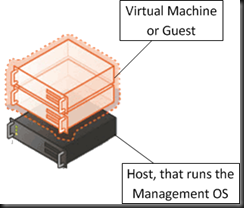
image

The Host

The physical machine is referred to as a host.  It is not called a Hyper-V server.  There is a product called Hyper-V Server that you can download and install on the host. It is absolutely not called a virtual server.

The operating system that is installed on the host and used to manage the hypervisor and host is referred to as the management OS. You will see some other terms floating about such as root partition and parent partition. Both are out-dated; yes there is new MSFT documentation that uses “root partition” and I was until recently (incorrectly) using “parent partition” but the correct term is management OS.  The generic term of host operating system (Host OS) is acceptable in my opinion seeing as it could include to many hypervisor products.

The Virtual Machines

Guess what: in virtualisation we have virtual machines. The are not called Hyper-V servers. The are definitely not called virtual servers.  It is simple: virtual machine or VM.  A VM can also be referred to as a guest

When you’re talking to a Microsoft licensing specialist they’ll talk to you about VOSEs.  That’s a Virtual Operating System Environment or a guest operating system or guest OS.  Guest OS = VOSE.

Summary

  • The host = the tin you’re hosting VMs on
  • The host OS or management OS is the OS that you enable Hyper-V in and use to manage the host
  • You run virtual machines (VMs) or guests on the host
  • A VM has a guest OS, that a licensing person calls a VOSE

Getting your terminology right will:

  1. Get you taken seriously as an engineer/consultant
  2. Help you get the help you’re asking for

WS2012 – Enabling Services To Start When A VM Can’t Get Enough Dynamic Memory

The Performance Tuning Guidelines for Windows Server 2012 document is available and I’m reviewing and commenting on notable text in it.

I normally advise that the startup amount of memory in a Dynamic Memory virtual machine is set to whatever is required to get the services up and running.  This Microsoft document has another approach:

  • Set the VM to start with some small amount
  • Configure the paging file to be able to live up to any additional requirements – the paging file maximum size being 3 times the paging file’s initial size

Now if a VM cannot get enough physical RAM, it’ll page internally.  Before the questions come in, this is different to how VMware pages; host level paging has no knowledge of prioritisation or usage of memory pages inside a VM. Using the Microsoft approach, the guest OS has complete knowledge of how to prioritise and page in/out memory to suit what is going on.

If you are sizing hosts/VMs appropriate then VMs should always get enough RAM. But I suppose there might be rare circumstances where a number have hosts in a cluster are offline and you have to squeeze more out of your physical RAM.

RTM Week! Much Better Than Shark Week If You Ask Me

Although I would have expected the marketing people to wait for 8/8 to RTM Windows 8, they did previously announce RTM would be in the first week of August so that gives them from today (the 1st) until the 7th. And as I tweeted yesterday, Windows 8 product keys have appeared in the Microsoft Volume Licensing Service Center.

Watch for blog posts or news releases from Microsoft at 8am PST and 10am PST. I seem to remember Windows RTM meetings are usually early in the morning, but this Sinofskian release might be quite different to the past.

RTM does not mean that Windows 8/Server 2012 will appear on MSVL/MSDN/TechNet straight away. I think Vista took an age to spread out via the various networks. And I think Windows 7 was instantly available.  Developers will be critical to the success of Windows 8, so surely MSFT will give them access to RTM code on MSDN as quickly as possible?