Microsoft 25 Years in Ireland

Today is is the 25th anniversary of Microsoft in Ireland.  Their location has evolved a good bit over the years.  Originally it was a CD pressing location and where localization was done.  Now there are lots of developers working on coding the latest version of Windows and Azure services, European computing services are/were run from here, and Dublin is one of the 2 geo-located Azure data centres.

There is something going on but it appears to be reserved to the people MS are selling to – Azure and software developers were mentioned on the news.

Technorati Tags:

Configuration Manager 2007 R3 Beta Released

In case you missed it in one of my MMS posts, the beta for ConfigMgr 2007 R3 is now public and is available on Connect.  I received the following in an email earlier today:

“Yesterday at the Microsoft Management Summit, Brad Anderson announced during his keynote the release of ConfigMgr07 R3 Beta. Power management is at the core of the R3 release, it addresses the need that many organizations have to monitor and reduce the power consumption of their computers. ConfigMgr07 R3 Power Management leverages the power management features built into Windows to apply relevant and consistent settings to computers in the organization. There are three major components to power management in ConfigMgr07 R3:

  1. Monitoring and Planning: Power Management collects information about computer usage and power settings for computers in the origination. Reports are provided to allow the administrator to analyze this data and determine optimal power management settings for computers.
  2. Enforcement: Power management allows the administrator to create power plans which can be applied to collections of computers. These power plans configure Windows power management settings on computers, and different power plans can be configured for peak and non-peak working hours.
  3. Compliance: After applying power plans to computers in the organization, the administrator can run reports to validate that power settings were correctly applied and to calculate power and carbon footprint savings across collections of computers.

In addition to power management, ConfigMgr07 R3 will provide customers with enhanced scale and performance support (scale to 300K managed clients per hierarchy, delta AD discovery, dynamic collection updates), as well as enablement of further capabilities for operating system deployment. A full list of the R3 features can be found on Microsoft Connect at the “What’s new in R3” post”.

Technorati Tags: ,

Irish Tax Breaks on Energy Efficient Dell Servers

IrishDev reports that the Irish government has added 5 Dell servers to the Accelerated Capital Allowance (ACA) scheme.  This allows the purchaser to write off 100% of the purchase price of energy efficient servers against the profits of that year.  The models in question (there are limited specifications) are:

  • PowerEdge R210 with Intel X3470
  • PowerEdge T310 with Intel X3470
  • PowerEdge R410 with Intel X5570
  • PowerEdge R610 with Intel X5570
  • PowerEdge R710 with Intel X5570

You might know that I prefer Dell and HP (my personal favourite) servers to everyone else purely because of the level of System Center integration that is available.  If you’re a Dell house and you are considering a virtualization project (Hyper-V, Xen, VMware) then these are the models to consider to make the most of your energy, minimise your carbon footprint, and maximise consolidation.

You can search for approved products on the SEI site.  It appears the only approved storage systems are from EMC and only 2 HP servers (HP DL360 G6 5570 and HP DL380 G6 5520).

MuckAfee Update Breaks PC’s

Thanks to Tim Bolton for making me aware of this.  It appears that MuckAfee (aka McAfee) distributed a bad AV update that breaks PC’s.  The malware definition file quarantined a critical XP system file.  They admit that “The problem occurs with the 5958 virus definition file (DAT) that was released on April 21 at 2:00 P.M. GMT+1 (6:00 A.M. Pacific).”

You know what?  I really don’t get why people still use MuckAfee or Sin-Mantec software.  Both have had these issues in the past.  This sort of failure makes me wonder about a complete lack of quality control in the release process.  People have been burned and they continue to hand over money for this trash.  Would you really go to a doctor who amputates your leg instead of extracting your appendix and then return to him again with an ingrown toe nail?  Seriously?  Get real and buy some decent software. 

You do have options!  Trend Micro’s up front cost may seem expensive but it is per user based.  AVG’s business product is fine – and very cheap.  Microsoft’s corporate and home solutions are easy to manage and lightweight on the machine. 

But I guess I’m wasting wear and tear on my keyboard.  Those same people who’ve just seen their XP PC’s die will renew their support contracts because they just don’t want to know better.  So be it.

Technorati Tags:
EDIT:
Microsoft blogged a method to make a published fix that can run as a ConfigMgr task sequence.  Now didn’t I say ConfigMgr was powerful?!?!?

MMS 2010 Keynote: User-Centric Client Management

I’m blogging live once again using the live webcast from the Microsoft Management Summit 2010.  Today’s featured speaker is Brad Anderson.

Anderson says that Windows Update updated 90million Windows 7 computers in March 2010.  This session will focus on management of the PC.  The role of the desktop administrator will change, involving cloud (that’s #1) and security.

Configuration Manager 2007 R3

As promised by Jeff Wettlaufer in a TechNet Edge video, Configuration Manager 2007 R3 is now in public beta (after a lengthy TAP).  Jeff comes on stage to show power management of R3.  This is all about learning about power usage, policy creation/enforcement, and reporting.

We see power consumption reporting being enabled on a collection.  A series of reports are viewed, e.g. the cost (local cost defined by you) of the power based on KwH.  That might be useful for servers.  Power management settings are also configured in the collection.  All the familiar ones are available from Windows 7.  You can define peak and non-peak as well as on battery and plugged in.  You can also define a wake-policy to tell a machine to power up, get some policy/updates and go back to sleep.  Now you run reports to see how you improved your power consumption, e.g. environmental impact.  You can quantify the savings from pre- and post-policy.  A report shows the types of activity that keep computers awake in relation to computers/monitors being active/asleep.  Handy for tuning policy or trying to figure out why something never powers down.

The CEO of 1E is featured in a video.  He couldnt’ travel because of the travel chaos.  MS missed a UC demo opportunity here.  1E is one of the biggest players in extending ConfigMgr functionality.  They’ve built upon the power management of ConfigMgr with a product called Night Watchman.  Claims it saves Dell $26/PC/year in power costs.

XenApp Management with ConfigMgr

A distribution type for XenApp can be created in ConfigMgr Software Distribution.  New package and programs are created in there.  A advertisement is set up to install the package onto the XenApp servers.  Users get drained from the servers, the apps get installed and then users can log in.

Dynamic Memory and RemoteFX

Windows Server 2008 R2 Service Pack 1 is now talked about and how the new Hyper-V features positively impact VDI – more machines per host and better graphics.

Michael Kleef comes out to demo.  This is the first time non-NDA people get a demo as far as I know.  You can see a VM being started up with 1GB RAM and it will be able to grow to 3GB RAM.  Additional memory will be allocated as required and released back to the host when not required.  The current usage is shown in the Hyper-V console.  VMM will get an update to enable this management.

RemoteFX is aimed at VDI. The host has a high end graphics card.  This will be shared by Hyper-V VM’s on the host for graphics processing for the VDI machines.  A demo of 720P video is shown running on a remote VM.  Aero features like peek and flip are there.  The GPU does the work, not the CPU.  This is shown in Performance Monitor.

ConfigMgr Advanced Hardware Power Management

ConfigMgr can audit machines that aren’t even powered up, e.g. Dell 11G servers.  You get an audit of the racked, networked machines that are still powered off.  When ready, ConfigMgr can power them up and deploy an OS.

ConfigMgr To Consolidate Security – Forefront

ConfigMgr allows you to eliminate a separate security infrastructure by integrating with ForeFront End Point Protection.  You don’t need new servers and you get an integrated console.  Updating, policy analysis, reporting were already there since the 2007 R1 release.

Demo: Forefront appears in ConfigMgr as a set of packages by default.  The install program has logic to be able to remove other AV solutions – just like Trend Micro has/had (it’s been a while).  A set of collections based on different states are created – allowing context sensitive advertisements.  A new Forefront node is created for policy creation.  Here you can configure scan preferences, exclusions, how to get updates (default is ConfigMgr), scheduled scans, etc.  You can then assign the policy to a collection.  Reports are available to show status breakdowns, infections, etc.

This is a tidy solution.  I still see lots of people not adopting it which is unfortunate.

System Center Configuration Manager in the Cloud

He said “cloud”!  You know the drinking game rules: 1 shot – now!  OK – put the bottle down.  You’d already have alcohol poisoning if we played the MMS 2010 cloud drinking game.

Here’ comes Windows Intune.  See my previous launch post.  An admission that this is not nearly (not even way) as powerful as ConfigMgr.  However, it will be updated quite frequently.  It’s not a rival to ConfigMgr but it will be an alternative entry point to centralised management.

We get a very quick Windows Intune demo where we see update management.  We see something ConfigMgr doesn’t have – update automatic approval policies like WSUS has.

Service Manager

We hear how a corporation used the beta to create a CMDB (ITIL/MOF configuration manager database) that integrated many System Center databases into one.  That was done in 2 hours: a singe data warehouse for all configuration data.  Nice!

On top of Service Manager 2010 MS has built in some auditing functionality.  SMSD customers have access to Service Manager now.

NOW Service Manager gets the welcome it should have.  Nicely done by the speaker :-)  The team deserves a lot of credit – they wrote a product, got bad feedback, scrapped it and started all over.  Not many will do that.

We get a demo on how Service Manager is used to assist with PCI compliance – stuff to do with credit card payments processing certification.  A library of 350 (!) compliance documents is built into the package.  You can pull from this.  The demo pulls documents to do with American Express.  Objectives are presented that IT will understand.  Now you work on them, update your progress and track your progress.  Some of this could be duplicated in other projects but Service Manager knows this and strips out redundant new steps.  There is integration into OpsMgr, ConfigMgr and AD.  Demonstration of compliance can be done using this too, making auditing much easier.

User Focused

This is something I firmly believe in: we need to put some power back in the users hands, e.g. self service provisioning.  Whether it be OS deployment, virtual machine deployment, software deployment, etc.

ConfigMgr v.Next is demonstrated now.  It has some cool user focused stuff. 

Desired Configuration Management (DCM) is shown.  It will have remediation, not just the current reporting feature.  In the demo, a file association no longer works.  That’s because someone has uninstalled it.  ConfigMgr uses a state to decide what software should be installed.  AT LAST!  This has been needed since SMS 0.0.  V.Next will remediate the state (software is assigned to the PC but missing) by reinstalling the software.  DCM can also remediate things like firewall, IE settings, etc.  Enabling the remediation is a simple tick box operation for the administrator.  Doh – the demo falls into the trap of trying to do things too quick in ConfigMgr.  ConfigMgr is not meant to be a hurried product.  Things in large enterprises take time.

The beta will be out in May.  Everything is re-rewritten to leverage the DCM state engine.  That’s the way it should be.

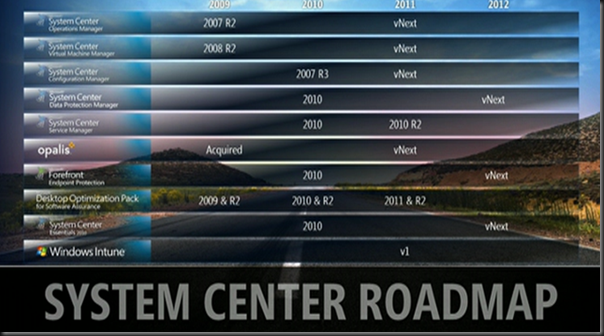
Road Map

VMM v.Next, ConfigMgr v.Next, OpsMgr v.Next, Service Manager 2010 R2 all appear in 2011.  MMS 2011 will be a crazy busy conference.
 image

That was a keynote that had the content you want – lots of demos and lots of new stuff.  Nicely done!

SQL Server 2008 R2 RTM and SQL 2008 R2 Express Downloads

SQL Server 2008 R2 was released to manufacturing.  As usual, a free (and limited scale/functionality) Express edition was also released.  There are three packages, from the version just with the core components, the version with management functionality, and the version that has management and more advanced features:

  • SQL Server 2008 R2 Express: The Microsoft® SQL Server® 2008 R2 Express RTM is a powerful and reliable data management system that delivers a rich set of features, data protection, and performance for embedded applications, lightweight Web Sites and applications, and local data stores. Designed for easy deployment and rapid prototyping, this download includes support for Sysprep, Microsoft’s System Preparation Utility for Microsoft Windows operating system deployment.
  • SQL 2008 R2 Express with Management Tools: an easy-to-use version of the SQL Server Express data platform that includes the graphical management tool SQL Server Management Studio (SMSS) Express
  • SQL 2008 R2 Express with Advanced Services: an easy-to-use version of the SQL Server Express data platform that includes the graphical management tool SQL Server Management Studio (SMSS) Express, powerful features for reporting, and advanced text-based search capabilities

The requirements for the Express edition are:

  • Windows 7; Windows Server 2003; Windows Server 2008; Windows Server 2008 R2; Windows Vista; Windows XP
  • 32-bit systems: Computer with Intel or compatible 1GHz or faster processor (2 GHz or faster is recommended.)
  • 64-bit systems: 1.4 GHz or faster processor
  • Minimum of 512 MB of RAM (2 GB or more is recommended.)
  • 2.2 GB of available hard disk space
Technorati Tags:

MMS 2010 Keynote: Server Management

I’m tuning into the live webcast of today’s (there’s another tomorrow) Microsoft Management Summit 2010 keynote featuring server management.  I’ll be doing my best to blog about new stuff as it happens.

System Center Service Manager 2010 is announced as RTM.  Sorry dudes!  YEARS of work (and rework) and I thought you’d get more of a launch than that.

Jeez, an hour later and I’ve not got much more to report.  There’s a lot of talk about cloud (nothing new) and a lot of talk about old concepts (using System Center to do more, and more engineering rather than operations).

EDIT: Someone on Twitter counted the number of times “cloud” was mentioned.  The final count was 83.  Cloud OD.

The next generation of System Center data center is based on lessons from Azure and Bing.  Edwin Yuen hits the stage.  Now we’re cooking!

VMM v.Next

It looks quite different!  It has the cleaner v.Next interface rather than the Outlook 2007 one we are used to.  Server application virtualization, SQL models and MSDeploy (IIS) packages live in the library.  The template model is evolved to a service template spanning multiple servers or tiers.  We see a demo of a 3 tier application.  You can drop OS templates (that we know) and “Server App-V”/MSDeploy packages which we can drop into the model.  You can say that you want X numbers of server in a tier in the model.  You can tier your storage to standard or high performance.  So you’ve got X variations of servers made from a few Server App-V images and OS templates. 

Seriously – I could use this right now.  I have recurring deployments that I could model like this.

You can integrate with WSUS and perform a patching compliance report based on the VHD in the library!  You can then remediate this image in the library.  Now – VMM knows which VMM managed VM’s need to be updated!  You don’t need to patch the running VM OS.   You can <Update Service>, to replace the running OS, while keeping the Server App-V package.

Operations Manager & Azure

How you can monitor Azure and on-premises for seamless application monitoring using OpsMgr 2007 R2.  We see a distributed application containing traditional monitored items (including databases and web watchers) and an Azure presence.  OpsMgr integrates into Azure using a soon-to-be-released (“later this year sometime”) management pack to gather performance information.  A task is there to add new web role instances in Azure.  Nice and simple! 

Deployment of more Azure instances is based on real (synthetic transaction monitoring) measured performance data.  Expansion (or withdrawal) of new instances can be easily done through the same monitoring interface based in your site.

That’s the end.  Really only had good content in the last 22 minutes of a 82 minute keynote.  A quite short post compared to what I would do at an MS Ireland event lasting the same time (see last week for a 3 hour session).

KMS Download for Office 2010

Office 2010 activation has gone the way of Windows and now supports both MAK and KMS.  This download gives you an update for KMS activation.

“An Office 2010 KMS host is required if you want to use KMS activation for your volume licensing editions of Office 2010 suites or applications, Microsoft Project 2010 or Microsoft Visio 2010. When Office 2010 volume edition client products are installed, they will automatically search for a KMS host on your organization’s DNS server for activation. All volume editions of Office 2010 client products are pre-installed with a KMS client key, so you will not need to install a product key.

This download contains an executable file that will extract and install KMS host license files. These license files are required for the KMS host service to recognize Office 2010 KMS host keys. It will also prompt you to enter your Office 2010 KMS host key and activate that key. After this is done, you may need to use the slmgr.vbs script to further configure your KMS host”.

You Know How Iceland Was To Become The New Digital Hub?

Lots of experts were predicting that Iceland was to become the new digital hub of the world.  Abundant free geo thermal power, a cold climate, new gigantic connectors to the rest of the world, brand new data centres … and then something happened.  Now what was it … I only saw something on the news recently and it’s gone and slipped my mind …. ah yeah: Mother nature decided to tip a great big hole in the country and cover the northern hemisphere with ash.  It appears this might cause companies to think twice about locating critical IT resources in the already-financially crippled country.