Welcome to TechEd Europe 2014, blogged live to you by me from Barcelona, Spain. It’s early, I got in to near of the front of the hall, and the crowd is streaming in as a DJ Joey Snow mixes.

The stage is lit blue and purple, with the press sitting front and centre.
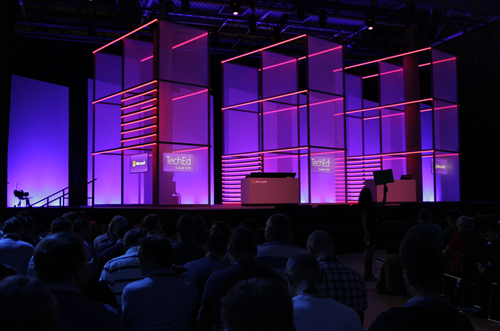
The crowd is awaiting the show to start.

Cameras are rolling.

And here we go ….
Alex Zander VP of Azure comes out. He starts on the pitch about the number of devices. The number of connected devices now outnumbers the number of humans on the planet. This brings up IoT. Here comes mobile-first, cloud-first.
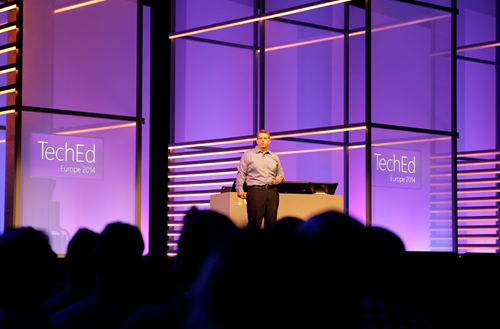
What are Microsoft enabling in enterprise devices to expand your digital work and personal lives?
Here comes Joe Belfiore to talk about Windows 10 in the Enterprise.

1) Windows 10 delivers a single platform across a wide range of devices to ensure your investment covers a wide array of devices
2) Provide users with a platform that they will love to use.
3) Provide protection against modern security threats.
4) A way to manage all devices in a way that makes sense for businesses
Breadth of Devices
This covers everything from sensors in a jet plan to PCs, to tablets, to phones, to giant computing systems.
Love to Use
Interesting topic: Windows 8 has some “mixed response”. Customer satisfaction for keyboard/mouse users of Windows 8 was lower than that for touch users. Now they are making non-touch and emphasis point.
They have focused on that large group of Windows 7 users on classic PCs. The Start Menu is shown. Search is now a part of the Start Menu and is shown – this includes web searches so they are adding value to “Windows 7 features”. Windows 8 Live Tiles are added to the familiar start menu – adding value to familiar features. So this isn’t a big disruptive change for users – it’s more evolutionary.
Live Tiles add personalisation to a work environment – to make Windows more enjoyable for users.
Now he starts on the apps and the store. Today, they are not being used as much as MSFT would like because “the apps behave so differently”. Apps of all kinds are in the start menu and launch in Windows that run on the desktop.
And then he gets a big round of applause for CTRL+V at the command prompt:

Two more power user features coming in the next flight of Windows Insiders releases.
He has a multiple monitors display set up. Right now you cannot snap a window to the joining edge of a multi-monitor display. But Snap in Windows 10 allows you to snap a window to the “join”.
Now he moves over to the Surface Pro. Touchpads are all differently by the OEMs. MSFT are adding their own multi touch gestures on Windows 10 for the touchpad. 3 finger up/down hides/reveals all windows. Left/right does alt-tab with 3 finger swipe.
End user/consumer stuff will come in the new year. Then he shows the Continuum UI for hybrid devices (see previous posts).
Protecting Corporate Data
IT can control the PC’s apps that are used on the corporate network – allegedly.
Demo: Windows 10 PC that the user logs into. The company authorizes some apps to use company data and appear in the Start Menu. The user can also run non-authorized apps (including 3rd party). When she hits save as in Word she has Personal and Company stores that she can see. The user cannot save company data into a non-corporate store. For example, she cannot paste from Word (company app) into Twitter (non-company app). Policy allows a user override … assuming that the user enters a reason, and this goes into an audit log that IT is managing.
You’ll see this in Windows Phone too – one OS, remember?
Protecting User ID
Lots MSFT thinks they can do to protect against modern security threats. Today you can do 2 factor authentication but it’s cumbersome to deploy. They are going to enable cheaper two factor auth and fingerprint biometrics.
They user the Windows Phone as a second factor. When you log into the PC, the phone prompts you to enter a pin on the phone via Bluetooth. Do that, and now your log in on the PC is completed. No additional devices – just the company phone that you might have been buying anyway.Demo was done with Windows Phone.
Windows 10 Management for continuous Innovation
Improving the app store so you can use it to deploy your own or your licensed s/w. Hmm, SCCM? You’ll have a choice of GPO or MDM to manage all kinds of devices – “it’s your choice” – MSFT will faciliate 3rd party MDM.
Volume License support is coming via license claim and reuse in the Store. No MSA is required to use the Store infrastructure in the future. You can set up your own company store to manage your licensing.
Managed in-place upgrades are coming. They are ending the era of wipe and reload. Making OOBE more user friendly in the biz: a user gets a PC, goes through OOBE and corporate policy will be applied. There’s a “my organization owns it” option in OOBE. There’s a sign-in (looks like workplace join) dialog and policy is then applied accordingly. There will be 2 factor auth via Admin managed SMS. Now policy and pre-assigned apps are deployed. Custom data protection, authentication, security policy, etc are all deployed.
This is like a merger of SCCM and AD GPO into a cloud-based solution. I like the message. Lets see what the final product looks like.
Cloud
Back to Alex Zander again to talk cloud. Let’s watch the crowd to see what happens to them. It didn’t go well in Houston in May.
Asked to store more data and increase agility, security, and data privacy. Costs must be reduced while increasing flexibility for everyone. The pace of innovation is advancing at a dizzying rate. Businesses that adapt to this will thrive. Right now, SMEs are doing this.

MSFT cloud is more than Azure and O365. It’s also on-premises and with partner hosting companies. Three USPs to the cloud OS:
- Hybrid
- Enterprise grade
- Hyper-scale
Key investments in Windows Server vNext in software-defined everything, such as the new Network Controller. This can run your software-defined networking.
Many are coming off of W2003 and are looking for new features, etc. MSFT wants to make that seamless: www.microsoft.com/ws2003eos.
A way to get started with the cloud is to just connect and extend functionalities using hybrid solutions, such as Azure Site Recovery Services for DR in the cloud.
Announcing: Azure Operational Insights. Install an agent on existing on-premises machines and start to log information into th cloud to do deep insights on how things are running and visualize that data. There are security, capacity planning and change management insight packs. You can do a fast search and fix incidents. See System Center Advisor *cough*
Bring Azure to your on-premises data centre. This is Windows Azure Pack (WAP). You get the same skin as Azure, powered by the same hypervisor (Hyper-V) and System Center.
Jeff Woolsey comes out to talk new stuff.
Storage Replica: Storage replication, storage agnostic, built into the box. Do replication between clusters or stretch clusters between sites. Demo: 2 notes in NY and 2 nodes in NJ. Seemless failover with no data loss thanks to synchronous replication. A cloud witness gives you quorum with a virtual witness site. Doesn’t require SANs and it woks with standalone servers. SIMPLE to set up.

System Center Advisor has come a long way:
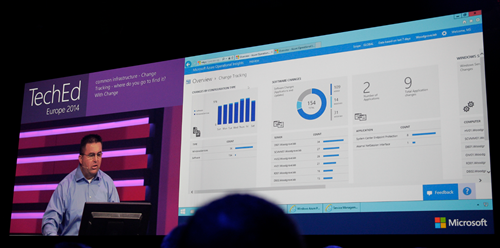
Capacity planning allows you to project future usage based on empirical data and usage. Lots of information presented in a nice layout with lots of graphs. All powered by search. You can create personalized dashboards.
Manage your infrastructure using WAP to create Azure consistent clouds on premises using Windows Server and System Center.
Back to Alex Zander. He’s now going to pitch CPS. This is MSFT sold hardware running pre-packaged on-premises cloud, based on Dell h/w with lots of custom work done on drivers and firmware. Only Fortune 100’s need apply.
Half of the Microsoft hosting partners running the Cloud OS are in Europe.
On to Hyper-Scale. Over the last few decades, the industry is defined by the scarcity of resources: we are always struggling to find more, squeeze in more, etc. What if that was flipped on its head and we could use a hyper scale cloud with effectivly infinite resources.
Australia went live yesterday – now there are 19 Azure regions. The immense scale of Azure makes them cheaper and we can deploy cheaper “infrastructure” and services. Over 30 trillion storage objects in Azure. Over 1.2 million SQL DBs. Over 140m WAAD users.

Reminder of the G series of large memory VMs – the largest available on the public market. Intended for data processing. Also announced durable SSD storage in Azume Premium Storage with 50K IOPS with <1 MS read latency. Intended for workloads that might have been on bare metal.
Azure Batch preview is a job scheduling service in the cloud at a massive scale. Rich API and simple portal. Do batch jobs more quickly with massive elastic compute scale. You might use it for batch scale our and in on a scheduled basis to reduce VM costs.
1/5 of VMs in Azure are running Linux. CoreOS is supported now – a containerized tiny Linux OS.
Mark Russinovich, CTO and Azure, comes out to demo Azure Batch. He demos an open source 3d rendering app called Blender. He has a basic model that he will ray trace to make complete. he shows it before batch and it’s like watching paint dry. Now he adds a plug in to submit work to Azure Batch. How many VM instances you want are entered ina dialog. He uses 8 x A8 compute intensive VMs with 40 GBps Infiniband networking. submits the job and now he can track the job status via the plugin. The rendering accelerates. We get a nice picture. He compares with the non-optimized job and it’s barely got started.
He now starts to talk about Docker containers on CoreOS. Docker is normally managed from Linux We see Docker management from Windows for the first time:

He manages containers running in a Ubuntu VM. He creates a wordpress site from Windows, via the CoreOS management host, running in a container on the Ubuntu VM. Takes about 1 second to fire up.
Now he moves on to premium storage. There are 3 VMs, one on standard storage. IOMETER running in the VM to stress test the IOPS of the VM. Hits 500-600 IOPS (min guarantee is 500). The second is a D-Series VM with premium storage. Same test gives 4082 IOPS (single premium disk). 3rd VM has 16 disks on premium storage and they’re striped. Appears as 16 TB volume. IOMETER gives 61623 IOPS.

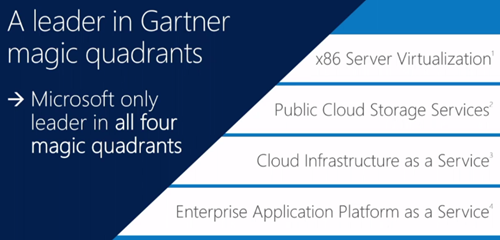
Microsoft are the only big 3 cloud vendor with enterprise grade, hyper scale, and hybrid cloud. Gartner has Microsoft as the leading cloud vendor in 4 key areas:
Amazon only has 12 MPLS WAN networked locations for hybrid cloud. Google has none.
Azure Marketplace offers ahuge collection of partner provided and curated VM services. See names like Kemp, Oracle, SAP, IBM, Riverbed, Dell, Symantec, Kaspersky, Barracuda, and many more.
Enterprise Productivity
Users expect to be connected from anywhere with access to resources with no IT-created complications. Workers coming into the workforce work very differently than my generation. Touch, connectivity, collaboration, discoverability of information are their norm. BYOD .. that’s a cultural thing that affects the USA more, according to IDC.
We go back to device management, applications, and identity.
Some old info here on MDM. Sleepy time.
New Windows Intune updates arriving in the coming months. Manage Office mobile apps, MDM for Office 365 so you can manage docs and email and do selective wipe of O365 data on lost devices.
Office 365
Julia White is out to demo. She shows the new Azure AD Connect Preview tool for linking on-premises AD to WAAD. Goal is to simplify a previous complicated process.
Azure AD app proxy allows you to bring all apps into a single control plane. She has a Sharepoint on-prem app that she adds to Azure AD. Users now go to one place for authentication and authorization. Is AD MOVING (not just extending) to the cloud? User logs into the app via an iDevice.
Feedback on Office for iPad is that IT wants to manage those apps and corporate data. Intune will enable this in near future. White sets up a configuration policy. Can set up so managed apps can only copy/paste to other managed apps. Can manage deployment of managed apps. Make available the app out from the admin portal. Back to the iPad. Runs Ourlook. There’s an email with an Excel attachment and opens that. The only app possible in the selection is Excel. That’s the only managed spread sheet tool so the unmanged ones are not available. Tries to copy/paste into the Apple email tool – cannot. But can paste into Word because it is managed.
There’s a new O365 SDK for iPad apps. Devs can reach into O35 data from the Apple tablet.
MSFT is the only global provider to be approved for Article 29 pan European data privacy. O365 data is encrypted at rest. DLP is a feature of the E3 plan that allows you to protect against data leakage. Users can see it in action and understand the purpose of it – therefore no excuse for trying to work around it.
Brings up a report to see amount of overrides on opt-in DLP policy. Too high, so she decides to change the policy. There’s a credit card DLP policy that’s being overriden. Modifies it, and adds an action for overrides. Adds and RMS policy to disable forwards when the policy is overridden. If it’s overriden, a notification can be sent to auditors.
Creates a new email with an attachment. Straight away Office detects the DLP rule and notifies the user. The user overrides. The recipient gets the doc in an email – RMS prevents snipit, forward, print, etc. os the credit card details are secure.
That’s a wrap, folks!
Technorati Tags:
Event Notes,
Events,
Windows 10,
Azure,
Cloud,
Cloud Computing,
WAP,
System Center,
Hybrid Cloud,
Hyper-V,
Virtualisation,
Storage,
Failover Clustering


 Fast networking, good host hardware, and LOTS of PowerShell. All my demos are driven by PowerShell. Don’t think “ugh, boring!”. Nope. It’s all very visual, I assure you! There are ways, means, and tricks to show you the goodies even with a scripting language! Heck! PowerShell is even a part of the product that I want to demo! Right now I have 9 demos to show, and that might expand.
 Please check the box for my session on the Schedule Builder to try change their mind before the move me!!!!!



 but here’s the short version of the sales pitch: I want to show you the bits of Hyper-V that are rarely talked about. These are the features that help you get your job done. They’re the ones that make the big headlines possible. They’re the ones that you think “I’d switch from vSphere to Hyper-V if it had X”. They’re the features that you asked for!
