100% Pure Speculation – Will Windows “Blue” (“8.1”) Upgrade Require A New License?

If you’ve been hiding under a rock lately, then you should know that a new “version” of Windows 8 appears to be on the way.  The program in Microsoft (not the product) is codenamed “Blue”.  There’s leaks, screenshots, speculation, a new Build conference, etc.

I’ve wondered how will this new “version” be released?  Will it be a service pack?  Will it be a feature pack?  Will it be an OS upgrade?  Will it require a new license … and a spend to get from Windows 8 to Windows “8.1”?  Apple does that, albeit with a “micro” payment for the new OS.

I cannot say what Microsoft is going to do; my magic 8 ball is on the fritz.  But I did drink the fluid from inside of it and I’m having visions of the future – someone might need to call an ambulance Smile

Two things hint to me that this will be a free upgrade:

1) Surface and other Windows 8/RT tablets are getting murdered right now.  iPad is the desirable device and Android has everyone beat when money is a factor.  Apple gives OS upgrades away for free.  Android updates (when the manufacturers bother) are free too.  Microsoft cannot afford to hand critics a baseball bat with 6 inch rusty nails driven through it.  They need to make “8.1” free.

2) Customers who have invested in Windows 8 didn’t expect their OS to have a 1 year life as the primary version.  We’ve been conditioned to expect 3 years.  Consumers are one thing; enterprises are something completely different.  Enterprises are still moving to Windows 7.  Those few who might have jumped to Windows 8 will be delighted (that’s sarcasm, Sheldon) to hear that they should fire up MDT and app regression testing every 12 months.  And yes, I am discounting Software Assurance here; the actual test/deployment of an OS is disruptive and costly.  Everything here screams out that “8.1” will be a minor revision (free and released like a feature/service pack, with the usual updated & slipstreamed media), and we’ll have major revisions every 3 years.

Anyway, I think I can hear the sirens now so I’ll wrap up this post.

Technorati Tags:

KB2796995 – Offloaded Data (ODX) Transfers Fail On A Windows 8 or Windows Server 2012 Computer

This is another recent KB article relevant to Hyper-V (and other scenarios) that I missed.  This one is for when file transfers via ODX fail on Win8 or WS2012 computers/hosts.

Symptoms

Consider the following scenario:

  • You create two Logic Unit Numbers (LUNs) on a third-party storage device.
  • You connect a computer that is running Windows 8 or Windows Server 2012 to the third-party storage device.
  • You assign the LUNs to the computer.
  • You copy a large amount of data by using the third-party storage device.
  • Then you use the Offloaded Data Transfers (ODX) feature to copy files from one LUN to another LUN.

In this scenario, the copy operation freezes at 99 percent.

Cause

This issue occurs because the copy engine incorrectly initializes regular copy chunks. Therefore, the copy engine restarts the entire copy process for the file when nonzero bytes are copied through the ODX. When the copy engine restarts, the destination file size is incorrectly set if all the following conditions are true:

  • The copy type is non-cached.
  • Nonzero bytes are copied through the ODX.
  • The file size is not aligned to a sector boundary.

Note The expected behaviour is that when nonzero bytes are copied through an ODX copy, the copy engine restarts a regular copy from where the ODX copy failed.

A supported hotfix is available from Microsoft

Windows 8–“You Already Own This App” But It’s Missing Or Not Installed

I just had a weird issue where some apps got messed up on my Windows 8 PC at work.  They disappeared.  I went onto the Windows Store to re-install them but according to the store:

You already own this app

Sure, I might “own” it, but it’s not installed.  How do I fix that?

It’s not obvious but there is a way to sort it out in the Windows Store:

  • Open the Windows Store.
  • Left click or swipe from the top, and click/touch Your Apps.
  • In the top left change Apps Not Installed On This PC to Apps Installed On <Name Of Device>.  This is because the store thinks that the app is actually installed.
  • Click/touch the app(s) that is missing.
  • In the bottom, click Install.  This is … a repair I suppose.

Bob’s your uncle!

Note: This does not seem to work with the default Microsoft apps.  I don’t have a solution for this yet.

Technorati Tags:

Microsoft Introduction To Windows 8 Client Hyper-V

Microsoft has released a very high level document on Windows 8 Client Hyper-V (the actual name for this edition/version of Hyper-V) which you can optionally enable in Windows 8 Pro or Windows 8 Enterprise:

Client Hyper-V is the virtualization technology built into Windows 8. Client Hyper-V is the same virtualization technology previously available only in Windows Server. A similar functionality in Windows 7 is called Windows XP Mode.

Client Hyper-V enables you to run more than one 32-bit or 64-bit x86 operating system at the same time on the same host computer. But instead of working directly with the computer’s hardware, the operating systems run inside a virtual machine (VM).

Hyper-V enables developers and IT professionals to easily maintain multiple test environments and provides a simple mechanism to quickly switch between these environments.

Licensing:

I will not be answering questions on licensing, no matter what mechanism you try to contact me with.  Ask your LAR, distributor, or reseller … that’s their job because that’s why you pay them and that’s why they have lawyers Smile

Windows 8 Enterprise gives you up to 4 VOSEs.  That means you can install Windows 8 Enterprise up to 4 times in virtual machines that are running on a PC that is licensed for Windows 8 Enterprise.  It doesn’t matter what virtualization you use: VirtualBox, VMware Workstation, Client Hyper-V, or whatever.  This is not a limit on how many VMs you can create; it is a limit on how many times you can install Windows 8 in virtual machines that are running on the licensed physical PC.  You’ll need licensing for any other operating system (Windows Server for example) if you want to install that OS in the VMs that you can run on your machine.

Reminder #1: This applies no matter what virtualisation you use.

Reminder #2: Send your licensing questions to your reseller, not to me.

Non-USA (Including Irish) Businesses Can Bulk Order Microsoft Surface

Mary Jo Foley has reported (lots more information there than here) that businesses can now buy (direct from Microsoft) a bulk number of Surface devices.  The choices vary by country:

image

In the USA you can buy the RT and Pro Surfaces.  In Ireland you are restricted to the Surface RT:

image

Note that when you add our VAT (a whopping 23%) then the Surface RT bulk order for business price is exactly the same as the consumer price (at least for the 32 GB RT tablet).

The Pro is the one businesses will want so I don’t see too much biz here for partners outside of the USA/Canada until the Pro model spans other markets.  There is no distribution channel that I know of for partner reselling so it won’t really happen – what partner will buy at retail price to resell at uncompetitive prices?  I expect HP/Lenovo to dominate there until Dell has a suitable Intel model (their new one does not fly IMO).

Go check out Mary Jo’s article if you want to learn more.

Technorati Tags: ,

Simulate A Bandwidth Challenged WAN For BranchCache Demos On WS2012 Hyper-V

I just started to read a post by Keith Mayer (Microsoft) on BranchCache and I got to wondering “how could I build a nice demo rig to demonstrate this stuff?”.  Way back when I started showing DFS-R in Windows Server 2008 R2, we used some network appliance that the guys called a “network nightmare” to throttle our network and show off how efficient DFS-R could be with redundant block (cross file) replication.  I want something like that … but virtual … and free.

Actually, it’s really easy and effective.

I’ve got 2 VMs, VM01 (the client) and VM02 (the remote file server).  What I’m going to do is restrict the outbound bandwidth from VM02 in the NIC settings of VM02 in Hyper-V Manager – also possible using PowerShell.

Before I do, I’m going log into VM01 and copy a Ubuntu 12.04 ISO from a file share on VM02 to VM01:

image

After a few runs, that takes 11 seconds.  Both VMs are on the same host, virtual switch, and simple subnet.  Now to hammer that.

image

I’ve enabled bandwidth management and set Maximum Bandwidth to 10 Mbps, not an uncommon speed for branch offices.  Click OK and that’s done.  There’s no need to shutdown or reboot the VM.

Now do the copy again …

image

That file copy is going to take a bit longer Smile  Point proven!  Now you can head over to Keith’s blog, set up BranchCache, and show how Windows Server 2012 and Windows 8 Enterprise can add value to a business by overcoming limited bandwidth to/from branch offices.

If you want to build this out into a bigger virtual WAN, then you could do that.  Just set up a VM with multiple NICs.  It could be an appliance (I haven’t looked at Vyatta in quite a while) or maybe you set up a Windows Server VM with RRAS and enable simple RIP routing.  Now you can restrict the NICs on the router to simulate a bandwidth challenged WAN.

Before you comment – yes I know, this solution won’t simulate latency.

Why Most Windows Store Apps Suck Donkey Ba…

I really want Windows 8 to succeed.  But marketing fluff aside, it’s struggling.  The media are relishing in hammering Windows 8 on a daily basis.  Retailers are more interested in what Android devices they can stock than in what Windows 8 devices are on tap.  Lack of device availability (seems OK in the USA now, but still not great here) by the OEMs hasn’t helped.  The built-in apps in Windows 8 don’t help the cause.  And the apps in the store sure don’t give us much to hope for.

I don’t want to be Mr. Negative.  Let me offer examples of good apps:

Shark Dash

image

This is the one app that I have pad for in the Windows Store.  I love it.  You stretch a rubber shark to fire him around the bath tub, with a primary mission of eating the rubber duckies and a secondary mission of collecting the coins.  My colleague uninstalled it from her machine because it was too addictive.

Note that the game fills the screen.  It makes use of touch for interacting with the shark and scrolling the multi-sized bath tubs.  And it looks amazing on a 27” touch screen Smile

Armed happens to be another great example of how to get this right.  There are some, like Nightmares From The Deep that are very pretty, and Hydro Thunder Hurricane that has console quality graphics (but at a steep price).

Sky News

image

It’s not easy praising something that is owned by Rupert Murdoch, but the Sky News (UK) app is a very good news app.  Once again, you use touch in a screen filled interface.  News is presented in text/image, recorded video clips, and a live feed from the Sky News channel.

Star Chart uses the entire screen to allow you to explore the cosmos.  Netflix is a superb implementation, with smooth animation that puts the website to shame.

OK.  How do apps get it wrong?

Not Using the Screen Space

Exhibit A, your honour, is Twitter’s brand new app.  Imagine this on a normal 22” monitor.  I have a column of information that is around 25% of the total real estate.

image

Seriously?  That’s the best that Twitter can do?  Please don’t bother informing me about the various other Twitter apps.  I’ve tried them.  They are all $hit. 

What should a Twitter app look like?  Your honour, please turn your eyes towards the Tweetdeck app running in the Chrome browser.  Notice how the various columns are right there, for the user.  The user doesn’t switch between single columns that waste 75% of the screen.

Yes, I am aware that Twitter now owns Tweetdeck.  Their Windows Store App “effort” shows just how little they care.

Useless Boxes

This is almost every information app in the Windows Store.  I’m only presenting The Register because it’s the only one of these that I have installed.

image

These apps are a lazy implementation.  I don’t know how they operate under the hood, but they appear as if each box is an RSS entry from the original website.

Want to see how to get this right?  Have a look at Appy Geek, an IT news aggregator.

It Just Doesn’t Refresh Like It’s Supposed To

I give you a heinous villain.  Standing in the dock now … is the built-in People app.

image

What I like about this app is the potential: aggregate all of your various social networks and contacts into a design-for-touch UI.  It should be the app I use the most on my Windows 8 tablet.  But it is not.  Instead I have Facebook open in IE (Metro) and Tweetdeck open in Chrome.  How … inefficient.

Why don’t I use People?  When I browse into What’s New, there’s a wait for it to load.  Up comes all the posts.  OK so far … apart from the lengthy wait.  Maybe I’ll open IE via a link to read something.  I come back to People a while later and there’s no new posts.  Huh!  Refresh reveals nothing.  But what if I double check?  If I open the Facebook website I’ll find newer posts.  If I browse back to the main page in People and back into What’s New then the new posts appear.  Ugh!  Why bother!?

MetroTwit (a hardened villain, your honour) falls into this bucket.

It Crashes More Than A Bandicoot

I call for the death sentence for MetroTwit, your honour.  This vile creature sins in so many ways.

MetroTwit was the app of choice on the PC.  It became my TweetDeck replacement after Twitter decided to geld their new acquisition.  The desktop app sucks on a touch UI, being sluggish, and it’s a resource hog on my Atom tablet.  I was delighted to hear that MetroTwit would have a multi-column Windows Store App.  And then I tried it.

It wastes space.  It is nothing like the desktop version.  It doesn’t refresh dependably.  And it crashes.  I can make it crash at will.  In the morning, I’ll scroll back though my Twitter feed to see what I’ve missed.  In any other Twitter app, I can go back 8-12 hours with no problems to see where I’d left off the previous day.  But if I go back more than a few pages in MetroTwit (an each page is only a handful of tweets thanks to the wasteful UI) then *bang* it’s gone with no explanation.

Where Is The Synchronisation?

At the original Build we were told that developers would be able to synchronize their apps between our (up to) 5 devices.  I’d love that.  I have a work laptop, a work PC, my personal tablet, and my personal ultrabook.  I’d like to sync via SkyDrive.

Some apps get this right.  OneNote MX is a perfect example.  Edit a note and it syncs immediately.  Some, but not many, games do this too.  But not My Country.  My Country, a Sim City style of game, broke my heart.  I had spent weeks building up my city.  Then one day it crashed and reset itself.  Had the game synced via the cloud then I might have had some way to get back my progress.  Maybe I could have continued on another device.  Alas, it did not and I immediately uninstalled the game.

Cra-Apps

Every app store is filled with crap apps (cra-apps).  Unfortunately there are so few of the established brands in the Windows Store that these cra-apps seems to dominate.  How many stick men or dancing sprites do we really need?  How many Justin Beiber info sites do we need?  How many quizzes are required? 

image

The focus has been on quantity rather than on quality.  There are competitions to encourage newbies to get apps published.  Where is the encouragement to get Tweetdeck, Facebook, NFL Gamepass, and all the other big names in there?  I couldn’t care less if there were 1,000,000 apps in the store.  I’ll only ever use a certain number, but they have to be the right apps.  I got over sprites when I graduated from the Commodore 64.

Desktop Trash

Wild Tangent, I’m looking at you.  Let me get this very clear: Microsoft should not allow desktop apps to be published/sold via the Windows Store.  Microsoft should also limit the number of apps that can be published in a day/month by any one person/company.  Wild Tangent is polluting the Windows Store with $hite.  It serves the marketing people well because it boosts the numbers of apps in the store. 

Note: Windows RT users won’t notice this because desktop apps don’t appear in the Windows RT store app.

They Just Didn’t Try

Why is it that some apps are much better on every other platform?  Take Kindle for example.  I’d rather read a book on my iPhone than use Amazon’s app on Windows 8.  It’s a poor implementation compared to what is available on every other OS.  It feels like they took the poor desktop app and thought “that’ll do”.  Page turning, the one thing you do the most in Kindle, is nasty in the Windows Store App.

If a consumer goes into a store and tries a Windows 8 app then the natural reaction will be to compare and contrast it what they’ve used on iOS or Android.  Let’s take Zinio (magazine subscription/reading) for example.  There is no attempt to hide Zinio from you in the Apple Store.  Zinio is region crippled in the Windows Store; I got around that by temporarily setting my computer’s location to the USA.  Then I logged in to access my existing subscriptions.  No matter that I did, I couldn’t access more than the last 6 issues of a subscription.  I have no such problems on other platforms.  To the uneducated consumer the reason is simple: “Windows 8 sucks”.  It never crosses their mind to blame the app.

And let’s not forget the reliability of the app.  Back to Kindle: I have a situation where if I read a bit of a book on another device (such as my Kindle reader or iPhone) and sync, I cannot sync to the new position on my Windows 8 tablet.  The app just sits there forever, trying to sync, and never succeeds, fails, nor times out.  Uninstalling and reinstalling the app, followed by downloading the book again allows me to sync … until I dare to read a few pages on another device again.  Ugh!

Like I said, I really want Windows 8 to succeed.  But the desired apps and app quality is just not there.  Until there’s a shift from quantity to quality, I just don’t see Windows 8 having a chance in the consumer space, and IDC might end up being right about the future of this new tablet platform.  Consumers don’t care about the OS.  They don’t use the OS.  Users want apps, and the apps and app quality they want just aren’t there – which they can quickly see when they try devices out in the store (assuming the store bothers to power up or Internet-connect the display Windows devices in the same way that Apple demands for their devices on the next table).

Technorati Tags:

KB2795531 – You Cannot Log In To A VM Running Windows 8 Or Windows Server 2012 In A VDI Environment

This isn’t exactly a Hyper-V issue (it’s RDS) but Hyper-V is running on the affected WS2012 hosts. 

Consider the following scenario:

  • You deploy a Virtual Desktop Infrastructure (VDI) environment in a network.
  • You enable the Remote Desktop Virtualization Host (RD Virtualization Host) role service on the Windows Server 2012-based computers.
  • You try to log on to a virtual machine that is running Windows 8 or Windows Server 2012 in the VDI environment.

In this scenario, you cannot log on to the virtual machine. The logon screen appears but the logon process cannot be completed.
Notes

  • The previous corresponding remote session to the RD Virtualization Host does not log off.
  • You may receive the following error message when you try to manually logoff the session in the Server Manager console:

    RD Connection Broker failed to process the connection request for user <domain><userid>.
    Failed while checking for disconnected session.
    Error: User is trying to connect to the same Pool more than once simultaneously.

This issue occurs because the host computer does not receive a notification that the previous session has ended during the logoff operation. Therefore, the previous session does not log off successfully.

A supported hotfix is available from Microsoft.

Windows 8 Deployment Resources

These resources apply to Windows 8 but you could also use them in a Windows Server 2012 deployment or cloud.

Windows XP Support ends on 8th April 2014 AND THERE WILL BE NO EXTENSIONS no matter what the penguin-hugging activation-fearing “genius” you know at the bar says.  This means no more security patches or hotfixes for XP after that date, and also means that the support statements of 3rd parties will become meaningless.  It’s time to start planning an upgrade or become a breeding ground for malware.

Microsoft Assessment and Planning (MAP) Toolkit

A free tool that is an important first step in discovering what it is that you have on the network.  Honestly, it’s a good tool.  But, if your XP network is as shagged as many I’ve encountered, then remote admin will be broken on half the PCs and MAP won’t work.  I have found that the push capability of the System Center Configuration Manager agent will get you the same information via hardware audits and Asset Intelligence.

Windows Assessment and Deployment Kit (Windows ADK)

This is a single free download that contains most of the tools you might use to plan, facilitate, and implement a Windows 8 deployment:

  • Application Compatibility Toolkit (ACT): The Application Compatibility Toolkit (ACT) helps IT Professionals understand potential application compatibility issues by identifying which applications are or are not compatible with the new versions of the Windows operating system. ACT helps to lower costs for application compatibility evaluation by providing an accurate inventory of the applications in your organization. ACT helps you to deploy Windows more quickly by helping to prioritize, test, and detect compatibility issues with your apps. By using ACT, you can become involved in the ACT Community and share your risk assessment with other ACT users. You can also test your web applications and web sites for compatibility with new releases of Internet Explorer.
    Deployment Tools: Deployment tools enable you to customize, manage, and deploy Windows images. Deployment tools can be used to automate Windows deployments, removing the need for user interaction during Windows setup. Tools included with this feature are Deployment Imaging Servicing and Management (DISM) command line tool, DISM PowerShell cmdlets, DISM API, Windows System Image Manager (Windows SIM), and OSCDIMG.
    User State Migration Tool (USMT): USMT is a scriptable command line tool that IT Professionals can use to migrate user data from a previous Windows installation to a new Windows installation. By using USMT, you can create a customized migration framework that copies the user data you select and excludes any data that does not need to be migrated. Tools included with the feature are ScanState, Loadstate, and USMTUtils command line tools.
  • Volume Activation Management Tool (VAMT): The Volume Activation Management Tool (VAMT) enables IT professionals to automate and centrally manage the activation of Windows, Windows Server, Windows ThinPC, Windows POSReady 7, select add-on product keys, and Office for computers in their organization. VAMT can manage volume activation using retail keys (or single activation keys), multiple activation keys (MAKs), or Windows Key Management Service (KMS) keys.
    Windows Performance Toolkit (WPT): Windows Performance Toolkit includes tools to record system events and analyze performance data in a graphical user interface. Tools available in this toolkit include Windows Performance Recorder, Windows Performance Analyzer, and Xperf.
    Windows Assessment Toolkit: Tools to discover and run assessments on a single computer. Assessments are tasks that simulate user activity and examine the state of the computer. Assessments produce metrics for various aspects of the system, and provide recommendations for making improvements.
    Windows Assessment Services: Tools to remotely manage settings, computers, images, and assessments in a lab environment where Windows Assessment Services is installed. This application can run on any computer with access to the server that is running Windows Assessment Services.
    Windows Preinstallation Environment (Windows PE): Minimal operating system designed to prepare a computer for installation and servicing of Windows.

Microsoft Deployment Toolkit (MDT)

MDT is a free download.  Think Ghost .. but with MUCH more functionality, e.g. capture user settings & files, blast the machine with a new image, install some software, patch it, and restore the user settings & files … all while you drink your coffee.  MDT is so good that it’s considered an essential extension to Microsoft’s corporate solution: System Center 2012 Configuration Manager SP1.

Free: who can argue with free!?!?!  Who needs Ghost!?!?!

Deploying Windows 8 with System Center 2012 Configuration Manager Service Pack 1

ConfigMgr + MDT gives you the best OS image deployment solution available.  It simply blows people away when they see it in action.

BTW, Microsoft has the driver thing sorted so you can do the single-image deployment that a sector-based image, such as Ghost, hasn’t a hope of matching.

Deliver and Deploy Windows 8

This is an aggregation of content from all across Microsoft.

Johan Arwidmark

The Deployment God of the North is a must-see if he’s presenting at an event near you.  This guy has forgotten more deployment wizardry than we mere mortals will ever learn.  He’s also the author of Deployment Fundamentals, Vol. 4 “Deploying Windows 8 and Office 2013 Using MDT 2012 Update 1” available on:

In fact, for just $9.99, I thought it was such good value that I’ve just bought the e-book myself Smile

Group Policy: Fundamentals, Security, and the Managed Desktop

You’ll want to manage and control those new deployments using GPO.  Jeremy Moskowitz writes the book on the subject:

That should be enough to get you started!

My Microsoft Store Experience & The Surface Pro

I thought I’d write about my experience of the Microsoft Store; the stores have limited presence and are just in the USA at the moment.  That means there’s nearly a whole world of people who have never visited one.  We’re also at an interesting time for devices. with Windows 8 driving a major change in interface and form types, and supply of these machines has been limited worldwide.

IMG_0780

It’s MVP Summit week.  That means some 1,200 geeks head to the Pacific northwest of the USA to visit Redmond (Microsoft global HQ) and we typically stay in nearby Bellevue, WA.  Most of the hotels are within walking distance of Lincoln Square, where you will find a Microsoft Store (and an Apple Store just up the escalator).  Every Sunday before the Summit, you’ll see hundreds of MVPs walk into this store and many of them walking out carrying a large bag.  Oh!  And don’t forget that the Surface Pro was just launched, and MVPs are in that niche that would want an ultrabook alternative tablet, with 4 GB RAM, 128 GB+ of storage, and an i5 CPU.

Sure enough, the store was busy just after opening last Sunday.  Myself and two other MVPs went in.  1 wanted to buy a Surface Pro, and the other was interested and open to the idea of a purchase.  As you can see above, the Surface (RT on left, Pro on right) were front and centre, one with a type keyboard and the other with a touch one.  All along the wall on the right were sample Surfaces for you to spend time on.  The other tables (on the right) were populated with alternative tablets and (on the left) with ultrabooks and laptops.  Either all, or close to all, devices featured multipoint touch.

We went straight to the Surface Pro.  It is as advertised.  It is solid as a tank, as is the Surface RT, has a great screen (Surface screen has excellent contrast which we photographers love), and the type keyboard is worth the extra 1.5mm for the typing experience.  The power connector is improved slightly from the RT device.  The stylus attached to this same connector.  The attachment is pretty solid and it takes a good tug to pull it out.  However, with a 4 hour battery life, I can see people needing to remove the stylus, power the device, and ordering many an expensive stylus from Microsoft over the coming years.  I had already told my colleague who wanted to buy a Pro to check out a few things:

  • The typing experience for when you’re on the go or at a conference like TechEd or MMS where you have no table to rest a kickstand
  • The battery life versus the competition

The battery life of the Surface is a serious weakness.  4 hours is very short, shorter than a modern ultrabook by 1.5-4 hours.  He got a stool from another desk and tried to use the Surface Pro keyboard on his lap: fail. 

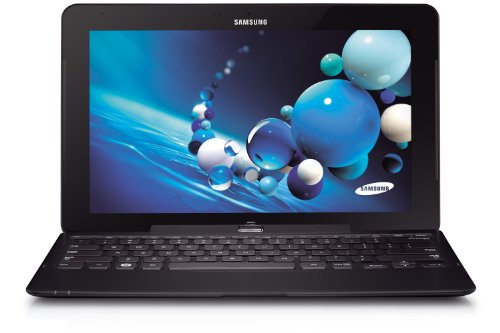
We tried some other machines.  The Samsung ATIV Smart Pc (what I use) was there.  That “clovertrail” device gets 12 hours of real life but the CPU is limited.  The similar HP Envyx2 was there too.  I liked the feel of it, but I didn’t like the lack of ports and the use of a blank to fill the MicroSD port; that blank will get lost.  The Samsung approach with a nicely fitting flap is much better.  The Samsung ATIV XE700T1C-A01US Smart PC Pro 700T was also there:

  • Same i5m (mobile) as the Surface Pro
  • Same 4 GB RAM as the Surface Pro
  • Stylus with same functionality as Surface Pro that hides seamlessly into a dock in the chassis (so much so that 1 person who bought one of these tablets last Sunday thought he didn’t have a stylus until I showed it to him on Friday)
  • 8 hours of advertised battery life – twice that of the equivalent Surface Pro running the same operating system

The dockable keyboard was not there to try out on the demo table.  The Microsoft Store has lots of sales people available and easy to find in their luminous t-shirts.  We asked for a keyboard to test with, and one appeared a couple of minutes later.  The clamshell (or convertible or transformer) keyboard gave 2 USB 2.0 ports in addition to the USB 3.0 port on the tablet.  My MVP colleague tried the stool test again and was happy with the laptop-like experience.  Here’s where things start to get interesting:

  1. The sales guy told us that the keyboard (clearly different to my one) had an additional 4 hours of battery life.  I was surprised, but had no material to contradict him.  He must have been briefed.
  2. Other MVPs who were trying the Surface Pro out came over and started to ask lots of questions about this Samsung tablet that could also be an ultrabook style machine.  We started to gather a crowd around us.

My colleague was sold and decided to buy the Samsung instead of the Surface Pro … and a few minutes later we saw another guy in the crowd do the same.  I decided to wander the store:

  • Lots of Windows Phone 8 handsets, all locked to networks (ick!)
  • An attractive Asus 15” thin laptop that reminded me of a MacBook Pro
  • The wafer thin Acer ultrabook that journalists have raved about … that features a keyboard with the feedback of wet lettuce.  I would hate this machine
  • Lots and lots of machines with variations to suit anyone

Two great things about buying from the Microsoft Store:

  • You get a 2 weeks, no questions asked, return policy.  You don’t like it, you can bring it back and get your money back.
  • Every machine is rebuilt with a “signature” build so you don’t get crapware that eats up disk space, RAM, and CPU.

We left and spend the day wandering, checking out the Barnes and Noble Nook (a nice machine but with severe region limitations on content availability), seeing some of our books for sale on the shelf (happy dance!).  We met more of our MVP colleagues that night, many of whom had bought the Surface Pro, and some were having buyer’s regret.  We told them that it wasn’t too late to return the device and look at alternatives, such as the Samsung.

The next day was the start of the Summit and some more Samsungs appeared where the owners had a Surface until the night before.  Hmm!  And the trend continued.  The no-questions-asked returns policy was being tested and passing with flying colours as people switched to an alternative device.  And this went on for the week.

Myself and another colleague looked into the question of the keyboard having an additional battery.  I was doubtful – and our research confirmed my suspicions.  We went back to the store when we had a free moment … my colleague with the new Samsung explained what had happened to another sales person.  We’re used to a “who give a flying f**k” attitude from sales people back home.  They’d tell us that’s our problem.  Not so in the Microsoft Store; the sales person was apologetic and gave my colleague two kick stands for his new tablet … no questions asked.

I’ve got to say that the Microsoft Store is the best PC shopping experience that I’ve had.  Great modern stock, and helpful sales staff.  I really hope they expand internationally … and soon.  Right now they have a limited presence and that allows the Best Buys of the world (we went there and it was a very different experience) to continue unchanged.

By the way: there were only 64 GB Surface Pros available until mid-week.  A discount was being given to anyone who bought one and additional expandable storage in the Microsoft Store.  I know lots of MVPs bought a Surface Pro this week, and most of the folks we talked to weren’t very happy with them.  Battery life was an issue.  Meanwhile, another VM MVP was using his machine all day long on battery to take notes, keep up with email, etc, and my original colleague from this story managed to get 9 hours with the machine sleeping here and there as a tablet does.  My lesser clovertrail machine was coming home with over 25% of available battery with constant usage – I was even leaving the charger in the hotel – who does that with a Windows machine!!!

The Surface Pro is a niche machine.  Who’s going to pay $1100 plus tax for a tablet, other than a Pro who needs an ultrabook style machine that will double as a tablet?  The Surface has name recognition … and that’s mostly all it has over the competition.  The Pro alternatives from the others are much better machines with the same internals, same touch interface, and same operating system.  I get driver and software updates made available to me almost every couple of weeks from Samsung – I have 4 queued up right now.  So that’s not an advantage for Microsoft. 

My advice is: don’t mistakenly assume that Surface is the only machine.  Go out and get the machine that suits you best … and maybe that is a Surface and maybe it is an Asus, a HP, a Lenovo, a Samsung, an Acer, a Dell … and so on … and it runs Windows 8 or Windows 8 Pro.

Technorati Tags: ,