Why I Think Windows 8 Will RTM Before July 2012

You’ll soon see that this is not based on any inside information … so make of it what you want.

We all know that Mary-Jo Foley reported a little while ago that Windows 8 could RTM as soon as April 2012.  I have 2 reasons to think that she might not be far off.

The first is a little bit more sensible than the second.

Timing

The Build conference is being held earlier than PDC used to be.  That makes me think that we’re working on a schedule with earlier milestones.  RTM for Windows 7 was early Summer with launches later in the year.  So maybe we’ll see a Windows 8 RTM in Spring with launches in the summer time frame?

Microsoft is Superstitious

Yes, a 100,000 employee corporate giant is afraid of the number 13.  Was there an Office 13?  Was there an Exchange 13?  No; they skipped a version number and went from 12 to 14 (“Wave 15” is on the way).

Microsoft’s financial years are from July to June.  For example, Microsoft is currently in financial year 2012.  Come July 2012, Microsoft will be in financial year 2013.  They name their products like EA Sports.  If Microsoft releases Windows Server “8” in June, it could be called Windows Server 2012.  But come July, it’ll more likely (not necessarily) be called Windows Server 2013.

Remember that they hate black cats, walking under ladders, spilling salt (or is it throwing it?), and the number 13.  I bet the next version of Server is called Windows Server 2012 … and therefore they will aim to RTM it before July of 2012.  Launches will probably be in September … that’s because MSFT is a mess in July with FY planning, and everyone is away on vacation in August.

That’s my 2 cents, not exactly based on science Winking smile

28 Days Before Build Windows … And News of Hyper-V

It is 28 days (and a bit) until the sold out Build Windows conference.  I was looking forward to it.  And then today, I skimmed through the latest vTax blog post by Jeff Woolsey (Principal Group Program Manager, Windows Server Virtualization), and at the end he said this:

“At Microsoft’s Worldwide Partner Conference 2011, we demonstrated some of the new capabilities of Windows Server “8,” specifically around Hyper-V. With an ability to create VMs with more than 16 virtual processors and built-in replication with Hyper-V Replica, Microsoft is showcasing its deep commitment to its customers, and our relentless pursuit to provide even more value, at no extra cost. These are just 2 of the hundreds of features coming in the Microsoft Private Cloud, of which you’ll be able to find out more about at Microsoft’s BUILD conference, September 13th-16th in Anaheim, CA”.

What the deuce?!  My tickets are booked and I cannot wait.  I have a Kingston keyboard for my iPad so I can blog the good news all day long … but maybe, just maybe, I might end up blogging with a Windows 8 tablet instead.  Now wouldn’t that be cool it if was so?  Must not get my hopes up …

Hyper-V Replica DR Strategy Musings VS What We Can Do Now

See my more recent post which talks in great detail about how Hyper-V Replica works and how to use it.

At WPC11, Microsoft introduced (at a very high level) a new feature of Windows 8 (2012?) Server called Hyper-V Replica.  This came up in conversation in meetings yesterday and I immediately thought that customers in the SMB space, and even those in the corporate branch/regional office would want to jump all over this – and need the upgrade rights.

Let’s look at the DR options that you can use right now.

Backup Replication

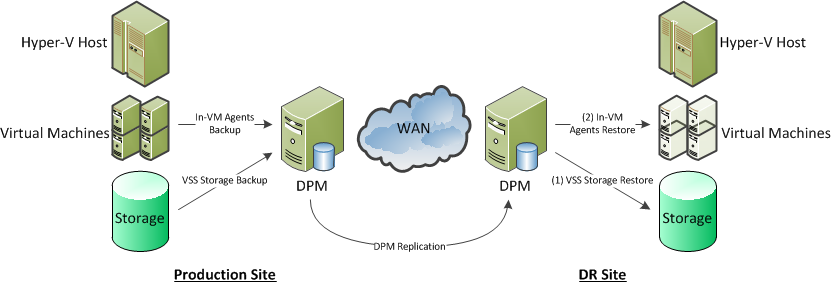
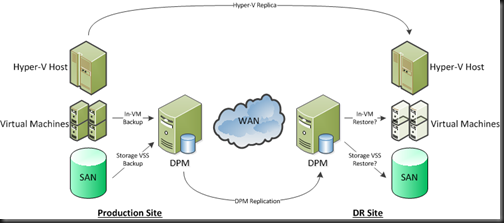
One of the cheapest around and great for the SMB is replication by System Center Data Protection Manager 2010.  With this solution you are leveraging the disk-disk functionality of your backup solution.  The primary site DPM server backs up your virtual machines.  The DR site DPM server replicates the backed up data and it’s metadata to the DR site.  During the invocation of the DR plan, virtual machines can be restored to an alternative (and completely different) Hyper-V host or cluster.
image

Using DPM is cost effective, and thanks to throttling, is light on the bandwidth and has none of the latency (distance) concerns of higher-end replication solutions.  It is a bit more time consuming for the invocation.

This is a nice economic way for an SMB or a branch/regional office to do DR.  It does require some work during invocation: that’s the price you pay for a budget friendly solution that kills two marketing people with one stone – Hey; I like birds but I don’t like marke …Moving on …

Third-Party Software Based Replication

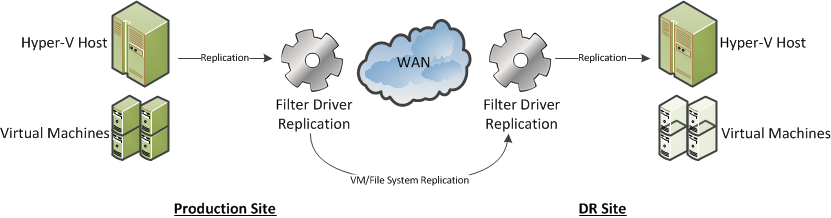
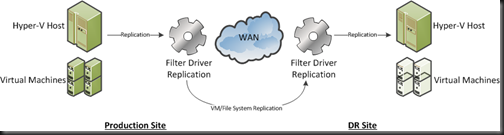
The next solution up the ladder is a 3rd party software replication solution.  At a high level there are two types:

  • Host based solution: 1 host replicates to another host.  These are often non-clustered hosts.  This works out being quite expensive.
  • Simulated cluster solution: This is where 1 host replicates to another.  It can integrate with Windows Failover Clustering, or it may use it’s own high availability solution.  Again, this can be expensive, and solutions that feature their own high availability solution can possibly be flaky, maybe even being subject to split-brain active-active failures when the WAN link fails.
  • Software based iSCSI storage: Some companies produce an iSCSI storage solution that you can install on a storage server.  This gives you a budget SAN for clustering.  Some of these solutions can include synchronous or asynchronous replication to a DR site.  This can be much cheaper than a (hardware) SAN with the same features.  Beware of using storage level backup with these … you need to know if VSS will create the volume snapshot within the volume that’s being replicated.  If it does, then you’ll have your WAN link flooded with unnecessary snapshot replication to the DR site every time you run that backup job.
image

This solution gives you live replication from the production to the DR site.  In theory, all you need to do to recover from a site failure is to power up the VMs in the DR site.  Some solutions may do this automatically (beware of split brain active-active if the WAN link and heartbeat fails).  You only need to touch backup during this invocation if the disaster introduced some corruption.

Your WAN requirements can also be quite flexible with these solutions:

  • Bandwidth: You will need at least 1 Gbps for Live Migration between sites.  100 Mbps will suffice for Quick Migration (it still has a use!).  Beyond that, you need enough bandwidth to handle data throughput for replication and that depends on change to your VMs/replicated storage.  Your backup logs may help with that analysis.
  • Latency: Synchronous replication will require very low latency, e.g. <2 MS.  Check with the vendor.  Asynchronous replication is much better at handling long distance and high latency connections.  You may lose a few seconds of data during the disaster, but it’ll cost you a lot less to maintain.

I am not a fan of this type of solution.  I’ve been burned by this type of software with file/SQL server replication in the past.  I’ve also seen it used with Hyper-V where compromises on backup had to be made.

SAN Replication

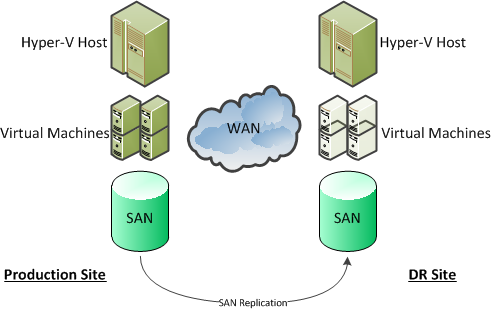
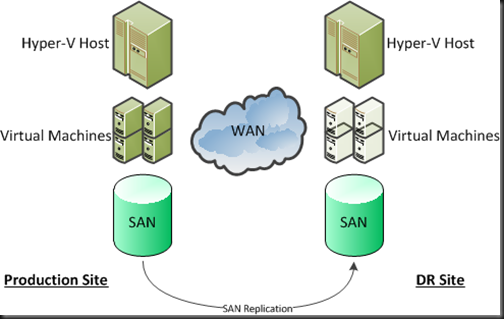
This is the most expensive solution, and is where the SAN does the replication at the physical storage layer.  It is probably the simplest to invoke in an emergency, and depending on the solution, can allow you to create multi-site clusters, sometimes with CSVs that span the sites (and you need to plan very carefully if doing that).  For this type of solutions you need:

  • Quite an expensive SAN.  That expense varies wildly.  Some SANs include replication, and some really high end SANs require an additional replication license(s) to be purchased.
  • Lots of high quality, and probably ultra low latency, WAN pipe.  Synchronous replication will need a lot of bandwidth and very low latency connections.  The benefit is (in theory) zero data loss during an invocation.  When a write happens in site A on the SAN, then it happens in site B.  Check with the manufacturer and/or an expert in this technology (not honest Bob, the PC salesman, or even honest Janet, the person you buy your servers from).
image

This is the Maybach of DR solutions for virtualisation, and is priced as such.  It is therefore well outside the reach of the SMB.  The latency limitations with some solutions can eliminate some of the benefits.  And it does require identical storage in both sites.  That can be an issue with branch/regional office to head office replication strategies, or using hosting company rental solutions.

Now let’s consider what 2012 may bring us, based purely on the couple of minutes presentation of Hyper-V replica that was at WPC11.

Hyper-V Replica Solution

I previously blogged about the little bit of technology that was on show at WPC 2011, with a couple of screenshots that revealed functionality.

Hyper-V Replica appears (in the demonstrated pre-beta build and things are subject to change) to offer:

  • Scheduled replication, which can be based on VSS to maintain application/database consistency (SQL, Exchange, etc).  You can schedule the replication for outside core hours, minimizing the impact on your Internet link on normal business operations.
  • Asynchronous replication.  This is perfect for the SMB or the distant/small regional/branch office because it allows the use of lower priced connections, and allows replication over longer distances, e.g. cross-continent.
  • You appear to be able to maintain several snapshots at the destination site.  This could possibly cover you in the corruption scenario.
  • The choice of authentication between replicating hosts appeared to allow Kerberos (in the same forest) and X.509 certificates.  Maybe this would allow replication to a different forest: in other words a service provider where equipment or space would be rented?

What Hyper-V Replica will give us is the ability to replicate VMs (and all their contents) from one site to another in a reliable and economic manner.  It is asynchronous and that won’t suit everyone … but those few who really need synchronous replication (NASDAQ and the like) don’t have an issue buying two or three Hitachi SANs, or similar, at a time.
image

I reckon DPM and DPM replication still have a role in the Hyper-V Replica (or any replication) scenario.  If we do have the ability to keep snapshots, we’ll only have a few of them.  What do you do if you invoke your DR after losing the primary site (flood, fire, etc) and someone needs to restore a production database, or a file with important decision/contract data?  Are you going to call in your tapes from last week?  Hah!  I bet that courier is getting themselves and their family to safety, stuck in traffic (see post-9/11 bridge closures or state of the roads in New Orleans floods), busy handling lots of similar requests, or worse (it was a disaster).  Replicating your back to the secondary site will allow you restore data (that is still on the disk store) where required without relying on external services.

Some people actually send their tapes to be stored at their DR site as their offsite archival.  That would also help.  However, remember you are invoking a DR plan because of an unexpected emergency or disaster.  Things will not be going smoothly.  Expect it to be the worst day of your career.  I bet you’ve had a few bad ones where things don’t go well.  Are you going to rely entirely on tape during this time frame?  Your day will only get worse if you do: tapes are notoriously unreliable, especially when you need them most.  Tapes are slow, and you may find a director impatiently mouth-breathing behind you as the tape catalogues on the backup server.  And how often do you use that tape library in the DR site?

To me, it seems like the best backup solution, in addition to Hyper-V Replica (a normal feature of the new version of Hyper-V that I cannot wait to start selling), is to combine quick/reliable disk-disk-disk backup/replication for short term backup along with tape for archival.

That’s my thinking now, after seeing just a few minutes of a pre-beta demo on a webcast.  As I said, it’s subject to change.  We’ll learn more at/after Build in September and as we progress from beta-RC-RTM.  Until then, these are musings, and not something to start strategising on.

Thinking About Buying a Windows 7 Slate PC? Check the Screen Resolution First

Then make sure you read this:

“To take advantage of the Windows 8’s side-by-side window view, that requirement rises to 1366×768”

Windows 8 will run on Windows Vista/7 hardware but you need to be aware of that graphics requirement for side-by-side.  Check the screen resolution of any slate PC you were considering to ensure that you will be able to upgrade to Windows 8 next year.

For example, have a look at these current machines:

Machine Maximum Screen Resolution Windows 8 Side-by-Side?
Asus Eee Slate EP121 1280 x 800 No
Toshiba WT310 1366 x 768 Yes, but … *1
Gigabye S1080 1024 x 600 Not a chance!
HP Slate 500 1024 x 600 or 1024 x 768 You must be kidding?
Acer Iconia Tab W500 1280 x 800 Snowball’s chance in hell
Lenovo IdeaPad P1 1280 x 800 (not RTM yet) The computer says “no”
Fujitsu STYLISTIC Q550 1920 x 1080 480p, 720 p and 1080i – Impressive! *2

That Acer is nearly €500 from a UK online reseller, and is around $549 in the USA.  I’d sure want to know that I could install Windows 8 on it next year if I spent money on it now.  I’m actually quite stunned that of the big names I found with Windows 7 slates, only Toshiba and Fujitsu have one with the graphics requirement for Windows 8 side-by-side. 

*1 It’s been rumoured that since the announcement the device, Toshiba did a 180 and cancelled their slate PC plans.  Oh well!  Kinda makes sense considering the hardware would have limited sales with anticipation of true Windows 8 tablets in 2012 and more suitable hardware with alternative OS’s right now.

My advice:

  1. If you can wait, then wait until Windows 8 is released and ARM (system on a chip) tablets are released.  You’ll get great battery life, a lighter machine, Windows 8 support, and your lap won’t be burned by a flat PC.
  2. If you want the true tablet experience now then compare the iPad2 (I have the iPad 1 and love it, watching movies on the go, or reading from Kindle) with one of the many Android devices such as the Motorola Xoom (my cousin bought one recently and he raves about it, including the ability to insert and use an SD card with media on it).  The expected Amazon Android device will also be rather interesting (October allegedly).
  3. If you really want to buy a Windows 7 slate PC (not a true tablet IMO) then check the screen resolution first and make sure it supports 1366 x 768.  That’s not looking so good.  If you’re using it for business and want to enable BitLocker then you’ll really want a TPM 1.2 (or later) chip.  But that’s a whole other conversation … *2 By the way, Fujitsu’s machine also has a TPM chip option.  I guess that makes the Fujitsu STYLISTIC Q550 the best option as an enterprise slate PC if you really must buy one now.
Technorati Tags: ,

Do You Buy/Sell Hyper-V and/or System Center?

If you’re a service provider (engineering/consulting/etc) and you’re involved in Hyper-V and/or System Center, or if you’re a customer that is currently buying those technologies, then pay attention.  2011/2012 is a time of interesting change and there are opportunities for customers and for service providers.

System Center

Everything in the System Center circle (a graphic used by MSFT in just about every System Center presentation) is going through an upgrade during the next 12 months:

If you’re doing a deployment of any of these products in the coming months then you really want to make sure that you or your customer will have the rights to do an upgrade next year.  Do you wait until the RTM of the new products?  Probably not; the reason you’re installing now is that there are technical or business issues that need solutions.  For the business’s sake, you solve that issue now, and upgrade later. 

Each of these new versions includes a bunch of new features or improves functionality.  That means there are more gains for the customer, and more service opportunities for the consultant.

Note that some licensing actually includes upgrade rights, e.g. OVS or OV, and System Center Management Suite.  Don’t forget that the SQL database on the back of these servers may also need an upgrade to 2008 R2 or even “Denali”, so protect them too.  And don’t forget the management licenses or CALs.

Hyper-V

If you are licensing Windows Server VMs on any virtualisation (Hyper-V, VMware, Xen) correctly then you are licensing the hosts with Enterprise or Datacenter edition, and availing of the free license benefits for VMs on those licensed hosts.  That alone can save you a fortune.  Bundle in Software Assurance for those host OSs and the saving growth is exponential.  Why would you want to do this?  Windows 8 of course!!!

Yes, you will find yourself needing/wanting to deploy Windows 8 Server virtual machines next year after the RTM.  You’ll need to license your hosts with Windows 8 to do that.  Software Assurance or upgrade rights (OVS) on your existing hosts will cover you for that.

We already know of 2 Hyper-V features that will bring technology and business benefits to the business:

  • More vCPUs: We’re getting support for at least 16 virtual CPUs per virtual machine.  That’s 16 threads of execution, meaning more powerful scale-up VMs, meaning more of the server farm can be virtualised.
  • Hyper-V Replica: Small-Medium Businesses (SMBs) struggle with implementing disaster recovery (DR) or business continuity.  This is an example of where technology and budget have an impact on business.  Get it right, and the business gains – I’m told insurance costs can go down.  Get it wrong, and the business … well … you may need to update your CV/résumé.  For a service provider, there is likely going to be a fantastic service opportunity to implement scheduled, asynchronous DR for customers in the SMB space, with modest bandwidth, and without expensive third party software or crazy costing storage solutions.

We’ll probably learn much more about Windows 8 Server at/after the Build conference in September (13-16).

Don’t forget the CALs either!  Something like the Core CAL Suite under OVS covers the end machine/user for a lot of products with Software Assurance.

Recommendation

My recommendations are:

  • Don’t “wait for 8”
  • Look at what Windows 8 and System Center can bring to you business next year, and figure out if you want that to solve your or your customers’ technology or business issues.  If so, make sure your licensing sales/purchases include rights to upgrade.

Going to BUILD

Assuming the USA lets me in, I’ll be going to the BUILD conference in September.  This is where Microsoft will be opening the taps on Windows 8 information.  It’s mainly aimed at developers and hardware manufacturers but I’m pretty sure there’ll be lots more information.  With no TechEd Europe this Autumn/Winter, I guess this’ll be our only event full of info this side of the new year.

I’ll try to live blog the good stuff, where possible, like I did at TechEd 2008 in Barcelona.  We were given a monstrous amount of info about Windows 7 & Server 2008 R2 back then.

Technorati Tags: ,

First Official Showing of Windows Server “8” Hyper-V

Odds are you’ve already read about this on Ben Armstrong’s blog (I’ve been engaged on an intense deployment project with little time to keep the blog up to date), but it’s worth me posting just in case.  Microsoft showed off Windows Server 8 (2012? MSFT have a thing against the number 13 so I doubt it will be Windows Server 2013) for the first time and featured Hyper-V.  Hyper-V Replica was on show, allowing a VM to be replicated to another (possibly remote) Hyper-V host.

The video is online and you can jump to around the 37 minute mark to start hearing about Windows 8.

It seems we have two authentication methods for the replication:

  • HTTP aka Windows authentication: Probably for hosts inside the same forest.
  • HTTPS aka certificates: Maybe for hosts in different forests?  Could be great for replicating to a “public cloud”?  Pure guessing. 

File this under “we’ll learn more at/after the Build Conference in September”.

An interesting screen shot is this one:

image

Cool: we can optionally keep a history of replicas!  Maybe a VM’s OS or application corrupts in site A but we can restore a previous version in site B before the corruption started?  And it appears to allow us to use VSS to take snaps every X hours to get consistent replicas.  That’s critical for things like Exchange or SQL Server.

A big challenge for replication is getting that first big block of data over the WAN.  MSFT has thought of that, as you can see below.  We can schedule it for out of hours, export to removable media and import on the destination host, or use backup/restore (apparently).

image

This is just a simple wizard to get something complex (under the hood) to work.  And it’s software based so it should work with any Hyper-V supported hardware.

This was a very early build on show at WPC11 so things are subject to change.  We’ll learn more, I guess, at/after the Build conference.  Until then, everything is speculation so don’t plan your deployments until at least the RC release next year!

Jeff Woolsey says in the video that this will be an alternative to those very expensive hardware replication mechanisms that are the only option right now.  Yup.  Also an alternative to the vTax alternative by VMware because Hyper-V Replica will be a built-in feature at no extra cost.

WPC11 Hyper-V Announcements and Some Brainfarts

WPC is Microsoft’s conference for partners.  The delegates tend to be executives or account managers from the Microsoft partner community, and the content is not the usual technical level one should expect from an MMS or TechEd.

Yesterday Microsoft announced some Hyper-V features from Windows 8 (Windows Server 2012?).  The first was that Hyper-V “3.0” will support “more than” 16 vCPUs per VM.  That’s a nice add on for those larger VM’s, giving us 16+ simultaneous threads of execution.  People are virtualising larger workloads as well as the usual/expected lighter ones because virtualisation offers solutions to more than just power/rack consolidation, e.g. fault tolerance.  A bottleneck has been the ability to run larger multi-threaded workloads, and Windows Server “2012” Hyper-V will give us a potential solution for this.

One of the big reasons we adopt virtualisation is the ability to make DR (disaster recovery or business continuity) easier.  Mid-to-enterprise businesses can afford really expensive SAN/WAN solutions for this.  There’s a number of storage or backup replication solutions that can allow replication of virtual workloads over smaller lines for the small-medium enterprise (SME).  Some are good, and some are downright rubbish to the point of being dangerous.

Microsoft is stepping in with a new feature called Hyper-V Replica.  This will give us the ability to replicate VMs asynchronously.  This means it will work over longer distances, with lower capacity lines, higher latency, and will be cheaper.  It also means that there is a slight delay in replication of VM data.  That’s unacceptable to a small set of the market who have regulatory/business needs for synchronous replication and will have to continue to look at those third party or expensive SAN/WAN replication solutions.

Thinking about Hyper-V Replica makes me wonder if there are other new features/upgrades that we haven’t been told about yet.  This isn’t DFS-R as we know it.  DFS-R requires a file to be closed before it can analyse it and replicate the change blocks.  Maybe we have a new DFS-R but I’m sceptical of that.  Maybe we have a “new” transactional file system?  I say “new” because Microsoft has had a transactional file system for quite some time in the form of WinFS.  This would allow the file system to track changes, and replicate them, all while keeping VMs in a consistent state in source and destination locations.  Consistency is one of those things that has worried me in third party software based replication of VMs because they are unaware of things like in-VM database commits.  Maybe a new WinFS could be aware?  Potentially it could work in cluster-cluster replication (no mention of that in the reports I read this morning from WPC).

Good news: Hyper-V Replica will be a built-in feature with no extra charges, unlike something else we could mention Winking smile

I think that’s enough hot air and methane blown into the atmosphere for today.

Microsoft’s First Official View of Windows 8

I guess they had to do it because of the amount of leaks; Microsoft published a video showing us the new (codename) “Metro” UI for Windows 8.  This will be the primary way to use Windows 8 on touch enabled devices, such as the ARM enabled tablet PC.  I have to say, based on this (and this is probably too early to be 100% sure), Microsoft may have hit a grand slam.

This is the first of many promised videos.  I can’t wait for more.  Note the comment about multi-tasking Smile

This video appears to have gone viral.

Technorati Tags: ,

No Windows 8 Until 2012

It’s been widely reported this afternoon that news of a Windows 8 release schedule appeared very briefly on a Dutch MS website (before being pulled).  I have a nagging feeling that something similar happened there with Windows 7 sometime back …

Anyway, the story was that we wouldn’t see an RTM of the new server/desktop OSs for another 2 years.  I used to think that we’d see some announcements at TechEd Europe in November.  It is 2 years since we had the Windows 7/Server 2008 R2 “Better Together” announcements at TechEd Europe in Barcelona.  If you stick to the promise of 2 year release cycles (to the Software Assurance customers) then we should be entering that cycle now.  But it appears that we won’t enter that for another 6-12 months.  My guess would be TechEd NA 2011.

OK, so SA customers might be peeved that their recent SA purchases won’t bring an upgrade – they do get other benefits, some which they might value and others they may not.  But there is a bright side for the rest of us.

Think back 5 years.  Windows XP arrived in 2001.  It didn’t exactly go through a widespread deployment straight away.  In these parts, many people didn’t start to deploy it until 2004-2006.  Seriously!  The long time between XP and Vista gave businesses a chance to get off of the old hardware and onto XP. 

That doesn’t exactly suit the revenue generation of Microsoft.  They want people buying SA or upgrade licenses.  That means they need to provide a reason to pay extra.  And that mean more frequent releases.  Vista came along and it went down like the Hindenburg.  It wasn’t awful but the reaction was.  Mainly the issue was that it was very different and people/businesses had invested in an XP platform.  Official sales figures were misleading because SA figures are presented.  In reality, few deployed it. 

Windows 7 has had a positive critical response.  Think about this; it’s effectively Vista 1.1.  What’s changed?  There are improvements (drivers, performance and usability) but businesses have had more time to get used to it.  But it’s still not widely deployed in the business.  Money is short and upgrade projects take time and money.  Many of the better together solutions are excellent but most businesses have already purchased 3rd party solutions so the motivation to move might not be there now.

The fix is time.  And that’s why I’m happy about Windows 8 not being directly around the corner. 

Example:  Many people want x64 laptops in the office for 4GB+ RAM.  Fair enough.  But the catch is the firewall.  Why?  Cos the stupid VPN clients that they have right now are 32-bit only and a 64-bit client is only available if they purchased the firewall vendor’s equivalent of Software Assurance and many business don’t.  And the likes of CheckPoint go and require backdating of support + a new per user VPN license!  There’s an opportunity to deploy Windows 7 Ultimate/Enterprise with DirectAccess.

Windows 7 will gain more and more acceptance.  Eventually business applications will drive an upgrade like happened with XP. 

And what’s nice for an IT Pro that works with lots of technology: time to learn the stuff.  The constant churn means you can’t get in depth knowledge.  With time, you can learn the products, use them, adapt to the quirks, get inventive, etc.

So what if Windows 8 is “late”?  It’s a good thing.  Plus it means that MS has more time to come up with something cool and get it right.  I’d rather have late than wrong.

Technorati Tags: ,