I’ll tell you about my new virtual training course on Azure Firewall and share some schedule information in this post.
Background
I’ve been talking about Azure Firewall for years. I’ve done lots of sessions at user groups and conferences. I’ve done countless handovers with customers and colleagues. One of my talking points is that I reckoned that I could teach someone with a little Azure/networking knowledge everything there is to know about Azure Firewall in 2 days. And that’s what I decided to do!
I was updating one of my sessions earlier in the year when I realised that it was pretty must the structure of a training couse. Instead of me just listing out features or barely dicusssing architecture to squeeze it into a 45-60 minute-long session, I could take the time to dive deep and share all that I know or could research.
The Course
I produced a 2-day course that could be taught in-person, but my primary vector is virtual/online – it’s hard to get a bunch of people from all over into one place and there is also a cost to me in hosting a physical event that would increse the cost of the course. I decided that virtual was best, with an option off doing it in person if a suitable opportunity arose.
The course content is delivered using a combination of presentation and demo. Presentation lets me explain the what’s, why’s and so on. Demonstration lets me show you how.
The demo lab is built from a Bicep deployment, based on Azure Verified Modules (AVM). A hub & spoke network architecture is created with an Application Gateway, a simple VM workload, and a simple App Services (Private Endpoint) workload. The demonstrations follow a “hands-on guide”; this guide is written as if this was a step-by-step hands-on course, instructing the reader exactly which button to click and what/where to type. Each exercise builds on the last, eventually resulting in a secure network architecture with all of the security, monitoring, and management bells and whistles.
Why did I opt for demo instead of hands-on? Hands-on works for in-person classes. But you cannot assist in the same way when people struggle. In addition, waiting for attendees to complete labs would add another day (and cost) to the class.
Before and class, I share all of the content that I use:
System requirements and setup instructions.
The Bicep files for the demo lab.
The hands-on lab instructions
The PowerPoint
And a few more useful bits
I always update content – for example, my first run of this class was during Microsoft Ignite 2024 and I added a few bits from the news. Therefore I share the updated content with attendees after the course.
The First Run
I ran the class for the first time earlier this week, Novemer 20-21 2024. Attendees from all around Europe joined me for 2 days. At first they were quiet. Online is tough for speakers like me because I look for visual feedback on how I’m doing. But then the questions started coming – people were interested in what I was saying. Interaction also makes the class more interesting for me – sometimes you get comments that coer things you didn’t originally include and everyone benefits – I updated the course with one such item at the end of day 1!
I shared a 4-question anonymouse survey to learn what people thought. The feedback was awesome.
Feedback
This course was previously run in November 2024 for a European audience. The survey feedback was as follows:
How would you rate this course?
Excellent: 83%
Good: 17%
Was This Course Worth Your Time?
Yes: 100%
Would you recommend this course to others?
Yes: 100%
Some of the comments:
“I think it is a very good introduction to Azure Firewall, but it goes beyond foundational concepts so medium- experienced admins will also get value from this. I like the sections on architecture and explanations of routing and DNS. I think this course will enable people to do a good job more than for example az 700 because of the more practical approach. You are good at explaining the material”.
“Just what I wanted from a Deep dive course.”
“Perfectly delivered. Crystal clear content and very well explained”.
Future Classes
I have this class scheduled for two more runs, each timed for different parts of the world:
The classes are ultra-affordable. A few hundred Euros/dollars gets you custom content based on real-world usage. I did fint a virtual 2-day course on Palo Alto firewalls that cost $1700! You’ll also find that I run early-bird registration costs and discounts for more than 1 booking. If you have a large group (5+) then we might be able to figure out a lower rate 🙂
More To Come
More classes are coming! I have an old one to reinvent based on lots of experience over the years and at least 1 new one to write from scratch. Watch out for more!
This post about Azure Virtual Network Manager is a part of the online community event, Azure Back To School 2024. In this post, I will discuss how you can use Azure Virtual Network Manager (AVNM) to centrally manage large numbers of Azure virtual networks in a rapidly changing/agile and/or static environment.
Challenges
Organisations around the globe have a common experience: dealing with a large number of networks that rapidly appear/disappear is very hard. If those networks are centrally managed then there is a lot of re-work. If the networks are managed by developers/operators then there is a lot of governance/verification work.
You need to ensure that networks are connected and are routed according to organisation requirements. Mandatory security rules must be put in place to either allow required traffic or to block undesired flows.
That wasn’t a big deal in the old days when there were maybe 3-4 huge overly trusting subnets in the data centre. Network designs change when we take advantage of the ability to transform when deploying to the cloud; we break those networks down into much smaller Azure virtual networks and implement micro-segmentation. This approach introduces simplified governance and a superior security model that can reliably build barriers to advanced persistent threats. Things sound better until you realise that there are no many more networks and subnets that there ever were in the on-premises data centre, and each one requires management.
This is what Azure Virtual Network Manager was created to help with.
Introducing Azure Virtual Network Manager
AVNM is not a new product but it has not gained a lot of traction yet – I’ll get into that a little later. Spoiler alert: things might be changing!
The purpose of AVNM is to centralise configuration of Azure virtual networks and to introduce some level of governance. Don’t get me wrong, AVNM does not replace Azure Policy. In fact, AVNM uses Azure Policy to do some of the leg work. The concept is to bring a network-specialist toolset to the centralised control of networks instead of using a generic toolset (Azure Policy) that can be … how do I say this politely … hmm … mysterious and a complete pain in the you-know-what to troubleshoot.
AVNM has a growing set of features to assist us:
Network groups: A way to identify virtual networks or subnets that we want to manage.
Connectivity configurations: Manage how multiple virtual networks are connected.
Security admin rules: Enforce security rules at the point of subnet connection (the NIC).
Routing configurations: Deploy user-defined routes by policy.
Verifier: Verify the networks can allow required flows.
Deployment Methodology
The approach is pretty simple:
Identify a collection of networks/subnets you want to configure by creating a Network Group.
Build a configuration, such as connectivity, security admin rules, or routing.
Deploy the configuration targeting a Network Group and one or more Azure regions.
The configuration you build will be deployed to the network group members in the selected region(s).
Network Groups
Part of a scalable configuration feature of AVNM is network groups. You will probably build several or many network groups, each collecting a set of subnets or networks that have some common configuration requirement. This means that you can have ea large collection of targets for one configuration deployment.
Network Groups can be:
Static: You manually add specific networks to the group. This is ideal for a limited and (normally) unchanging set of targets to receive a configuration.
Dynamic: You will define a query based on one or more parameters to automatically discover current and future networks. The underlying mechanism that is used for this discovery is Azure Policy – the query is created as a policy and assigned to the scope of the query.
Dynamic groups are what you should end up using most of the time. For example, in a governed environment, Azure resources are often tagged. One can query virtual networks with specific tags and in specific Azure regions and have them automatically appear in a network group. If a developer/operator creates a new network, governance will kick in and tag those networks. Azure Policy will discover the networks and instantly inform AVNM that a new group member was discovered – any configurations applied to the group will be immediately deployed to the new network. That sounds pretty nice, right?
Connectivity Configurations
Before we continue, I want you to understand that virtual network peering is not some magical line or pipe. It’s simply an instruction to the Azure network fabric to say “A collection of NICs A can now talk with a collection of NICs B”.
We often want to either simplify the connectivity of networks or to automate desired connectivity. Doing this at scale can be done using code, but doing it in an agile environment requires trust. Failure usually happens between the chair and the keyboard, so we want to automate desired connectivity, especially when that connectivity enables integration or plays a role in security/compliance.
Connectivity Configurations enable three types of network architecture:
Hub-and-spoke: This is the most common design I see being required and the only one I’ve ever implemented for mid-large clients. A central regional hub is deployed for security/transit. Workloads/data are placed in spokes and are peered only with the hub (the network core). A router/firewall is normally (not always) the next hop to leave a spoke.
Full mesh: Every virtual network is connected directly to every other virtual network.
Hub-and-spoke with mesh: All spokes are connected to the hub. All spokes are connected to each other. Traffic to/from the outside world must go through the hub. Traffic to other spokes goes directly to the destination.
Mesh is interesting. Why would one use it? Normally one would not – a firewall in the hub is a desirable thing to implement micro-segmentation and advanced security features such as Intrusion Detection and Prevention System (IDPS). But there are business requirements that can override security for limited scenarios. Imagine you have a collection of systems that must integrate with minimised latency. If you force a hop through a firewall then latency will potentially be doubled. If that firewall is deemed an unnecessary security barrier for these limited integrations by the business, then this is a scenario where a full mesh can play a role.
This is why I started off discussing peering. Whether a system is in the same subnet/network or not, it doesn’t matter. The physical distance matters, not the virtual distance. Peering is not a cable or a connection – it’s just an instruction.
However, Virtual Network Peering is not even used in mesh! It’s something different that can handle the scale of many virtual networks being interconnected called a Connected Group. One configuration inter-connects all the virtual networks without having to create 1-1 peerings between many virtual networks.
A very nice option with this configuration is the ability to automatically remove pre-existing peering connections to clean up unwanted previous designs.
Security Admin Rules
What is a Network Security Group (NSG) rule? It’s a Hyper-V port ACL that is implemented at the NIC of the virtual machine (yours or in the platform hosting your PaaS service). The subnet or NIC association is simply a scaling/targeting system; the rules are always implemented at the NIC where the virtual switch port is located.
NSGs do not scale well. Imagine you need to deploy a rule to all subnets/NICs to allow/block a flow. How many edits will you need to do? And how much time will you waste on prioritising rules to ensure that your rule is processed first?
Security Admin Rules are also implemented using Port ACLs but they are always processed first. You can create a rule or a set or rules and deploy it to a Network Group. All NICs will be updated and your rules will always be processed first.
Tip: Consider using VNet Flow Logs to troubleshoot Security Admin Rules.
Routing Configurations
This is one of the newer features in AVNM and was a technical blocker for me until it was introduced. Routing plays a huge role in a security design, forcing traffic from the spoke through a firewall in the hub. Typically, in VNet-based hub deployments, we place one user-defined route (UDR) in each subnet to make that flow happen. That doesn’t scale well and relies on trust. Some have considered using BGP routing to accomplish this but that can be easily overridden after quite a bit of effort/cost to get the route propagated in the first place.
AVNM introduced a preview to centrally configure UDRs and deploy them to Network Groups with just a few clicks. There are a few variations on this concept to decide how granular you want the resulting Route Tables to be:
One is shared with virtual networks.
One is shared with all subnets in a virtual network.
One per subnet.
Verification
This is a feature that I’m a little puzzled about and I am left wondering if it will play a role in some other future feature. The idea is that you can test your configurations to ensure that they are working. There is a LOT of cross-over with Network Watcher and there is a common limitation: it only works with virtual machines.
What’s The Bad News?
Once routing configurations go generally available, I would want to use AVNM in every deployment that I do in the future. But there is a major blocker: pricing. AVNM is priced per subscription at $73/month. For those of you with a handful of subscriptions, that’s not much at all. But for those of us who saw that the subscription is a natural governance boundary and use LOTS of subscriptions (like in Microsoft Cloud Adoption Framework), this is a huge deal – it can make AVNM the most expensive thing we do in Azure!
The good news is that the message has gotten through to Microsoft and some folks in Azure networking have publicly commented that they are considering changes to the way that the pricing of AVNM is calculated.
The other bit bad news is an oldie: Azure Policy. Dynamic network group membership is built by Azure Policy. If a new virtual network is created by a developer, it can be hours before policy detects it and informs AVNM. In my testing, I’ve verified that once AVNM sees the new member, it triggers the deployment immediately, but the use of Azure Policy does create latency, enabling some bad practices to be implemented in the meantime.
Summary
I was a downer on AVNM early on. But recent developments and some of the ideas that the team is working on have won me over. The only real blocker is pricing, but I think that the team is serious about fixing that. I stated earlier that AVNM hasn’t gotten a lot of traction. I think that this should change once pricing is fixed and routing configurations are GA.
I recently demonstrated using AVNM to build out the connectivity and routing of a hub-and-spoke with micro-segmentation at a conference. Using Azure Portal, the entire configuration probably took less than 10 minutes. Imagine that: 10 minutes to build out your security and compliance model for now and for the future.
Microsoft recently announced a public preview of User-Defined Route (UDR) management using Azure Virtual Network Manager. I’ve taken some time to play with it, and here are my thoughts.
Azure Virtual Network Manager (AVNM)
AVNM has been around for a while but I have mostly ignored it up to now because:
The connectivity configuration feature (centrally manage VNet connections) was pointless to me without route management – what’s the point of a hub & spoke in a business setting without a firewall?
I liked the Security Admin Rule configuration (same tech as NSG rules in the Hyper-V switch port, but processed before NSG rules) but pricing of AVNM was too much – more on this later.
Connectivity was missing something – the ability to deploy UDRs or BGP routes from a central policy that would force a next hop to a routing/firewall appliance.
AVNM is deployed centrally but can operate potentially across all virtual networks in your tenant (defined by a scope at the time of deployment) and even across other tenants via mutually agreed guest access – the latter would be useful in acquisition or managed services scenarios.
Routing Configuration Preview
Routing Configuration was introduced as a preview on May 2nd. Immediately I was drawn to it. But I needed to spend some time with it – to dig a little deeper and not just start spouting off without really understanding what was happening. I spent quite a bit of time reading and playing last week and now I feel happier about it.
Network Groups
Network Groups power everything in AVNM. A Network Group is a listing of either subnets or virtual networks. It can be a static list that you define or it can be a dynamic query.
At first, dynamic query looks cool. You can build up a dynamic query using one or a number of parameters:
Name
Id
Tags
Location
Subscription Name
Subscription ID
Subscription Tags
Resource Group Name
Resource Group Id
When you add members via a query, an Azure Policy is created.
When that policy (re)evaluates a notification is sent to AVNM and any policies that target the updated network group are applied to the group members. That creates a possible negative scenario:
You build a workload in code from VNet all the way through to resource/code
You deploy the workload IaC
The VNet is deployed, without any peering/routing configurations because that’s the job of AVNM
The workload components that rely on routing/peering fail and the deployment fails
Azure Policy runs some time later and then you can run your code.
Ick! You don’t want to code peering/routing if it’s being deployed by AVNM – you could end up with a mess when code runs and then AVNM runs and so on.
What do you do? AVNM has a very nice code structure under the covers. The AVNM resource is simple – all the configurations, the rules collections, and rules, and groups are defined as sub-resources. One could build the group membership using static membership and place the sub-resource with the workload code. That will mean that the app registration used by the pipeline will require rights in the central AVNM – that could be an issue because AVNM is supposed to be a governance tool.
Ideally, Azure Policy would trigger much faster than it does (not scientific, but it was taking 15-ish minutes in my tests) and update the group membership with less latency. Once the membership is updated, configurations are deployed nearly instantly – faster than I could measure it.
Routing Configuration
I like how AVNM has structured the configurations for Security Admin Rules and Routing Configurations. It reminds me of how Azure Firewall has handled things.
Rule Collection
A Routing Configuration is deployed to a scope. The configuration is like a bucket – it has little in the way of features – all that happens in the Routing Rule Collections. The configuration contains one or more Rule Collections. Each collection targets a specific group. So I could have three groups defined:
Production
Dev
Secure
Each would have a different set of routes, the rules, defined. I have only one deployment (the configuration) which automatically applies to the correct VNets/subnets based on the group memberships. If I am using dynamic group membership, I can use governance features like tags (which can be controlled from management groups, subscriptions, resource groups or at the resource level) for large-scale automation and control.
There are 3 kinds of Local Route Setting – this configures:
How many Route Tables are deployed per VNet and how they are associated
Whether or not a route to the prefix of the target resource is created
None Specified
Direct Routing Within Virtual Network
Direct Routing Within Subnet
How Many Route Tables?
One per VNet
One per VNet
One per subnet
Association
All subnets in the VNet
All subnets in the VNet
With the subnet
Local_0 Route
N/A
Yes > VNet Prefix
Yes > Subnet Prefix
Local Route Setting in a Rule Collection
The Route Tables are created an AVNM-managed resource group in the target subscription. If you choose one of the “Direct …” Local Route Setting options then a UDR is created for the target prefix:
Direct Routing Within Virtual Network
Direct Routing Within Subnet
Address Prefix
The VNet Prefix
The subnet prefix
Next Hop Type
Virtual Network
Virtual Network
Using the Direct Routing options
The concept is that you can force routing to stay within the target VNet/Subnet if the destination is local, while routing via a different next hop when leaving the target. For example, force traffic to the local VNet via the firewall while staying in the subnet (Direct Routing Withing Subnet). Note that the Default rules for VNet via Virtual Network are not deactivated by default, which you can see below – localRoute_0 is created by AVNM to implement the “Direct …” option.
You have the option to control BGP propagation – which is important when using a firewall to isolate site-to-site connections from your Azure services.
Some Notes
AVNM isn’t meant to be the “I’ll manage all the routes centrally” solution. It manages what is important to the organisation – the governance of the network security model. You have the ability to edit routes in the resulting Route Table. So if I need to create custom routes for PaaS services or for a special network design then I can do that. The resulting Route Tables are just regular Azure Route Tables so I can add/edit/remove routes as I desire.
If you manually create a route in the Route Table and AVNM then tries to create a route to the same destination then AVNM will ignore the new rule – it’s a “what’s the point?” situation.
If someone updates an AVNM-managed rule then AVNM will not correct it until there is a change to the Rule Collection. I do not like this. I deem this to be a failure in the application of governance.
Pricing
This is the graveyard of AVNM. If you run Azure like a small business then you lump lots of workloads into a few subscriptions. If you, like I started doing years ago, have a “1 workload per subscription” model (just like in the Azure Cloud Adoption Framework) then AVNM is going to be pricey!
AVNM costs $0.10/subscription/hour. At 730 hours per average month, AVNM for a single subscription will cost $73/month. Let’s say that I have 100 workloads. That will cost me $7300/month! Azure Firewall Premium (compute only) costs $1277.50/month so how could some policy tool cost nearly 6 times more!?!?!
Quite honestly, I would have started to use AVNM last year for a customer when we wanted to roll out “NSG rules” to every subnet in Azure. I didn’t want to do an IaC edit and a DevOps pull request for every workload. That would have taken days/hours (and it did take days). I could have rolled out the change using AVNM in minutes. But the cost/benefit wasn’t worth it – so I spent days doing code and pull requests.
I hear it again and again. AVNM is not perfect, but its usable (feature improvements will come). But the pricing kills it before customer evaluation can even happen.
Conclusion
If a better triggering system for dynamic member Network Groups can be created then I think the routing solution is awesome. But with the pricing structure that is there today, the product is dead to me, which makes me sad. Come on Microsoft, don’t make me sad!
In this post, I want to discuss how one should design network security in Microsoft Azure, dispensing with past patterns and combatting threats that are crippling businesses today.
The Past
Network security did not change much for a very long time. The classic network design is focused on an edge firewall.”All the bad guys are trying to penetrate our network from the Internet” so we’ll put up a very strong wall at the edge. With that approach, you’ll commonly find the “DMZ” network; a place where things like web proxies and DNS proxies isolate interior users and services from the Internet.
The internal network might be made up of two/more VLANs. For example, one or more client device VLANs and a server VLAN. While the route between those VLANs might pass through the firewall, it probably didn’t; they really “routed” through a smart core switch stack and there was limited to no firewall isolation between those VLANs.
This network design is fertile soil for malware. Ports usually are not let open to attack on the edge firewall. Hackers aren’t normally going to brute force their way through a firewall. There are easier ways in such as:
Send an “invoice” PDF to the accounting department that delivers a trojan horse.
Impersonate someone, ideally someone that travels and shouts a lot, to convince a helpful IT person to reset a password.
Target users via phishing or spear phishing.
Cimpromise some upstream include that developers use and use it to attack from the servers.
Use a SQL injection attack to open a command prompt on an internal server.
And on and on and …
In each of those cases, the attack comes from within. The spread of the blast (the attack) is unfettered. The blast area (a term used to describe the spread of an attack) is the entire network.
Secure Zones To The Rescue!
Government agencies love a nice secure zone architecture. This is a design where sensitive systems, such as GDRP data or secrets are stored on an isolated network.
Some agencies will even create a whol duplicate network that is isolated, forcing users to have two PCs – one “regular” one on the Internet-connected network and a “secure” PC that is wired onto an isolated network with limited secret services.
Realistically, that isolated network is of little value to most, but if you have that extreme a need – then good luck. By the way, that won’t work in The Cloud 🙂 Back to the more regular secure zone …
A special VLAN will be deployed and firewall rules will block all traffic into and out of that secure zone. The user experience might be to use Citrix desktops, hosted in the secure zone, to access services and data in that secure zone. But then reality starts cracking holes in the firewall’s deny all rules. No line of business app lives alone. They all require data from somewhere. Or there are integrations. Printers must be used. Scanners need to scan and share data. And legacy apps often use:
Domain (ADDS) credentials (how many ports do you need for that!!!)
SMB (TCP 445) for data transfer and integration
Over time, “deny all” becomes a long list of allow * from X to *, and so on, with absolutely no help from the app vendors.
The theory is that if an attack is commenced, then the blast area will be limited to the client network and, if it reaches the servers, it will be limtied to the Internal network. But this design fails to understand that:
An attack can come from within. Consider the scneario where compromised runtimes are used or a SQL injection attack breaks out from a database server.
All the required integrations open up holes between the secure zone and the other networks, including those legacy protocols that things like ransomware live on.
If one workload in the secure zone is compromised, they all are because there is no network segmentation inside of the VLAN.
And eventually, the “secure zone” is no more secure than the Internal network.
Don’t Block The Internet!!!
I’m amazed how many organisations do not block outbound access to the Internet. It’s just such hard work to open up firewall rules for all these applications that have Internet dependencies. I can understand that for a client VLAN. But the server VLAN such be a controlled space – if it’s not known & controlled (i.e. governed) then it should not be permitted.
A modern attack, an advanced persistent threat (APT), isn’t just some dumb blast, grab, and run. It is a sneaky process of:
Penetration
Discovery, often manually controlled
Spread, often manually controlled
Steal
Destroy/encrypt/etc
Once an APT gets in, it usually wants to call home to pull instructions down from a rogue IP address or compromised bot. When the APT wants to steal data, to be used as blackmail and/or to be sold on the Darknet, the malware will seek to upload data to the Internet. Both of these actions are taking advantage of the all-too-common open access to the Internet.
Azure is Different
Years of working with clients has taught me that there are three kinds of people when it comes to Azure networking:
Those who managed on-premises networks: These folks struggle with Azure networking.
Those who didn’t do on-premises networking, but knew what to ask for: These folks take to Azure networking quite quickly.
Everyone else: Irrelevant to this topic
What makes Azure networking so difficult for the network admins? There is no cabling in the fabric – obviously there is cabling in the data centres but it’s all abstracted by the VXLAN software-defined networks. Packets are encapsulated on the source virtual machine’s host, transmitted over the physical network, decapstulated on the destination virtual machine host, and presented to the destination virtual machine’s NIC. In short, packets leave the source NIC and magically arrive on the destination NIC with no hops in between – this is why traceroute is pointless in Azure and why the default gateway doesn’t really exist.
I’m not going to use virtual machines, Aidan. I’m doing PaaS and serverless computing. In Azure, everything is based on virtual machines, unless they are explcitly hosted on physical hosts (Azure VMware Services and some SAP stuff, for example). Even Functions run on a VM somewhere hidden in the platform. Serverless means that you don’t need to manage it.
The software-defined thing is why:
Partitioned subnets for a firewall appliance (front, back, VPN, and management) offer nothing from a security perspective in Azure.
ICMP isn’t as useful as you’d imagine in Azure.
The concept of partitioning workloads for security using subnets is not as useful as you might think – it’s actually counter-productive over time.
Transformation
I like to remind people during a presentation or a project kickoff that going on a cloud journey is supposed to result in transformation. You now re-evaluate everything and find better ways to do old things using cloud-native concepts. And that applies to network security designs too.
Micro-Segmentation Is The Word
Forget “Greece”, get on board with what you need to counter today’s threats: micro-segmentation. This is a concept where:
We protect the edge, inbound and outbound, permitting only required traffic.
We apply network isolation within the workload, permitting only required traffic.
We route traffic between workloads through the edge firewall, , permitting only required traffic.
Yes, more work will be required when you migrate existing workloads to Azure. I’d suggest using Azure Migrate to map network flows. I never get to do that – I always get the “messy migration projects” and I never get to use Azure Migrate – so testing and accessing and understanding NSG Traffic Analytics and the Azure Firewall/firewall logs via KQL is a necessary skill.
Security Classification
Every workload should go through a security classification process. You need to weigh risk verus complexity. If you max the security, you will increase costs and difficulty for otherwise simple operations. For example, a dev won’t be able to connect Visual Studio straight to an App Service if you deploy that App Service on a private or isolated App Service Plan. You also will have to host your own DevOps agents/GitHub runners because the Microsoft-hosted containers won’t be able to reach your SCM endpoints.
Every piece of compute is a potential attack vector: a VM, an App Service, a Function, a Container, a Logic App. The question is, if it is compromised, will the attacker be able to jump to something else? Will the data that is accessible be secret, subject to regulation, or reputational damage?
This measurement process will determine if a workload should use resources that:
Have public endpoints (cheapest and easiest).
Use private endpoints (medium levels of cost, complexity, and security).
Use full VNet integration, such as an App Service Environment or a virtual machine (highest cost/complexity but most secure).
The Virtual Network & Subnet
Imagine you are building a 3-tier workload that will be isolated from the Internet using Azure virtual networking:
Web servers on the Internet
Middle tier
Databases
Not that long ago, we would have deployed that workload on 3 subnets, one for each tier. Then we would have built isolation using Network Security Groups (NSGs), one for each subnet. But you just learned that a SD-network routes packets directly from NIC to NIC. An NSG is a Hyper-V Port ACL that is implemented at the NIC, even if applied at the subnet level. We can create all the isolation we want using an NSG within the subnet. That means we can flatten the network design for the workload to one subnet. A subnet-associated subnet will restrict communications between the tiers – and ideally between nodes within the same tier. That level of isolation should block everything … should 🙂
Tips for virtual networks and subnets:
Deploy 1 virtual network per workload: Not only will this follow Azure Cloud Adoption Framework concepts, but it will help your overall security and governance design. Each workload is placed into a spoke virtual network and peered with a hub. The hub is used only for external connectivity, the firewall, and Azure Bastion (assuming this is not a vWAN hub).
Assign a single prefix to your hub & spoke: Firewall and NSG rules will be easier.
Keep the virtual newtorks small: Don’t waste your address space.
Flatten your subnets: Only deploy subnets when there is a technical need, for example VMs and private endpoints are in one subnet, VNet integration for an App Services plan is in another, a SQL managed instance, is in a third.
Resource Firewalls
It’s sad to see how many people disable operating system firewalls. For example, Group Policy is used to diable Windows Firewall. Don’t you know that Microsoft and Linux added those firewalls to protect machines from internal attacks? Those firewalls should remain operational and only permit required traffic.
Many Azure resources also offer firewalls. App Services have firewalls. Azure SQL has a firewall. Use them! The one messy resource is the storage account. The location of the endpoints for storage clusters is in a weird place – and this causes interesting situations. For example, a Logic App’s storage account with a configured firewall will prevent workflows from being created/working correctly.
Network Security Groups
Take a look at the default inbound rules in an NSG. You’ll find there is a Deny All rule which is the lowest possible priority. Just up from that rule, is a built in rule to allow traffic from VirtualNetwork. VirtualNetwork includes the subnet, the virtual network, and all routed networks, including peers and site-to-site connections. So all traffic from internal networks is … permitted! This is why every NSG that I create has a custom DenyAll rule with a priority of 4000. Higher priority rules are created to permit required traffic and only that required traffic.
Tips with your NSGs:
Use 1 NSG per subnet: Where the subnet resources will support an NSG. You will reduce your overall complexity and make troubleshooting easier. Remember, all NSG rules are actually applied at the source (outbound rules) or target (inbound rules) NIC.
Limit the use of “any”: Rules should be as accurate as possible. For example: Allow TCP 445 from source A to destination B.
Consider the use of Application Security Groups: You can abstract IP addresses with an Application Security Group (ASG) in an NSG rule. ASGs can be used with NICs – virtual machines and private endpoints.
Enable NSG Flow Logs & Traffic Analytics: Great for troubleshooting networking (not just firewall stuff) and for feeding data to a SIEM. VNet Flow Logs will be a superior replacement when it is ready for GA.
Makes connections using site-to-site networking using SD-WAN, VPN, and/or ExpressRoute.
Hosts the firewall. The firewall blocks everything in every direction by default,
Hosts Azure Bastion, unless you are running Azure Virtual WAN – then deploy it to a spoke.
Is the “Public IP” for egress traffic for workloads trying to reach the Internet. All egress traffic is via the firewall. Azure Policy should be used to restrict Public IP Addresses to just those requires that require it – things like Azure Bastion require a public IP and you should create a policy override for each required resource ID.
My preference is to use Azure Firewall. That’s a long conversation so let’s move on to another topic; Azure Bastion.
Most folks will go into Azure thinking that they will RDP/SSH straight to their VMs. RDP and SSH are not perfect. This is something that the secure zone concept recognised. It was not unusual for admins/operators to use a bastion host to hop via RDP or SSH from their PC to the required server via another server. RDP/SSH were not open directly to the protected machines.
Azure Bastion should offer the same isolation. Your NSG rules should only permit RDP/SSH from:
The AzureBastionSubnet
Any other bastion hosts that might be employed, typically by developers who will deploy specialist tools.
Azure Bastion requires:
An Entra ID sign-in, ideally protected by features such as conditional access and MFA, to access the bastion service.
The destination machine’s credentials.
Routing
Now we get to one of my favourite topics in Azure. In the on-prem world we can control how packets get from A to B using cables. But as you’ve learned, we can run cables in Azure. But we can control the next hop of a packet.
We want to control flows:
Ingress from site-to-site networking to flow through the hub firewall: A route in the GatewaySubnet to use the hub firewall as the next hop.
All traffic leaving a spoke (workload virtual network) to flow through the hub firewall: A route to 0.0.0.0/0 using the firewall backend/private IP as the next hop.
All traffic between hub & spokes to flow through the remote hub firewall: A route to the remote hub & spoke IP prefix (see above tip) with a next hop of the remote hub firewall.
If you follow my tips, especially with the simple hub, then the routing is actually quite easy to implement and maintain.
Tips:
Keep the hub free of compute.
NSG Traffic Analytics helps to troubleshoot.
Web Application Firewall
The hub firewall shold not be used to present web applications to the Internet. If a web app is classified as requireing network security, then it should be reverse proxied using a Web Application Firewall (WAF). This specialised firewall inspects traffic at the application layer and can block threats.
The WAF will have a lot of false positives. Heavy traffic applications can produce a lot of false positives in your logs; in the case of Log Analytics, the ingestion charge can be huge so get to optimising those false positives as quickly as you can.
My preference is to route the WAF through the hub firewall to the backend applications. The WAF is a form of compte, even the Azure WAF. If you do not need end-to-end TLS, then the firewall could be used to inspect the HTTP traffic from the WAF to the backend using Intrusion Detection Prevention System (IDPS), offering another layer of protection.
Azure offers a couple of WAF options. Front Door with WAF is architecturally interesting, but the default design is that the backend has a public endpoint that limits access to your Front Door instance at the application layer. What if the backend is network connected for max protection? Then you get into complexities with Private Link/Private Endpoint.
A regional WAF is network connected and offers simpler networking, but it sacrifices the performance boosts from Front Door. You can combine Front Door with a regional WAF, but there are more costs with this.
Third party solutions are posisble Services such as Cloud Flare offer performance and security features. One could argue that Cloud Flare offers more features. From the performance perspective, keep in mind that Cloud Flare has only a few peering locations with the Microsoft WAN, so a remote user might have to take a detour to get to your Azure resources, increasing latency.
You can seek out WAF solutions from the likes of F5 and Citrix in the Azure Marketplace. Keep in mind that NVAs can continue skills challenges by siloing the skill – native cloud skills are easier to develop and contract/hire.
Summary
I was going to type something like “this post gives you a quick tour of the micro-segmentation approach/features that you can use in Azure” but then I reaslised that I’ve had keyboard diarrhea and this post is quite Sinofskian. What I’ve tried to explain is that the ways of the past:
Don’t do much for security anymore
Are actually more complex in architecture than Azure-native patterns and solutions that will work.
If you implement security at three layers, assuming that a breach will happen and could happen anywhere then you limit the blast area of a threat:
The edge, using the firewall and a WAF
The NIC, using a Network Security Group
The resource, using a guest OS/resource firewall
This trust-no-one approach that denies all but the minimum required traffic will make life much harder for an attacker. Including logging and the use of a well configured SIEM will create trip wires that an attacker must trip over to attempt an expansion. You will make their expansion harder & slower, and make it easier to detect them. You will also limit how much they can spread and how much the damage that the attack can create. Furthermore, you will be following the guidance the likes of the FBI are recommending.
There is so much more to consider when it comes to security, but I’ve focused on micro-segmentation in a network context. People do think about Entra ID and management solutions (such as Defender for Cloud and/or SIEM) but they rarely think through the network design by assuming that what they did on-prem will still be fine. It won’t because on-prem isn’t fine right now! So take my advice, transform your network, and protect your assets, shareholders, and your career.
This post will explain how you can connect your Azure network(s) with Oracle Cloud Infrastructure (OCI) via the Oracle Cloud Interconnect.
Background
Many mid-large organisations run applications that are based on Oracle software. When these organisations move to the cloud, they may choose to use Oracle Cloud for their Oracle workloads and Azure for everything else.
But that raises some interesting questions:
How do we connect Azure workloads to Oracle workloads?
If Oracle is hosting data services, how do we minimise latency?
The answer is: The Oracle Cloud Interconnect (OCI).
Microsoft and Oracle are inter-connected via their respective private “site-to-site” connection mechanisms:
Azure: ExpressRoute
Oracle: FastConnect
This is achieved by both service providers sharing a “meet me” location where each cloud’s edge networks allow a “cross-connection”. So, there is no need to contact an ISP to lease an ExpressRoute circuit. The circuit already exists. There is no need to sign a circuit contract. The ISP is “Oracle” and you pay for the usage of it – in the case of Azure by paying for the ExpressRoute circuit Azure resource.
Location, Location, Location
The inter-connect mechanism is obviously play a role in where you can deploy your ExpressRoute Circuit and FastConnect resource. But performance also comes into play here – latency must be kept to a minimum. As a result, there is a support restriction on which Azure/Oracle regions can be inter-connected and where the circuit must be terminated.
Let’s imagine that we are using OCI Amsterdam. If we want to connect Azure to it then we must use Azure West Europe.
Now, what about keeping that latency low? The trick there is in selecting a Peering Location that is closeby. Note that the Oracle docs do a better job at defining the Azure peering location (see under Availability).
In my scenario, the peering location would be Amsterdam2. According to Microsoft:
Connectivity is only possible where an Azure ExpressRoute peering location is in proximity to or in the same peering location as the OCI FastConnect.
That means you must always keep the following close to be able to use this solution:
The Oracle Cloud Infrastructure region
The Azure region
The peering location of the ExpressRoute circuit & FastConnect circuit
Configuring ExpressRoute
You have few options to decide between. The first is the SKU of ExpressRoute that you will choose.
Type
Billing
Connections
Local
Unlimited
1 or 2 Azure regions in the same metro as the peering location.
Standard
Metered or Unlimited
Up to 10 connection in the same geo zone as the peering location.
You also have to choose one of the supported speeds for this solution: 1, 2, 5, or 10 Gbps.
The ISP will be Oracle Cloud FastConnect.
So do you choose Local or Standard? I think that really comes down to balancing the cost. Local has unlimited data transfer but it is billed based on bandwidth. The entry cost per month in Zone 1 is €1,111.27/month with 1 Gbps and unlimited data transfer.
The entry point for a Standard metered plan is €403.76/month. That is €707.51 cheaper than the Local SKU but that savings has to cover your outbound data transfer cost in Azure. At €0.024/GB, that leaves you with (707.51/0.024) 29,479 GB of outbound data transfer per month until the Local SKU is more affordable.
The safe tip here is choose Local, monitor data usage, and consider jumping to Standard if you are using a small enough amount of outbound data transfer to make the metered Standard SKU more affordable.
Note that you can upgrade from Local but you cannot downgrade to Local.
Getting Connected (From Azure)
I’ll talk about the Azure side of things because that’s what I know. I will cover a little bit about Oracle, from what I have learned.
You will need an ExpressRoute Gateway in the selected Azure region. Then you will create an ExpressRoute Circuit in the same region:
Retrieve the service key and then continue the process in the OCI portal. There is one screen that is very confusing: configuring the BGP addresses.
You are going to need two /30 prefixes that are not used in your OCI/Azure networks. I’m going to use 192.168.0.0/30 and 192.168.0.4/32 for my example. You need two prefixes because Azure and Oracle are running highly available resources under the covers. The ExpressRoute Gateway is two active/active compute instances. Each will require an IP address to advertise/receive addresses prefixes via BGP from the OCI gateway, and vice versa.
What addresses do you need? Oracle requires you to enter:
Customer (Azure) BGP IP Address 1
Oracle BGP IP Address 1
Customer (Azure) BGP IP Address 2
Oracle BGP IP Address 2
Here’s how you calculate them:
Customer (Azure) BGP IP Address 1: Usable IP #2 from Prefix 1
Oracle BGP IP Address 1: Usable IP #1 from Prefix 1.
Customer (Azure) BGP IP Address 2: Usable IP #2 from Prefix 2
Oracle BGP IP Address 2: Usable IP #1 from Prefix 1
The below is not the final answer yet! But we’re getting there. That would lead us to caclulating:
Customer BGP IP Address 1: 192.168.0.2
Oracle BGP IP Address 1: 192.168.0.1
Customer BGP IP Address 2: 192.168.0.6
Oracle BGP IP Address 2: 192.168.0.5
But the Oracle GUI has an illogical check and will tell you that those addresses are wrong. They are correct – it’s just the Oracle GUI is broken by design! Here is what you need to enter:
Customer BGP IP Address 1: 192.168.0.2/30
Oracle BGP IP Address 1: 192.168.0.1/30
Customer BGP IP Address 2: 192.168.0.6/30
Oracle BGP IP Address 2: 192.168.0.5/30
You finish the process and wait a little bit. The ExpressRoute circuit will eventually change status to Provisioned. Now you can create a connection between the circuit and the ExpressRoute Gateway. When I did it, the Private Peering was automatically configured, using 192.168.0.0/30 and 192.168.04/30 as the peering subnets.
Check your ARP records and route tables in the circuit (under Private Peering) and you should see that Oracle has propagated its known addresses to your Azure ExpressRoute Gateway, and on to any subnets that are not blocking propagation from the gateway.
And that’s it!
Other Support Things
The following Oracle services are supported:
E-Business Suite
JD Edwards EnterpriseOne
PeopleSoft
Oracle Retail applications
Oracle Hyperion Financial Management
Naturally, your OCI and Azure networks must not have overlapping prefixes.
You can do transitive routing. For example, you can route through the interconnect to an Oracle network and then on to a peered Oracle network (a hub and spoke).
You cannot use the interconnect to route to on-premises from Azure or from OCI.
Microsoft has announced that the default route, an implicit public IP address, is being deprecated 30 September 2025.
Background
Let’s define “Internet” for the purposes of this post. The Internet includes:
The actual Internet.
Azure services, such as Azure SQL or Azure’s KMS for Windows VMs, that are shared with a public endpoint (IP address).
We have had ways to access those services, including:
Public IP address associated with a NIC of the virtual machine
Load Balancer with a public IP address with the virtual machine being a backend
A NAT Gateway
An appliance, such as a firewall NVA or Azure firewall, being defined as the next hop to Internet prefixes, such as 0.00.0/0
If a virtual machine is deployed without having any of the above, it still needs to reach the Internet to do things like:
Activate a Windows license against KVM
Download packages for Ubuntu
Use Azure services such as Key Vault, My SQL for Azure SQL, or storage accounts (diagnostics settings)
For that reason, all Azure virtual machines are able to reach the Internet using an implied public IP address. This is an address that is randomly assigned to SNAT the connection out from the virtual machine to the Internet. That address:
Is random and can change
Offers no control or security
Modern Threats
There are two things that we should have been designing networks to stop for years:
Malware command and control
Data exfiltration
The modern hack is a clever and gradual process. Ransomware is not some dumb bot that gets onto your network and goes wild. Some of the recent variants are manually controlled. The malware gets onto the network and attempts to call home to a “machine” on the Internet. From there, the controllers can explore the network and plan their attack. This is the command and control. This attempt to “call home” should be blocked by network/security designs that block outbound access to the Internet by default, opening only connections that are required for workloads to function.
The controller will discover more vulnerabilities and download more software, taking further advantage of vulnerable network/security designs. Backups are targeted for attack first, data is stolen, and systems are crippled and encrypted.
The data theft, or exfiltration, is to an IP address that a modern network/security design would block.
So you can see, that a network design where an implied public IP address is used is not a good practice. This is a primary consideration for Microsoft in making its decision to end the future use of implied public IP addresses.
What Is Happening?
On September 30th, all future virtual machines will no longer be able to use an implied public IP address. Existing virtual machines will be unaffected – but I want to drill into that because it’s not as simple as one might think.
A virtual machine is a resource in Azure. It’s not some disks. It’s not your concept of “I have something called X” that is a virtual machine. It’s a resource that exists. At some point, that resource might be removed. At that point, the virtual machine no longer exists, even if you recreate it with the exact same disks and name.
So keep in mind:
Virtual networks with existing VMs: The existing VMs are unaffected, but new VMs in the VNet will be affected and won’t work.
Scale-out: Let’s say you have a big workload with dozens of VMs with no public IP usage. You add more VMs and they don’t work – it’s because they don’t have an implied IP address, unlike their older siblings.
Restore from backup: You restore a VM to create a new VM. The new VM will not have an implied public IP address.
Is This a Money Grab?
No, this is not a money grab. This is an attempt by Microsoft to correct a “wrong” (it was done to be helpful to cloud newcomers) that was done in the original design. Some of the mitigations are quite low-cost, even for small businesses. To be honest, what money could be made here is pennies compared to the much bigger money that is made elsewhere by Azure.
The goal here is to:
Be secure by default by controlling egress traffic to limit command & control and data exfiltration.
Provide more control over egress flows by selecting the appliance/IP address that is used.
Enable more visibility over public IP addresses, for example, what public address should I share with a partner for their firewall rules?
Drive better networking and security architectures by default.
What Is Your Mitigation?
There are several paths that you can choose.
Assign a public IP address to a virtual machine: This is the lowest cost option but offers no egress security. It can get quite messy if multiple virtual machines require public IP addresses. Rate this as “better than nothing”.
Use a next hop: You can use an appliance (virtual machine or Marketplace network virtual appliance) or the Azure Firewall as a next hop to the Internet (0.0.0.0/0) or specific Internet IP prefixes. This is a security option – a firewall can block unwanted egress traffic. If you are budget-conscious, then consider Azure Firewall Basic. No matter what firewall/appliance you choose, there will be some subnet/VNet redesign and changes required to routing, which could affect VNet-integrated PaaS services such as API Management Premium.
September 2025 is a long time away. But you have options to consider and potentially some network redesign work to do. Don’t sit around – start working.
In Summary
The implied route to the Internet for Azure VMs will stop being available to new VMs on September 30th, 2025. This is not a money grab – you can choose low-cost options to mitigate the effects if you wish. The hope is that you opt to choose better security, either from Microsoft or a partner. The deadline is a long time away. Do not assume that you are not affected – one day you will expand services or restore a VM from backup and be affected. So get started on your research & planning.
This post will explain how to override false positives in the (network) Azure Web Application Firewall (WAF), without compromising security, using one of four methods in combination with a tiered WAF Policy architecture:
Managed Rulesets
Custom Rules
Exclusions
Disabled rules
False Positives
A WAF is a rather simple solution, attempting to inspect L7 (application layer) traffic and intercept attacks such as protocol misuse, SQL injection, or cross-site scripting. Unfortunately, false positives can occur.
For example, let’s assume that an API app is securely shared using a WAF. Messages sent to the API might be formatted in JSON, with lots of special characters to format the message. SQL Inspection defenses count special characters, trying to find where an attacker is trying to escape out of a web request to create a database command that will execute. If the defense counts too many special characters (it will!) then an alert will be created and the message will be blocked if Prevention mode is enabled.
One must allow that traffic through because it is expected traffic that the application (and the business) requires. But one must do this without opening up too many holes in the WAF, making the WAF a costly, pointless existence.
Log Analytics Ingestion Charge
There is a side effect to false positives. False positives will vastly outnumber actual attack/probing attempts. Busy workloads can generate huge amounts of logs for false positives. If you use Log Analytics, that data has a cost:
Storage: Not too bad
Ingestion: This one is painful
The way to reduce the cost is to reduce the noise by overriding the detections that create false positives. Organizations that have a lot of web traffic could save a significant amount of money here.
WAF Policies
The WAF functionality of the Azure Application Gateway (AppGw) is managed by a resource called an Application Gateway WAF Policy (WAF Policy). The typical approach is to associate 1 WAF Policy with a WAF resource. The WAF policy will create customizations. For reasons that should become apparent later, I am going to urge you to take a slightly more granular approach to manage your WAF if your WAF is used to securely share more than one workload or listener:
WAF parent policy: A WAF policy will be associated with the WAF. This policy will apply to the WAF and all listeners unless another WAF Policy overrides specific settings.
Per-Listener/Per-Workload policy: This is a policy that is created specifically for a listener or a workload (a set of listeners). Any customisations that apply only to a listener or a workload will be applied here, without affecting any other listener or workload.
Methodology
You will never know what false positives you will encounter. If your WAF goes straight into Prevention mode then you will create a world of pain and be the recipient of a lot of hate-messages/emails.
Here’s the approach that I recommend:
Protect your WAF with an NSG that has Traffic Analytics enabled. The NSG should only allow the necessary HTTP, HTTPS, WAF monitoring (from Azure), and load balancing traffic. Use a custom deny-all rule to block everything else.
Enable monitoring for the Application Gateway, sending all logs to a queryable destination such as Log Analytics.
Monitor traffic for a period of time – enough to allow expected normal usage of the full systems. Your monitoring should detect the false positives.
Verify that Traffic Analytics did not record malicious IP addresses hitting your WAF.
Query your monitoring data to find the false positives for each listener. Identify the hostname, request URI, ruleset, rule group, and rule ID that is causing the issue on a per-listener/workload basis.
Ideally, developers fix any issues that create false positives but this is unlikely – so we’ll move on.
Determine your override strategy (see below).
Deploy your overrides with the policies still in Detection mode.
Monitor traffic for another period of time to ensure that there are no more false positives.
Switch the parent policy to Prevention Mode.
Swith each per-listener/per-workload policy to Prevention Mode
Monitor
Managed Rule Sets
The WAF today has two rulesets that you can use:
OWASP: Used to detect attacks such as SQL Injection, Cross-site scripting, and so on.
Microsoft Bot Manager Rule Set: Used to prevent malicious bots from browsing/attacking your workloads.
You need the OWASP ruleset – but we will need to manage it (later). The bot ruleset, in my experience, creates a huge amount of noise will no way of creating granular overrides. One can override the bot ruleset using custom rules, but as you’ll see later, that’s a big stick that is not granular at all!
My approach to this is to disable the Microsoft Bot Manager Rule Set (or leave it disabled) in the parent and child rulesets. If I have a need to enable it somewhere, I can do it in a per-listener or per-workload ruleset.
Custom Rules
A custom rule is created in a WAF Policy to force traffic that matches certain criteria to be:
Always allowed
Always denied
Logged only without denying it
You can create a sequence of filters based on:
IP Address
Number
String
Geo Location
If the set of filters matches a request then your desired action will apply. For example, if I want to force traffic to be allowed to my API, I can enter the API URI as one of the filters (as above) and all traffic will be allowed.
Yes, all traffic will be allowed, including traffic that is not a false positive. If I only had a few OWASP rules that were blocking the traffic, the custom rule would disable all OWASP rules.
If you must use this approach, then implement it in the child policy so it is limited to the associated listener/workload.
Exclusions
This is the newest of the override types in WAF Policy – and I’ve found it to be the least useful.
The theory is that you can create an exclusion for one or more OWASP rules based on the values of request headers. For example, if a header called RequestHeaderKeys contains a value of X-Scanner you can instruct the affected OWASP rules to be disabled. This sounds really powerful and quite granular. But this starts to fall apart with other scenarios, such as the aforementioned SQL Injection.
Another common rule that alerts on or blocks traffic is Missing User Agent Header. Exclusions work on the value of a header, so if the header is missing, Exclusions cannot evaluate it.
Another gotcha is that you cannot combine header filters to create an exclusion. The Azure Portal experience for creating an Exclusion makes it look like you can. However, the result is two or more Exclusions that work independently.
If Exclusions will work for you, implement them in the per-listener/per-workload policy and specify only the rules that must be overridden. This approach will limit the effect of the exclusion:
The scope is just the listener/workload that is associated with the WAF Policy.
The scope is further limited to just requests where the header matches, allowing all other requests and all OWASP rules to be applied.
Disabled Rules
The final approach that you can use is to disable rules that are creating false positive alerts. A simple workload might only require one or two rules to be disabled. An older & larger workload might require many OWASP rules to be disabled!
If you are going to disable OWASP rules, then do it in the per-listener/per-workload policy. This will limit the effect of the changes to that listener/workload.
This is a fairly each approach and it is pretty granular – not as much as Exclusions. The downside is that you are completely disabling certain protections for an entire listener/workload, leaving the workload vulnerable to attacks of those previously protected types.
Combinations
If you have the time and the data, you can combine different approaches. For example:
A webhook that comes from the same IP address all of the time can be allowed via a Custom Rule based on an IP Address filter. Any other traffic will be subject to the fill defenses of the WAF.
If you have certain headers that must be allowed and you want to enable all other protections for all other traffic then use Exclusions.
If traffic can come from anywhere and you need to override OWASP rules, then disable those rules.
No Great Solution
In summary, there is no perfect solution. The best you can do is find the correct override solution for the specific false positive and deploy it to a specific listener or workload. This will limit the holes that you create in the WAF to the absolute minimum while enabling your workloads to function.
It is possible to dynamically retrieve the resulting IP address of an Azure Private Endpoint and use it in other resources in Terraform. This post will show you how.
Scenario
You are building some PaaS resources using Private Endpoints. You have no idea what the IP addresses are going to be. But you need to use those IP addresses elsewhere in your Terraform code, for example in an NSG rule. How do you get the IP addresses?
Find The Properties
The trick for this is to use the terraform state command. In my case, I deployed a Cosmos DB resource using azurerm_private_endpoint.cosmosdb-account1. To view the state of the resource, I can run:
terraform state show azurerm_private_endpoint.cosmosdb-account1
That outputs a bunch of code:
Terraform state of a Cosmos DB resource
You can think of the exposed state as a description of the resource the moment after it was deployed. Everything in that state is addressable. A common use might be to refer to the resource ID (azurerm_private_endpoint.cosmosdb-account1.id) or resource name (azurerm_private_endpoint.cosmosdb-account1.name) properties. But you can also get other properties that you don’t know in advance.
The Solution
Take another look at the above diagram. There is an array property called private_dns_zone_configs that has one item. We can address this property as azurerm_private_endpoint.cosmosdb-account1.private_dns_zone_configs[0].
In there there is another array property, with two items, called record_sets. There is one record set per IP address created for this private endpoint. We can address these properties as azurerm_private_endpoint.cosmosdb-account1.private_dns_zone_configs[0].record_sets[0] and azurerm_private_endpoint.cosmosdb-account1.private_dns_zone_configs[0].record_sets[1].
Cosmos DB creates a private endpoint with multiple different IP addresses. I deliberately chose Cosmos DB for this example because it shows a more complex probelm and solution, demonstrating a little bit more of the method.
Dig into record_sets and you’ll find an array property called ip_addresses with 1 item. If I want the two IP addresses of this private endpoint then I will use: azurerm_private_endpoint.cosmosdb-account1.private_dns_zone_configs[0].record_sets[0].ip_addresses[0] and azurerm_private_endpoint.cosmosdb-account1.private_dns_zone_configs[0].record_sets[1].ip_addresses[0].
Using the Addresses
destination_address_prefixes = [
 azurerm_private_endpoint.cosmosdb-account1.private_dns_zone_configs[0].record_sets[0].ip_addresses[0], // Cosmos DB Private Endpoint IP 1
 azurerm_private_endpoint.cosmosdb-account1.private_dns_zone_configs[0].record_sets[1].ip_addresses[0] // Cosmos DB Private Endpoint IP 2
 ]
}
And now I have code that will deploy an NSG rule with the correct destination IP address(es) of my private endpoint without knowing them. And even better, if something causes the IP address(es) to change, I can rerun my code without changing it, and the rules will automatically update.
In this post, I will share the details for granting the least-privilege permissions to GitHub action/DevOps pipeline service principals for a DevSecOps continuous deployment of Azure Firewall.
Quick Refresh
I wrote about the design of the solution and shared the code in my post, Enabling DevSecOps with Azure Firewall. There I explained how you could break out the code for the rules of a workload and manage that code in the repo for the workload. Realistically, you would also need to break out the gateway subnet route table user-defined route (legacy VNet-based hub) and the VNet peering connection. All the code for this is shared on GitHub – I did update the repo with some structure and with working DevOps pipelines.
This Update
There were two things I wanted to add to the design:
Detailed permissions for the service principal used by the workload DevOps pipeline, limiting the scope of change that is possible in the hub.
hub: This deploys a (legacy) VNet-based hub with Azure Firewall.
customRoles: 4 Azure custom roles are defined. This should be deployed after the hub.
spoke1: This contains the code to deploy a skeleton VNet-based (spoke) workload with updates that are required in the hub to connect the VNet and route ingress on-prem traffic through the firewall.
DevOps Pipelines
The hub and spoke1 folders each contain a folder called .pipelines. There you will find a .yml file to create a DevOps pipeline.
The DevOps pipeline uses Azure CLI tasks to:
Select the correct Azure subscription & create the resource group
Deploy each .bicep file.
My design uses 1 sub for the hub and 1 sub for the workload. You are not glued to this bu you would need to make modifications to how you configure the service principal permissions (below).
To use the code:
Create a repo in DevOps for (1 repo) hub and for (1 repo) spoke1 and copy in the required code.
Create service principals in Azure AD.
Grant the service principal for hub owner rights to the hub subscription.
Grant the service principal for the spoke owner rights to the spoke subscription.
Create ARM service connections in DevOps settings that use the service principals. Note that the names for these service connections are referred to by azureServiceConnection in the pipeline files.
Update the variables in the pipeline files with subscription IDs.
Create the pipelines using the .yml files in the repos.
Don’t do anything just yet!
Service Principal Permissions
The hub service principal is simple – grant it owner rights to the hub subscription (or resource group).
The workload is where the magic happens with this DevSecOps design. The workload updates the hub suing code in the workload repo that affects the workload:
Ingress route from on-prem to the workload in the hub GatewaySubnet.
The firewall rules for the workload in the hub Azure Firewall (policy) using a rules collection group.
The VNet peering connection between the hub VNet and the workload VNet.
That could be deployed by the workload DevOps pipeline that is authenticated using the workload’s service principal. So that means the workload service principal must have rights over the hub.
The quick solution would be to grant contributor rights over the hub and say “we’ll manage what is done through code reviews”. However, a better practice is to limit what can be done as much as possible. That’s what I have done with the customRoles folder in my GitHub share.
Those custom roles should be modified to change the possible scope to the subscription ID (or even the resource group ID) of the hub deployment. There are 4 custom roles:
customRole-ArmValidateActionOperator.json: Adds the CUSTOM – ARM Deployment Operator role, allowing the ARM deployment to be monitored and updated.
customRole-PeeringAdmin.json: Adds the CUSTOM – Virtual Network Peering Administrator role, allowing a VNet peering connection to be created from the hub VNet.
customRole-RoutesAdmin.json: Adds the CUSTOM – Azure Route Table Routes Administrator role, allowing a route to be added to the GatewaySubnet route table.
customRole-RuleCollectionGroupsAdmin.json: Adds the CUSTOM – Azure Firewall Policy Rule Collection Group Administrator role, allowing a rules collection group to be added to an Azure Firewall Policy.
Deploy The Hub
The hub is deployed first – this is required to grant the permissions that are required by the workload’s service principal.
Grant Rights To Workload Service Principals
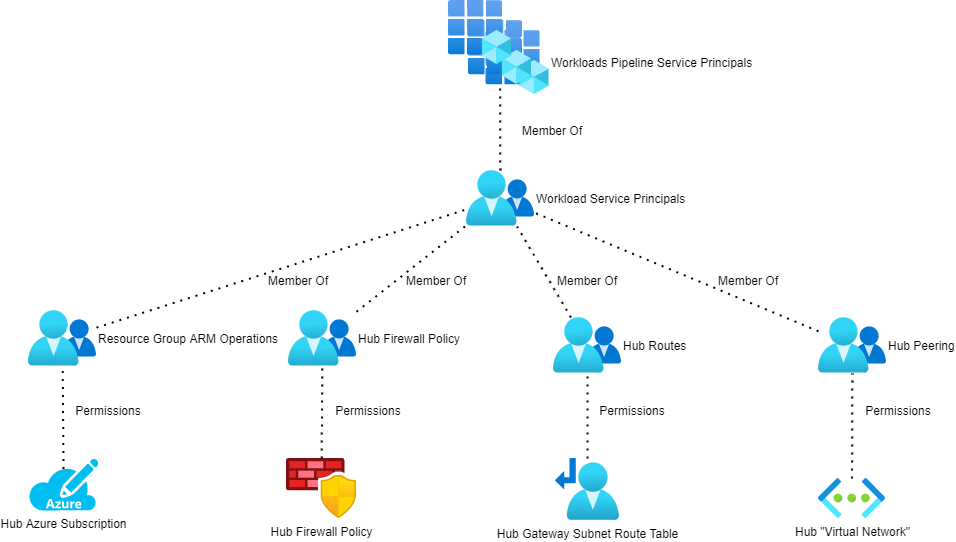
The service principals for all workloads will be added to an Azure AD group (Workloads Pipeline Service Principals in the above diagram). That group is nested into 4 other AAD security groups:
Resource Group ARM Operations: This is granted the CUSTOM – ARM Deployment Operator role on the hub resource group.
Hub Firewall Policy: This is granted the CUSTOM – Azure Firewall Policy Rule Collection Group Administrator role on the Azure Firewalll Policy that is associated with the hub Azure Firewall.
Hub Routes: This is granted the CUSTOM – Azure Route Table Routes Administrator role on the GattewaySubnet route table.
Hub Peering: This is granted the CUSTOM – Virtual Network Peering Administrator role on the hub virtual network.
Deploy The Workload
The workload now has the required permissions to deploy the workload and make modifications in the hub to connect the hub to the outside world.
In this post, I will explain the types of resources used in Azure Virtual WAN and the nature of their relationships.
Note, I have not included any content on the recently announced preview of third-party NVAs. I have not seen any materials on this yet to base such a post on and, being honest, I don’t have any use-cases for third-party NVAs.
As you can see – there are quite a few resources involved … and some that you won’t see listed at all because of the “appliance-like” nature of the deployment. I have not included any detail on spokes or “branch offices”, which would require further resources. The below diagram is enough to get a hub operational and connected to on-premises locations and spoke virtual networks.
You need at least one Virtual WAN to be deployed. This is what the hub will connect to, and you can connect many hubs to a common Virtual WAN to get automated any-to-any connectivity across the Microsoft physical WAN.
Surprisingly, the resource is deployed to an Azure region and not as a global resource, such as other global resources such as Traffic Manager or Azure DNS.
Also known as the hub, the Virtual Hub is deployed once, and once only, per Azure region where you need a hub. This hub replaces the old hub virtual network (plus gateway(s), plus firewall, plus route tables) deployment you might be used to. The hub is deployed as a hidden resource, managed through the Virtual WAN in the Azure Portal or via scripting/ARM.
The hub is associated with the Virtual WAN through a virtualWAN property that references the resource ID of the virtualWans resource.
In a previous post, I referred to a chicken & egg scenario with the virtualHubs resource. The hub has properties that point to the resource IDs of each deployed gateway:
vpnGateway: For site-to-site VPN.
expressRouteGateway: For ExpressRoute circuit connectivity.
p2sVpnGateway: For end-user/device tunnels.
If you choose to deploy a “Secured Virtual Hub” there will also be a property called azureFirewall that will point to the resource ID of an Azure Firewall with the AZFW_Hub SKU.
Note, the restriction of 1 hub per Azure region does introduce a bottleneck. Under the covers of the platform, there is actually a virtual network. The only clue to this network will be in the peering properties of your spoke virtual networks. A single virtual network can have, today, a maximum of 500 spokes. So that means you will have a maximum of 500 spokes per Azure region.
These are resources that are used in custom routing, a recently announced as GA feature that won’t be live until August 3rd, according to the Azure Portal. The resource control the flows of traffic in your hub and spoke architecture. They are child-resources of the virtualHubs resource so no references of hub resource IDs are required.
This is an optional resource that is deployed when you want a “Secured Virtual Hub”. Today, this is the only way to put a firewall into the hub, although a new preview program should make it possible for third-parties to join the hub. Alternatively, you can use custom routing to force north-south and east-west traffic through an NVA that is running in a spoke, although that will double peering costs.
The Azure Firewall is deployed with the AZFW_Hub SKU. The firewall is not a hidden resource. To manage the firewall, you must use an Azure Firewall Policy (aka Azure Firewall Manager). The firewall has a property called firewallPolicy that points to the resource ID of a firewallPolicies resource.
This is a resource that allows you to manage an Azure Firewall, in this case, an AZFW_Hub SKU of Azure Firewall. Although not shown here, you can deploy a parent/child configuration of policies to manage firewall configurations and rules in a global/local way.
This is one of 3 ways (one, two or all three at once) that you can connect on-premises (branch) sites to the hub and your Azure deployment(s). This gateway provides you with site-to-site connectivity using VPN. The VPN Gateway uses a property called virtualHub to point at the resource ID of the associated hub or virtualHubs resource. This is a hidden resource.
This is one of 3 ways (one, two or all three at once) that you can connect on-premises (branch) sites to the hub and your Azure deployment(s). This gateway provides you with site-to-site connectivity using ExpressRoute. The ExpressRoute Gateway uses a property called virtualHub to point at the resource ID of the associated hub or virtualHubs resource. This is a hidden resource.
This is one of 3 ways (one, two or all three at once) that you can connect on-premises (branch) sites to the hub and your Azure deployment(s). This gateway provides users/devices with connectivity using VPN tunnels. The Point-to-Site Gateway uses a property called virtualHub to point at the resource ID of the associated hub or virtualHubs resource. This is a hidden resource.
The Point-to-Site Gateway inherits a VPN configuration from a VPN configuration resource based on Microsoft.Network/vpnServerConfigurations, referring to the configuration resource by its resource ID using a property called vpnServerConfiguration.
This configuration for Point-to-Site VPN gateways can be seen in the Azure WAN and is intended as a shared configuration that is reusable with more than one Point-to-Site VPN Gateway. To be honest, I can see myself using it as a per-region configuration because of some values like DNS servers and RADIUS servers that will probably be placed per-region for performance and resilience reasons. This is a hidden resource.
The following resources were added on 22nd July 2020:
This resource has a similar purpose to a Local Network Gateway for site-to-site VPN connections; it describes the on-premises location, AKA “branch office”. A VPN site can be associated with one or many hubs, so it is actually connected to the Virtual WAN resource ID using a property called virtualWan. This is a hidden resource.
An array property called vpnSiteLinks describes possible connections to on-premises firewall devices.
A VPN Connections resource associates a VPN Gateway with the on-premises location that is described by an associated VPN Site. The vpnConnections resource is a child resource of vpnGateways, so there is no actual resource; the vpnConnections resource takes its name from the parent VPN Gateway, and the resource ID is an extension of the parent VPN Gateway resource ID.
By necessity, there is some complexity with this resource type. The remoteVpnSite property links the vpnConnections resource with the resource ID of a VPN Site resource. An array property, called vpnSiteLinkConnections, is used to connect the gateway to the on-premises location using 1 or 2 connections, each linking from vpnSiteLinkConnections to the resource/property ID of 1 or 2 vpnSiteLinks properties in the VPN Site. With one site link connection, you have a single VPN tunnel to the on-premises location. With 2 link connections, the VPN Gateway will take advantage of its active/active configuration to set up resilient tunnels to the on-premises location.
The purpose of a hub is to share resources with spoke virtual networks. In the case of the Virtual Hub, those resources are gateways, and maybe a firewall in the case of Secured Virtual Hub. As with a normal VNet-based hub & spoke, VNet peering is used. However, the way that VNet peering is used changes with the Virtual Hub; the deployment is done using the hub/VirtualNetworkConnections child resource, whose parent is the Virtual Hub. Therefore, the name and resource ID are based on the name and resource ID of the Virtual Hub resource.
The deployment is rather simple; you create a Virtual Network Connection in the hub specifying the resource ID of the spoke virtual network, using a property called remoteVirtualNetwork. The underlying resource provider will initiate both sides of the peering connection on your behalf – there is no deployment required in the spoke virtual network resource. The Virtual Network Connection will reference the Hub Route Tables in the hub to configure route association and propagation.
More Resources
There are more resources that I’ve yet to document, including: