System Center 2012 Technical Documentation Downloads

Smell that?  We’re getting close to release!  Microsoft has released a bunch of technical documentation downloads for System Center 2012:

And there’s a lot of related downloads available too:

  • Microsoft Security Compliance Manager: Take advantage of the experience of Microsoft security professionals, and reduce the time and money required to harden your environment. This end-to-end Solution Accelerator will help you plan, deploy, operate, and manage your security baselines for Windows client and server operating systems, and Microsoft applications. Access the complete database of Microsoft recommended security settings, customize your baselines, and then choose from multiple formats—including XLS, Group Policy objects (GPOs), Desired Configuration Management (DCM) packs, or Security Content Automation Protocol (SCAP)—to export the baselines to your environment to automate the security baseline deployment and compliance verification process. Use the Security Compliance Manager to achieve a secure, reliable, and centralized IT environment that will help you better balance your organization’s needs for security and functionality.
  • System Center 2012 – Service Manager Component Add-ons and Extensions: Download and install add-ons and extensions for the System Center 2012 – Service Manager component.
  • System Center 2012 – Orchestrator Component Add-ons and Extensions: Download and install add-ons and extensions for the System Center 2012 – Orchestrator component.

And there are some new management packs too!  Check the catalog, read the documentation, prep, download, import, and configure as specified in that documentation you made sure to read first, rather than lazily importing the management packs via the import GUI and hoping for the best Smile

The New Hyper-V Gotcha – No Permission to Remotely Manage VMs on SMB Shared Folder

Windows Server 8 allows us to store virtual machines on file shares.  As Taylor Brown explains, when you are managing VMs from RSAT on your desktop, and those VMs are running on a host and stored on a file server, then your authentication is between you and the host.  The file server doesn’t know who you are and rejects your efforts.

Up to now, un-merged snapshots were the big gotcha in Windows Server 2008/R2 Hyper-V.  I suspect this Kerberos “issue” will be the new one, especially because SMB for storing VMs will probably be widely adopted in the breadth market.

The solution is constrained delegation, which is something you’ve been doing if you’ve been sharing ISO files so that VMs can mount them across the network.  Taylor Brown goes into some detail on a best practice method for enabling constrained delegation for correctly managing VMs that are stored on an SMB file share.

Windows Server 2008 R2 Hyper-V Achieves BSI EAL 4+ Security Certification

Windows Server 2008 R2 Hyper-V has just achieved EAL 4+ security certification from the Federal Office for Information Security (Bundesamtes für Sicherheit in der Informationstechnik – BSI) in Germany.  According to Wikipedia:

EAL4 is the highest level at which it is likely to be economically feasible to retrofit to an existing product line. EAL4 is therefore applicable in those circumstances where developers or users require a moderate to high level of independently assured security in conventional commodity TOEs and are prepared to incur additional security-specific engineering costs.

Thanks to Dariusz Porowski (@DariuszPorowski) for the heads up on this news.

Deploy The MS12-020 Security Fix Or Face The Consequences

Security experts are urging people to deploy MS12-020, a security hotfix that was released this week. 

This security update resolves two privately reported vulnerabilities in the Remote Desktop Protocol. The more severe of these vulnerabilities could allow remote code execution if an attacker sends a sequence of specially crafted RDP packets to an affected system.

This is the sort of vulnerability that will be seized upon very quickly by hackers because RDP is typically enabled on high value assets – servers.  Deploy or be shamed like those who are still being hammered by Conficker.  In my opinion, it is professional negligence not to get patched for something like this.  BTW, I’ve read that people expect scripted attacks for this vulnerability within 30 days.  You have been warned!

Technorati Tags: ,

Microsoft BitLocker Administration and Monitoring (MBAM)

To be honest, I hadn’t heard of this MBAM toolset until this morning; it’s tucked away in MDOP (Microsoft Desktop Optimization Pack).  In Microsoft’s words:

“Microsoft BitLocker Administration and Monitoring (MBAM) provides a simplified administrative interface to BitLocker drive encryption (a feature included in Windows 7 Enterprise/Ultimate). MBAM lets you select BitLocker encryption policy options appropriate to your enterprise so that you can monitor client compliance with those policies and report on the encryption status of the enterprise in addition to individual computers. Also, you can access recovery key information when a user forgets their PIN or password, or when their BIOS or boot record changes”.

It includes:

  • Administration & monitoring server: here you have the admin console and a portal, apparently with self-service support for recovery.
  • Compliance and audit database: stores compliance data for managed clients.
  • Recovery & hardware database: stores recovery data for managed clients.
  • Compliance & audit reports: Use SQL Reporting Services to generate reports from the databases.
  • Group policy template: Configure managed clients using AD GPO.
  • Microsoft BitLocker Administration and Monitoring client agent: Used to manage and configure machines for BitLocker, and return data to the above administration components.

Documentation for MBAM can be downloaded from here.

Technorati Tags: ,,

Microsoft Issues Duqu Workaround (MSA 2639658/CVE-2011-3402)

In the last couple of weeks we’ve heard quite a bit about the alleged “Stuxnet” variant called Duqu.  This Trojan uses a zero-day vulnerability that exploits the TrueType font parsing engine.  The Trojan replicates itself, does whatever it does (still not entirely clear), and removes itself after 36 days to avoid detection.  That last bit is sneaky; it could steal passwords or certs, high-tail it before the heat arrives, and you’d never know to reset anything that was stolen.  Very clever!

While Microsoft are working on a hotfix, they have issued an advisory that contains a workaround to prevent infection.  The actions depend on your operating system, but revolve around changing the permissions of t2embed.dll.

I’ve become very hesitant of these workarounds.  A few months ago I worked on a site that had no choice but to deploy such a workaround for Conficker.

I was installing a ConfigMgr 2007 R3 site server.  I installed ConfigMgr and checked the health of the system (it’s easy to miss a pre-req and get some sort of error).  Then I got the strangest error that I had never seen before; the management point role would not install.  What normally happens is the site server is installed (not far from next-next-next), and then a number of default roles install automatically.  The management point is usually painless.  I googled, binged, you name it, and had no joy.  A day later and 2 things gave me the solution:

  1. I had been told of the Conficker infection and clean up job that was done
  2. I found an obscure post with a similar error that pointed to a system registry key permissions issue.

1 + 1 and I verified this key was a part of the Microsoft Conficker workaround advisory.  Now, I needed to find how this was deployed.  GPMC made it easy to find a GPO that was responsible.  Permission changes via GPO are tattooed so I reversed the edits (AV was up to date).  I forced the policy refresh on the site server, reran the ConfigMgr install and the Management Point installed.  Luckily the customer had used GPO and made this workaround very easy deploy for them, and ID/reverse for me.

By the way, part of the change was changing permissions of scheduled tasks.  It turns out that backup jobs hadn’t been running correctly for a while.

So the lesson is:

  • When there is a zero-day exploit, Microsoft can issue workarounds to prevent infection.
  • Sometimes treatment for an illness can do quite a lot of damage to the patient.  Understand what you are doing and document/communicate it.
  • If at all possible, do what my customer did.  Use a GPO because it is (a) fast to deploy and (b) fast to reverse once the long term defences (patch/AV) are deployed.  And that means impacted systems can be put back to rights.
Technorati Tags: ,

I Hope You Patch Adobe Products Like All The Others

Yesterday I quoted a Microsoft security report based on information they gather from numerous sources:

“Detections of exploits targeting Adobe Flash, although uncommon in comparison to some other types of exploits, increased in 2Q11 to more than 40 times the volume seen in 1Q11 … Two vulnerabilities accounted for the bulk of zero-day exploit activity … Both vulnerabilities affect Adobe Flash Player”.

In other words, hackers have found a new sweet spot.  Most (not all) companies have copped on when it comes to patching Microsoft products.  But:

  1. Other companies make software
  2. Pretty much all software has vulnerabilities
  3. Hackers aren’t stupid.  I’m reading a book called Kingpin and it illustrates how hackers will move from one attack vector to another to find a soft underbelly.  Adobe is that new point of attack.

And there is a high profile example of that.  The Inquirer website reports that (and there is no evidence because RSA have not publicly documented this):

“Criminals used a zero-day vulnerability in Adobe Flash player to penetrate RSA defences through an embedded Flash file in an Excel email attachment. A spear phishing attack, it targeted regular employees of RSA Security disguised as a recruitment form. It breached the RSA systems, even though it first went to Microsoft Outlook’s spam folder”.

OK, it was a zero day attack.  We know this was a very organised attack, possibly sponsored by a nation.  They found a hole in Flash (allegedly) that wasn’t yet reported and crafted an email attachment to attack it, knowing that the recipient would get stung by it, thus allowing the hacker to 0wn the PC.  Unlucky. 

But even if it wasn’t a zero day attack would they have patched Adobe?  (we learned that less than 1% of attacks are zero day) I bet the answer is no.  Most companies focus just on Microsoft software.  Adobe products do automatically prompt for upgrades, but they are seriously click heavy and frequent, so most people probably disable the auto-check for upgrades, and the PCs probably go years without updating.  And that leaves those PCs vulnerable to:

  • Drive by attacks where a user navigates to an innocent website that has either been hacked (malware uploaded) or has a compromised advert that is hosted elsewhere.
  • When a user reads a document/email with a crafted attachment for attacking an Adobe product vulnerability.

In other words, patch Adobe products too, and not just Microsoft ones.  Unfortunately, that isn’t too easy (or supported) in WSUS.  However, you can do it using System Center Essentials (that’s what we use in our office) or System Center Configuration Manager.

Interesting Analysis on Patching and Attacks

Microsoft produces a document called the Security Intelligence Report on a regular basis.  Some of it hit the news today so I decided to take a peek.  The report doesn’t restrict itself to exploits of Microsoft products and is based on data that they gather from a number of sources.

“In this supplemental analysis, zero-day exploitation accounted for about 0.12 percent of all exploit activity in 1H11, reaching a peak of 0.37 percent in June”.

OK, so that tells us that the vast majority of exploits take advantage of old vulnerabilities that have had patches available previously.

“Of the attacks attributed to exploits in the 1H11 MSRT data, less than half of them targeted vulnerabilities disclosed within the previous year, and none targeted vulnerabilities that were zero-day during the first half of 2011”.

People aren’t patching like they should be. That explains this:

Conficker is still (STILL!!!!) the leading infection on domain joined computers. Seriously!?!?!? It is not in the top 10 of non-domain joined PCs.

And it explains this:

“Exploits that target CVE-2010-2568, a vulnerability in Windows Shell, increased significantly in 2Q11, and were responsible for the entire 2Q11 increase in operating system exploits. The vulnerability was first discovered being used by the family Win32/Stuxnet in mid-2010”.

This report covers up to H2 2011 and MS10-046 is still being exploited because people haven’t deployed the patch.

“Detections of exploits targeting Adobe Flash, although uncommon in comparison to some other types of exploits, increased in 2Q11 to more than 40 times the volume seen in 1Q11 … Two vulnerabilities accounted for the bulk of zero-day exploit activity … Both vulnerabilities affect Adobe Flash Player”.

Adobe Flash is one of those products that is constantly badgering me to get updated at home.  I leave this turned on because Flash is a real target for attackers. 

“The most commonly observed types of exploits in 1H11 were those targeting vulnerabilities in the Oracle (formerly Sun) Java Runtime Environment (JRE), Java Virtual Machine (JVM), and Java SE in the Java Development Kit (JDK). Java exploits were responsible for between one-third and one-half of all exploits observed in each of the four most recent quarters”.

Other products like Java and Adobe Reader are nice targets too because they have vulnerabilities and are rarely patched.  At work, we patch the Adobe products via System Center Essentials.  You can also use ConfigMgr 2007 to do this.

“As in previous periods, infection rates for more recently released operating systems and service packs are consistently lower than earlier ones, for both client and server platforms. Windows 7 and Windows Server 2008 R2, the most recently released Windows client and server versions, respectively, have the lowest infection rates”.

A) Newer products always do more under the hood to protect themselves.  B) Newer home PCs will have current AV.  C) Newer business deployments will have had a fresh installation of patching/security systems that some more mature environments have lacked, e.g. lack of WSUS, etc.

Interestingly, in the regional analysis, Italy appears to lead the pack at minimizing most malware infections (congrats!) but is second worst when it comes to adware infections (boo!). 

Don’t be so quick to blame Microsoft: 44.8% of exploits are because of the weakness that is found between the keyboard and the chair, where the user is handing over some piece of information or OK-ing something bad. 

Drive by attack download sites (innocent web sites that have been compromised, e.g. adspace that was sold and contains a Flash exploit) are on the rise.

There’s a lot of good info in the Security Intelligence Report.  You should give it a read if considering the security of your business.

Can I Mix LAN and DMZ/Internet VMs On A Hyper-V Host/Cluster?

The question of mixing internal and edge network virtual machines on a single Hyper-V host or cluster has popped up a number of times over the past few years.  Businesses are under pressure to reduce costs, but there is that old issue of security.  It’s something I’ve given consideration to over the past few weeks and I have a few answers.

I’ll start with the simplest answer: Yes, you can, and you can do it securely.

Firstly, the Hyper-V virtual switch, without third party network add-ins (like NIC teaming) is secure.  You can’t bounce from one VLAN to another.  In the below example, we have a simple scenario where VLAN 101 is in the LAN and VLAN 102 is an edge network.  The physical network firewall isolates the two VMs from each other and they cannot eavesdrop on each other. 

image

NIC teaming can change things quite a bit if you have 2 pNICs for virtual switch traffic on the host (read the OEM’s guidance).  In the case of the HP Network Configuration Utility, you need to do something like this to maintain security:

image

Both of those deal with traditional firewall and network isolation.  But is that enough?  The virtualisation guidance for Forefront Threat Management Gateway (TMG – Microsoft’s firewall solution) indicates that we have more thinking to do.  Firewall and network isolation is not enough.

A distributed denial of service (DDOS) attack aims to disrupt or bring down an online service by flooding it with traffic of some kind.  I’ve seen one in action (against a small company in Ireland).  They really are more common than you would think, small companies do get targeted (not just the big guys/government), and you rarely hear about them. 

The one I saw succeeded in bringing down the edge network devices, first one, and then the next in line when the defence/attack were adjusted.  That attack brought down dedicated network appliances.  What if the appliances hadn’t gone down.  What was next in line?  With the above two designs the next network device is either the pNICs in the host or the virtual switch in the host.  The pNICs share traffic for internal (LAN) VMs and external (DMZ) VMs.  If the NIC fails – everything loses communication and therefore the DDOS hits not just the online presence but the LAN VMs too.  If the virtual switch is hit then we’re looking at the CPU and RAM of the parent partition being stressed, and DMZ and LAN traffic/VMs experiencing downtime.  We need physical isolation of LAN and DMZ in some fashion.

The cheapest solution would be to have dedicated NICs in the hosts: one for LAN traffic and one for DMZ traffic.  This would allow a single host/cluster to still run internal and external VMs but to isolate the impact of traffic at the NIC level (as below).  At least now, if the online presence is hit by a DDOS attack then we’ve limited the impact of the damage.  In the below example, pNIC2 is the last physical device that can fail or be flooded.  The VMs on pNIC1 are physically isolated from the DMZ and should be unaffected … of course that assumes that the virtual switch for the DMZ (on pNIC2) doesn’t spike the CPU/RAM of the parent partition – I actually have no idea what would happen in this case to be honest – my guess is that an edge network or the WAN connection would suffer first but I really do not know.

image

If your web presence is large enough, then maybe you can justify a dedicate Hyper-V host/cluster for the edge network.  The design would be something like below.  This design is a take-no-chances solution that completely isolates everything.  If the online presence in the DMZ is hit by a DDOS attack then there is not a single physical connection to the LAN Hyper-V hosts that should impact their normal operations within the LAN.

image

There is another benefit to this design approach too.  The handful of security fixes for Hyper-V have been related to DDOS attacks from within a compromised VM on a host.  In other words, if a VM is compromised (for example, a hacker gains admin rights on a VM via a SQL injection attack or a WordPress website compromise), they can use their local log on in the VM to DDOS attack the host that the VM is on if the relevant Hyper-V security fixes (as shared by MSFT via Windows Update) have not been applied.  If you aren’t quick about your updates you might get hit by a zero day attack if you have the really bad luck of (a) not having the update deployed and (b) a hacker gaining logon rights on a VM.  If that’s the case – you know at least that all that the hacker can DDOS attack are the DMZ VMs that are on that particular DMZ host.  And hopefully you’ve been good with your network isolation, password rules, etc, to slow down the hacker, and maybe you have an IDS to detect their attempts to break out from that VM via the network.

Anyway, there’s a few thoughts to keep you thinking.

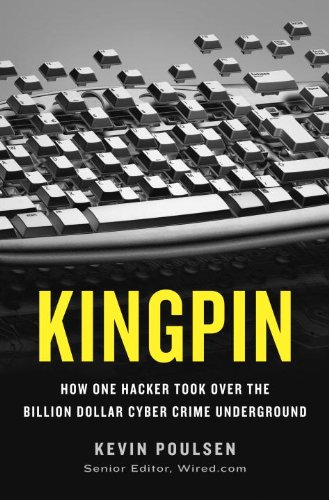
Started Reading a Hacking Insider’s Book Called Kingpin

I just started reading this book during lunch today – when possible, I like to get out of the office for an hour to do something that is not at the desk.

There’s been a lot of movies, TV shows, and books about hacking.  I imagine that it isn’t a world full of bikini-clad babes clicking on a mysterious Pi symbol on The Net, or people with multi-coloured pencils in their hair typing out >Go Hack Now with instantaneous results.  The description of this book, Kingpin, got me interested.  It’s a story with the insider’s perspective:

In a previous life, Poulsen served five years in prison for hacking. So the Wired senior editor and "Threat Level" blogger knows intimately the terrain he explores in this page-turning tale of the criminal exploits of a hacker of breathtaking ambition, Max Butler, who stole access to 1.8 million credit card accounts. Poulsen understands both the hows of hacking, which he explains clearly, as well as the whys, which include, but also can transcend, mere profit. Accordingly, his understanding of the hacking culture, and his extensive interviews with Butler, translates into a fascinating depiction of a cybercriminal underworld frightening in its complexity and its potential for harm, and a society shockingly vulnerable to cybercrime. The personalities, feuds, double dealing, and scams of the hackers are just one half of this lively story. The other half, told with equal verve, is law enforcement’s efforts to find and convict Butler and his accomplices. (Butler is now serving a 13-year sentence and owes .5 million in restitution.) Poulsen renders the hacker world with such virtual reality that readers will have difficulty logging off until the very end.

But the question remains – does the president get saved in 24 hours?  I’ll post a review when I’ve finished reading it.

Technorati Tags: ,