
In this post, I want to explain the real reasons to add subnets to an Azure virtual network. This post is born out of frustration. I’ve seen post after post on social media, particularly on LinkedIn, where the poster has “Azure expert” in their description, and sharing advice from the year 2002 for cable-oriented (on-prem) networks.
The BS Advice
Consider the scenario below:
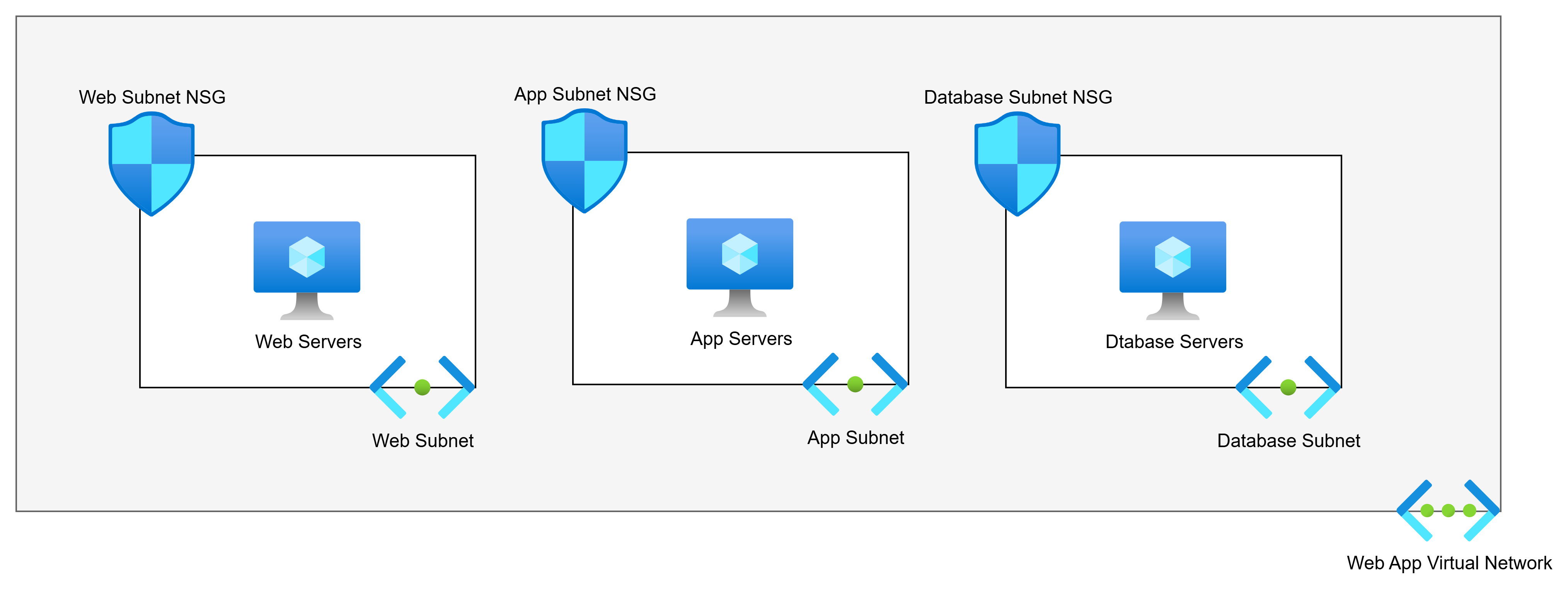
The above diagram shows us the commonly advised Virtual Network architecture for a 3-tier web app. There are 3 tiers. The poster will say:
Each tier should have its own subnet for security reasons. Each subnet will have an NSG.
So if we have web servers, app servers, and database servers, the logic is that the subnet + NSG combination provides security. The poster is half right:
- The NSG does micro-segmentation of the machines.
- The subnets do nothing.
Back To The Basics … Again
I want you to do this:
- Build a VNet with 2 subnets.
- Build 2 VMs, each attached to a different subnet.
- Log into one of the VMs.
- Run tracert to the second VM.
What will you see? The next and only hop is the second VM.
Ping the default gateway. What happens? Timeouts. The default gateway does not exist.
This is easily explained: Virtual Networks do not exist. Subnets do not exist.

Think of a Virtual Network as a Venn diagram. Our two virtual machines are in the same circle. That is an instruction to the Azure fabric to say:
These machines are permitted to route to each other
That’s how Coca-Cola and PepsiCo could both have Virtual Networks with overlapping address spaces in the same Azure room and not be able to talk to each other.
Note: This is functionality of VXLAN implemented through the Hyper-V switch extension capability that was introduced in Windows Server 2012.
Simple Example
Let us fix that simple example. We will first understand that NSGs offer segmentation. No matter how I associate an NSG, the rules are always applied on the host virtual switch port (in Hyper-V, that’s on the NIC). If a rule says “no” then that packet is automatically dropped. If a rule says “yes”, then the packet is permitted.
In the diagram below, we accept that subnets play no role in security segmentation. We have flattened the network to a single subnet. There is a single web server, app server, and database server – we will add complexity later:
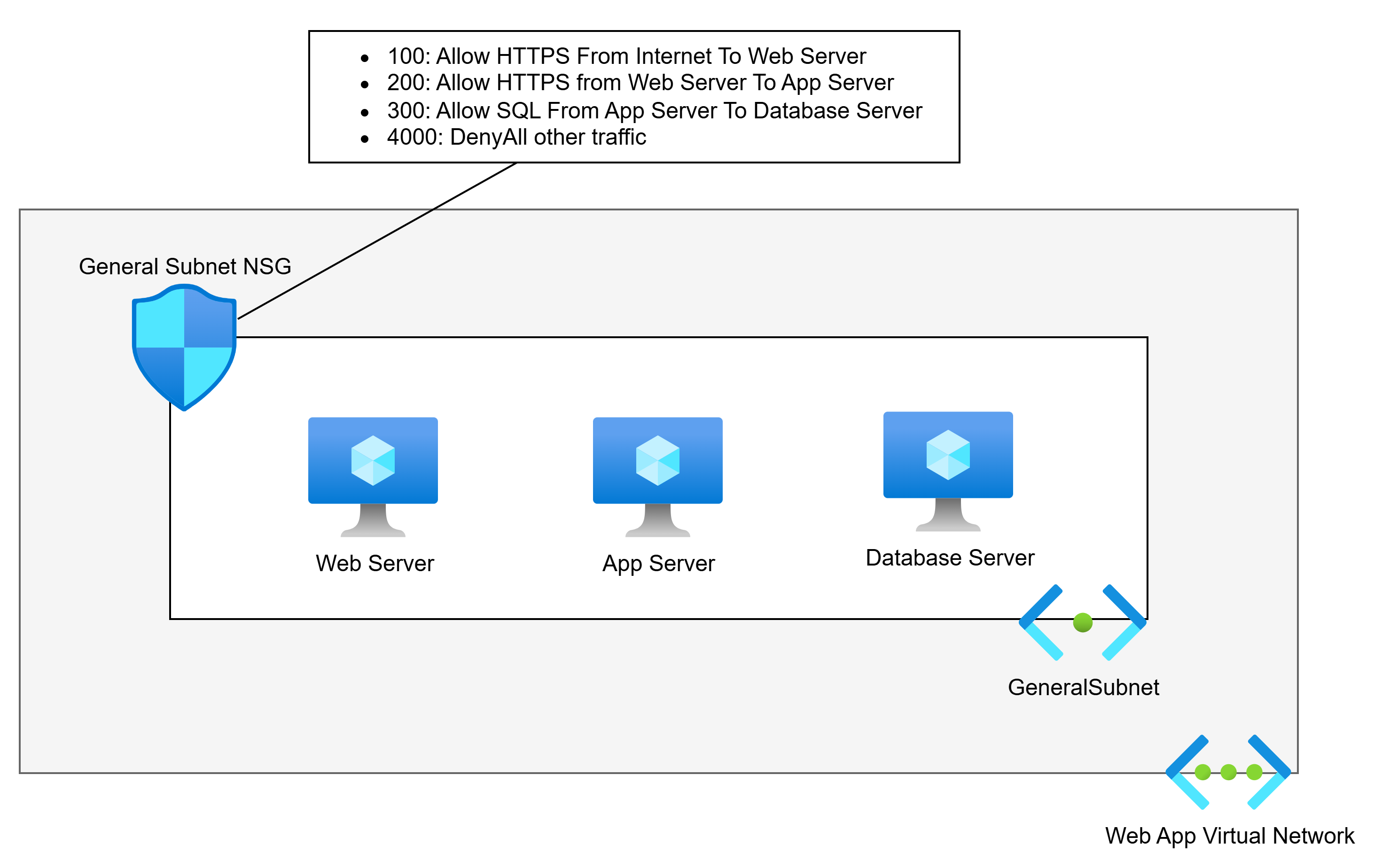
This network is much simpler, right? And it offers no less security than the needlessly more complicated first example. An NSG is associated with the subnet. NSG rules allow the required traffic, and a low-priority rule denies all other traffic. Only the permitted traffic can enter any specific NIC.
I’ve seen arguments that this will create complicated rules. Pah! I’ve built/migrated more apps than I care to remember. The rules for these apps are hardly ever that numerous.
Aidan, what if I am going to run a highly available application? Lucky for you if the code supports that (seriously!). Whether you’re using availability sets or availability zones (lucky you, these days), we will make a tiny design change.

We will create a (free) Application Security Group (ASG) for each tier. We will then use the ASG as the source and destination instead of the VM IP addresses.
Aidan, what if I’m going to use Virtual Machine Scale Sets (VMSS)? It’s no different: you add the ASG for the tier to the networking properties of the VMSS. Each created VMSS instance will automatically be associated with the ASG.
When Should I Add Subnets?
There are several reasons why you should add subnets. I’ll list them first before I demonstrate them:
- Azure requires it
- Unique routing
- Remote network sources
- Scaling
Azure Requires It
There are scenarios when Azure requires a dedicated subnet. Some that I can immediately think of are:
- Virtual Network Gateway
- Azure Route Server
- SQL Managed Instance (MI)
- App Service Regional Virtual Network Integration
- App Service Environment (ASE – App Service Isolated Tier) VNet injection
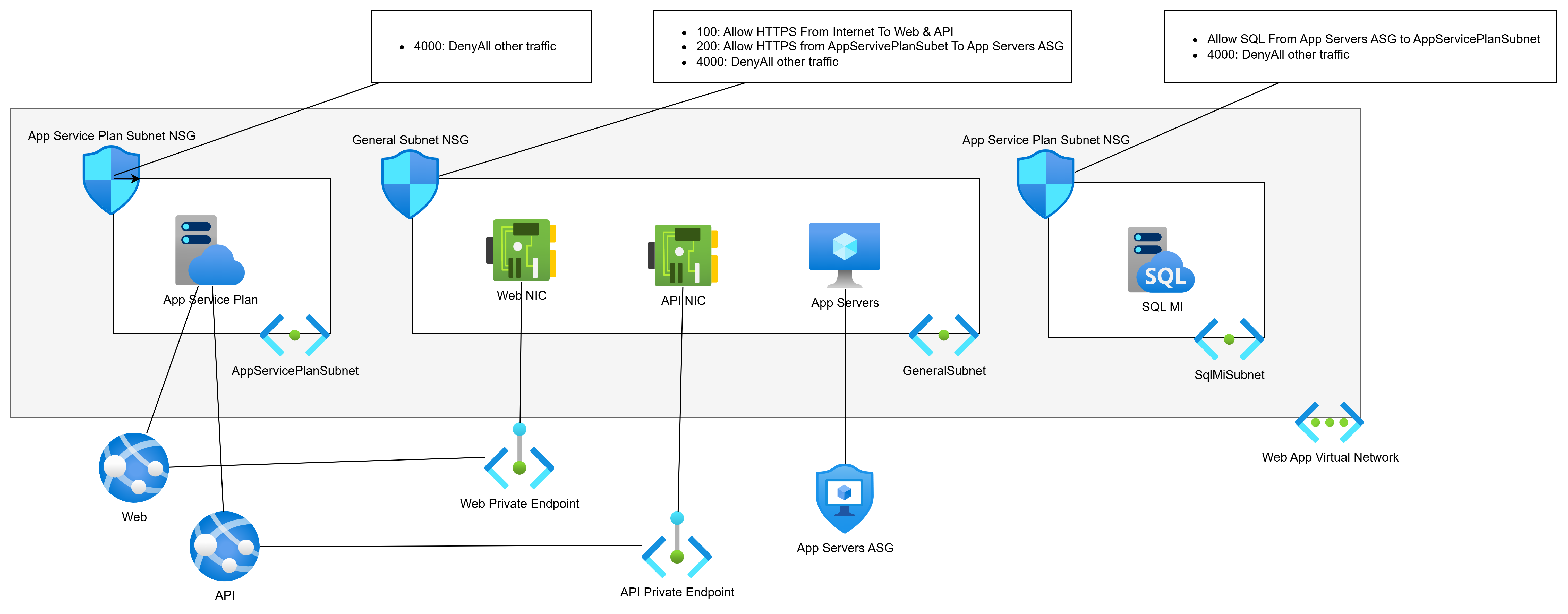
Let’s PaaS-ify the developers (see what I did there :D) and move from VMs to PaaS. We will replace the web servers with App Services and the database with SQL MI:
- The web servers ran two apps, Web and API. Each will have a Private Endpoint for ingress traffic. The Private Endpoints can remain in the General Subnet.
- The web servers must talk to the app servers (still VMs) over the VNet, so they will get Regional VNet Integration via the App Service Plan. This will require a dedicated subnet for egress only. This subnet will have no ingress.
- SQL MI requires a dedicated subnet.
Unique Routing
Next-hop routing is always executed by the source Azure NIC. Every subnet has a collective set of routes to destination prefixes (network addresses). Those routes are propagated to the NICs in that subnet (subnets do not exist). The NICs decide the next hop for each packet, and the Azure network fabric sends the packet (by VXLAN) directly to the NIC of the next hop
There may be a situation where you want to customise routing.
For the sake of consistency, I’m going to use our web app, but in a little wonky way. My app is expanding. Some more VMs are being added for custom processing. Those VMs are being added to the GeneralSubnet.
My wonky scenario is that the security team have decided that traffic from the App Servers to the SQL VM must go through a firewall – that implies that the return traffic must also go through the firewall. No other traffic inside the app needs to go through the firewall. The firewall is deployed in a peered hub.

That means that I must split the GeneralSubnet into two source routing domains (subnets):
- GeneralSubnet: Containing the Private Endpoint NICs and my new custom processing VMs.
- AppServerSubnet: Containing only the app server VMs.
We will implement the desired via-firewall routing using User-Defined Routes in Route Tables:
- AppServerSubnet: Go via the hub firewall to get to SqlMiSubnet.
- SqlMiSubnet: Go via the hub firewall to get to AppServerSunet.
Remote Network Sources
So far, we have been using Application Security Groups (ASGs) to abstract IP addresses in our NSGs. ASGs are great, but they have restrictions:
- Firewalls, including Azure Firewall, have no idea what an ASG is. You will have to use IP addresses as the sources in the firewall rules – possibly abstracted as IP Groups (Azure Firewall) or similar in third-party firewalls.
- ASGs can only be used inside their parent subscription. You’re not going to be able to use them as sources in other workloads if you follow the subscription/workload approach of application landing zones.
Using an IP address(es) as a source is OK if the workload does not autoscale. What happens if your app tier/role uses autoscaling and addresses are mixed with addresses from other tiers/roles that should not have access to a remote resource?
There is only one way to solve this: break the source resource(s) out into their own subnet. I recently saw this one with a multi-subscription workload where there was going to be an Azure-hosted DevOps agent pool. Originally, the autoscaling pool was going to share a subnet with other VMs. However, I needed to grant HTTPS access to the DevOps pool only to all other resources. I couldn’t do that if the DevOps pool remained in a shared subnet. I split the pool into its own subnet and was able to use that subnet’s prefix as the source in the various firewall/NSG rules.
Scaling
There are two scaling scenarios that I can think of at the moment. You will have some workload component that will autoscale. The autoscaling role/tier requires a large number of IPs that you want to dedicate to that role/tier. In this case, yes, you may dedicate a subnet to that role/tier.
The second scenario is that you have followed a good practice of deploying a relatively small VNet for your workload, with some spare capacity for additional subnets. However, the scope of the workload has changed significantly. The spare capacity will not be enough. You need to expand the VNet, so you add a second IP prefix to the VNet. This means that new IP capacity requires additional subnets from the new prefix.
In Summary
Every diagram for a new VNet in Azure should start very simply: 1 subnet. Do not follow the overly-simple advice from “Azure expert”LinkedIn posts that say “create a subnet for every tier to create a security boundary”. You absolutely do not need to do that! Most workloads, even in large enterprises, are incredibly simple, and one subnet will suffice. You should only add subnets when the need requires it, as documented above.