I’m working on a couple of writing projects after work at the moment and I thought I’d talk a little bit about how I’m doing my lab work. I’ve previously talked about how I’m using Hyper-V on my Dell E6500 laptop. With a few projects going, you can imagine how far I’m pushing it!
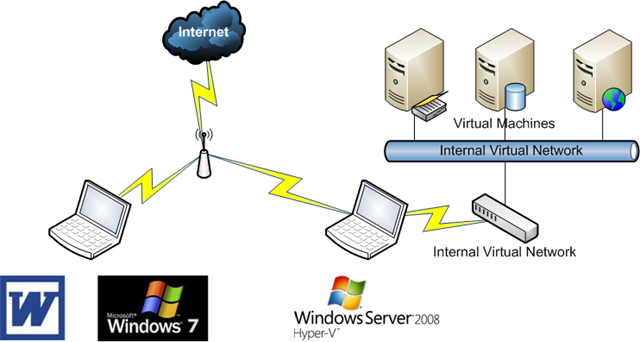
At the moment, I’m using two laptop. My old Sony Vaio is running Windows 7 and Microsoft Office 2007. Why not 2010? I’m using a customised ribbon that is version specific. That allows me to use all the formatting that the publisher requires.
My Dell E6500 (Dual Core CPU, 8GB RAM) is running Windows Server 2008 R2 Datacenter edition from an 7200 RPM 250GB eSATA hard disk. Normally it boots from Windows 7 using the internal hard disk. But I’ve set up the BIOS to boot from eSATA first if it is found. On there, I’ve enabled the Hyper-V role, configured the machine as a domain controller and installed VMM 2008 R2. None of that is good production practice! DNS is also enabled on the parent partition and uses forwarders for Internet name resolution.
The laptops are on my wifi network at home. Hyper-V does not support wifi for virtual machine networking. However, there’s a well known way to create an internal virtual network and bridge it with the wifi NIC in the parent partition.
I started out keeping my VM’s in a folder on the C: drive. However, 250GB runs out pretty quick. Compressing the VMM library did help a bit here. I ended up using a USB 2.0 external drive for additional space. Sure the performance sucks, but I’m doing lab work, not production server hosting!
The laptop has 8GB of RAM. I want to make the very most of every MB of RAM. So I enable RDP on my VM’s. That way I don’t even have to log into the Hyper-V laptop once things are up and running.
This allows me to work away on the documentation on my Vaio. I can RDP from there onto my VM’s which are on the same network (with static IP’s). I’m using a tool called MWSnap to capture screenshots to TIF files. They auto save to a shared folder on the parent partition, which I copy over to the VAIO every now and then.
As much as I can squeeze out of this, I’m realistically looking at deploying more hardware. I’m still going back and forth on pulling the trigger on that purchase.