I ordered this Ultrabook from Lenovo to replace my 2-year-old (how time flies!) Asus UX31E. The machine arrived in the office yesterday and I got my mitts on it this morning.
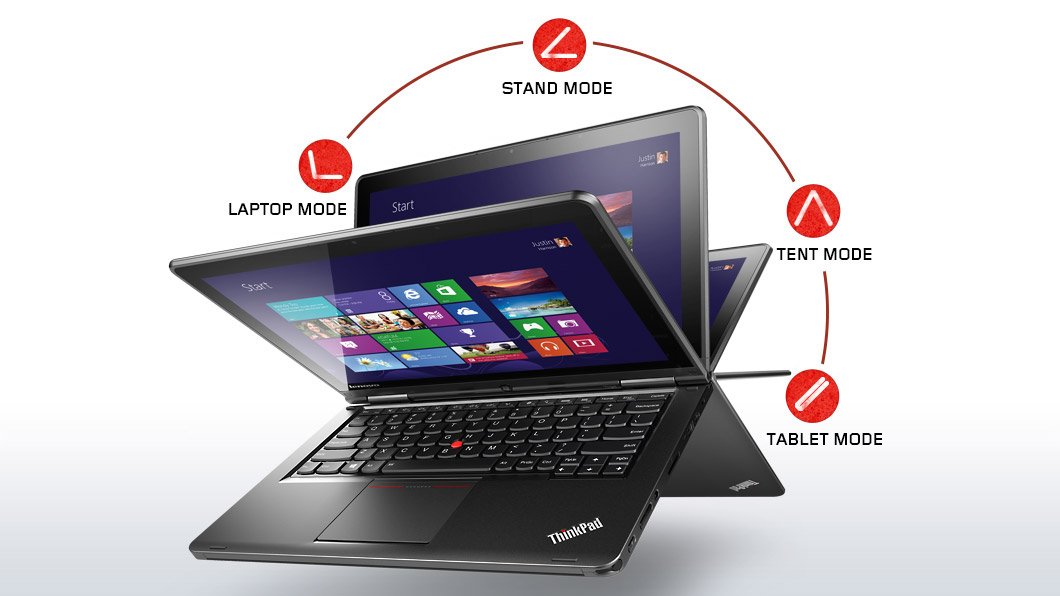
The major trick of the Yoga is that it is a touch-enabled Ultrabook first, with the normally great ThinkPad keyboard. But push that screen back and the stiff double hinges allow it to go back into “stand mode” for drawing/touching on a table, “tent mode” for watching video, or “tablet mode” where you can hand hold the device. The keyboard rises up to avoid accidental touch when the screen reaches a certain point. I will probably use this machine as a laptop 99.99% of the time. The Yoga just so happened to offer the best mix of features that I required in my next Ultrabook.
No, this device is not a tablet. Anyone who reviews the Yoga Ultrabook as a tablet is a moron. It’s a laptop that happens to offer some use options. My Windows laptop is a Toshiba Encore and my Android machine for long distance entertainment is a Lenovo Yoga 8. They are tablets and only a moron would review them as laptops.
The custom spec I went with is:
- Intel Core i5-4200U Processor (3MB Cache, up to 2.60GHz)
- Windows 8.1 64
- Touch & Pen, FHD (1920 x 1080)
- Intel HD Graphics 4400
- 8GB PC3-12800 DDR3L on MB
- ClickPad without NFC antenna & module
- 720p HD Camera
- 1TB Hard Disk Drive, 5400rpm
- 16GB M.2 Solid State Drive Double
- Battery (LiPolymer 47Wh)
- Intel Dual Band Wireless 7260AC with Bluetooth 4.0
I wanted a digitizer pen. In early tests, it works well with the Shared Whiteboard app. That’s my alternative to using whiteboards or flipcharts, and it’s handy in OneNote for grabbing diagrams where a photo just won’t do. The pen is one of the thin ones, allowing it to dock in the front-right corner of the Ultrabook’s base. You hear that Surface, Sony, Toshiba, and a hell of a lot of others?

I upgraded the RAM to 8 GB so I could run Photoshop reliably. That’s also why I switched from SSD to a 1 TB HDD with 16 GB SSD cache. Now I have room to store photos while on a vacation, meaning that a USB 3.0 drive is there only as backup.
Port-wise, there is an SD card reader (nice for photography), Mini-HDMI (more reliable than micro-HDMI), and a pair of USB 3.0 ports. There is also a Lenovo OneLink port for the OneLink dock. There is no VGA port. I have a USB – VGA adapter so that will continue to be used when connecting to projectors.
The power and volume buttons are on the side, cleverly placed if you go into “tablet mode”. You’ll also find a Windows button on the base of the screen.
Touch works and works smoothly. The build quality is solid. I deliberately went with ThinkPad to get build quality to last for years. The screen is nice and stuff, something that other touch Ultrabooks have gotten badly wrong by having too much wobble after being touched.
There’s not too much crapware onboard. Some Lenovo stuff and Norton 30-day trial. I was sad to see that the system update tool requires Adobe Air. That is a mortal sin in my books. I guess the Chinese military still wants easy access to everyone’s computers.
No review yet – I’ll need some time with the machine, and I’ll probably post something on the Petri IT Knowledgebase in the new year.
 We saw VMware’s market share slide in 2013 (IDC) while Hyper-V continued the march forward. More and more people want to see how these products compare.

![Hyper-V-235x235-DIAGRAM-RED[1]](https://aidanfinn.com/wp-content/uploads/2013/12/HyperV235x235DIAGRAMRED1.png "Hyper-V-235x235-DIAGRAM-RED[1]")