How To Check That A Hyper-V VM Is Active Using PowerShell

I wanted to write a little bit of code to see if a virtual machine was active or not.  Here is a crude bit of code that you could turn into a function:

$VM = Get-VMIntegrationService -VMName VM04 -Name Heartbeat
while ($VM.PrimaryStatusDescription -ne "OK")
{
    $VM = Get-VMIntegrationService -VMName VM04 -Name Heartbeat
    write-host "The VM is not on"
    sleep 5
}

    write-host "The VM is on"

The code checks to see if the integration component for the VM heartbeat is active.  This assumes you have either the Windows Integration Components or the Linux Integration Services installed (I wrote this code testing with a Ubuntu 12.04 VM with the built-in services) and that you have not disabled the Integration Services in the VM properties.

The code simply queries the heartbeat status to see if it is “OK” or not.  It will loop until the status is “OK”.  You could use it to see when a VM is active … it is actually testing to see when the Integration Components/Services are active and responsive.

The code could be more elegant, and could be turned into a function for reuse.  This is just a crude example to get you started.

Buy Office 2010 Now, And Get A Free Upgrade to Office 2013!

To keep the Microsoft sales pipe flowing, Microsoft is offering a free upgrade to Office 2013 if you buy Office 2012 now:

image

Some notes on the Home & Student and Home & Business SKUs:

image

That’s a pretty nice offer!  Limited to twenty-five (25) Offer redemptions per person or organization.  So the medium/enterprise has limited usability of the offer, but the small business or SOHO can take full advantage of it.

Note the the Office Pro Plus customer can chose a year of Office 365 Home Premium which includes “Click To Run” Office 2013 (click to install it on your machine from the net).  So get Office for your computer and get email/collaboration and Lync as an optional upgrade for a year!

The Office Pre-Launch Offer has two distinct periods:

  • Eligibility Period – from October 19, 2012 to April 30, 2013: You must purchase, install, and activate your Office 2010 or Office for Mac 2011 product. You may sign up at Office.com/offer to be notified by email when the products are ready for download.
  • Redemption Period – from the availability dates of the new Office to May 31, 2013: If you signed up, you will receive an email from Microsoft when the new Office is ready for download. You must redeem the offer at Office.com/offer within the redemption period.

Make sure you check the offer site for the terms and conditions.

Technorati Tags: ,

KB2712156–AVX Does Not Work In AM On W2008 R2Host With AMD CPU That Is AVX Capable

Microsoft released a hotfix to deal with an issue where AVX instructions do not work in a virtual machine on a Windows Server 2008 R2-based computer that has an AMD CPU which supports the AVX feature.

Consider the following scenario:

  • An AMD CPU that supports the Advanced Vector Extensions (AVX) feature is installed in a computer that is running Windows Server 2008 R2.
    Note AMD introduces support for the AVX feature in Bulldozer-based multicore processors.
  • You install the Hyper-V server role on the computer.
  • You create a virtual machine on the computer, and then you start the virtual machine.

In this scenario, AVX instructions do not work as expected on the virtual machine.  This issue occurs because the CPUID maximum function limit is not updated to reflect the support for the AVX feature on AMD processors.

A supported hotfix is available from Microsoft.

Microsoft Surface Suffering From A Mild Case Of The Curse Of Zune

I hope you weren’t too desperate to get a Microsoft Surface anytime Zune soon.  They are only available on pre-order in select countries (you know … the ones where Windows Phone sort of works):

  • Australia
  • France
  • Canada
  • USA
  • Germany
  • UK

image

Hmm, and $499 seems to convert into EUR479.  Strange that!?!?!

Hard luck!  Try a Dell XPS 10 or Samsung ATIV instead.  No such limitations there … and you get the option of a real keyboard with contained battery … the XPS10 has 20+ hours of video play time with the keyboard attached.

Technorati Tags: ,

Choosing Hardware Or Software Functionality In Virtualisation

I say this a lot: “The great thing about Windows Server 2012 is that you have options”. It’s true, so very true.

Software can only ever do so much until it impacts the performance of the host.  Hardware will always do things more efficiently, enabling lower latency, more throughput, and allowing greater scalability.  Windows Server 2008 R2 recognised this by giving us some hardware offloads:

  • Virtual Machine Queuing (VMQ) improved inbound networking for VMs
  • Second Level Address Translation (SLAT – Intel EPT or AMD NPT/RVI) greatly improved the overall performance of memory paging intensive VMs by offloading VM to host memory mapping to the CPU rather than having the hypervisor do it.

This all continues in WS2012:

  • Receive Side Scaling (RSS): Uses queues on the NIC and scales out beyond core 0 on the CPU to enable greater scalability for network processing
  • Dynamic Virtual Machine Queuing (DVMQ): Using the same queues as RSS (and therefore being incompatible on the same NICs) it does something similar to RSS but for virtual machine traffic.
  • IPsec Task Offload: Policy driven network encryption that is offloaded to capable NICs
  • Datacenter Bridging (DCB): Protocol-based QoS can be offloaded to the NIC for non-virtual NIC traffic, giving better performance than by using the OS Packet Scheduler (and being able to do QoS and Priority Flow Control for RDMA)

Single Root I/O Virtualisation (SR-IOV) is a great example of the pros and cons of software versus hardware functionality.  Without SR-IOV we have traditional virtual switch networking:

image

Packets come in the NIC, through the drivers, into the virtual switch for filtering and routing, back down the stack into the VM Bus (ring –1 and DEP/No Execute) and up into the virtual NIC in the VM.  It’s software processing the entire way in and out again.

Now compare it with SR-IOV enabled on a host and VM:

image

You get something weird: the VM now has hardware connectivity to a Virtual Function (VF) on the NIC.  There is on VF used for every vNIC and a pNIC has a number of VFs. Now software has been removed from the process of copying packets to the vNIC in the VM.  Latency is improved, and the scalability of the host is improved too (more CPU available to apps in VMs).

The Pros of SR-IOV are easy to see.  But do you need it?  Maybe if you need the lowest possible latency.  Maybe if you’re going to have hugely dense hosts or network processing could spike your CPUs.  These are choices that we make for ESXi and Hyper-V.  But where ESXi cannot vMotion one of these VMs, we can with Hyper-V.  That’s nice. 

On the con side, you cannot team the pNIC when usign SR-IOV because that NIC team (in the management OS) is completely bypassed.  You’d have to create a NIC team in every VM … yuck!  Double-yuck if deploying self-service clouds.  So it is a trade-off.

You see a similar thing with DR replication.  I love the concept of setting a SAN to replicate LUNs to another location and just leaving it.  But it’s just not that simple.

On the pro side, SAN replication is set-and-forget (to some extent, assuming you monitor and manage by exception).  That’s great for a cloud.  VMs or services are put into one tier of storage and they auto-replicate to the DR site.  Put into another tier and they are not.  As a former hosting engineer, I love that.

On the con side, SAN replication is expensive (not so good in public cloud).  It’s not only vendor lock in, but it’s usually SAN model lock in.  I don’t love that.  And while multi-suite clusters are a great idea, I think the WAN, physical networking, storage, servers, and virtualisation solution is one of the most complicated things you can build in IT infrastructure.  While a consultant might be up to that, are the admins who are left holding the baby skilled enough to maintain it?

Hyper-V Replica is built-in and free to use.  It’s very granular, and it’s designed to be able to work on commercial broadband.  I love that.  There’s no vendor lock in, and no requirement for partners.  Another plus.  It’s simple to set up and maintain.  But there are scalability/performance considerations to any host-based replication.  Hyper-V Replica also has resource requirements.  That’s always the way with software.  SAN based replication will not have those same host resource requirements, but it has other complexity/budgetary requirements.

Choosing the right solution for any site is a classic consultant’s “it depends”.  There is never one right answer.  Know the requirements of the customer/site, know the possible solutions, and find the best fit.

Microsoft Security Intelligence Report – H1 2012

Volume 13 (Jan-June 2012) of the Microsoft SIR has been released.  Last year I read the same one, and Conficker was still the number 1 malware on domain-joined computers.  What nuggets are there this year?

Before we get there …

I heard of another report (Symantec I think) that a new kind of attack is being employed by hackers called a “water-hole attack”. Much like Lions on the plains, the hackers lie in wait at locations where their prey comes to get something. So they deliberately place targeted malware on a site that they know their intended victim will visit, and wait.  And eventually *bang* they hit and take over a machine in the networks of their victim.  It’s more efficient than the normal un-targeted drive-by attack.

Hackers are also now attacking the supply chains of their prey.  This is a good approach if you wanted to cripple a manufacturer, e.g. hit their suppliers so the manufacturer cannot produce.  This is very effective now because of Just-in-Time manufacturing and exclusive supply contracts. The real victim (the manufacturer) can do nothing with their own IT security to defend against this.  The only solutions are business ones: demand high levels of security/compliance in suppliers, and have varied supply chains so one down supplier does not shut down the business.

And back to the main event …

Unsecure Supply Chains

There is a rise in malware being spread by BitTorrent, warez, legit website downloads, etc. The rise in BYOD and consumerisation of IT makes this a threat in the business. Users are downloading software outside of the traditional locked down administrator-driven controls, and they are bringing in malware.

Win32/Keygen is a common threat in this space, and the name gives away what it sells itself as – a quick way to activate software that you haven’t bought or can’t find a product key for: Photoshop, Nero, AutoCAD, Call of Duty, etc.  Some “Adobe Flash” installers were also found with malware.  These were non legit installers hosted on 3rd party sites; the user comes to a site that won’t play and they’re told to install an up to date version of Flash.  They do, and their PC is owned, because that was not the official installer from the Adobe site.

Contrary to many misconceptions, no malware can offer 100% protection anymore.  There are just too many attacks, many of which go unreported for very long times thanks to the new zero-day black markets and their “royalty for staying quiet” payment schemes.  The days of the teenager in the basement are over, and this stuff is very professional now, looking to steal confidential data and financial access.

What can help is a well designed BYOD scheme with isolation.  I like the App Catalog in ConfigMgr 2012.  It gives the user the flexibility of BYOD but on a corporate machine.  As for true, BYPD personally owned devices, you have to treat those as untrusted and not let them all the way in, in my opinion.  Windows To Go is a nice touch, allowing the user to use their own device but they must use a Windows 8 image on a USB 3.0 storage device that is provided and managed by the business.

This kind of malware is a real threat in BYOD deployments.  Isolate those machines and only give them limited access to web apps via firewalls is my thinking.  But I can see how that’s not enough, e.g. key loggers.

Microsoft has a few suggestions:

  • Acceptable usage policies: sorry, but users are stupid (rule #1) and rules are made to be broken.  We all know that IT only creates these policies to make life more intolerable anyway – that was sarcasm, by the way.  Blocking and limited rights are the only way forward.
  • Block P2P: That goes without saying for LAN/Internet access but is a challenge for mobile computing, without expensive 3rd party software
  • Procurement: Buy all hardware and image for the users … hmm
  • Use AppLocker: Software Assurance required for this white listing solution on Windows 7/8 Enterprise
  • Use a 64-bit OS: Not a solution but it appears to limit success of attacks.

Windows To Go or RDS/Citrix seems like the solution for BYOD to me.  Let them use the device of their choice, but not the OS/data on that machine.

Disclosed Vulnerabilities

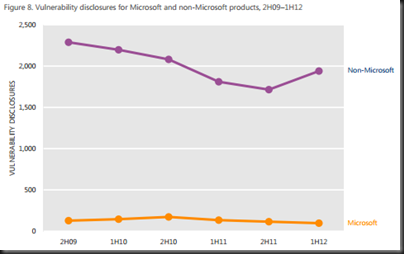
This refers to the number of industry revealed weaknesses in software.  There had been a trend where this number was dropping from 2009 to 2011, but we see a rise in 2012, across low, medium, and high risk threats.  50% of threats in H1 2012 where medium and 31.5% were high risk.

OS vulnerabilities have been dropping since 2010 and continue to do so.  Browser vulnerabilities (industry wide) have been rising since 2009.  Application (e.g. Flash and Java) have risen drastically in H1 2012.  Note that the rise affects non-Microsoft products, while Microsoft vulnerabilities have been reducing in number since H2 2010 (down 56.1%).
image

Exploits

HTML/Javascript (dropping in this period) and Java (rising since Q3 2011) lead the way, by a long shot.

image

Java has made a lot of bad security headlines in recent months and you can see why this is a concern.  This is compounded by Oracle’s infrequent releases and their intransigence on this matter until the media as a whole said that Java needed to be turned off or removed.

Documents were the number 3 type to be hit.  Guess who cam in at number 1 with no one in the rear mirror?  You guessed it: Adobe Reader and Acrobat.

As for OS being attacked, Windows was the clear number 1, as it should be because it is on 95% of all PCs after all.  Android is number 2.  Apple are barely a spec on the market and were just bundled into the flat Others category.

The number 1 most attacked vulnerability was the 2 year old (August 2010) MS10-46 (made famous by Stuxnet but Ramnit is the #1 threat [and rising]). 

Turns out that some of the jailbreak solutions for Android contain malware.  Not too surprising, really.

Security Update Maintenance

No surprises here unfortunately:

image

Windows is still not being updated.  I still encounter reasonably large organisations that “manually” approve patches.  If you attend any presentation that I do that includes the topic of patching, then you know that manual approval is an oxymoron.  These are usually the same people that have been hit by Conficker, etc, years after the patch to block it is released.  That’s professional negligence in my opinion, pure and simple.

The lack of compliance for Adobe and Java is far some surprising.  28% percent of Adobe Reader users had not updated in 2 years.  Adobe needs to do more to work with the OS vendors to get their products updated.  And we all know that Java apps are usually written to run on a specific 5 year old version of the runtime, and that’s usually government (taxation) or banking software … you know … the stuff that needs the best security?!?!?!

Geography

Infection rates (FakePav fake malware – detections up 45 times) went up by 32.6% in the USA during Q1 and Q2 of 2012.  Similar with Korea (Pluzoks trojan).  Chine has a slight increase and everyone else was down. 

Successful infection rates are rocketing in Korea.  I mean rocketing.

Operating System

Windows XP SP3 leads the way.  Windows 7 SP1 x86 is half of that rate, and the x64 is one third of it.  Adware is dropping since Q1 2011 but Trojans are on the rise since Q2 2011.

Business Versus Home PCs

A Javascript threat called IframeRef number one threat on domain-joined (business) PCs.  Here is the bit that is the most sickening and annoying of all.  Conficker is still the number 2 threat on business machines.  Seriously!?!?!!?  The patch (MS08-067) to prevent this was released in October 2008 … 4 frakking years ago!  Why the hell are businesses not patching?  The tools have been freely available since … jeez 2003 or something when SUS was released!?!?!  There is absolutely no legitimate excuse for this … don’t bother posting any lame excuses you might have to excuse your lack of professionalism if this applies to you; you’ll only highlight you own deficiencies for the world to see.

On the home side, Conficker is not in the top 10.  KeyGen is the #1 and Autorun is #2.

Phishing Sites

Remember I said these guys want to steal money?  All categories (including social media) are down, except for financial phishing (fake emails from your bank saying you need to log in to a dodgy site) are on the increase in Q2 2012.  USA, Ireland, China, east Africa, south Gulf, and southeast Asia are all hotspots for this activity.

Go have a read of the document for yourself, especially if you are involved in the decision making of IT security or engineering in your site or those of your customers.  It’s useful to see what’s going on right now so you can plan accordingly.

Technorati Tags:

KB2652137 – Communications Fail When You Use W2008 R2 Provider Package With WS2012 iSCSI Target

Another hotfix last night, this time for a scenario when communications fail when you try to use the Windows Server 2008 R2 provider package to communicate with a Windows Server 2012 iSCSI target.

You have a Windows Server 2008 or a Windows Server 2008 R2 server that runs applications such as Microsoft SQL Server. You have a Windows Server 2012 server that is configured for the iSCSI Software Target. When you try to use the Windows Server 2008 or the Windows Server 2008 R2 provider package to communicate with the iSCSI target, communications fail.

This problem occurs because the DCOM Remote Protocol is no longer used for the iSCSI Software Target in Windows Server 2012. The WMI interfaces are now used in the provider to communicate with the iSCSI target.

The resolution is to:

To resolve this problem, install a Windows Server 2012-aware provider package on the iSCSI initiator. The new provider package implements the iSCSI Software Target WMI Provider to communicate with the iSCSI target service.

The update, “iSCSI Target Storage Providers (VDS/VSS) for downlevel application servers”, supports installation on Windows Server 2008 Service Pack 2 (SP2) or Windows Server 2008 R2 Service Pack 1 (SP1).

EDIT#1:

If you are installing the WS2012-aware provider package on down level operating systems then you really should read this blog post by Jane Yan, paying particular attention to the credential configuration step.  Credit: Andreas Erson.

KB2727972–W2008 R2 Cluster Node Crashes When You Restart A Node

Microsoft has posted a hotfix for a scenario where a cluster node crashes when you restart a computer in a Windows Server 2008 R2 environment.

  • You deploy a failover cluster in a Windows Server 2008 R2 environment.
  • You enable the Volume Shadow Copy Service on a cluster disk.
  • You replace a host bus adapter (HBA) on a cluster node.
  • You restart the cluster node.

In this scenario, the cluster node crashes.  This issue is triggered by a deadlock that occurs when the computer restarts.

A supported hotfix is available from Microsoft.

KB2752183 – Cannot Migrate A W2008 R2 Hyper-V VM From Non-Bulldozer Host To Bulldozer Host

Microsoft has posted a hotfix for a scenario where you cannot migrate virtual machines from a host with one kind of AMD CPU (non-Bulldozer) to another host with a Bulldozer CPU

  • You configure a Windows Server 2008 R2-based computer as a failover cluster node.
  • You perform a live migration of a Hyper-V virtual machine from a source node to a destination node.
  • The source node is located on a computer that has an AMD processor that was released earlier than the Bulldozer family of processors. For example, the computer has an AMD Opteron 6100 series processor.
  • The destination node is located on a computer that has an AMD Bulldozer processor. For example, the computer has an AMD Opteron 6200 series processor.

In this scenario, the migration fails, and you receive a message that states that the destination node is incompatible.

This issue occurs because the AMD 3DNow! technology is deprecated in the AMD Bulldozer family of processors. However, Hyper-V virtual machines incorrectly use the AMD 3DNow! technology when they are in compatibility mode.

A supported hotfix is available from Microsoft.

Hyper-V Sales Overtake The Competition In Q2 2012– IDC

I saw some tweets this morning that referred to a Turkish article.  I opened it, ran the translator and read.  According to IDC:

Server virtualization is an important successes in the market, Hyper-V virtualization market in the second quarter of 2012, according to research, was the market leader in 11 countries, including Turkey.

This is where a defensive snob will say “it’s just Turkey” or “it’s just Europe”.  That, quite honestly, would be a sad excuse.  Save that crap for your racism club meeting.  This is an industry trend.  Look at the charts:

image

They show that Hyper-V started at zero.  We know from IDC’s global data that Hyper-V market penetration was increasing.  It was only inevitable that Hyper-V started to take a lead.  I’ve seen it locally, even since the GA of WS2012, with Hyper-V beating VMware in head-head feature-based sales competition.

Hyper-V Virtualization Host 3.2 per cent market share of the nearest competitor with a market share rose to 41.9 percent.

Is that champagne I hear being popped in Redmond?

Technorati Tags: ,,