I’ve performed many Azure audits over the years, both formally and informally while learning new environments. Despite the differences between organisations, the same three security failures appear again and again. I’m going to surprise you here, because my scope is not the defence – it’s what comes after because we must assume that we have already been breached. The three most common reasons that I see failing Azure security are:
Monitoring
Alerting
Response
Pre-2003 Security
Most of you assume that cybersecurity should be based on the 1990s movie, The Net. Build a great big firewall and keep the bad guys on the Internet out. That approach has served us all “well”:
Ransomware runs rampant.
Cybercrime is earning countless billions per year – we only have hints at pockets of the earnings.
The reality is that the bad guys can bypass your firewall, including but not limited to:
PCs (that aren’t sufficiently isolated) that are browsing phishing variant sites and opening malware attachments.
Compromised libraries being used by developers or compromised software being installed by system administrators.
External vendors/partners/customers are not isolated/untrusted and they become an attack vector.
We assume the bad guy will attack non-application ports. But in reality, they will spread through approved channels if they have to (micro-segmentation).
Modern Security
I did an analysis of recommendations by several national cybersecurity agencies in the EU last year. The common thread was a move away from a purely preventative approach and towards rapid detection and response when prevention inevitably fails, mirroring the requirements of the EUs NIS2 regulation:
Defend
Monitor
Response
I’m not covering “defend” in this post. My focus is points 2 and 3. Don’t misunderstand me – most organisations do a bad job at “Defend”.
Failure 1 – Monitoring
Imagine – you purchase a nice NGFW firewall such as Azure Firewall Premium or something else from the Azure Marketplace. You spend countless hours (hopefully) modelling precise firewall rules to permit only the required traffic, retaining the deny-by-default concept. But, you do not:
Gather logs from the firewall.
Set security features, such as Threat Intelligence or Intrusion Detection and Prevention System (IDPS) to “Alert & Deny” mode.
Elsewhere, the Web Application Firewall is set up:
Without log collection.
In detection (log only) mode, not prevention mode.
In the Virtual Networks, you don’t enable VNet Flow Logs, which see everything, including the bad guy probing and attempting to move east/west.
All these tripwires to catch the bad guy inside of your network are commonly ignored. We spend so much time (hopefully) on building a defence, but we ignore the fact that the bad guy will get in and our job is to detect that as soon as possible so we can act.
Failure 2 – Alerting
Assume that we have enabled monitoring to gather the data. Now we need to do something with that data. Having that data sitting around is great for investigations – but how are you going to trigger an investigation:
Wait for the ransomware demand after you’ve been shut down?
Detect the bad guy before he does (too much) damage?
I’d prefer the latter option. But, I see two situations:
Customers who focus on the obvious things like networks, site-to-site connections, firewall appliances, but don’t think about the critical small stuff like what to generate an alert on or where to send it.
Giant repositories of monitoring data but no alerts that use that data to trigger a human/automated response.
Failure 3 – Response
This is easily the most ignore aspect of cybersecurity. We’ve detected a bad guy or an attack – now what?
We can break this down to:
Immediate response: How do we immediately act, including fast investigation, shutting things down, requesting assistance, etc?
Recovery: What do we do to recover from the attack, such as restoring backups, triggering failover, etc?
Investigation: Determine the entry point and method, how the attack spread, how did our processes work, what can we do to prevent this from repeating, how can we improve our processes, etc?
Most of the above is procedural. There are two technical elements to consider:
Backup
Disaster recovery (DR)
Quite honestly, DR in Azure is a mess right now (capacity issues) unless you use a backup solution such as Veeam that can recover all of your compute and data to another available location. There are so many conditions in that sentence!
Let’s focus on backup – unlike many organisations. I bet that most are not retaining backups for very long (to save money), they may use unprotected third-party backup, and I can safely bet that the last test restore was more than 5 years ago, if ever.
If the technical stuff isn’t there, then we can bet that the well documented & communicated processes are fictional too.
What You Can Expect
We should expect that an attacker will eventually gain access. Based on the above, then that experience for most of you will be:
The bad guy moves around without being detected.
You find out about the attack from your users/customers.
You will panic, take too long to respond, and maybe make destructive mistakes.
The time to prevent all this is as-soon-as-possible. Monitoring ingestion will cost money – that’s just how that works. Alerting is matter of getting organised by deciding what the tripwires are and how notifications should be sent – alerts are a micro-cost. You should have backups – we don’t need to say more. Modern backups use differencing-based-retention to keep costs low for keeping data around for months or years. What you really need is time to build processes and implement them – that may be the biggest cost.
Pay Now Or Pay Later
We can argue costs when it comes to cybersecurity. If you’re doing business in or with the EU then you have no choice but to get compliant:
The GDPR
NIS2
Other countries/regions have their own variants that I know little about. The EU has made it clear that cybersecurity is an organisation leadership issue, not an IT issue. NIS2 is pretty clear, really bad non-compliance cases can lead to directors losing the right to be directors for any organisation.
You can pay the toll now, or you can pay the piper later. Firewalls and security controls may slow attackers down, but monitoring, alerting, and response are what determine whether an intrusion becomes an incident or a disaster.
Find Out Where You Stand
Every failure above was found in a real environment by someone doing exactly this. If you don’t know whether your monitoring, alerting and response would stand up to a real intrusion, then you already have your answer. Cloud Mechanix runs a Fixed-Rate Cloud Environment Review: a fixed price, read-only assessment of your Azure environment, delivered in 5 business days, with a written report and a session to walk you through what we found and what to do about it. No open-ended consulting engagement, and no surprise invoice. Find out what an attacker would find, before they do.
The purpose of this post is to share what I’ve learned (through prompting through AI) about capacity issues in Azure regions in the EU.
The data in this presentation was gathered and assembled by Claude.AI using social media data from the last 6 months. This does not guarantee that the data is accurate, but I have to admit that the anecdotal evidence that I have observed coincides with many of the findings.
Background
We’ve all been there. Maybe you were deploying App Services. Maybe you tried to make your firewall available across availability zones. Maybe you tried to deploy Cosmos DB, Azure SQL Managed Instance, or even a small Azure SQL logical server. And you get greeted with something like:
{
"code":"DeploymentFailed",
"target":"xxxxx",
"message":"At least one resource deployment operation failed. Please list deployment operations for details. Please see https://aka.ms/arm-deployment-operations for usage details.",
"details":[
{
"code":"ResourceDeploymentFailure",
"target":"xxxxx",
"message":"The resource write operation failed to complete successfully, because it reached terminal provisioning state 'Failed'.",
"details":[
{
"code":"ProvisioningDisabled",
"message":"Provisioning is restricted in this region. Please choose a different region. For exceptions to this rule please open a support request with Issue type of 'Service and subscription limits'. See https://docs.microsoft.com/en-us/azure/sql-database/quota-increase-request for more details."
}
]
}
]
}
That’s a hard block. You do what you are told and open a (free) support ticket to request some/more quota, once you figure out the maze of options in the awful support ticket experience. And then you wait … and wait … and you get an email from support to say “we’re looking into this” and you wait … and wait … and you get an email from support to say “we’re engaging with engineering” … and you wait … and you wait … and you get an email from support to say “sorry, we can’t give you capacity, but there’s some free space at the other side of the planet where you have no other resources and latency will suck for you, and who cares that you already invested loads into infrastructure and applications in region X”.
Where Then?
Brownfield scenarios where you have existing resources – that’s a mess. But let’s look for a better location for new deployments.
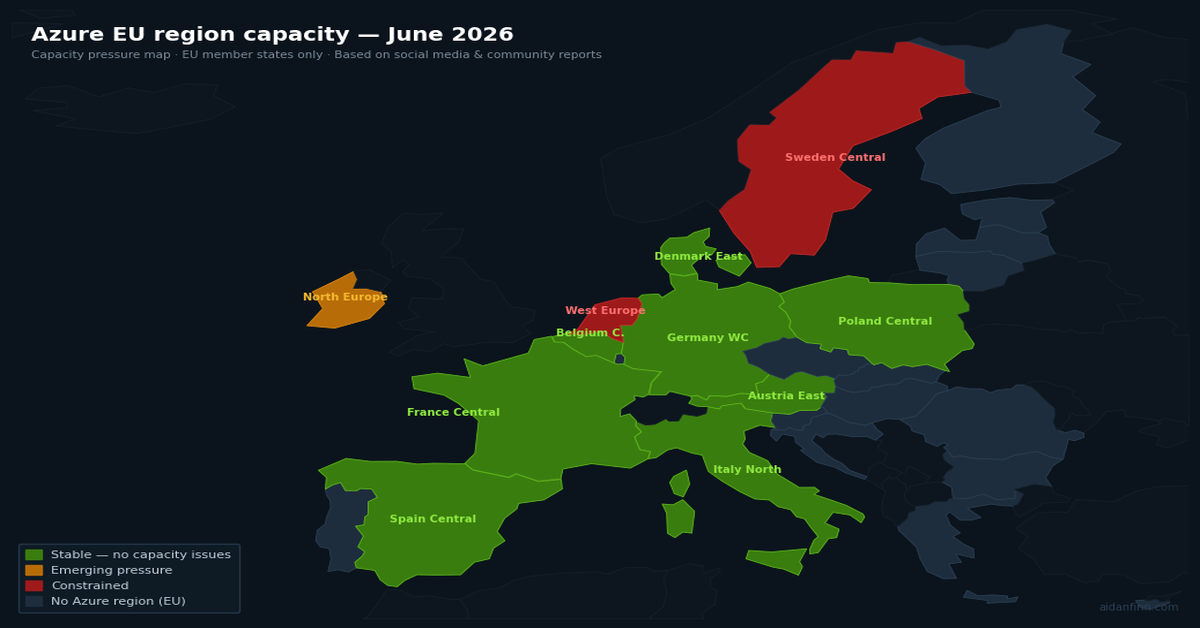
I use Claude.AI to inspect social media over the last 6 months and analyse Azure capacity reports across all EU-located regions. The following table was produced:
Region
GA
Capacity Status
Service Breadth
Resource Types with Reported Issues
France Central
2018
🟢 Stable
🟢 Full
Azure OpenAI Standard quota tighter than Global Standard; no VM AllocationFailed reports
Germany West Central
2019
🟢 Stable
🟢 Full
No capacity failures reported; Responses API and Foundry Agent Service supported
Poland Central
2023
🟢 Stable
🟢 Full
No capacity failures reported; Responses API supported
Italy North
2023
🟢 Stable
🟢 Full
No capacity failures reported; Responses API supported; limited community signal
Spain Central
2024
🟢 Stable
🟡 Growing
Service roadmap (Nov 2025) had several categories at H1/H2 2026 availability; no capacity pressure; 3 AZs available
Austria East
2025
🟢 Stable
🟡 Growing
Broadly available from August 2025; 3 AZs; service catalogue still filling in; no capacity issues reported
Belgium Central
2025
🟢 Stable
🟡 Growing
Opened 18 November 2025; 3 AZs; Log Analytics Workspace not yet available as of early 2026; no capacity pressure
Denmark East
2026
🟢 Stable
🔴 Limited
GA March 2026; no availability zones; newest and most limited region — service catalogue is minimal
North Europe
2009
🟡 Emerging pressure
🟢 Full
Reported alongside UK South in community threads as absorbing overflow demand; VM allocation concerns growing
Sweden Central
2021
🟠 Constrained
🟢 Full
Major Azure OpenAI outage 27 Jan 2026 (IRM/OOM failures, all-day impact); retry amplification overload 29 May 2026 from Microsoft 365 Copilot traffic; H100 GPU capacity tighter than North Europe; DataZoneStandard quota denied on new tenants
West Europe
2010
🟠 Constrained + feature gap
🟡 Partial
D-series VMs flagged ‘in high demand’; SkuNotAvailable across multiple AZs; Responses API absent with no Microsoft ETA; customers waited weeks for OpenAI quota only to find region unsupported; thermal event knocked multiple storage scale units offline late 2025
As I said, this is an EU table. Finland Central is not included because it is not GA – 5+ years after MS Finland were asking customers to sign up for it. Norway East and Switzerland North are excluded (not EU members). UK South and UK West are excluded (UK left the EU in January 2020).
The best of the lot appear to be:
France Central: Centrally located in the EU and capacity isn’t an issue thanks (maybe) to France increasingly abandoning non-EU cloud services.
Germany West Central: See France Central – Germans have mostly been sceptical of US-owned cloud services since day 1.
Poland Central: This region is brand new. Sharing a border with an aggressive neighbour might put it lower on the list for some.
Italy North: Another relatively new region – but there’s little public evidence of capacity issues.
You’ve got a valid certificate. It works in the browser. IIS is happy. Everything looks fine on the Windows server. You put Azure Application Gateway in front of the backend, enable end-to-end TLS, and the backend health probe goes red. The gateway won’t talk to your server.
Nothing changed. That’s the problem. Windows was lying to you the whole time.
Windows Is Too Helpful
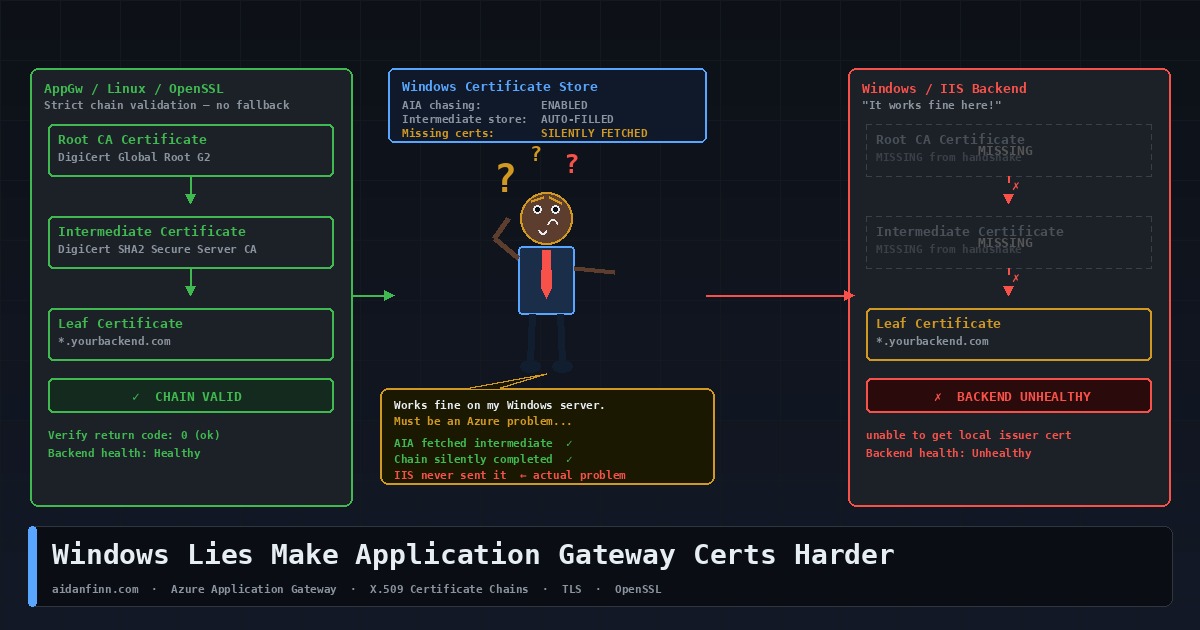
When Windows validates a TLS certificate, it doesn’t just look at what the server presented in the handshake. If it can’t build a complete trust chain from what it received, it checks the local machine certificate store. If intermediate certificates are installed there — and on any reasonably maintained Windows server, they usually are — Windows silently completes the chain and returns a clean result.
It goes further than that. x.509 certificates include an extension called Authority Information Access. The AIA field contains a URL pointing to the issuing CA’s certificate. If Windows still can’t build the chain, it quietly downloads the missing intermediate from that URL in the background, without telling anyone. Chain built. Handshake succeeds. No errors, no warnings, nothing to indicate the server was never presenting a complete chain in the first place.
This is why you can run a Windows server with an incomplete certificate for years … and never know. Every Windows client fills in the gaps for you. The problem only surfaces when something that isn’t Windows tries to connect.
Linux and Appliances Don’t Fill In the Gaps
OpenSSL doesn’t do AIA chasing by default. It doesn’t consult a well-stocked machine certificate store. It validates exactly what the server presented in the TLS handshake, and if the chain is broken, the handshake fails. No fallback. No retry. No silent download from the CA’s website.
That’s correct behaviour. A TLS handshake should succeed or fail based on what the server presents, not what the client can patch together from external sources. Relying on AIA chasing means your certificate validity depends on a runtime HTTP request to a CA endpoint, which may not be reachable in private networks, zero-trust environments, or anything running behind a restrictive firewall policy.
Application Gateway Is a Reverse Proxy
This is where the Application Gateway problem comes in, and it helps to be clear on the architecture.
AppGw is a Layer 7 reverse proxy. The client TLS connection terminates at the gateway. Your browser — or your API consumer — is talking to Application Gateway, not to your backend server. AppGw then makes its own separate outbound connection to the backend pool. That second leg is a fresh TLS handshake if end-to-end TLS is configured … Application Gateway is the client.
In that handshake, AppGw behaves like OpenSSL, not like Windows. It validates what the backend presents. When HTTPS is selected in the backend settings, Application Gateway performs a full TLS handshake validation, including verifying that the certificate chain is trusted. It has no access to a Windows certificate store. It doesn’t go off to fetch missing intermediates from AIA URLs. It checks the chain against what it received, and if the chain is broken, the backend is marked unhealthy.
The Microsoft documentation is explicit: the chain must start with the leaf certificate, then the intermediate certificates, and finally the root CA. Microsoft recommends installing the complete chain on the backend server including the root CA certificate.
Spotting the Problem
The first sign is a red backend pool in the portal. Go to your Application Gateway, open Backend Health, and look at the Details column. You’ll see messages like “The backend server certificate isn’t signed by a well-known Certificate Authority” or errors about the intermediate certificate not being signed by any uploaded root certificate. Microsoft has a full list of backend health error messages and their causes.
Before touching anything in the gateway, run this from Azure Cloud Shell or any Linux machine:
That’s what Application Gateway sees. If OpenSSL reports a chain verification failure, the server configuration is wrong. Fix the server first. The gateway problem is a symptom, not the cause.
Fixing It
Two scenarios, two different approaches.
Certificate from a public CA — DigiCert, Sectigo, Let’s Encrypt, and so on
In the backend HTTP settings, tick “Use Well Known CA Certificate”. Application Gateway maintains its own trust store of well-known root CAs and if your backend cert chains to one of them, you don’t need to upload anything. What you do need is the backend server presenting a complete chain — leaf plus all intermediates.
On Nginx, concatenate the leaf and intermediate into a single bundle file:
cat your_domain.crt DigiCertCA.crt >> bundle.crt
DigiCert’s Nginx installation guide covers this in full. Point your openssl s_client directive at the bundle. Restart Nginx and verify with openssl s_client before touching the gateway.
Uploading the root is only part of it. The backend server still needs to present the full chain, including all intermediates. The gateway matches the root you uploaded against the chain the backend presents — if the chain has a gap, the handshake still fails.
Before You Go to Production
Self-signed certificates are for lab use. Don’t take them to production and upload them to the gateway backend settings as a workaround. You’re trading a configuration problem for a certificate management headache that will bite you at renewal time.
When you renew certificates, check whether the intermediate has changed. CA intermediates do rotate, and a backend that was presenting a complete chain can silently break at renewal if the new intermediate isn’t installed on the server at the same time.
Check the CN. Application Gateway uses the hostname you configure in the backend HTTP settings as the SNI indicator in its connection to the backend. If the CN on the backend certificate doesn’t match, the handshake fails regardless of how clean the chain is. Make sure what you put in the backend settings matches the certificate. The end-to-end TLS configuration guide walks through all of this in detail.
Verify with SSL Labs or openssl s_client before going live, every time. If OpenSSL can validate the chain without needing any additional CA file flags, the backend is presenting correctly. If it can’t, fix the server — not the gateway.
The Short Version
Windows has been hiding incomplete certificate chains from you for years by filling in the gaps from local stores and downloading missing intermediates on the fly. Application Gateway doesn’t do either. It validates what it receives, and if what it receives is incomplete, the backend goes unhealthy.
The fix isn’t in Azure. It’s on your server. Present the full chain.
An Azure architecture review is something I’ve done many times. Some are focused on networking. Some take a broader look at governance, security, and disaster recovery. Some are urgent — a customer has a problem and needs to understand the full picture before they can fix it. Others are scheduled health checks. The nature of each engagement varies, but the findings? They’re remarkably consistent.
After completing several Azure architecture reviews across very different organisations – different sizes, sectors, and levels of Azure maturity – I’ve noticed the same issues surfacing time and again. I thought it was worth documenting them, because if these problems appear this consistently, they’re likely to appear in your environment too.
Here are the five most common findings.
1. Governance Is Either Missing or Broken
This one appears in every single review. Without exception.
The most common anti-pattern is the “everything in one subscription” model. I understand how it happens – an IT manager kicks off a cloud migration, picks up a subscription, and starts deploying things. It works, for a while. Then the environment grows, the resource groups multiply, and suddenly you have a sprawling mess where cost management is a nightmare, RBAC delegations are a headache, and nobody can tell which resources belong to which workload.
The Microsoft Cloud Adoption Framework (CAF) has a clear answer to this: Landing Zones. One subscription per workload. No cost. No catch. The result is a level of granularity that simplifies cost management, role assignment, quota management, naming, and troubleshooting in one move.
Beyond subscriptions, I typically find that Management Groups haven’t been set up correctly – or at all. Azure Policy is either absent or consists of a handful of default assignments nobody has reviewed. Naming standards are inconsistent, making the environment harder to read and operate at scale.
The fix isn’t a multi-year transformation project. The fix is a minimum viable product: get the right structure in place, assign sensible policies, and improve from there. I’ve designed starter governance architectures in a single afternoon that gave organisations a solid foundation to build on. I’ve written previously about how I interpret and apply the CAF with customers, and why it’s never too late to apply it – even if you’ve been in Azure for years.
2. The Network Architecture Is Overly Complex and Doesn’t Enforce Zero Trust
The second finding is closely related to the first. When governance is weak, networks tend to be large, flat, and complicated.
The most common pattern I encounter is what I call the “big VNet” design. Everything lives in one or two large Virtual Networks. Multiple workloads share the same address space. Route Tables get bigger and bigger as more exceptions are added. The network becomes unpredictable. Nobody is entirely sure what path traffic takes from A to B.
The security implication of this is significant. Without workload isolation, without proper routing via a central firewall, and without meaningful NSG enforcement, the environment defaults to a “full trust” model. Every workload can, in principle, reach every other workload. That is the opposite of Zero Trust.
The right design is a proper hub-and-spoke architecture, with application Landing Zones providing the granularity needed to enforce isolation. Each workload gets its own small Virtual Network, peered with the hub. The hub contains the firewall, connectivity resources, and nothing else. Traffic between spokes goes through the firewall and is subject to rules and IDPS inspection. I covered this in more depth in There Is More To Azure Networking Than Connectivity & Security.
I review a lot of firewalls. Very few of them are doing the job that was intended when they were deployed.
The problems vary. In some environments, the firewall is only inspecting a fraction of the traffic. The rest bypasses it entirely because the Route Tables aren’t configured correctly, or because workloads are co-located in the hub where they communicate directly. In others, the firewall is a single instance in a single Availability Zone with no redundancy. One data centre issue and the organisation loses its primary security control.
Network Security Groups are another recurring issue. They are either missing from most subnets, configured with overly permissive rules, or duplicated inconsistently across the environment. In several environments I’ve reviewed, a single NSG was associated with just one subnet while all others had open traffic. That’s not a security boundary. That’s a gap.
WAF configurations also warrant attention. It’s not unusual to find a Web Application Firewall deployed in a way that places unnecessary load on the network firewall, or where the WAF itself has no high availability and is restricted to a single Availability Zone.
There is rarely a simple fix here. These issues tend to be symptomatic of a broader architectural problem – the network was built incrementally without a coherent design. The right answer, in most cases, is a rebuild using a proper hub-and-spoke design with a cloud-native, scalable firewall. If your team needs to get up to speed on how to design this correctly, Cloud Mechanix runs a Designing Secure Azure Networks course for exactly that purpose.
4. Disaster Recovery Is Backup-Based and Wouldn’t Survive a Real Incident
This one concerns me the most.
Almost universally, the disaster recovery capability I encounter in reviews is backup-based rather than replication-led. On the surface, this looks like disaster recovery – data is being backed up, and some of those backups are geo-replicated. But look at what would actually happen if a major incident occurred, and the picture changes quickly.
Recovery Time Objectives are measured in days or weeks rather than hours. Recovery Point Objectives are up to 24 hours because backups run once a day. Multiple backup solutions introduce complexity and inconsistency. Retention periods are short, meaning a ransomware attack that went undetected for several weeks could render the backups useless. Active Directory is being restored from backup, which is widely regarded as error-prone and risky. And in several environments, the disaster recovery region hasn’t been pre-built or secured to the same standard as production.
The regulatory stakes are rising. EU NIS2 makes clear that subject organisations must demonstrate tested recovery plans, reasonable recovery objectives, and appropriate governance. Backup-based disaster recovery will be difficult to defend to a regulator following a major incident. I explored the distinction between backup, resiliency, and genuine disaster recovery in Backup Versus Resiliency Versus Disaster Recovery – worth a read if you’re trying to explain the difference to stakeholders.
The right direction is a replication-led strategy with a warm secondary Azure region. Azure Site Recovery handles virtual machine replication. Azure Backup with geo-redundant replication handles retention and clean-room restores. Infrastructure-as-code ensures that the secondary environment stays consistent with production. And critically – it should be tested regularly, with documented, automated recovery plans.
Disaster recovery should be treated as a core business risk management capability, not an IT optimisation exercise.
5. Monitoring and Security Visibility Are Inadequate
The last finding is perhaps the least glamorous, but it enables everything else.
Across the environments I’ve reviewed, visibility is typically poor. Virtual Network Flow Logs are not enabled. Defender for Cloud is either unused or operating with a limited set of plans that don’t reflect the actual risk profile of the workloads. Subscription-level diagnostic logs and activity logs aren’t being forwarded to a central Log Analytics Workspace. Alerts – whether for threat intelligence signals, IDPS events, or operational anomalies – are either absent or minimal.
This matters for two reasons. First, without visibility, security incidents go undetected. The assumption that no alerts means no problems is dangerously wrong. The assumption should be the opposite. Second, troubleshooting complex connectivity issues without Flow Logs, firewall logs, or PaaS diagnostics is genuinely difficult. I’ve helped diagnose problems that should have taken minutes but took hours because the logging was never turned on.
The fix here isn’t particularly expensive. Virtual Network Flow Logs with Traffic Analytics, a centralised Log Analytics Workspace, Defender for Cloud with appropriate plans enabled, and a sensible set of alerts will transform the visibility of an Azure environment. These should be baseline requirements in any well-governed deployment, not optional extras.
A Pattern Worth Noting
Reading back through that list, there’s a common thread. Each of these findings is a consequence of deploying Azure without a framework. Without a governance strategy, without a landing zone architecture, without a security policy – teams make decisions in isolation, workloads accumulate, and complexity grows in ways that nobody fully intended.
The Cloud Adoption Framework exists precisely to avoid this. It’s not a lengthy consulting exercise. Done right, it provides a practical process for building Azure correctly – one that starts with business motivations, produces a clear architecture, and enables continuous improvement. Cloud Mechanix has developed its own interpretation of the CAF that keeps the process lean and focused on results rather than documentation.
If any of the above findings sound familiar, it may be worth taking stock.
Is Your Azure Environment on the Right Track?
If the findings in this post ring any bells, a structured Azure architecture review is the fastest way.
Cloud Mechanix offers a Fixed-Rate Cloud Environment Review – an expert-led review of your Azure environment, delivered in five business days. The scope is agreed upfront, access is read-only, and the output is a comprehensive report with clear, prioritised recommendations. No vague observations. No 200-page documents that nobody reads.
Whether the concern is security, governance, network architecture, disaster recovery, or the broader picture – get in touch and we can take it from there.
Most of us are no strangers to the backup versus disaster recovery conversation. Each is a different problem, typically (but not always) with different business expectations. Lately, resiliency has crawled into the mix, and a lot of social media commentary isn’t helping. In this post, I’m going to explain how I define backup, resiliency, and disaster recovery, and discuss how they impact my Azure designs for service & data availability.
Essential Terminology
There are two essential terms that we have to understand to discuss these problems/solutions:
RPO: The recovery point objective is how much data, measured in time, is lost when our solution kicks in.
RTO: The recovery time objective is how long, measured in time, services are offline while the solution kicks in.
Backup/Restore
A backup is when we take a copy of our data and (ideally) store that copy elsewhere, and even in several places. The concept is that we can restore our data from a backup if the original data (files, database, VM files, etc) are deleted either accidentally or deliberately.
The base product for backup in Azure is Azure Backup, which supports:
Azure VMs
Managed disks
Azure Files
SQL Server in Azure VMs
SAP HANA databases in Azure VMs
Azure Database for PostgreSQL servers
Azure Blobs
Azure Database for PostgreSQL Flexible server
Azure Kubernetes service
Azure Database for MySQL – Flexible Server
SAP ASE (Sybase) database on Azure VMs
Azure Data Lake Storage
Azure Elastic SAN
Quite honestly, that list is much longer than the last time I searched for it! Azure Backup covers a lot, but it doesn’t cover everything. Some solutions, like Azure SQL, feature their own backup solution.
It’s not unusual for people to bring another backup tool to Azure. The one I hear most of is Veeam Backup for Microsoft Azure. While I’ve never used Veeam hands-on, its reputation is excellent, and it has the unique ability to be platform agnostic. Want to restore VMs from Azure to Hyper-V, Nutanix, or VMware if you’re that way inclined ;)? You can with Veeam.
RPO: Backup features the longest RPO here. The data loss is depdendent on how often your backup jobs run. Daily backups? You can lose up to 24 hours of data. Backups every 15 minutes? You might lose up to 15 minutes of data.
RTO: This is where the pain can be; the RTO is how long it takes to copy your data from the backup storage to the production storage? Restoring an Azure Backup snapshot recovery point is a disk-to-disk copy. Restoring a 10 TB VM from blob storage over the network is going to be a long wait.
Disaster Recovery (DR)
The purpose of DR is to recover from a disaster. Let’s define what a disaster could be using real examples:
Hurricane Katrina was a natural disaster that wiped out huge areas of the USA in 2005.
The “black summer” bushfires in Australia destroyed millions of hectares of land in 2019-2020.
The Indian Ocean Tsunami in 2004 caused devastation in the coastal areas of many countries.
Keeping it local for me: post-storm winter floods have caused widespread damage throughout Ireland in the last few years.
Three AWS data centres were hit by drone attacks in the UAE & Bahrain in March of this year.
Disasters can be natural or they can be man-made. Disasters rarely target 1 building; they wipe out an area. They are rare – but they happen. There is another kind of disaster, which few think about:
KNP Logistics Group, a 125-year-old UK transport firm with over 700 employees, was put out of business because of a ransomware attack in 2025.
Pending (and passed in some countries) EU regulations (NIS2) consider this a disaster that subject organisations must be prepared for.
For cloud planning, if we need to prepare for disaster recovery, then we must plan for the loss of the Azure region ny replicating services/data to another region – typically the paired region. There is no one solution, and there are plenty of complicating factors. Techs that will be in scope include:
Azure Site Recovery (ASR) for Azure VMs
Geo-redundant storage (GRS) and the various geo-variants
PaaS resources that include GRS
Database replication
DevOps pipelines/workflows to redeploy resources (but not data)
There is a fun grey area here. Veeam is not only a backup solution; it is also a DR solution! You will also find that some people use backup as a budget DR solution – they replicate data from the primary location to the secondary location (Azure Backup Geo-Redundant). The right solution for your organisation is often based on business requirements and budget, with budget being the big elephant in the room.
RPO: DR replication is typically based on asynchronous replication. The RPO is often measured in seconds/minutes.
RTO: The RTO really is dependent on the complexity of services, the quantity of services to restore, the interdependencies, and how automated the process is once it starts. The RTO should be measured in hours, but a backup solution might be measured in days/weeks.
Resilience
The purpose of resilience is to enable a service to survive a localised issue, such as:
A VM crashes.
Microsoft are patching an App Service compute instance.
An Azure host is getting a firmware update.
Microsoft had a networking issue in a single data centre building.
We use resilience to keep the service operational with no perceivable outage to the service consumer. There are many ways to tackle resilience, but they are all based on scaling out:
Availability Zones: Most Azure regions have multiple data centre buildings. The buildings are split into what we see as 3 Availability Zones. Each Availability Zone has independent external network connections, power, and cooling. The theory is that if I spread the tier of a service across 3 zones, then that tier can survive 2 zones going offline. Some PaaS services, like Bastion, default to using zones; some have to be opted in. Beware of some PaaS resources, like App Service Environment, that have minimum consumption requirements to be placed across Availability Zones.
Availability Sets: If we cannot use Availability Zones (more later on this), then we can place virtual machines in Availability Sets. We can think of Availability Sets as a form of anti-affinity; machines in the same set are placed into different update domains (Azure platform updates) and fault domains (racks) in the same room in the same data centre. Microsoft does this for multi-instance PaaS services that are not using Availability Zones.
Zone Redundant Storage (ZRS): Azure storage is based on the concept of storing each block 3 times. ZRS places the replica blocks across 3 different Availability Zones. Your data remains operational even if 2 of the data centres are lost.
There are many architectural considerations to handle when you start resiliency planning.
The old pain-in-the-a** is the legacy line-of-business app that supports just a single VM. There is no scaling out to gain resiliency. Traditionally, VMs used LRS (locally redundant storage) managed disks. LRS managed disks are stored in a single data centre with the VM. There have been issues in the past where storage in a single room has gone offline, taking all three LRS replicas of the disks’ blocks offline. You can choose to use ZRS managed disks. The VM will continue to primarily use the local replica, but two replicas are stored in other Availability Zones in the same region. If the primary storage cluster goes offline, you can perform a manual process to get the VM back online with another replica.
RPO: Depending on the architecture and technologies, there is either a zero-RPO (active/active services) or an RPO of a few seconds (replicated storage).
RTO: In most cases, the RTO is 0. The one exception that I can think of is the single VM with a ZRS where the RTO is how long it takes you to force-detach the disk and create a new VM with the existing disks in another Availability Zone.
By the way, there are whole areas on networking resiliency that I could type about for hours too!
Confusion
As I have alluded to, I’ve seen some discussions on LinkedIn recently stating that Availability Zones can be used for disaster recovery. They could. Can they? Should they?
What is the disaster that you are planning for? If it’s any of the above natural disasters then I would argue that spreading your services/data across data centres located beside each other is going to lead to a sudden career-ending meeting.
Don’t give me the “Availability Zones are spread apart from each other” line. Suuuuure they are – except any of the ones that I’ve located on Google Maps, such as North Europe, West Europe, or US East to begin with.
Now, let’s get on with the practical realities of following the concept of using Availability Zones for DR. When was the last time you tried to deploy Azure VMs across Availability Zones? What about a firewall? Or App Services? Did you get an “Internal Service Error”, a weird quota error, or at least some helpful message to inform you that there was no capacity in “zone 2”? That’s been my experience for the last 14+ months in any regions that I’ve worked in. So, don’t recommend me to use a technology for emergency DR if I cannot even use it for operational resiliency!
Yes, I know that capacity issues also impact inter-region DR designs. If West Europe were to be flooded, you can be all but sure that you are not getting into North Europe thanks to the instant massive demand from many customers. I know that’s an unlikely scenario – but it’s one that some organisations must plan for. For example, I had a central government customer ask me about Azure region choice. The country in question has an “aggressive” neighbour to the east that likes to wage war on its neighbours. The local Microsoft office asked them to move into the new local Azure region soon after Ukraine was invaded. I asked the customer: “Where would Ukraine be now if all of its IT services were based in a local Azure region under 300 KM from Russia?” I’d extend that with a follow-up question now: “What if you used Availability Zones in that single region for DR?” Yes, the scenario is real – see above. Or consider if a hurricane reached Boydton in Virginia, USA, or a bushfire ran rampant in New South Wales/Victoria, Australia.
Before you go planning, please:
Understand the risks you are planning for
Have a budget
Understand the technologies
Comprehend how or if the technologies counter the risks
There have been a lot of AI-related headlines lately. In this post, I’m questioning whether the investment in Artificial Intelligence will be worthwhile.
The Purpose Of Opinion Posts
Have you ever flicked through the news (or read a newspaper, heaven forbid!) and saw some outrageous headline followed by a very opinionated article? That “opinion editorial” (OpEd) was deliberately written to make you think, read more, and maybe even as clickbait. I used to be paid to write tech articles for Petri.com. Every now and then, I was asked to write an OpEd, something opinionated, that would make people read.
Why I’m Writing This Post
I have seen many news articles about AI lately. Then I saw a tweet by Brad Sams (previously the chief editor at Petri.com) where he wonders what the future of Windows Recall is. That triggered me after reading the news this morning.
The Promise of AI
Where I grew up, AI meant something very different that involved a vet, a long glove, a prime specimen bull, a syringe, and a herd of cattle. But then I went to college and sat through some awful classes on Prolog; I learned about the concept of artificial intelligence back in the mid-1990s. It was just a thing I associated with Hollywood movies until ChatGPT started to run wild a few years ago.
AI is meant to change everything. Huge amounts of data can be analysed in ways that humans cannot accomplish. Insights should be found. Decisions can be made or recommended. The mundane should be automated, freeing up humans to do more responsible tasks or tasks more suited to humans. The world should be better, thanks to AI.
The Realities of AI
I use a combination of generative AI tools for my job:
It’s mostly replaced Google as my primary search engine. Google is faster and more accurate, but the commercial ordering of content makes it increasly unproductive.
I’ve used it a lot for IaC and scripting. Every one of them makes the same awful, repetitive mistakes, where I’ve ended up writing off half a day and doing it 100% by hand. It’s not all been bad, but it’s very limited.
I’ve used it for research on new topics.
As a self-employed consultant, I need a reviewer. Copilot has become my chief editor to give me an opinion on my work. Quite honestly, this has been super.
I’ve started training an agent to “clone myself” in the way that I work with Azure. This is going slowly.
Copilot is great for explaining a complex JSON-formatted error. I’ve used that a lot to cut to the chase. Copilot sucks at troubleshooting. Everyone knows how much AI hallucinates. We’ve all seen the scenario where it creates a whole “existence” of something that doesn’t exist. I’ve been given PowerShell cmdlets with full syntax explanations – only to find that neither the cmdlet nor the documentation exists! I’ve had troubleshooting tips or root cause suggestions that are complete fabrications that do not fit the fully explained scenario.
I may not be working in Foundry, etc, but I am using the main tools that most are using – and some are paying for.
Which leads me to … return on investment (ROI). It is believed that just 3% of M365 subscribers are paying for Copilot. I suspect that a tiny percentage of those subscribers are paying anything more than the basic amount. I wonder how many, like me, are using free-only SKUs of ChatGPT, Grok, Claude, etc?
Meanwhile, each of the hyperscalers is crippled by capacity issues. In Azure, I cannot deploy services/resources across Availability Zones in the regions that my clients are using. Microsoft Ireland was telling Irish customers to use Sweden Central instead of North Europe (Dublin, Ireland). Now Swedish users are complaining about capacity issues – we’re all eyeing up Denmark East now 🙂
You can bet that the capacity issues are AI-related. The GPUs for AI consume:
A lot of space for the rack units and their cooling systems
A lot of water
A lot of electricity
In Ireland, we have lots of water – please, take some – so that’s not a constraint on data centre expansion here. If you do a little research, you’ll find that Microsoft has ~11 data centres in Grangecastle, Dublin (search on Google Maps for Cuisine De France). Those data centres are nearly full, and the expensive land there is occupied. Microsoft planned a 180MW expansion for North Europe in Jigginstown, Kildare. But those plans have gone nowhere – the last update was in July 2024. Why?
Ireland’s electrical transmission grid is full. We have barely tapped our natural generational capacity, but we cannot transmit the electricity. It is estimated that 33% of the grid will be consumed by data centres in 2026! Localised bans have been established for data centre connections to the grid.
Data centre manufacturers are building their own carbon-based power stations to counter the grid connection bans. Locals have invested huge amounts in carbon reduction. Those locals are angry that their efforts are being countered by international companies that (a) hire very few locals after construction and (b) pay less than their fair share of local corporation taxes.
AI is filling data centres. And this means that customers who want to use Cloud Computing are not able to get into those data centres. Something has to give.
Redundancies
I did a LinkedIn learning course on generative AI a few years ago. One of the presenters was a woman from Spain who promised that generative AI would free me up from mundane tasks to spend more time being creative. What are we going to do – knit scarves for when we have no electricity to heat our homes?
Microsoft (and others) released free SKUs of their products to “help us” techies with our programming, scripting, and infrastructure-as-code projects. In reality, these products are learning how to code/script from us. Then they are being or will be promised as a way to replace us. The same applies to other generative tasks and skills.
What exactly are those people to do? I know that there were tech skills shortages, but a sudden dump of experienced talent is not natural and will flood the market with more skills than job availability.
A Generation Of Lost Skills
I guess, like many of you, now and then, someone will ask me, “What should I do in college?” I advise them to find a career that involves a lot of human interaction that cannot be automated. For example, I expect that AI will replace most of us in IT infrastructure or software development roles. I read a story yesterday about how one of the redundant Microsoft software engineers took up a career of welding.
I treat Copilot as a junior intern. I will delegate selected small tasks to it, but I have to:
Be very selective of the tasks, considering the limited capabilities of generative AI.
Review the work to combat hallucinations.
I previously worked in a consulting team where our main way to increase headcount was to hire interns directly from college. We could teach them and give them tasks that increased in complexity and responsibility. Over time, those interns became juniors, and some progressed to seniors. We saw the intern as an investment in future capacity and billing potential. Some made it, some didn’t. But we repouped the investment with those who progressed and stayed. The company, therefore, had a sustainable supply of skills.
Let’s go back to those big tech companies that are replacing skills with generative AI. They probably are not recruiting interns – in fact, it is widely reported that internships are harder to get thanks to AI. Those firms have AI bots that will learn, but can never really be trusted. I have no evidence or insider knowledge, but I suspect that recent cloud outages were caused by AI failures. The experienced humans who supervise the bots will age or move on, but where are the developing interns to replace them? Will they be off somewhere being creative?
Is The Squeeze Worth The Juice?
Ask the stock market what it thinks.
Microsoft is down 24-36% year-to-date
A $200 billion spend shook the market, and there are near-term cash-burn concerns.
Meta has CapEx rising to $115–135B in 2026, raising sustainability questions.
IBM experienced a 6.5% stock drop in Feb 2026 amid a broader AI sentiment “reset” and enterprise spending slowdown.
Oracle is down ~50% from 2025 highs.
The market’s overall sentiment is worried about massive cap-ex spend. There is, admittedly, long-term optimism. However, I’d question that if:
Actual purchases of AI are tiny compared to the investment
Capacity issues will force clients to non-hyperscaler platform systems, which will reduce any investment in hyperscaler AI.
Software quality will drop, which will force SLA compensation and drive customers elsewhere – not great when large swathes of the market are already dumping American software.
Here’s my crystal ball projection (I have a high fail rate with this stuff!). I think that the market will force a reset. The low ROI on AI, combined with slowing cloud consumption (capacity issues), will cause massive reactions. Skills will plummet. Reduced software quality will cause issues. AI will make bigger mistakes that cost lives/money. CEOs will fall. It may take a decade to regain the lost skills. It may take longer to regain faith in the Cloud if the problem persists too long.
This post will explain how a well-designed, secured, governed and managed network design plays a foundational role in digital transformation and cloud enablement.
Cloud Adoption Versus Cloud Migration
What? Aidan – I thought this was a post about Azure networking!
Yes, it is … but you’ll have to join me on this journey. Lately, I’ve been using the “we need to step back and think about why we’re doing any of this” line quite a bit. The context of that line changes, but the message remains consistent.
Why did we go to The Cloud (Azure in our case)? For many, the reason is something like “I was told to”, “we were leaving our old hosting company”, or “our hardware support ended”. Those reasons triggered what I call a cloud migration project. I’ve done a LOT of those projects – thanks to scope limitations in the engagement, forced either by poorly advised customers (that lead to restricted tenders) or salespeople who refused to have a larger conversation.
Many organisations with internal developers that do a cloud migration end up in a situation 18-24 months later. Developers refuse to deploy into “IT’s cloud”. This is because IT has recreated its old data centre in Azure, along with the restrictions, controls, and lack of trust. We were told “cloud is how you work, not where you work”, but not many people heard that message. We end up with situations where businesses have paid for Azure, but developers don’t get the Cloud; they get IT-driven and IT-restricted virtualisation in Azure.
Understand why the business (not IT) wants to use the Cloud
Create a cloud strategy for the organisation
Define and enable a new way of delivering cross-functional digital services.
Do all the other technical stuff that we focus on, with the architecture based on the above.
Steps 1 and 2 (CAF Strategy and Phase) are the keys to cloud adoption success. In theory, if we do everything correctly:
The developers want to adopt the new cloud environment because it enables their mission.
The business sees a return on the investment with faster innovation of digital services.
Where Does Networking Come Into This?
Pretty much every customer I’ve dealt with wants to improve their security for business protection or to meet compliance requirements. That typically results in larger usage of Virtual Networks. Many customers end up recreating their data centre networks in Azure; they create 1 Virtual Network (spoke) for each VLAN:
DMZ
Regular zone
Secure Zone
Or maybe they have:
Dev
Test
Production
Each of these networks shares various traits:
A big virtual network with many subnets
Managed by the central IT infrastructure
I can go into all the security and complexity flaws that result from this too-common design pattern. But my focus is on cloud adoption in this post:
Developers are actively prevented from having network access/control. They rely on helpdesk tickets to get anything done – what happened to the essential cloud trait of “on-demand self-service”?
Subscriptions are filled with dozens of resource groups. Access is granted on a per-resource group granularity, which complicates and slows things down.
The desire for more security is gradually eroded due to operational complexity and constant delegation of rights with complicated granularity.
So, believe it or not, Azure networking is our canary in the mine. I have used, and I continue to use this reliable little bird to smell out operational/security failures in customers’ Azure environments.
Now, you know how I can detect adoption problems from the floor up. Next I want to explain how I can architect the Azure network to solve these issues.
Landing Zones
Let’s bend some minds. 8-ish years ago, I started working on a new “standard design” for my employer (a consulting company) with a fellow principal consultant. We mutually came to the table with an alternative subscription strategy than usual. The norm was that each of the above traditional spoke VNets would be aligned with a subscription each. That results in very few subscriptions, with demands for complicated role delegations, tagging, cost management, and so on. We switched to a 1 subscription/workload (application/service) approach; this new level of granularity:
Required 1 small Virtual Network where networking is required
Developer/operator role delegations are done once per subscription
Cost management is done per subscription (Budgets) with much less tagging for metadata
Easier operations with fewer mistakes through subscription selection in Azure Portal/PowerShell/CLI/etc. The resource groups in the subscription are related to only that workload.
The security boundary is much smaller. The access boundary is the single workload. Any VNet-based workloads must route via the hub firewall to reach any other workload, subject to rules and IDPS inspection.
Microsoft introduced the concept of landing zones a few years ago, which uses the same subscription/workload approach:
Platform landing zone: A subscription that offers shared infrastructure, such as a hub, a shared Application Gateway/WAF, Active Directory Domain Controllers, DNS, etc.
Application landing zone: A subscription that hosts a single application/service/workload.
Like with my approach, each landing zone has a Virtual Network (if required) that is:
Sized according to the workload architecture with some spare capacity.
Peered with the hub, with the egress path from the workload being via the hub firewall.
Security & Governance
Let’s consider some things:
The business requires governance to manage IT and to ensure regulatory compliance.
IT security must protect the business, customers, vendors, etc.
We have many workloads/subscriptions.
We cannot have 1 policy for everything – sometimes we have business/operational reasons to have more-strict policies or less-strict policies. For example, we might require more Defender for Cloud features in some workloads or allow PaaS public endpoints in others.
Microsoft gave us Enterprise Scale around 5 years ago. This reference architecture (with supplied templated deployments) offers a subscription categorisation approach using Management Groups:
Corporate: Workloads that can connect to other networks.
Online: Workloads that have an online presence and should not connect to other workloads.
Azure Policy is used to enforce the standards for each Management Group.
I don’t know about you, but I have never seen such a binary requirement in the real world. I’ve seen many people discuss/use a third Management Group called Hybrid; they wonder how to build the policies to enforce the requirements.
In the real world, just about everything is shades of grey when it comes to connectivity. I’ve had ultra-secure workloads with web interfaces. I’ve had low-end workloads with high security. And I can guarantee you that sensitive workloads have compelling business reasons to be both online and integrated with traditional private-protocol connectivity.
I thought about this last year and came up with a different approach. We can use CAF’s operational methodologies to develop a tiered, documented, and implemented policy that aligns with the organisation’s governance, security, and management requirements. I suggested that we would have three tiers (names are irrelevant):
Gold: The strictest policies
Silver: Medium-level policies, containing the most workloads
Bronze: The most relaxed policies
The result is 3 Management Groups (above), each with Azure Policy automatically auditing/enforcing the designed and continuously improved requirements.
The new (CAF Plan) operational model would introduce a step to categorise the workload based on security risks, governance requirements, and management needs. Each workload would be placed in the correct Management Group with policies.
The policies give us automation and guardrails. For example, where appropriate, we can:
Restrict regions.
Ban public IP association with NICs
Disable public endpoints
Enable Defender for Cloud plans
Force VNet Flow Logging
Configure diagnostics settings
Enable VNet Flow Logs
And much more
The key to this is momentum. My approach is “minimum viable product” (MVP). For example, I had a 30-minute call with a customer last year and designed their starter policies. Now they (should) run regular reviews to assess the policies/risks/requirements and expand the policies/implementations. We didn’t freeze for 2 years to build a policy. We got some essentials in place and we carried on with getting results for the business.
Now, let’s get back to networking!
At-Scale Network Configuration And Enforcement
Developers, operators, and (rival) service providers are empowered to build in the Azure environment with a new guardrail-protected landing zone approach. How do we ensure that their Virtual Networks are built correctly?
We can use Azure Virtual Network Manager (AVNM).
Note that the horrid per-subscription pricing for AVNM was replaced a long time ago. Please go back and reassess the pricing before you run away.
AVNM gives us policy-driven:
Discovery and grouping of Virtual Networks for granular policy assignments
Peering with a hub and mesh capabilities
Route Table deployment/association with User-Defined Routes (UDRs)
Security Admin Rules that are processed before NSG rules with override capabilities
IP Address Management (IPAM) to provide approved, non-repeating IP prefixes for new networks and to manage their lifecycle
In short, if you deploy a VNet, I can:
Get an approved IP prefix for the Virtual Network
Use Azure Policy to automatically configure/enforce things like VNet Flow Logs and DNS settings
Use AVNM to correctly connect, route, and secure your VNet
To quote Van Halen: “they got you coming in, and they got you going out”. I always did prefer “Van Hagar” 🙂
Summary
A legacy, cable-oriented, on-prem network in Azure indicates that the organisation has not modernised how digital services are created, operated, and delivered to the business. In short, the business is paying for the cloud but is getting remotely hosted Hyper-V.
We can enable modern collaborative working processes by modernising our designs. Using application landing zones will create a new form of granularity for all aspects of infrastructure, security, governance, and management. We can use the governance features to create the guardrails and some of the autmations. We can use Azure Virtual Network Manager (AVNM) to ensure a good Virtual Network deployment.
If You Want To Learn More
Contact me via my consulting company, Cloud Mechanix, if you would like to learn how I can help you with this design pattern.
In this post, I want to explain the real reasons to add subnets to an Azure virtual network. This post is born out of frustration. I’ve seen post after post on social media, particularly on LinkedIn, where the poster has “Azure expert” in their description, and sharing advice from the year 2002 for cable-oriented (on-prem) networks.
The BS Advice
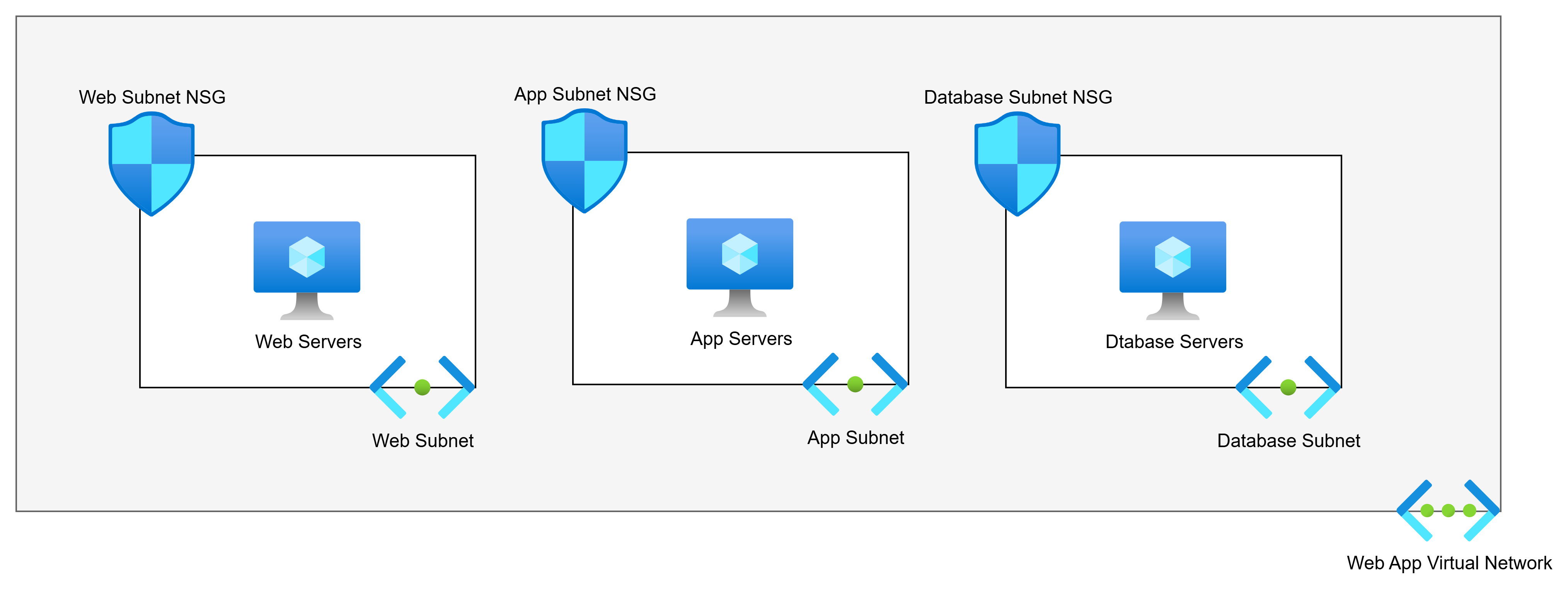
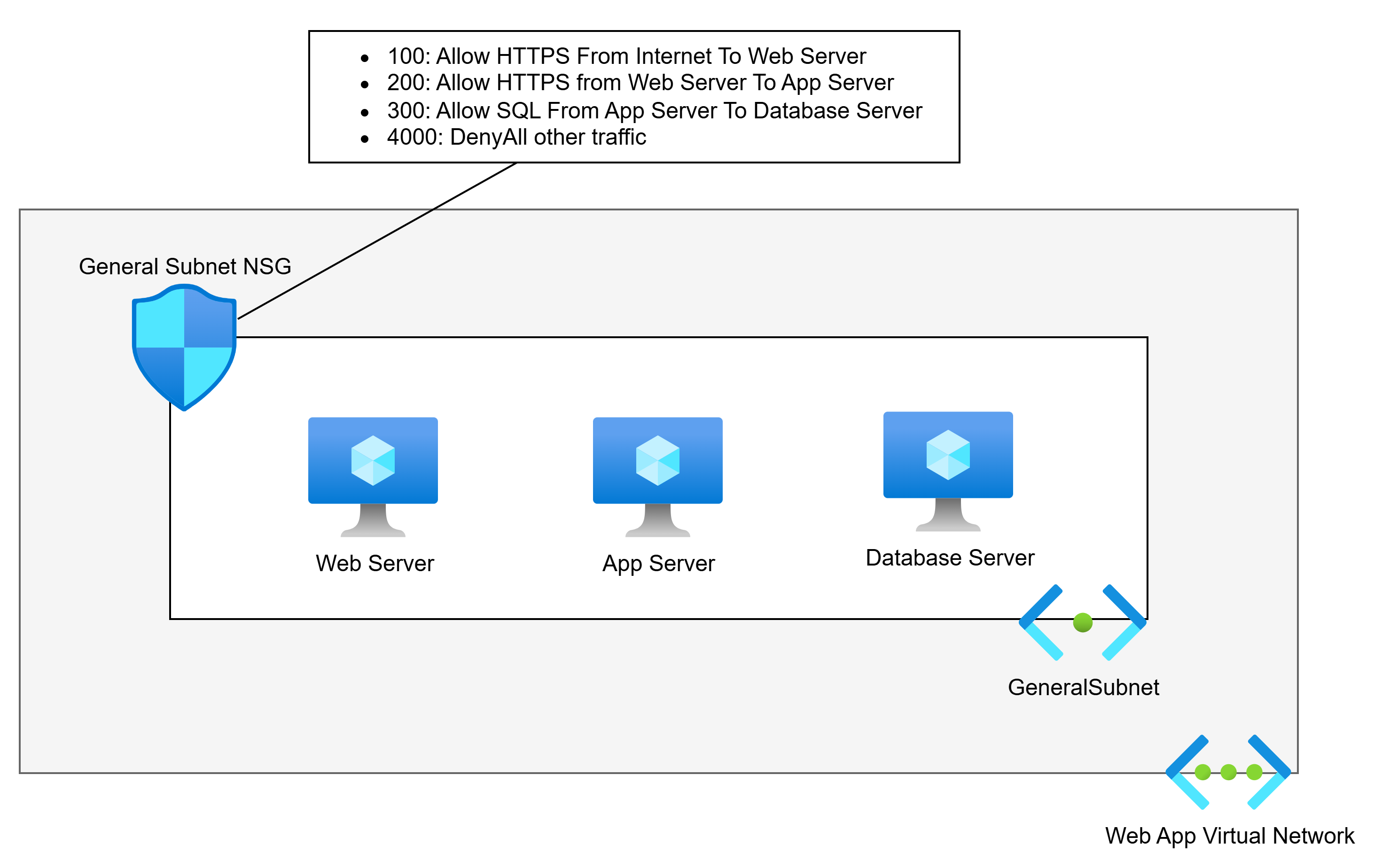
Consider the scenario below:
The above diagram shows us the commonly advised Virtual Network architecture for a 3-tier web app. There are 3 tiers. The poster will say:
Each tier should have its own subnet for security reasons. Each subnet will have an NSG.
So if we have web servers, app servers, and database servers, the logic is that the subnet + NSG combination provides security. The poster is half right:
The NSG does micro-segmentation of the machines.
The subnets do nothing.
Back To The Basics … Again
I want you to do this:
Build a VNet with 2 subnets.
Build 2 VMs, each attached to a different subnet.
Log into one of the VMs.
Run tracert to the second VM.
What will you see? The next and only hop is the second VM.
Ping the default gateway. What happens? Timeouts. The default gateway does not exist.
Think of a Virtual Network as a Venn diagram. Our two virtual machines are in the same circle. That is an instruction to the Azure fabric to say:
These machines are permitted to route to each other
That’s how Coca-Cola and PepsiCo could both have Virtual Networks with overlapping address spaces in the same Azure room and not be able to talk to each other.
Note: This is functionality of VXLAN implemented through the Hyper-V switch extension capability that was introduced in Windows Server 2012.
Simple Example
Let us fix that simple example. We will first understand that NSGs offer segmentation. No matter how I associate an NSG, the rules are always applied on the host virtual switch port (in Hyper-V, that’s on the NIC). If a rule says “no” then that packet is automatically dropped. If a rule says “yes”, then the packet is permitted.
In the diagram below, we accept that subnets play no role in security segmentation. We have flattened the network to a single subnet. There is a single web server, app server, and database server – we will add complexity later:
This network is much simpler, right? And it offers no less security than the needlessly more complicated first example. An NSG is associated with the subnet. NSG rules allow the required traffic, and a low-priority rule denies all other traffic. Only the permitted traffic can enter any specific NIC.
I’ve seen arguments that this will create complicated rules. Pah! I’ve built/migrated more apps than I care to remember. The rules for these apps are hardly ever that numerous.
Aidan, what if I am going to run a highly available application? Lucky for you if the code supports that (seriously!). Whether you’re using availability sets or availability zones (lucky you, these days), we will make a tiny design change.
We will create a (free) Application Security Group (ASG) for each tier. We will then use the ASG as the source and destination instead of the VM IP addresses.
Aidan, what if I’m going to use Virtual Machine Scale Sets (VMSS)? It’s no different: you add the ASG for the tier to the networking properties of the VMSS. Each created VMSS instance will automatically be associated with the ASG.
When Should I Add Subnets?
There are several reasons why you should add subnets. I’ll list them first before I demonstrate them:
Azure requires it
Unique routing
Remote network sources
Scaling
Azure Requires It
There are scenarios when Azure requires a dedicated subnet. Some that I can immediately think of are:
Virtual Network Gateway
Azure Route Server
SQL Managed Instance (MI)
App Service Regional Virtual Network Integration
App Service Environment (ASE – App Service Isolated Tier) VNet injection
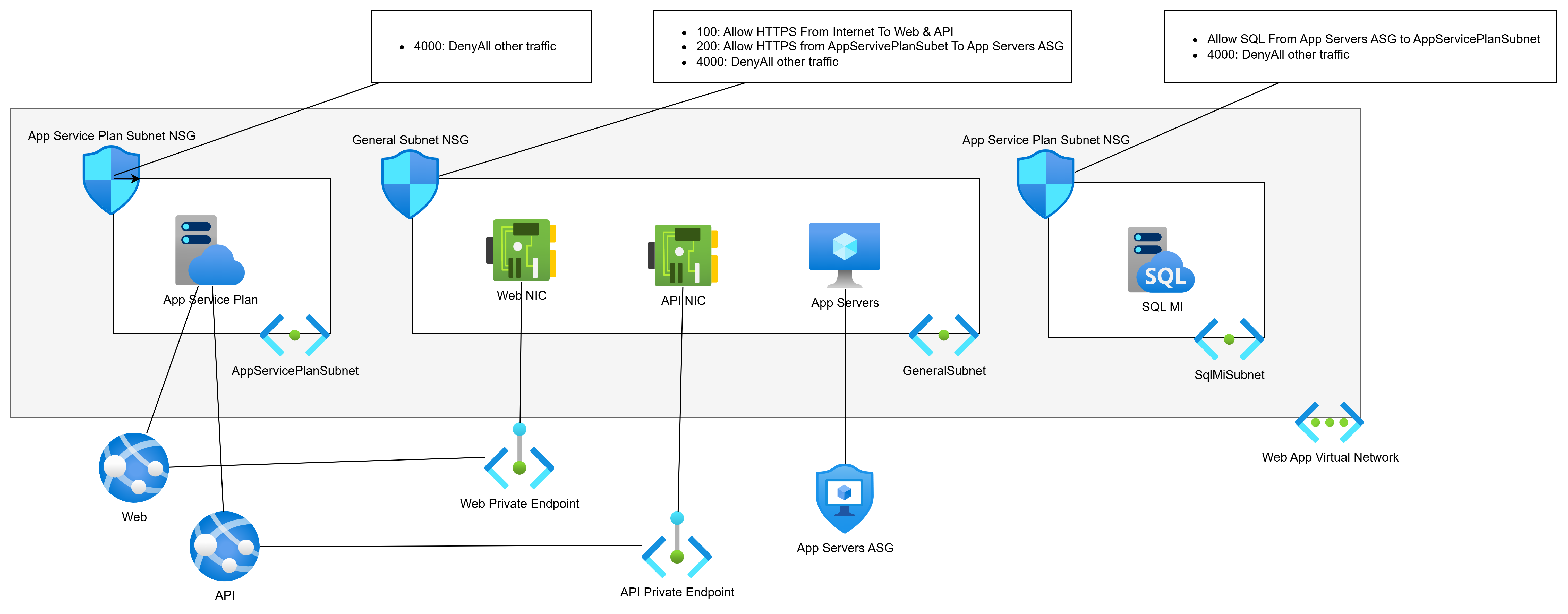
Let’s PaaS-ify the developers (see what I did there :D) and move from VMs to PaaS. We will replace the web servers with App Services and the database with SQL MI:
The web servers ran two apps, Web and API. Each will have a Private Endpoint for ingress traffic. The Private Endpoints can remain in the General Subnet.
The web servers must talk to the app servers (still VMs) over the VNet, so they will get Regional VNet Integration via the App Service Plan. This will require a dedicated subnet for egress only. This subnet will have no ingress.
SQL MI requires a dedicated subnet.
Unique Routing
Next-hop routing is always executed by the source Azure NIC. Every subnet has a collective set of routes to destination prefixes (network addresses). Those routes are propagated to the NICs in that subnet (subnets do not exist). The NICs decide the next hop for each packet, and the Azure network fabric sends the packet (by VXLAN) directly to the NIC of the next hop
There may be a situation where you want to customise routing.
For the sake of consistency, I’m going to use our web app, but in a little wonky way. My app is expanding. Some more VMs are being added for custom processing. Those VMs are being added to the GeneralSubnet.
My wonky scenario is that the security team have decided that traffic from the App Servers to the SQL VM must go through a firewall – that implies that the return traffic must also go through the firewall. No other traffic inside the app needs to go through the firewall. The firewall is deployed in a peered hub.
That means that I must split the GeneralSubnet into two source routing domains (subnets):
GeneralSubnet: Containing the Private Endpoint NICs and my new custom processing VMs.
AppServerSubnet: Containing only the app server VMs.
We will implement the desired via-firewall routing using User-Defined Routes in Route Tables:
AppServerSubnet: Go via the hub firewall to get to SqlMiSubnet.
SqlMiSubnet: Go via the hub firewall to get to AppServerSunet.
Remote Network Sources
So far, we have been using Application Security Groups (ASGs) to abstract IP addresses in our NSGs. ASGs are great, but they have restrictions:
Firewalls, including Azure Firewall, have no idea what an ASG is. You will have to use IP addresses as the sources in the firewall rules – possibly abstracted as IP Groups (Azure Firewall) or similar in third-party firewalls.
ASGs can only be used inside their parent subscription. You’re not going to be able to use them as sources in other workloads if you follow the subscription/workload approach of application landing zones.
Using an IP address(es) as a source is OK if the workload does not autoscale. What happens if your app tier/role uses autoscaling and addresses are mixed with addresses from other tiers/roles that should not have access to a remote resource?
There is only one way to solve this: break the source resource(s) out into their own subnet. I recently saw this one with a multi-subscription workload where there was going to be an Azure-hosted DevOps agent pool. Originally, the autoscaling pool was going to share a subnet with other VMs. However, I needed to grant HTTPS access to the DevOps pool only to all other resources. I couldn’t do that if the DevOps pool remained in a shared subnet. I split the pool into its own subnet and was able to use that subnet’s prefix as the source in the various firewall/NSG rules.
Scaling
There are two scaling scenarios that I can think of at the moment. You will have some workload component that will autoscale. The autoscaling role/tier requires a large number of IPs that you want to dedicate to that role/tier. In this case, yes, you may dedicate a subnet to that role/tier.
The second scenario is that you have followed a good practice of deploying a relatively small VNet for your workload, with some spare capacity for additional subnets. However, the scope of the workload has changed significantly. The spare capacity will not be enough. You need to expand the VNet, so you add a second IP prefix to the VNet. This means that new IP capacity requires additional subnets from the new prefix.
In Summary
Every diagram for a new VNet in Azure should start very simply: 1 subnet. Do not follow the overly-simple advice from “Azure expert”LinkedIn posts that say “create a subnet for every tier to create a security boundary”. You absolutely do not need to do that! Most workloads, even in large enterprises, are incredibly simple, and one subnet will suffice. You should only add subnets when the need requires it, as documented above.
Did you know that you do not need to use Virtual WAN to implement an SD-WAN with Azure? In fact, contrary to the recommendations from Microsoft, Virtual WAN might be the worst way to add Azure networks to an SD-WAN.
My History With Virtual WAN
You might think that the introduction of this post paints me as a complete hater who has never given Virtual WAN a chance. I have. In fact, I can point out features that some of my 1:1 feedback calls probably contributed to. I’ve implemented Virtual WAN with customers.
However, I’ve seen the problems. I’ve seen that the hype doesn’t always work. I’ve personally experienced the lack of troubleshooting capabilities that depended on my deep understanding of the hidden networking. I’ve seen colleagues struggle with the complexity. I’ve seen how some customers’ routing requirements cannot be met with Virtual WAN. And many architectural features that some organisations require cannot be deployed with Virtual WAN.
I concluded that my time with Virtual WAN was over during a proof of concept that I insisted a customer do. They had previously used Virtual WAN without a firewall. I was asked to build a new multi-region Azure environment (multiple hubs) with firewalls. I was not sure that it would go well – this was before routing intent was in preview. I tested and confirmed that Virtual WAN was not going to work; the customer implemented a Meraki SD-WAN using Virtual Network-based hubs and lost no functionality. In fact, they gained functionality.
In an older case, I convinced a customer to go with Virtual WAN. I regret this one. There was a lot of hype. They used Meraki. There was a solution from Meraki to integrate with the Virtual WAN VPN Gateway. We found bugs in the script and fixed them. But the most annoying thing about that solution was that every time the customer changed anything in the SD-WAN, every VPN tunnel to Azure was torn down and recreated. I heard recently that the customer is looking to remove SD-WAN. I don’t blame them, and I regret ever recommending it to them.
The Microsoft Claims
The Azure Cloud Adoption Framework incorrectly states the following:
Use a Virtual WAN topology if any of the following requirements apply to your organization:
Your organization intends to deploy resources across several Azure regions and requires global connectivity between virtual networks in these Azure regions and multiple on-premises locations.
Your organization intends to use a software-defined WAN (SD-WAN) deployment to integrate a large-scale branch network directly into Azure, or requires more than 30 branch sites for native IPSec termination.
You require transitive routing between a virtual private network (VPN) and Azure ExpressRoute. For example, if you use a site-to-site VPN to connect remote branches or a point-to-site VPN to connect remote users, you might need to connect the VPN to an ExpressRoute-connected DC through Azure.
I will burst those bubbles one by one.
Several Regions & Global Connectivity
Do you want to deploy across multiple regions? Not a problem. You can very easily do that with Virtual Network-based hubs. I’ve done it again and again.
Do you want to connect the spokes in different regions? Yup, also easy:
Build each hub-and-spoke from a single IP prefix.
Your spokes already route via the hub.
Peer the hubs.
Create User-Defined Routes in each firewall subnet (you will be using firewalls in this day and age) to route to remote hub-and-spoke IP prefixes via the remote hub firewalls.
Job done! The only additional steps were:
Peer the hubs
Add UDRs to each firewall subnet for each remote hub-and-spoke IP prefix
You do that once. Once!
How about connecting the remote sites? Simples: you connect them as usual.
There is some marketing material about how we can use the Microsoft WAN as the company WAN using vWAN. Yes, in theory. The concept is that the Microsoft Global WAN is amazing. You VPN from site A (let’s say Oslo, Norway) to a local Azure region and you VPN from site B (let’s say Houston, Texas) to a local Azure region. Then vWAN automatically enables Oslo <> Texas connectivity over the Microsoft Global Network. Yes, it does. And the performance should be amazing. I did a proof-of-concept in 2 hours with a customer. The performance of VPN directly between Oslo <> Houston was much better. Don’t buy the hype! Question it and test. And by the way, we can build this with VNets too – I was told by an MS partner that they did this solution between two sites on different continents years before vWAN existed.
SD-WAN
Microsoft suggests that you can only add Azure networks to an SD-WAN if you use Virtual WAN.
Here’s some truth. Under the covers, vWAN hub is built on a traditional Virtual Network. Then you can use (don’t) a VPN Gateway or a third-party SD-WAN appliance for connectivity.
The list of partners supporting vWAN was greatly increased recently – I remember looking for Meraki support a few months ago, and it was not there (it is now). But guess what, I bet you that everyone one of those partners offers the exact same solution for Virtual Networks via the Marketplace. And I bet:
There are more partner options
There are no trade-offs
The resilience is just the same
I have done Azure/Meraki SD-WAN twice since the above customer X. In both cases, we went with the Azure Marketplace and Virtual Network. And in both cases, it was:
Dead simple to set up.
It worked the first time.
Transitive Routing
Virtual WAN is powered by a feature that is hidden unless you do an ARM export. That feature is a routing service that is quite similar (not exactly identical) to Azure Route Server. Did you know:
You can deploy Azure Route Server to a Virtual Network. The deployment is a next-next-next.
It can be easily BGP peered with a third-party networking appliance, including HA services – for example, HA Meraki gets seamless failover using AS PATH when coupled with Azure Route Server.
The Azure Route server will learn remote site prefixes from the networking appliance/SD-WAN.
The Azure Route Server will advertise routes to the networking appliance/SD-WAN.
Azure Route Server BGP propagation is managed using the same VNet peering settings as Virtual Network Gateway.
There is a single checkbox (true/false property) to enable transitive routing between VPN/ExpressRoute remote sites. And that setting is amazing.
I signed in to work one day and was asked a question. I had built out the environment for a large customer with an HQ in Oslo:
Remote sites around the world with a Meraki SD-WAN.
Leased line to Oracle Cloud – the global sites backhauled through Oslo.
The VNet-based hub in Azure was added to the SD-WAN. All offices wre connected directly to Azure via VPN.
Azure Route Server was added and peered to the Meraki SD-WAN.
An excavator has torn up the leased line to Oracle. The essential services in Oracle Cloud were unavailable. I was asked if the Azure connection to Oracle Cloud coule be leveraged to get the business back online? I thought for 30 seconds and said, “Yes, give me 5 minutes”. Here’s what I did:
I check the box to enable transitive routing in Azure Route Server.
I clicked Save/Apply and waited a few minutes for the update task
I asked the client to test.
And guess what? Contrary to the above CAF text, the client was back online. A few weeks later, I was told that not only did they get back online, but the SD-WAN connection to the VIRUTAL NETWORK-BASED hub in Azure gave the global branch offices lower latency connections than their backhaul through Oslo to Oracle Cloud. Whoda-thunk-it?
vWAN is PaaS
One of the arguments for the vWAN hub is that it pushes complexity down into the platform; it’s a PaaS sub-resource.
Yes, it’s a PaaS sub-resource. Is a well-designed hub complex? A hub should contain very few resources, based around:
Remote connectivity resource
Firewall
Maybe Azure Bastion
There’s not much more to a hub than that if you value security. What exactly am I saving with the more-expensive vWAN?
Limitations of vWAN
Let’s start with performance. A hub in Virtual WAN has a throughput limitation of 50 Gbps. I thought that was a theoretical limit … until I did a network review for a client a few years ago. They had a single workload that pushed 29Gbps through the hub, 1 Gbps shy of the limit for a Standard tier Azure Firewall. I recommended an increase to the 100 Gbps Premium tier, but warned that the bottleneck was always going to be the vWAN hub.
The architectural limitations of vWAN are many – so many that I will miss some:
No VNet Flow Logs
Impossible to troubleshoot routing/connectivity in a real way
No support for Azure Bastion in the hub
No support for NAT Gateway for firewall egress traffic (SNAT port exhaustion)
Secured traffic between different secured (firewall) hubs requires Routing Intent
No Forced Tunnelling in Azure Firewall without Routing Intent
Routing Intent is overly simplistic – everything goes through the firewall
No support for IP Prefix for the firewall
Azure Firewall cannot use Route Server Integration (auto-configuration of non-RFC1918 usage in private networks)
Hub Route Tables are a complexity nightmare
Impossible Solution
Anyone who has deployed more than a couple of Azure networks has heard the following statement made regarding failing connections over site-to-site networking:
The Azure network is broken
A new site-to-site appliance or firewall has been placed in Azure, and the root cause of the issue is “never the remote network“.
Proving that the issue isn’t the firewall can be tricky. That’s because firewall appliances are black boxes. I updated my standard hub design last year to assist with this:
Add a subnet with identical routing configuration (BGP propagation and user-defined routes) as the (private) firewall subnet.
Add a low-spec B-series VM to this subnet with an autoshutdown. This VM is used only for diagnostics.
The design allows an Azure admin to log into the VM. The VM mimics the connectivity of the firewall and allows tests to be done against failing connections. If the test fails from the VM, it proves that the firewall is not at fault.
No other compute resources are placed in the hub.
Here’s the gotcha. I can do this in a VNet hub. I cannot do this in a vWAN hub. The vWAN hub Virtual Network is in a Microsoft-managed tenant/subscription. You have no access, and you cannot troubleshoot it. You are entirely at the mercy of Azure support – and, sadly, we know how that process will go.
Virtual WAN In Summary
You do not need Virtual WAN for connectivity or SD-WAN. So why would one adopt it instead of VNet-based hubs, especially when you consider costs and the loss of functionality? I just do not understand (a) why Microsoft continues to push Virtual WAN and (b) why it continues to exist.
While I’m on the topic of troubleshooting, I thought that I would add some tips on how to trace packets in Microsoft Azure.
The Problem
Here are a few scenarios, in descending order from most common, that I’ve been through over the years:
Remote Desktop To New VMs
You’ve just established a new site-to-site connection between a remote location and a (probably) new Azure network. The remote site admin complains:
No packets are getting through. Your Azure network is broken.
You know that everything in Azure is in good order, and you’re pretty sure the remote site firewall is blocking the traffic. However, many systems administrators jump to “the new Azure network is broken” when something doesn’t work – even if they configured their firewall to block that damned RDP traffic (it’s nearly always RDP in the first tests!).
Connecting to PaaS Services
You’ve deployed some PaaS services in Azure. Something can’t connect to them. The client might be in the same Virtual Network. Maybe it’s in another spoke that must route through a hub? Or maybe the client is in a remote site? The developer or operator is going to say:
We’re getting timeouts when we connect. Your network is broken.
So many things could be wrong here.
SSL Goes Wrong
SSL/PKI feels to me like a dinosaur technology that:
Most never learn
Few who did learn it never completely mastered it (I’m here, I’d estimate)
Those of us who did learn it have forgotten most of it
And modern application/network security is built on this deck of cards (from a knowledge perspective). I’ve seen a few scenarios:
My app gets a weird response from the database when it attempts to connect.
That one’s probably because something is reverse proxying the connection and something is going wrong in the connection – see Application Rules NATing east-west connections in Azure Firewall, causing the client IP to change.
How about this one I saw recently:
My application is failing to connect to a remote server.
When I dug into it, I saw that the TLS handshake was failing and the TCP connection was cleanly terminated. A self-signed certificate was to blame. Other scenarios I’ve seen are where Linux-based appliances fail the same handshake because the server cert doesn’t contain the full keychain. Tip: Windows LIES to you when it shows the whole keychain which it self-builds from the trusted publishers store on the machine. Most appliances require the full keychain in the cert, which many online CAs do not do by default. You’d be amazed how many weeks are wasted and repeated discusssions are had because of this.
But how have I proven this?
Complex Routing
Not everyone builds a simple hub-and-spoke. Sometimes there is a need for complexity. I had one of these a few years ago, where a customer required an ExpressRoute connection to a third-party data provider. The data provider mandated:
An ExpressRoute connection
The use of SNAT
The ExpressRoute Gateway doesn’t offer SNAT (unlike the VPN Gateway), so I had to conjure an interesting design. Luckily, I know Azure routing pretty well, and I tested this design in a lab. I was sure it would work – it did. But what if something went wrong? I would have had to troubleshoot what was happening.
The Need
What we need is:
The ability to prove that packets are routing to confirm the infrastructure’s ability.
Check how a PaaS resource has responded to connections.
The ability to see inside those packets to investigate application-layer issues.
Folks, most of this is basic logging/querying. But there are a few tricks.
Packet Travel
I want to confirm that a packet reached A, then went to B, then got to the destination. For example:
A packet from a remote client entered the hub and went through the firewall.
It then routed across peering – GAH! More on this in a moment.
And the packet routed through the destination spoke Virtual Network to reach the destination server – double GAH!
Before we proceed, I literally get session audiences to repeat the following 3 times each to enforce some basic knowledge:
Virtual Networks do not exist.
Subnets do not exist
Peering does not exist
Packets go directly from the source to the destination
This is why tracert is useless in Azure.
Understanding the above is halfway to mastering Azure networking. Please read this post before asking me questions or attempting to debate me on this topic of existence.
By the way, if you are using Azure Firewall, then (PowerShell) test-networkconnection is useful only to generate logs. The result may not be the actual result. Azure Firewall feeds “200” results from application rules, even when denying traffic. I always advise: generate the traffic and then check the logs.
Back to the topic …
The basic tool we need is a log of a packet or flow (a series of packets in a “conversation” between the client and server). Fortunately, we have a few sources of those.
The first is your firewall. Azure Firewall’s diagnostics settings send logs to your preferred destination. I prefer Log Analytics. You might prefer Splunk or similar. Potatoe Potahtoh. In Azure Firewall, the “decision making logs” include:
Threat Intelligence (an under-appreciated and oh-so useful feature)
IDPS
Network rules
Application rules
Log Analytics has a built-in query to search all those logs in a union. I can search for any combination of source IP, source port (not typically useful), protocol, destination IP, and destination port (very useful).
A third-party firewall has similar logs, often locked away in the previous grip of the firewall administrator. Sorry, I’m binge-watching Lord of the Rings, and I couldn’t help myself, firewall admins 🙂 Some firewalls can make those logs more available to other Azure operators. For example, the Palo Alto Cloud NGFW has the ability to route logs, via Application Insights, into Log Analytics, where queries, dashboards, and workbooks can share that data. Nice!
The firewall logs will show me:
If packets entered the firewall
If those packets were allowed or denied
The simple mention of a flow from a client to a server in the firewall log means that packets made it there:
A spoke routed via the firewall to another spoke or a remote site.
Packets from a remote site passed successfully over a site-to-site network connection.
The firewall log is often my first port of call. Sometimes, however, it doesn’t go deep enough. There have been a number of times where I’ve been told something along the lines of:
I can ping VM X in Azure, but I cannot make a HTTPS connection to it.
I know from experience that they have made a successful connectionless ping (ICMP). But they have failed to make a connection-oriented (TCP) HTTPS request. The stateful firewall is blocking a response to the connection request because it never saw the original SYN. Thank you to my 3rd-year networking lecturer – I can picture the guy demonstrating a luggable PC to us around 1993, but I don’t remember his name. Experience has taught me that:
A route for the spoke network prefix is missing from the GatewaySubnet, and the request is bypassing the firewall.
A Private Endpoint has added a /32 route to the GatewaySunet (see network policies for Private Endpoint), and routing “long prefix match” has chosen that system route over your User-Defined Route for the spoke prefix.
For these crazy situations, you need to dig a little deeper into the firewall logs. I cannot speak for third-party firewalls here. Azure Firewall doesn’t capture dropped connections such as these. For that deep dive, we need Flow Trace logs to be enabled. Note that:
The logs will be very detailed – and expensive to ingest into your monitoring solution. Only leave this feature enabled while troubleshooting the issue – set a calendar entry to unset it.
I haven’t had the opportunity to use this one in the real world personally, but I wonder if I sent those JSON logs to blob storage, could I download them to Copilot and get a reasonable response to my queries? Note to self.
Did the packet traverse a Virtual Network? Now you should know that’s a dumb question. The Azure fabric takes packets from source NICs and drops them into destination NICs. The correct question is: Did a packet reach the destination NIC?
The correct solution to answer that question today is Virtual Network Flow Logs with Traffic Analytics.
The wrong answer is the deprecated NSG Flow Logs. Virtual Network Flow Logs are current and capture much better data, including Private Endpoints.
Flow Logs will tell me about:
Outbound flows – did a packet leave a client?
Inbound flows – did a packet reach a server?
NSG Rules – what rule allowed/denied a connection?
Now I know if a connection:
Left an Azure client
Reached an Azure server
Was allowed or denied by an NSG rule
Flow Logs take time to generate:
The logs will take 30+ seconds to be written to blob storage. Honestly, I’ve seen this take longer during the pandemic. I think MSFT might throttle monitoring when CPU usage is in high demand.
Traffic Analytics is configured to run every 10 or 60 minutes. I prefer the 10-minute option.
Log Analytics will take time to process the data. I was told many years ago to allow up to 15 minutes for NSG Flow Logs to be processed.
Between the firewall logs and the Virtual Network Flow Logs, I have visibility of the traffic. Or some of it.
PaaS Resources
A PaaS resource may be deployed with:
Public endpoint: Firewall or Virtual Network Flow Logs will show my traffic leaving my network, but not the last mile.
Private Endpoint: Private Endpoint NICs fool us, because the packet is sent directly by the fabric from the client NIC to the NIC of the machine hosting the PaaS resource instance. Virtual Network Flow Logs show us “connectability” but not the full connection.
VNet Injection and VNet Integration: The PaaS resources don’t really live in our Virtual Network. I know that it’s confusing.
Let me give you a working example. You have an App Service wth VNet Integration that is attempting to talk to a Key Vault with a Private Endpoint. We can see the flows in the previously discussed logs. But are the packets really getting to the Key Vault? What happens when the App Service attempts to access a secret?
The only answer to this is to enable the diagnostics settings in the Key Vault. Querying those logs in Log Analytics, Splunk, etc, will tell you exactly what’s going on:
Was there a connection?
Was the connection successful?
Why did the connection fail?
Packet Capture
Don’t get scared! I promise that packet capture is easier than ever now. I’ll explain later.
The results of a packet capture show you the contents (as much as encryption allows) of packets in a flow between a client and a server. This is super useful for investigating further. Let me explain two scenarios:
In the first scenario, we have proven that packets get from A to B, but the customer/developer/operator doesn’t accept that because their application is failing. If we know the packets from client to server, then we know the error is further up the stack – it’s an application configuration or authoring issue. The only way to prove to the other person is to show them the actual packets.
Network Watcher provides a feature called Packet Capture. The only place you need the free Wireshark client is on your PC to open the capture. Network Watcher will automatically add an Azure extension (agent) to the client/server VM, based on your Azure rights over that VM. You can capture all or filtered packets and save the resulting .CAP file to blob storage. Unfortunately, this ability is limited to VMs.
The second scenario is where we have a remote admin complaining about their failing RDP connection (it’s always this) over site-to-site networking. You’ve proven the traffic doesn’t reach the firewall/Azure VM. You know their firewall is blocking the outbound connection, but they won’t accept that. You have to prove that the traffic never crossed the site-to-site connection. You can enable packet capture on a VPN Virtual Network Gateway or a Virtual WAN VPN Gateway. This will ultimately prove that packets never got across the tunnel, and the remote admin must face the mirror.
Back to the scary part about packet captures. Who the heck can read those things? Not many of us can. I understand some basics, such as control flags like SYN, SYN-ACK, and RST. But what would I do if I had to really understand a packet capture? Enter Copilot or another AI:
In Wireshark, click File > Export Packet Dissections > As JSON and select “Packet Range: All packets” and “Packet Format:JSON”. JSON is nice for AI to parse.
Upload the capture to your AI and ask it your questions.
You’ll get an answer that you can work with. I used this recently for an application issue to help a (good guy) developer get to the root cause of an issue.
By the way:
ExpressRoute does not offer packet capture, but Traffic Collector provides a Flow Log experience.
Azure Firewall with a Management NIC (recommended by me for the last 1.5+ years) has packet capture.
Some Other Tricks
Network Watcher can be useful for doing some basic diagnostics:
IP flow verify: Checks whether a specific traffic flow would be allowed or denied by NSG rules.
NSG diagnostics: Analyse NSG rules across hops to identify which rule permits or blocks traffic.
Next hop: Identifies the next routing hop a packet will take from a selected VM.
Effective security rules: Displays the combined, active security rules applied to a network interface after all NSGs are merged.
VPN troubleshoot: Diagnoses issues with Azure VPN gateways and site‑to‑site or point‑to‑site tunnels.
Packet capture: Captures packet data directly from a VM’s network stack for deep traffic analysis.
Connection troubleshoot: Tests end‑to‑end connectivity between a VM and a target to identify routing or NSG issues.
Connection Troubleshoot is especially nice:
We can send a bunch of probe packets from a source to a destination and see if the connection was successful. If not, the tool gives you some indication why – keep in mind that remote destinations will result in vague failure reasoning because Azure doesn’t control remote locations.
The sources can be:
VMs and VM Scale Sets: Using the Network Watcher extension.
Application Gateway: Great for figuring out those pesky backend health issues and proving that the CA-provided cert (lacking the complete trust chain) is the cause of the failure.
If there is a connection that is working but you consider to be critical, then I recommend using Connection Monitor in Network Watcher:
Works with any mix of Arc agents (non-Azure VMs) and Azure VMs – consider those remote site connections!
Model application connections.
Tests success and speed (latency).
Can trigger an alert/Action Group.
I used this a few years ago for a SaaS company that was using Placement Proximity Groups as a part of their need to minimise latency. I wanted proof of the platform performance, just in case. My colleague who wrote the Terraform for modelling the application in Connection Monitor probably didn’t like me for requiring this 😉 I started seeing alerts one day, so I let the customer know that I was opening a support ticket with Microsoft. We found out that there was a physical issue with one network appliance, and Microsoft fixed it. Wow – not only were we monitoring our infrastructure and the application’s networking, but we were monitoring Azure’s physical network too!
Last Tool
The last tool is you, not Copilot. Honestly, Azure Copilot is not good at this stuff. I’ve tested it in my build labs, and it hasn’t a clue (thankfully for us IT pros). You need a combination of:
Experience: What’s most common?
Intuition: Listen to the customer – did they just mention a cert, for example?
Knowledge: Understanding how Azure networks function is critical – did you know that not setting the network policies for Private Endpoint in your subnet causes asynchronous routing in the firewall?
Using your tools will better prepare you to use the above Azure tools.
If You Liked This …
Maybe you liked this post and are wondering: “Could Aidan help me?” Maybe I can through my company, Cloud Mechanix. Whether you need a review, design something, figure out some issue, do a large deployment, or figure out why the cloud is not working for your organisation, I can help – and other things too. Cloud Mechanix works with large and small organisations and service providers throughout Europe. Check out the site, and contact me if you are interested.