Build Windows 2011 Windows Server 8 Keynote

OK, yesterday was about aesthetics; today is meat and potatoes.  This is where we learn the back room stuff for Windows 8: the server.

Satya Nadella is the keynote speaker, president of Server and Tools (System Center, etc).  The subjects will be:

  • Windows Server 8
  • Azure
  • Visual Studio

Connected devices & continuous services describes the completion of yesterday’s subject.  PCs are consumers, servers/cloud are providers.  Design points:

  • elastic resources – cloud (public and/or private)
  • composable services – Cloud, e.g. VMM 2012 service templates
  • data as a namespace – to be honest, I guess it’s a SQL or BizTalk thing
  • identity & access – Forefront Identity Manager
  • continuous delivery – triage applications, e.g. OpsMgr 2012 Avicode

We are going to see a series of demos building of a Metro UI app, which then interacts with a cloud service running on Windows Server 8.

Jason Zander comes out to demo a Metro UI turn-based game that interacts via a cloud-based service.  I gotta say, the game looks pretty good for a demo.  Two competing users (one on phone and one on PC) are trying to shoot each other.  It was developed using VS 2010 with some new Azure SDK.  VS 11 is shown.  Looks the same to me, an IT pro Smile but apparently includes Azure SDK.  There is a pretty cool demo of a 3D model viewing/editing.  It’s the sort of thing you expect to see in a Pixar documentary, and we see how a 3D display of layered objects can be debugged from the pixel.

Satya comes back out.    The app platform (backend) is talked about now: .Net 4.5.  I won’t blog much of this dev stuff. 

Now we move onto Windows Server 8:

Application Platform

Symmetry between server and Azure.  IIS is more scalable and multi-tenant, with quality of service guarantees.  Virtualisation and cloud get a boost with a major revamp.  This is moving multi-tenant and cloud, with high availability and scalability getting a reboot.  Mission critical resource hungry services can be virtualised now.  Control by admins has been worked on.

Bryon Surace comes out:

  • Native NIC teaming
  • VHDX extends VHDs to beyond 2040 GB
  • Hyper-V Replica to provide asynchronous replication of running VMs in a consistent manner

New alternative called Storage Spaces in Windows to manage external storage.  There is a new & improved Server Manager (very Metro).  The demo shows a JBOD DASd to the server with 16 SSDs.  A LUN is shown, and a few SMB 2.2 file shares are on that LUN.

File shares have improved performance.  This enables VMs to run on file shares in a supported manner, unlike 2008/R2.  SMB 2.2 multi-channel and RDMA can team NICs for throughput and fault tolerance.    You can get huge network throughput doing this, with almost zero CPU utilisation.  RDMA uses little CPU and provides low latency. 

Hyper-V next.  Live Migration is supported between non-clustered hosts – it’s not HA; that still requires Failover Clustering.  We also get Live Storage Migration to move a VM’s files from one place (host, drive, share) to another. 

Data Platform

Here we go into Azure.  We’re in dev architecture space again.  Identity is the focus this time.  It’s an old subject, still without a complete global solution.  Odds are, if you’re a Windows 8 user, that ID will be Live ID.

There is a new Service Bus in September.  Storage geo-replication between data centres will be possible.  Bing data feeds will be available.

Hybrid Cloud

We get a demo on how to cloud enable your car using “Viper SmartStart” to do remote tracking and debugging of your car.  There is a smartphone app.  We see a live view of presenters daughter in Belleview WA, speeding (allegedly) and gas mileage all over the shop: sports driving maybe Smile  For the coolness factor, the owner of West Coast Customs (custom cars) comes out.  Microsoft are getting him to build an eCar with the latest in tech for the TV show.  They’re tweaking a 2012 Mustang with a 1967 body  Niiiiiiice.  It’ll be on Discovery USA in December.

Holy Crap!

Steve Ballmer surprises us by coming out.  “We have a long way to go still with Windows 8”.  This is good to hear. 500,000 downloads of it last night.  Ireland’s Silicon Republic is quoted.  Feedback in last 24 hours is overwhelmingly positive.  Microsoft’s aims with Windows 8:

  • New hardware form factors: tablet and slate PC
  • Cloud services: old news, but “we’re still early” in cloud services.  Still to evolve and be embraced.
  • New application scenarios
  • New developer opportunities

Windows centred focus on the business:

  • Windows 8 and Windows Live
  • Windows Server and Windows Azure
  • Windows Phone
  • Windows Reimagined

Steve seems delighted with the feedback, even on Server today.

Windows Phone:

  • 30,000 apps and 50,000 registered developers
  • 7.5 Mango just gone live with phones shopping with 500+ new features
  • New phones from variety of makers, including Nokia
  • My note: still a very minor player in units being sold.  I wonder if Mango + Windows 8 can change that?  It has potential.

Hardware:

“It will be Intel plus ARM” to clear up some misinformation.  One will be as important as the other. 

Note: I think Steve gets a pass for 2011 Winking smile

Windows, Windows Phone and XBox are the 3 device categories on platforms: Azure, Office, Bing and Dynamics (I guess there is pressure to sell Dynamics cos of this breakout/callout). 

Developer Opportunity:

  • 350+ million Windows devices this year.  Dwarves iPad and Apple.  What post-PC era?
  • 500 million installed Windows 7 PCs
  • 70%+ servers/Azure rising: I laugh at your fluffy penguin.
  • New commercial opportunities with Azure Marketplace and Windows Store
  • Choice with language, public/private/hybrid cloud: you choose the right one for you or your customer
  • Build apps for phone, cloud, Server: one experience from many devices.
  • Apps, content, servers, sites: choose your product
  • Sell to everyone from individual to the enterprise: cloud (Live to Azure) and apps for home or for LOB.

</Steve></keynotes>

Why I Think Windows 8 Will RTM Before July 2012

You’ll soon see that this is not based on any inside information … so make of it what you want.

We all know that Mary-Jo Foley reported a little while ago that Windows 8 could RTM as soon as April 2012.  I have 2 reasons to think that she might not be far off.

The first is a little bit more sensible than the second.

Timing

The Build conference is being held earlier than PDC used to be.  That makes me think that we’re working on a schedule with earlier milestones.  RTM for Windows 7 was early Summer with launches later in the year.  So maybe we’ll see a Windows 8 RTM in Spring with launches in the summer time frame?

Microsoft is Superstitious

Yes, a 100,000 employee corporate giant is afraid of the number 13.  Was there an Office 13?  Was there an Exchange 13?  No; they skipped a version number and went from 12 to 14 (“Wave 15” is on the way).

Microsoft’s financial years are from July to June.  For example, Microsoft is currently in financial year 2012.  Come July 2012, Microsoft will be in financial year 2013.  They name their products like EA Sports.  If Microsoft releases Windows Server “8” in June, it could be called Windows Server 2012.  But come July, it’ll more likely (not necessarily) be called Windows Server 2013.

Remember that they hate black cats, walking under ladders, spilling salt (or is it throwing it?), and the number 13.  I bet the next version of Server is called Windows Server 2012 … and therefore they will aim to RTM it before July of 2012.  Launches will probably be in September … that’s because MSFT is a mess in July with FY planning, and everyone is away on vacation in August.

That’s my 2 cents, not exactly based on science Winking smile

My HP Microserver & Windows Home Server 2011

I have a lot of digital media scattered all over at home.  I’ve got documents (whitepapers and books), music, videos, and about 700 GB of photos (RAW, PSD, and JPEG), all of which are either on a laptop or a USB disk.  I have tried to backup but it’s a painful, time consuming process.  I have Live Mesh and volume shadow copy up an running but that’s no solution.

Last week I bought a HP Microserver with the intention of running it as a home server.  It’s a low end machine, with a dual core AMD processor, and 1 GB (max 8 GB) RAM, with a 256 GB SATA drive.  I upgraded it with 2 * 2.5 TB Seagate “green” (low power) disks (removing the default 256 GB drive), and bumped up the memory by 4 GB.  It must be said that the chassis build is not great.  Getting the top cover off/on was a nightmare.  The board where the DIMMS sit can be seen in the following picture.  It’s at the bottom.  The sides do not come off, so you have to disconnect all those visible cables, undo 2 thumb screws, and wiggle the board out on the built-in slides.

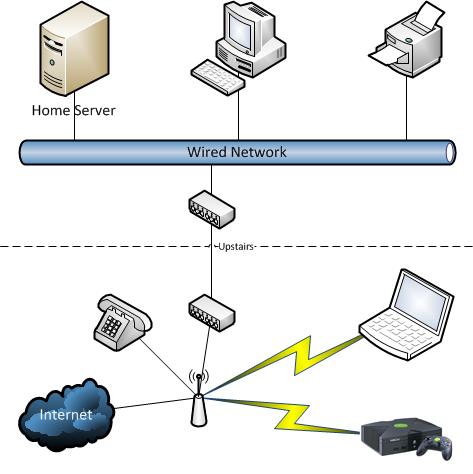
The machine has a built in wired NIC.  My home network is wireless N.  I probably could have gotten a wifi NIC for the machine (2 * PCIe slots) but I decided to span my network using a Devolo 200 MB power over ethernet kit:

image

This allows my Xbox and laptop/netbook/iDevices to sit free on the wifi network.  Upstairs in my office (a box room) is where the Devolo breaks out 3 wired connections and that’s where the HP Microserver, a PC, and printers (photo and general purpose) can be found.  The entire wifi and wired network runs on the same subnet.

I decided to try out Windows Home Server 2011 as the operating system.  It’s intended to do what I need:

  • Centralised storage
  • Automated backup of the storage and of PCs
  • Media streaming (to xBox, PCs, or to remote connections)

My first install was just a test.  The server’s storage controller was set by default to not have RAID enabled.  The result was that WHS 2011 was installed on disk 1 with a 60 GB C: drive, a 2 TB D: drive, and the remnants were unused.  This is where I realise that it backs up using Windows Server Backup to VHD.  The 2 TB volume limit is a result of the limit of a VHD.  Doh!  The disk is not RAIDed, so Disk 2 was partitioned up as well.  Not so useful.

So yesterday afternoon I had time to revisit.  I configured the server with RAID1 (wiping the contents of the disks) and reinstalled.  Or I tried to.  The install failed with the message being something like “the installation has failed.  Please see the log for details”.  The log told me the setup was starting and then it stopped.  Useless!  I Googled, re-RAIDed, I recreated the USB installer, and no joy.  Based on where the failure was (configuring Windows before the first reboot), it appears like the setup routine was trying to configure the boot environment and failing.

Eventually I tried installing on the 256 GB drive.  It worked.  OK – so the problem is RAID and/or the 2.5 TB drives.  I tried the following:

  • Preconfigure software based RAID1 array prior to installing WHS 2011 using DISKPART.  No joy because the WHS2011 installer wipes everything.
  • Install on 512 GB RAID1 drive set.  Worked fine.
  • Pop out a 512 GB drive and try repair with the 2nd drive being a 2.5 TB drive.  No joy because the RAID tool wouldn’t even give me the option.
  • Try to restore a backup from the first install to a 2.5 TB RAID 1 array.  No joy because the restore tool couldn’t see the WHS backup on the USB drive.

This left me with 2 choices:

  • Keep the 512 GB RAID1 array for the OS (and video), using 2 slots, and use the remaining 2 disk slots for a 2.5 TB RAID1 array.
  • Not use any RAID.  No way!

The end result is that I have a 512 RAID 1 drive with the OS on it, and a share for videos.  The 2.5TB drive is used for PC backup, docs/photos, and documents.  The volume is converted to GPT … and being 2.5 TB means that WHS2011 backup won’t back it up.  I’m looking at an alternative solution now.

Everything is in the same Windows 7 homegroup on the network.  I copied a bunch of video and music onto the machine last night.  I was streaming video from it to my netbook via Windows Media Player last night and that worked well.  I configured the remote access, and first thing thing this morning at work I was able to start watching “The King’s Speech” from home on my PC at work.  There is a minor loss in quality for bandwidth reasons but that’d be acceptable for most people I think.  That will come in handy whenever I’m staying in a hotel and the TV inevitably sucks.  As I write this post, I am listening to music streaming from home.  I can even log onto a home PC from work via the remote access feature – it’s kind of like using RDS Gateway – but much easier to configure.

Dual Booting Windows 7 with Hyper-V

I’ve started in my new job and I’m in “personal” hardware heaven.  I’ve a snazzy HP Eltitebook 8740w with an i7 processor, on the way, and have a 256 GB SSD, 512 HB hybrid (SSD cache) drive (in a DVD slot caddy), and additional 8 GB RAM (to bring the laptop to half it’s 32 GB RAM potential), and a 12 cell battery.  It’s going to be a mutha for demos.

I also have a desktop machine.  That’ll allow me to double up my virtual load at peak usage, but it is intended mainly as the office machine while I work in the laptop lab.  The good news is that it’s an i5 CPU PC, with 12 GB RAM.

So that means I need to start Hyper-V building.  The plan is to dual boot with Windows 7 on both machines.  I could go with external disks but that means carrying stuff.  I’ll have enough internal storage so the plan is to boot from VHD.  This means the server OS will be installed in a VHD. 

Now I could go installing an OS in a VHD.  Yawn!  Time consuming.  Alternatively I could use WIM2VHD.  Note that you must install WAIK for Windows 7 to provide the prerequisite tools for this utility to work.  I’ve taken the install.wim file from the Windows Server 2008 R2 media, and run it:

CSCRIPT WIM2VHD.WSF /WIM:C:install.wim /SKU:SERVERENTERPRISE /VHD:C:W2008R2Ent.vhd

That will create a VHD file with an “installed” operating system.  This works because the Windows installer consumes files from a WIM file in the ISO/DVD that is a file based image, making it easy to read, consume, and manipulate.  I could have customise the install using an unattend file:

/UNATTEND:C:unattend.xml

Now I can configure my PC to boot from this VHD.  First step: attach the VHD.  You can do this from an elevated command prompt.

diskpart
select vdisk file=c:W2008R2Ent.vhd
attach vdisk
list volume
select volume <volume_number_of_attached_VHD>
assign letter=v
exit

This attaches the VHD file that you have created from the install.wim file using WIM2VHD.  It then assigns the drive letter V (or whatever is free for you) to that VHD.  You can see this in Disk Manager.

The following commands will now configure your PC to add an additional boot option to allow your machine to dual boot with Windows 7 on the C: drive (default) and Windows Server from the VHD (just added):

cd v:windowssystem32

bcdboot v:windows

Now your PC can dual boot.  All that remains is to configure the server with Hyper-V, etc.

image

When you reboot a boot menu appears.  By default, the new Windows VHD will be the default, but you can change it as above in Advanced System Settings.

The VHD will boot up, and commence the mini-setup wizard.  The OS is customised, boots up, and you can log into it, install drivers, enable Hyper-V, and so on.  I’ve got this working on my PC.  Next up will be the laptop.

I think this is a great way to get a Hyper-V host up and running.

Oh and it doesn’t end there …

You may have heard that SCVMM 2012 can deploy Hyper-V hosts.  It does this by deploying a VHD and configuring the host hardware to boot from that VHD.  Where does that VHD come from? Maybe (I haven’t tried it yet because I don’t have the required hardware) it could come from WIM2VHD and an install.wim? 

Comments on a post card …

KB2531907: Validate SCSI Device Vital Product Data (VPD) test fails after you install W2008 R2 SP1

This one is a continuation on yesterday’s post.  Microsoft did post KB2531907 on the net – and that’s a good thing.  I’d recommend this patch becomes a part of your standard build for Windows Server 2008 R2 Service Pack 1 failover clusters.  Test before you deploy.

“Consider the following scenario:

  • You configure a failover cluster that has three or more nodes that are running Windows Server 2008 R2 Service Pack 1 (SP1).
  • You have cluster disks that are configured in groups other than the Available Storage group or that are used for Cluster Shared Volumes (CSV).
  • These disks are online when you run the Validate SCSI Device Vital Product Data (VPD) test or the List Potential Cluster Disks storage validation test.

In this scenario, the Validate SCSI Device Vital Product Data (VPD) test fails. Additionally, you receive an error message that resembles the following:


Failed to get SCSI page 83h VPD descriptors for cluster disk <number> from <node name> status 2

The List Potential Cluster Disks storage validation test may display a warning message that resembles the following:

Disk with identifier <value> has a Persistent Reservation on it. The disk might be part of some other cluster. Removing the disk from validation set.

The following hotfix resolves an issue in which the storage test runs on disks that are online and incorrectly not in the Available Storage group.

The error and warning messages that are mentioned in the “Symptoms” section may also occur because of other issues such as storage problems or an incorrect configuration. Therefore, you should investigate other events, check the storage configuration, or contact your storage vendor if this issue still occurs after you install the following hotfix”.

Reminder: Service Pack 1 for Windows 7 and Windows Server 2008 R2

This is a quick reminder that the release-to-web of SP1 for Win7 and W2008 R2 will be tomorrow for anyone on a volume licensing deal, or MSDN/TechNet.  I think most people won’t be in a mad rush to deploy it, but those of us doing Hyper-V virtualisation will be very keen to get our hands on it.  As blogged previously there are a few changes under the covers that’ll impact non-Hyper-V folks but most of them won’t notice any difference other than a build number.

I’d expect the download to appear at around midday Redmond time which is 20:00 GMT or 21:00 CET, or in the following hour.  That seems to be when most big releases happen.

Block Windows 7 and Windows Server 2008 R2 Service Pack 1

As usual, Microsoft is providing a way to prevent the download and install for a new service pack, this time it’s SP1 for Windows 7 and W2008 R2.

You can prevent the download/install if you use WSUS or ConfigMgr.  For example, you can choose if you want to download serivce packs (or not) and you can choose to approve (or not) the service pack for all machines or groups of machines.

But maybe you use Windows Update directly or maybe you have a one-size fits all policy and you want to blog the install for a few machines?  If so, you can use the blocker.

“A blocking tool is available for organizations that would like to temporarily prevent installation of Service Pack updates through Windows Update.
This tool can be used with:

  • Windows 7 Service Pack 1 (valid for 12 months following general availability of the service pack)
  • Windows Server 2008 R2 Service Pack 1 (valid for 12 months following general availability of the service pack)

This toolkit contains three components. All of them function primarily to set or clear a specific registry key that is used to detect and block download of Service Packs from Windows Update. You only need to use the component which best serves your organization’s computer management infrastructure.

  • A Microsoft-signed executable
  • A script
  • An ADM template
  1. The executable creates a registry key on the computer on which it is run that blocks or unblocks (depending on the command-line option used) the delivery of a Service Pack to that computer through Windows Update. The key used is HKLMSoftwarePoliciesMicrosoftWindowsWindowsUpdate.
    When the ‘/B’ command line option is used, the key value name ‘DoNotAllowSP’ is created and its value set to 1. This value blocks delivery of a Service Pack to the computer through Automatic Update or Windows Update.
    When the ‘/U’ command line option is used, the previously created registry value that temporarily blocked the delivery of a Service Pack to the computer through Automatic Update or Windows Update is removed. If the value does not exist on the computer on which it is run, no action is taken.
  2. The script does the same thing as the executable, but allows you to specify the remote machine name on which to block or unblock delivery of Service Packs.
    Note that the executable and script have been tested only as a command-line tool and not in conjunction with other systems management tools or remote execution mechanisms.
  3. The ADM template allows administrators to import group policy settings to block or unblock delivery of Service Packs into their Group Policy environment. Administrators can then use Group Policy to centrally execute the action across systems in their environment.

Please note that this toolkit will not prevent the installation of the service pack from CD/DVD, or from the stand-alone download package. This simply prevents the service pack from being delivered over Windows Update.”

Not Enough Windows Server Editions? Welcome … Windows Storage Server 2008 R2 Essentials

I can’t keep up.  I’ve ignored the Foundations fiasco.  We now have 2 different types of SBS.  Now there’s a new Windows Storage Server SKU.  I’m waiting for the next promise for simplified licensing ……..

SP1 RC for Windows 7 and Windows Server 2008 R2

Microsoft just announced the release of the Service Pack 1 release candidate for Windows 7 and W2008 R2.  This will be the only RC release before the eventual RTM release.  You can download it now.  The download page still talks about the beta release.  I guess that’ll get updated pretty quickly?

I haven’t seen any details on additional changes since the beta.  I know that MS demonstrated an additional Hyper-V feature at TechEd NA 2010 that was not in the beta.  This allowed Hyper-V admins to use PowerShell to configure virtual switches to filter out traffic from VMs if they used a non-assigned IP address – useful where you don’t trust the delegated admins of those VMs who are logged into them with admin rights (and could change the IPs to try do a spoof attack).

First Impressions: Windows Server 2008 R2 NLB

I have a customer that is using Windows Network Load Balancing for a fault tolerance web service across two web servers.  They started running W2003 x86 a few years ago and recently decided that they should “upgrade” to W2008 R2 to take advantage of some of the better web hosting features.  Each server has 2 NIC’s.  The first is the normal one we use to log into the servers and manage them.  The second is used purely for the NLB clustered web traffic.

This meant a rebuild of the servers.  For some architectural reasons, it was also decided to build a new NLB cluster.  We would do this one web server at a time.

We rebuilt the first server.  I brought up a new NLB cluster, with just itself as the only member for the moment. We would add the second server when it was rebuilt.  To bring it into production we would:

  • Change the production IP address on the old NLB cluster to a temporary one.
  • Change the temporary IP address on the new NLB cluster to the production on.

Then we could rebuild the second web server and away we go!

Muggins here drew the short straw and I was awake at 06:00 this morning to VPN in, do some prep work and switch the IP addresses to bring the new server into production.  I did that and tested.  The websites would not respond.  I had no idea what was up.  Network monitor showed external traffic coming in on TCP 80 and reaching the server.  I could even see my IP address coming in.

I checked the website bindings which were set to the default of *, that is all assigned IP addresses on the server.  I verified with IPCONFIG that the production IP was live.  I could ping it from other machines and see the traffic in Network Monitor.  I decided I would configure the site in IIS7.5 to just use the NLB cluster IP address.  That’s where issue #1 arose.  I could not select that IP address.  After a quick google I learned that W2008 R2 IIS7.5 cannot pick detect the NLB cluster IP address and load it into the drop down list box.  I had to type it in.

It should be OK now?  I tested.  And no joy.  At this point I had to roll back the changes. The site had been offline for too long.

A few hours later I had the time to start investigating some more.  I used another public IP address with a NAT rule to another internal IP address that I could use on the new NLB cluster.  That would leave the production, old NLB, websites up and running and unaffected by my tests.

I still couldn’t access the site.  I tested the sites from another server in the same VLAN.  I could access the sites from there.  Strange!  This means that I either had a firewall or a routing issue.  It couldn’t be a firewall issue.  The same NAT rule was being used on the new server.  I was simply moving the IP address and we don’t do anything crazy with MAC addresses.  It couldn’t be an ARP cache issue because I could see web traffic actually reaching the server in Network Monitor 3.3.

I scratched my head.  I could route out from the server.  I could surf the web and traceroute out.  Both the server’s management IP and NLB IP are in the same VLAN.  The server management IP had the correct default gateway.  The TCP configuration was identical to the W2003 R2 configuration.

What if … now I was reaching … what if NLB doesn’t route correctly?  What if the NLB NIC’s IP configuration doesn’t pick up the default gateway set up on the management NIC’s IP configuration.  If it was a normal NIC it probably would.  I set up the default gateway on the NLB NIC.  It was identical to the server management NIC configuration.  I got the warning about multiple default gateways on a computer and clicked OK.

Now I tested web site access from an external IP and it worked perfectly.  My conclusion?  You have to configure the default gateway on an NLB NIC if using Network Load Balancing on Windows Server 2008 R2.  Otherwise it will not route correctly to other networks; it should pick up the default gateway from the management NIC but it does not.

Technorati Tags: