Azure Firewall Improvements – February 2020

Microsoft blogged a couple of posts in the last month to announce some interesting news about Azure Firewall, a resource that I’m using with every customer that I dealt with in the last year.

Azure Firewall Manager (Preview)

I first played with Azure Firewall Manager in the Secure Virtual Hub preview. Now the feature is in preview with the “network SKU” of Azure Firewall. The concept starts with Azure Firewall Manager, an Azure Portal GUI that isn’t a resource; it’s a way to centrally manage one or more Azure Firewall resources in one region or in many regions.

Azure Firewall Manager does control a new top-level resource: a firewall policy. Policies move the management of Azure Firewall configuration and rules from the firewall resource to the policy resource. You can create a simple hierarchy of policies.

For example, I find myself creating the same collections/rules in every Azure Firewall; if a customer has 3 network deployments around the world with identical base requirements then you can create a “parent” policy. Then you can create a child policy for each firewall instance that is a child of the parent; that means it inherits the current and future configurations of the parent policy. And then you associate the child policy with the correct firewall. Now you do the network-specific changes in the child. Any future global changes go into the parent, and they will inherit down to each firewall.

Cool, right?

IP Groups (Preview)

This is another cool top-level resource. Let’s say I’m managing an Azure Firewall with a site-to-site network connection. There’s a pretty good chance that I am constantly creating rules for specific groups of addresses, sets of networks, or even all the “super-nets” of the WAN. Do I really want to remember/type each of those addresses? Surely a mistake will be made?

IP Groups allow you to create an abstraction. For example, I can put each of my WAN super-nets into an IP Group resource called wan-ipg. Then I can use wan-ipg instead of listing each address. Nice!

Support for TCP/UDP 65535

One of those base configurations that I’m constantly deploying is to enable Active Directory Domain Services (ADDS) domain controllers to replicate through the Azure Firewall. If you go look at the TCP/UDP requirements you’ll find that one of the rules requires a huge range, with the high port being 65535. However, Azure Firewall only supported up to TCP/UDP 64000. It did not affect me, but there were reports of issues with ADDS replication. Now you can create rules up to the normal maximum port number.

Forced Tunnelling Support

This is for those of you who live in 1990 or have tinfoil on your heads. Now you can force all outbound traffic to go back to on-premises instead of to the Internet. I guess that this one is for the US government or someone with equally large purchasing power (influence).

Enable Public IP Addresses in Private Networks

I’m working with a customer that has used public IP addressing behind their on-premises firewall. One of my colleagues at work has a similar customer. I know of others with the same sort of customer.

Azure Firewall has not been compatible with that configuration. Imagine this:

  • The customer has a public IP range for their on-premises LAN – no NAT rules on the firewall.
  • They have a site-to-site network connection to Azure.
  • An Azure Firewall sits in the hub of a hub and spoke network – all ingress and all egress traffic must pass through the firewall.
  • A service in an Azure spoke tries to communicate with something on-premises on one of those public IP addresses.

And that’s where it all goes wrong. Azure Firewall sees that the destination is a non-RFC1918 IP address (not 10.0.0.0/8, 172.16.0.0/12, or 192.168.0.0/16) and forcefully SNAT’s the packets to the Internet, and the packets never reach the on-premises destination.

With this update, you can use PowerShell/JSON to configure public IP ranges that are to route via the AzureFirewallSubnet (propagated routes from GatewaySubnet) and not to the Internet.

ICSA Labs Corporate Firewall Certification

Certifications are good, and some customers probably compare using these sorts of things.

Verifying Propagated BGP Routes on Azure ExpressRoute

An important step of verifying or troubleshooting communications over ExpressRoute is checking that all the required routes to get to on-premises or WAN subnets have been propagated by BGP to your ExpressRoute Virtual Network Gateway (and the connected virtual networks) by the on-premises edge router.

The Problem

Routing to Azure is often easy; your network admins allocate you a block of private address space on the “WAN” and you use it for your virtual network(s). They add a route entry to that CIDR block on their VPN/ExpressRoute edge device and packets can now get to Azure. The other part of that story is that Azure needs to know how to send packets back to on-premises – this affects responses and requests. And I have found that this is often overlooked and people start saying things like “Azure networking is broken” when they haven’t sent a route to Azure so that the Azure resources connected to the virtual network(s) can respond.

The other big cause is that the on-premises edge firewall doesn’t allow the traffic – this is the #1 cause of RDP/SSH to Azure virtual machines not working, in my experience.

I had one such scenario where a system in Azure was “not-accessible”. We verified that everything in Azure was correct. When we looked at the propagated BGP routes (via ExpressRoute) then we saw the client subnets were not included in the Route Table. The on-prem network admins had not propagated those routes so the Azure ExpressRoute Gateway did not have a route to send clients responses to. Once the route was propagated, things worked as expected.

Finding the Routes

There are two ways you can do this. The first is to use PowerShell:

Get-AzExpressRouteCircuitRouteTable -DevicePath Primary -ExpressRouteCircuitName TheNameOfMyCircuitResourceInAzure -PeeringType AzurePrivatePeering -ResourceGroupName TheNameOfTheResourceGroupTheCircuitResourceIsIn

The command takes quite a while to run. Eventually, it will spit out the full route table. If there are lots of routes (there could be hundreds if not thousands) then they will scroll beyond the buffer of your console. So modify the command to send the output to a text file:

Get-AzExpressRouteCircuitRouteTable -DevicePath Primary -ExpressRouteCircuitName TheNameOfMyCircuitResourceInAzure -PeeringType AzurePrivatePeering -ResourceGroupName TheNameOfTheResourceGroupTheCircuitResourceIsIn > BgpRouteTable.txt

Unfortunately, it does not create a CSV format by default but one could format the output to get something that’s easier to filter and manipulate.

You can also use the Azure Portal where you can view routes from the Route Table and export a CSV file with the contents of the Route Table. Open the ExpressRoute Circuit and browse to Peerings.

Click Azure Private, which is the site-to-site ExpressRoute connection.

Now a pop-up blade appears in the Azure Portal called Private Peering. There are three interesting options here:

  • Get ARP records to see information on ARP.
  • Get Route Table – more on this in a second.
  • Get Route Table Summary to get a breakdown/summary of the records, including neighbor, version, status ASN, and a count of routes.

We want to see the Route Table so you click that option. Another pop-up blade appears and now you wait for several minutes. Eventually, the screen will load up to 200 of the entries from the Route Table. If you want to see the entire list of entries or you want an export, click Download. A CSV file will download via your browser, with one line per route from the Route Table, including every one of the routes.

Search the Route Table and look for a listing that either lists the on-premises/WAN subnet or includes it’s space, for example, a route to 10.10.0.0/16 includes a subnet called 10.10.10.0/24.

I’m Presenting Two Sessions At NIC 20/20 Vision in Oslo

I will be presenting two Azure sessions at the (NICCONF) NIC 20/20 Vision conference in Oslo on February 6th.

The content I’m presenting on is inspired by the work I have been doing with Innofactor Norway for customers in Norway. So it will be kind of cool to stand (once again) on a stage in Oslo and share what I’ve learned. I have two sessions on the afternoon of the 6th.

Secure Azure Network Architecture

Azure networking & security has become my focus area. I enjoy the organic nature of how Azure’s software-defined networking functions. I enjoy the scale, the possibilities, and the variety of options. And most of all, I appreciate how the near-universally overlooked fundamentals play a bigger role in network security than people realise. It’s a huge area to cover, but I will do my best in the hour that I have:

This session will walk you through the components of Azure network security, and how to architect a secure network for Azure virtual machines or platform services, including VNets, network security groups, routing tables, VNet peering, web application gateway, DDoS protection, and firewall appliances.

Auditing Azure – Compliance, Oversight, Governance, and Protection

An important part of governance is recording what is going on in Azure and being able to retain, query, and report on that data. This is an area I had a cool solution for this time last year, but Microsoft blew that up. Recently I revisited this space and found cool new things that I could do. And in preparing for this session, I found more stuff that I could talk about. I’ve enjoyed preparing this session and it has contributed back to my work. This session is late in the day for most Norwegians, but I hope that attendees stick around.

Auditing isn’t the most glamorous subject, but in a self-service environment, it becomes important to protect assets, the company, and even your job. In this session, you’ll learn how Azure provides auditing functionality that you can query, report on, and store securely for as long as you need it in cost-efficient ways.

Hopefully, I will see some of you there at the event!

Back Teaching – Implementing Secure Azure Networks

After a quiet 2019, I am getting back into Azure training starting in March in Brussels, Belgium, with a new hands-on course called Implementing Secure Azure Networks.

2019 was a year of (good) upheaval. I started a new job with big responsibilities and a learning curve. Family-wise, we had a lot of good things going on. So I decided to put our (my wife and I) Cloud Mechanix training on the shelf for a while. All last year, I’ve been putting a lot of cool Azure networking & security things into practice with larger enterprises so I’ve been learning … new things, good practices, what works, what doesn’t, and so on. That put the seed into my head for the next class that I would write. Then along came Workshop Summit and asked if I would like to submit a 1-day practical training course. So I did, and they accepted.

The Course

Security is always number 1 or 2 in any survey on the fears of cloud computing. Networking in The Cloud is very different to traditional physical networking … but in some ways it is quite similar. The goals of this workshop are:

  • To teach you the fundamentals, the theory, of how Azure networking functions so you can understand the practical design and application
  • Do hands-on deployments of secure networks

As a result, this workshop takes you all the way back to the basics of Azure networking so you really understand the “wiring” of a secure network in the cloud. Only with that understanding do you understand that small is big. The topics covered in this class will secure small/mid businesses, platform deployments that require regulatory compliance, and large enterprises:

  • The Microsoft global network
  • Availability & SLA
  • Virtual network basics
  • Virtual network adapters
  • Peering
  • Service endpoints
  • Private Link & Private Endpoints
  • Public IP Addresses
  • VNet gateways: VPN & ExpressRoute
  • Network Security Groups
  • Application Firewall
  • Route Tables
  • Third-Party Firewalls
  • Azure Firewall
  • Architectures

Attendees will require an Azure subscription capable of deploying multiple 4 x single-core virtual machines, 1 x Azure Firewall, 1 x Web Application Gateway, and 1 x per GB Log Analytics Workspace for 1 day.

When

Tuesday, 3rd March

Where

Venue: the Hackages Lab, located at Avenue des Arts 3-4-5 in Brussels

Organisers & Registration

This event is being run by The Workshop Summit. All registration and payments are handled by that event.

Who Should Attend

You don’t need to be a networking guru to attend this class. I always start my Azure networking training by explaining that I have never set up a VLAN; I’m proud of that! But I can out-network most people in Azure. Azure networking requires some learning, especially to do it correctly and securely, and that starts with re-learning some fundamentals. Those who understand basic concepts like a route, a firewall rule, network addressing (CIDR blocks), and so on will do fine on this course.

Who will benefit? Anyone planning on working with Azure. If you’re the person building the first “landing zone” for a migration, setting up the infrastructure for a new cloud-based service, working with IaaS VMs or platform (PaaS – yes network security plays a big role here!) then this course is for you. Get this stuff right early on and you’ll look like a genius. Or maybe you’ve already got an infrastructure and it’s time to learn how to mature it? We will start with the basics, cover them deeply, and then dive deep, focusing on security in ways that a typical Azure introduction course cannot do.

Setting Up Azure – The Three Permissions You Will Need

You need to have rights to configure certain things in Microsoft Azure when you are setting it up for the first time. I will list those three permissions and the reasons for them in this post.

1. Global Admin Rights

You are going to need rights to configure things in Azure AD. For example, you should be creating security groups and using those for role-based access control of things like management groups, subscriptions, and maybe even resource groups – the higher in the hierarchy, the better, in my opinion.

This will require that you have Global Admin Rights. This is the equivalent of being a domain admin in Azure AD, and will impact all services attached to your directory such as Office 365. This right should be limited to just a few people. In a very large organisation, someone else might be doing these tasks for you because you will not be granted the necessary rights.

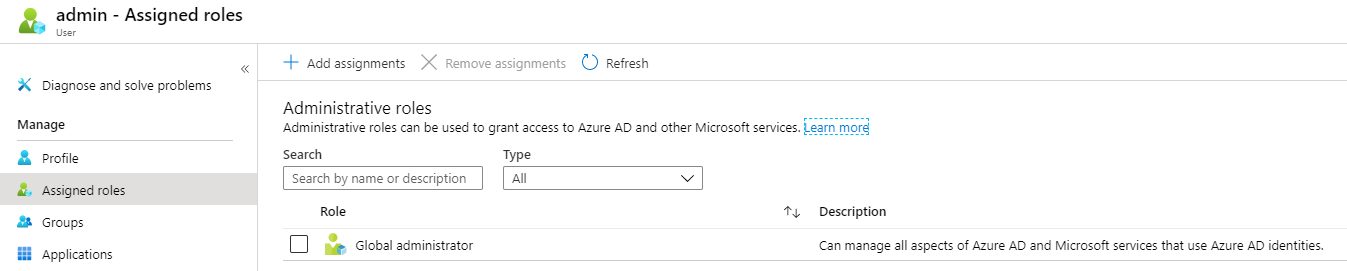
This role is easily added to the user account in Azure AD, either at the time of creation or later by opening the user account and selecting Assigned Roles.

2. Access Management For Azure Resources

This is an easy right to miss! It is also known as Elevated Access. This right gives you access to all subscriptions and management groups in your directory (tenant) and therefore grants you superuser powers that should be limited to a very small group of capable people. Here’s how I learned about the right: I was cleaning up management groups that I created using a service principal. I knew the management groups were there, and I could see them, but my Global Admin user couldn’t remove them. It was only when I elevated my account that I was able to move the subscriptions and remove the management groups.

Part of the reason this right is so hidden is that it is not configured in the user account screen in the Azure Portal. Instead, sign in to the Portal with your Global Admin-enabled user, open Azure AD, and then go to Properties. Now click “Yes” under Access Management For Azure Resources. Now you will have rights to everything in Azure even if you weren’t granted them originally – this is why this superpower should be tightly controlled!

3. Role-Based Access

The typical person working with Azure should have only the rights that they need to do their job. The two big reasons are:

  • External threats: Prevent someone from compromising a dev/ops employee’s account and using their rights to compromise the entire system.
  • Internal threats: Limit access that a single employee has, either for security or compliance reasons.

For example, one should not be made a subscription owner just “because”. Typically, being made a Contributor will give you more than enough rights to do your job in a subscription. And maybe a lesser right is necessary – an auditor might only be made a Reader or you might use/create a more specialised role.

One should start the RBAC design using management groups. As with organisational units in Active Directory Domain Services, management groups should model the administrative model, not the HR org chart. Permissions and policy association should start at the top and become more granular as you work your way down. Eventually, you will grant dev/ops rights often at the subscription or even resource group level.

Another Consideration: Privileged Identity Management

PIM is a solution in the Azure AD per-user licensing SKUs that is sometimes used in large enterprises. It allows you to deploy just-in-time access to Azure resources/rights. There are a bunch of features in PIM that make it a useful feature to limit any one person’s access to what they need, when they need it, and for only as long as they need it, with MFA, oversight, and auditing.

Failed to add new rule: IpSecurityRestriction.VnetSubnetResourceId is invalid.

This post is focused on a scenario where you are creating an Access Restriction rule in an Azure App Service to allow client requests from a subnet in a Virtual Network (VNET) and you get this error:

Failed to add new rule: IpSecurityRestriction.VnetSubnetResourceId is invalid. For request GET https://management.azure.com/subscriptions/xxxxxx/resourceGroups/xxxxxx/providers/Microsoft.Network/virtualNetworks/xxxxxx/taggedTrafficConsumers?api-version=2018-01-01 with clientRequestId xxxxxx and correlationRequestId xxxxxx, received a response with status code Forbidden, error code AuthorizationFailed, and response content: {“error”:{“code”:”AuthorizationFailed”,”message”:”The client ‘xxxxxx’ with object id ‘xxxxxx’ does not have authorization to perform action ‘Microsoft.Network/virtualNetworks/taggedTrafficConsumers/read’ over scope ‘/subscriptions/xxxxxx/resourceGroups/xxxxxx/providers/Microsoft.Network/virtualNetworks/xxxxxx’ or the scope is invalid. If access was recently granted, please refresh your credentials.”}}.

The Scenario

The customer wanted to deploy Standard Tier Azure App Services with some level of security in a hub and spoke architecture. The hub is in Subscription A. There a virtual network with an Azure Application Gateway (WAG)/Web Application Firewall(WAF) is deployed into a VNET/subnet. The WAF subnet has the Microsoft.Web Service Endpoint enabled, allowing the WAF to reverse proxy web requests via the direct path of the Service Endpoint to the App Service(s).

The App Service Plan and App Services are in Subscription B. The goal is to only allow traffic to the App Services via the WAF. All the necessary DNS/SSL stuff was done and the WAF was configured to route traffic. Now, the customer wanted to prevent requests from coming in directly to the App Service – an Access Restriction rule would be created with the Virtual Network type. However, when we tried to create that rule, it failed with the above security error.

Troubleshooting

At first, we thought there was an error with Azure Privileged Identity Management (PIM), but we soon ruled that out. The customer had Contributor rights and I had Owner rights over both subscriptions and we verified access. While doing a Teams screen share the customer read an article about Azure Key Vault with a similar error that indicated an issue with Resource Providers. We both had the same idea at the same time.

Solution

In the WAF subscription, enable the Microsoft.Web resource provider. This will allow the App Service to “configure” the integration with the subnet from its own subscription and solves the security issue.

Microsoft Ignite 2019 – Top 10 Azure Governance and Adoption Best Practices

Speaker: Nathan Lasnoski, Concurrency, MVP

Prepare & Execute

Picture of a tri-athlete. Riding on perfect smooth surface with perfect picture with hands off the brakes. The person is prepared – set up well. Azure operators & devs should be like this. Ready, confident, and on a smooth road with a great experience with no sudden stops.

Preface – Getting Started

Cloud Maturity Curve.

  • Legacy: On-prem, business not enabling. IT is a blocker to innovation.
  • Legacy +: IT stagnant. Scattered cloud across the business.
  • Platform: Target today – operationalized loud. Goverened.
  • Product:
  • Innovation
  • Fusion: Technology fully business integrated.

What is an “Azure Environment”?

  • Operated by the corporation
    • Runs with standards, policies, controls
  • Diverse workload enablement, powers innovation
    • Servers, containers, serverless, PaaS, AI, digital ledger
  • Stakeholder management
    • Delegated to targeted teams, under corporate oversight
  • Representative of technology investments
    • Areas like cost should relate to intended investment areas/business value. IT is not the bucket of all IT spend – Those spending should care about the things they pay for.

Number 1 – Employee Organizational Change and Operations

Transformation of organization, tied to DevOps

  • Increased multi-skill frameworks
  • Emphasis on code, repeatability, automation

New products/projects made up of:

  • Cloud architecture & operations
  • Innovation and business enablement
  • Application and Product DevOps Teams
  • Security

Number 2 – Define an operational and leave adoption strategy

High level view of a cloud program – diagram in the slides.

  • Define an iterative cloud program whith a MVP motion on operations
    • OPERATIONAL STANDARDS, PROVISIONING PROCESS, WIKI, MOTIONS
  • Be careful about overreaching – Corporation has a bad relationship with IT.

Number 3- Be a Blueprint That is Manageable

A structure of management groups and subscriptions, with limited resource groups.

Left-hand IT, Right-side business. Top – management groups, bottom – IT. Why split corp IT and business areas should be in different subscriptions/management groups.

Using 1 overloaded sub is BAD, even is MS people recommend it (AGREED!). RBAC, cost-management, quotas, etc.

Number 4 – Approaches for provisioning short-term and long-term

Using a portal for provisioning. It’s a manual process. Azure Portal, ServiceNow, whatever – minimise their usage. Problem with portals is that all the old manual problems of on-prem follow to the cloud. No documentation on config. No repeatability. No change control.

Source Code Release (Azure DevOps) > Control Plane (ARM, Policy) > Deployment.

Subscriptions should be read-only. Only time you use the portal to deploy/config should be sandboxes. Enterprise deployments should be done as code:

  • ARM
  • Script
  • Program code

This includes 3rd party stuff you put in VMs.

This is the right way to start. And it prepares you for PaaS, e.g. AKS, App Services, etc.

Number 5 – Define Structures for Naming and Tagging

You cannot work in the cloud long-term without this.

Critical tags:

  • Owning team
  • Business unit
  • Application Name
  • Classification (security)
  • Environment moniker (dev, test, production, etc)
  • Cost Center

Number 6 – Recovery and re-deployment approaches

  • Assume re-deployment at every level, especially corp-IT.
    • The Corp IT infrastructure is code too, store it in a code repository
    • Build based on release management pipeline
  • Re-deployability such as AKS
    • Re-deployable app environments
      • AKS
      • App Services
      • Data services
      • Functions
      • OAM, RUDR, DAPR

Number 7 – Adapt Security Controls For The Cloud

Movement to vertical network design. On-prem IT is flat and horizontal and things talk directly to things. In the cloud, direct connections should be limited with micro-segmentation – see previous blog posts.

This is easier to do in the cloud, and it should be done during migration and new-builds. According to Nathan, it’s one of the reasons to migrate to the cloud at all!

Use Azure Security Center to assess the environment and monitor it from a security perspective. Leverage automated responses to react, e.g. playbooks in Azure Sentinel. Use custom policies to audit Azure too.

Admin accounts:

  • Segment addresses – don’t use admin email accounts for Azure accounts.
  • Limit owner rights. Contributor at most. Read-only ideally in production.
  • Use PIM (AAD P5) to limit access but require rights escalation for admins. Consider approval.
  • Use MFA. Less than 8% of Azure tenants have MFA enabled.

RBAC applied to applications

  • Teams only get access to necessary RGs/subscriptions.
  • Admin owner credentials are different than application credentials
  • Deployments are encouraged to be automated from source code.

Number 8 – Monitoring responsibilities change as application owners take more responsibility

  • Corp IT is responsible for “cloud IT”.
    • Standards policies, connectity – not just things that go bump in the night
    • Ensures governance is applied, monitors for aggregate issues
  • Security might be a separate group
    • Measuring security compliance, reacting to incidents
    • Runs against playbooks but moving declaratively
  • Application teams
    • Own operational monitoring and reacting to their services
    • DevOps teams operating stuff

Azure Monitor/Logs provides data access via resources now that reflects RBAC to resources.

Number 9 – What do I do with my CMDB and how does it change?

  • Original function of the CMDB was to contain configuration data
  • Modern environment is quarriable platform, declarative config, DevOps

Resource Graph and DevOps can be your living always correct CMDB.

Number 10 – Building a methodology for cost reviews and organizational discipline

  • Tags are critical to cost analysis
    • Use policy enforced tagging regimes
    • Apply tags as needed for accounting purposes
  • Be able to judge costs on:
    • Owner
    • Business unit
    • Application
    • Technology
    • Dev/Prod/QU
  • Options:
    • Azure Cost Management
    • Custom PowerBI

Controlling Costs:

  • Setting budgets
  • Analysis and improvement
  • Limit high spenders
  • Optimize sizing
  • Cost management team should pay for itself.

Microsoft Ignite 2019 – Deliver Highly Available Secure Web Application Gateway and Web Application Firewall

Speaker:

  • Amit Srivastava, Principal Program Manager, Microsoft

Mission Critical HTTP Applications

  • Always On
  • Secure
  • Scalable
  • Telemetry
  • Polygot – variety of backed, IaaS, PaaS, on-prem

Many things to think about.

What Azure Pieces Can We Use?

  • WAG
  • AFD
  • CDN
  • WAF
  • Azure Load Balancer
  • Azure Traffic Manager

WAG

Regional ADS as a service. A full reverse proxy. It terminates the incoming connection and creates a new one to the web server.

  • Platform managed: built-in HA and sclability
  • Layer 7 load balancing: URL path, host based, round robin, session affinity, redirection
  • Security and SSL management: WAF, SSL Offload, SSL re-encryption, SSL policy
  • Public or ILB: Public internet, internal or both.
  • Flexible backends: VMs, VMSS, AKS, public IP, cloud services, ALB/ILB, On-premises
  • Rich diagnostics: Azure monitor, log analytics, network watcher, RHC, more

Standard v2 SKU in GA

  • Available in 26 regions
  • Built-in zone redundancy
  • Static VIP
  • HTTP header/cookies insertion/modification
  • Increased scale limits 20 -> 100 listeners
  • Key vault integration and autorenewal of SSL certs (GA)
  • AKS ingress controller (GA)

Autoscaling and performance improvements:

  • Grow and shrink based on app traffic requirements
  • 5 x better SSL offloads performance
    • 500-50,000 connections/sec with RSA 2048 bit certs
    • 30,000, 3,000,000 persistent connections
    • 2,500 – 250,0000 HTTP req/sec
  • 75% reduction in provisioning time ~5mins

Key Vault Integration in v2 GA

  • Front end TLS cert integrated with Azure Key Vault
  • Utilizes user-assigned management identity for access control on key vault
  • Use certificate or secrets on Key Vault
  • Pools every 4 hours to enable automatic cert renewal – you can force a poll if you need to
  • Manual override or specific certificate version retrieval

WAG v2 Header Rewrites

  • Manipulate request and response headers and cookies
    • Strip port from x-forwarded-for header
    • Add security headers like HSTS and X-XSS-Protection
    • Common header manipulation ex: HOST, SERVER
  • Conditional header rewrites … something

Ingress Controller

  • Ingress controller for 1+ AKS clusters at one time
  • Deployed using HELM – newer easier options by EOY
  • Utilized pod-AAD for ARM authentication
  • Tighter integration with AKS add-on support upcoming
  • Supports URI-path based, host based, SSL termination, SSL re-encryption, redirection, custom health probes, draining, cookie affinity.
  • Support for Let’s Encrypt provided TLS certs
  • WAF fully supported with custom listener policies
  • Support for multiple AKS as backend
  • Support for mixed mode- both AKS and other backend types on the same application gateway.

http://aka.ms/appgawks

Application Gateway Wildcard Listener

  • Managed preview
  • Support for wildcard characters in listener host name
  • Supports * and ? characters in host name
  • Associate wildcard or SAN certs to serve HTTPS

Telemetry Enhancements

  • GA
  • Diagnostics Log Enhancements
    • TLS protocol version, cipher spec selected.
    • Backend target server, response code, latency.
  • Metrics Enahncements
    • Backend response status code
    • RPS/healthy node
    • End-to-end latency
    • Backend latency
    • Backend connect, first byte, and last byte latency.

Azure Monitor Insights for Application Gateway

  • Public Preview
  • Sign health and metric console for your entire cloud network#
  • No agent/configuration required
  • Visualize the structure and functional dependencies
  • More

AKS Demo

He loads a Helm YAML config to the AKS cluster. Now the AKS cluster can configure listers, backend pools, rules, etc for the containers/services running on the cluster. Pretty cool.

Azure WAF

Cloud native WAF

  • Unified WAF offering
    • Protect your apps at network edge or in region uniformly
  • Public preview:
    • Microsoft threat intelligence
      • Protect apps against automated attacks
      • Manage good/bad bots with Azure BotManager RuleSet
    • Site and URI pathc specific WAF policies
      • Customise WAF policies at regional WAF for finer grained protection at each host/listener or URI path level
    • Geo-filtering on regional WAF

WAF

  • HA, scalable fully platform managed
  • Auto-scaling support
  • New RuleSet CRS 3.1 added, will soon be the default
  • Integration with Azure Sentinel SIEM
  • Performance and concurrency enhancements
  • More

WAF Policy Enhancements

  • Assign different policies to different sites behind the same WAF
  • Increased configurability
  • Per-URI policy

Geo Filtering Public Preview

  • Block, allow, log countries.
  • Easily configurable in WAF policy
  • Geo data refreshed weekly

Only in special Portal URI at the moment – normal Azure Portal soon.

Bot Protection (Public Preview)

  • Stuff

Microsoft Ignite 2019 – Extending Azure Resource Manager (ARM), Azure’s Control Plane

Speakers:

  • Guarav Bhatnagar
  • Evan Hissey

Challenges with Extending Azure

  • As part of my template deployment, I want to …
    • Do some post-configuration to set up my application
    • Ex-Configure DB passwords, etc.
  • Certain services/types/APIs can’t be called from ARM templates
    • Ex – Create AD users, storage tables, calling APIs external to Azure
  • 200+ Azure services – which ones are the right ones for my applications?
    • Which is the rights VM SKU to use?
    • Which would be more cost effective for my company?
  • Integrating my service in Azure
    • New or existing SaaS
    • Service just for my enterprise
    • Easy discovery for Azure customers

What is Extending Azure?

What does this really mean? Magnify the power of Azure platform by enabling customers and partners to easily bring in custom solutions to Azure.

  • Who are you building it for?
    • Own ent3erprise
    • Selected customers
    • All customers?
  • Different options available at your disposal

Deployment Scripts

  • New resource type – Microsfot.Resources/deploymentScripts – can be run directly from your ARM template.
  • Allows running PowerShell/CLI scripts
  • Script can be provided inline or URI
  • Pre or post configuration of ARM resources
    • Ex: configurate Cosmos DB accounts, DB passwords, create certifictes.
  • Fire and forget resource type
    • Configurable auto-deletion of this type – delete? And when?

Demo Service Catalog – Nothing New Here

Goes to Storage Accounts to create one. Names it. Clicks through. It fails at validation. It fails because he does not have permission to create a storage account – a policy prevents creation. He goes to service catalog. There is a managed storage account option there. It’s just managed apps – behind the scenes, a “service provider” subscription is filled with the actual resources, and they are reflected and billed through the “customer” subscription.

Extensibility Questions

  • Organisations want to extend ARM and Azure management to the services they use, both custom and 3rd party built.
  • Partners want to extend their services directly into Azure for their customers. Bring your SaaS into Azure, for example. Or create an API to do some complex task.
  • Managed app developers need to give some control to their customers

You can create custom resource provider custom actions and custom resources. Access from Managed App UI, PowerShell, ARM Template, HTTP Request. Any REST API, Azure Function, and more.

Azure Custom Provider Enables

  • Organisations want to extend Azure management to the service they use, both custom and 3rd party
  • Partners want to extend their services directly into Azure for their customers.
  • Manage app providers want stuff.

Demo

He’s got a managed application for ServiceNow in the Azure Portal. He clicks add to “onboard” resources. This gives the managed app permissions to the resources.

Managed App VS Code extension in private preview now and public version coming soon.

We can see in the VS Code ARM managed app code that one of the actions calls a logic app. We are shown the logic app, which uses a ServiceNow CMDB API call.

New feature: A policy to associate a managed app with an action, e.g. do something when a resource is created.

Customer Needs

  • Operated and managed for them by a 3rd party
  • Simple discovery and acquisition from Azure Marketplace
  • No overhead to begin when consuming complex applications

Partner Needs

  • Enable management out of the box
  • Easy to author
  • Something else

Azure Managed Applications Demo

Partner publishes an app in Managed Applications Center in Marketplace Applications. Can view subscription IDs, resource groups, customer names, version, and even alerts. Creates a new offer/SKU. Adds a new packaged file which is a zip file containing JSON files. Specifies principal ID and permissions for support staff from the partner tenant.

New private preview in December. You can specify custom metering for managed applications. It will appear in the customer bill. You can have up to 18 line items. You can create different tiers of SKUs.

What is a Resource Provider?

Around 220 RPs in Azure, 10% of which are third party. Most powerful mechanism to deliver your service to Azure customers.

Get the benefit of the Azure platofrm native capabilities for your services: RBACK , policy, billing and more.

Why Create an RP?

  • Customers use native Azure services AND partner services
  • Homogeneous experience across services
  • Capability parity across services
  • Custom billing

Build Services for off-Azure resources

  • Leverage Azure Arc and provide capabilities over Azure
  • More

Waste of useful time for customer story sales pitch.

Microsoft Ignite 2019 – Delivering Services Privately in Your VNet with Azure Private Link

Speakers:

  • Narayan Annamalai, Group Program Manager, Microsoft
  • Sumeet Mittal, Senior Program Manager, Microsoft

Private PaaS

We’ve been using Service Endpoint in addition with ACLs on the PaaS services. But this doesn’t provide an IP on the subnet. NSGs still need to allow access to all IPs of that PaaS service, e.g. all storage accounts.

Private Link maps your PaaS service into a subnet via an IP address. A private endpoint is effectively a NIC that connects to an instance of the PaaS.

Data Exfiltration Protection

Only a specific PaaS instance is mapped into your VNet subnet. So only one storage account, for example, joins your subnet via the Private Endpoint.  Trying to by pass this using clever tricks, e.g. DNS, will not work because the packets are dropped – this is data exfiltration protection.

Other clouds map an entire service, e.g. all storage accounts, to an IP address. Azure Private Endpoint maps a specific instance, e.g. a single storage account, to an IP address.

Secure Connectivity From On-Premises

Before:

  • You connect to PaaS via public DNS
  • The name resolves to the service public IP address
  • If VPN/no connection, you route over Internet. If ExpressRoute with Microsoft Peering enabled, you route over the ExpressRoute circuit.

After:

  • You connect to the PaaS service using a new DNS name
  • You route over the network connection (VPN/ER) to the VNet/subnet.
  • You connect to the Private Endpoint private IP address for the instance of the PaaS service.

Not Just For PaaS

Not just a new feature. It’s a new platform ability.

You can build your own services too, behind Standard Tier Load Balancer, and present the services to other VNets/tenants via Azure Private Link.

Private Link is the product. Private Endpoint is how you use it.

There are three kinds of Private Link:

  • PaaS
  • Other partner services (Snowflake)
  • Consume your own services

Simple Example – VM to Storage Account

VM sends a packet to Blob1.core.windows.net. The packet drops to the host SDN. An encapsulation layer adds a routable DIP (data center IP) address and some metadata. The packet travels the backbone network to the storage frontend. It is decapsulated and presented to the destination.

Demo

Creates a storage account. In networking, he has a choice of Public endpoint (all networks), public endpoint (selected networks), private endpoint.

He creates a private endpoint and selects the VNet/subnet. He then integrates with a private Azure DNS zone. It creates a DNS record for the storage account mapping to it’s private IP address in the VNet/subnet.

Into the storage account > Private Endpoint Connection. Tries to connect to the storage account from Internet – no access. He starts up a VM in the same VNet as the storage account private endpoint. He does a nslookup of the storage account’s private DNS name and it resolves to the IP address in the VNet.

In the VM he opens storage explorer and edits a blob. He logs into another VM that is also on the VNet. Browses to the storage blob in Storage Explorer. Opens the previously edited blob and can see the edits.

This storage account is now accessible from the VNet and nowhere else.

Announcements

  • Preview in all regions
    • Storage, ADLSv2, SQL DB, SQL DQW, Customer Own Service
  • Public preview Private Link available for Cosmos DB
    • Resions: uswestcentral, usnorth, uswest

Your Own Services

You can provide or consume your own services via Private Link.

  • Create/convert your existing services into Private Link Service – one API call to convert
  • VNet-Vnet connectivity without worrying about overlapping IP space
  • No regional, teant, subscription, or RBAC restrictions
  • More

Create Private Link Service

Lots of Marketplace scenarios spanning tenants.

  • App behind Std Load Balancer
  • Link service with one button/API call.
  • Mapped to the private IP of the load balancer

Consume Private Link Service

Similar to consuming PaaS:

  • Create a private endpoint
  • Attach to identification from the service provider
  • Done!

Approval Workflow

  1. Service provider creates a service
  2. Service provider creates a private link with Std LB
  3. Service provider shares private link service ID with consumers.
  4. Consumer creates a private endpoint in subnet with the service ID
  5. There is an approval by service provider.
  6. Consumer configures DNS to map to the private endpoint

Key Capabilities

  • Alias: Masks service provider resource IDs with a globally unique readable name. Mapped on the backend. The unique name uses a hash of stuff from service provider and other attributes.
  • Visibility: How to control access to the alias/service, e.g. stop random people DOSing you. You can make a service completely private to approved customers. Or you can make a service private to all Azure customers. Or you can limit visibility to selected subscriptions.
  • Auto-Approval: For huge services, you can avoid manual approvals. You can set audiences in the auto-approval list.
  • NAT-IP: The service provider masks customer IPs using NAT IP.

NAT IP

IP allocated by service provider

Acts as a source IP for inbound packets

Keeps service provider network private

Helps ensure overlapping IPs between source and destination are acceptable

TCP Proxy v2 Support

Service provider says they want to receive the TCP headers and extract the information. This allows you to identify unique customers even though they share a NAT IP on the service provider side: ACL, filter, etc.

Simplified Network Management

  • Predictable IP for configuring your policies
  • Cleaner ACLs on both Azure and on-prem
  • Resource the traffic the way you want
  • Approval workflow based modelling. No RBAC dependency
  • More

Demo

Goes to Private Link Center. Creates a new service and names it/selects region. Chooses the Std Load Balancer in front of the service. Selects up the frontend IP and NAT IP address. Chooses the auto-approval method.  A new Private Link Service resource is created – opens it and we can see the alias – copies it.

Creates a new Private Endpoint in a different subscription. Chooses the option to connect to the Alias ID and adds request text. Selects the VNet/subnet to put the private endpoint into.

In Private Endpoint Connections, the service provider sees the request and can approve/reject it – approves it.

On the consumer side he tries to connect to the private IP address – it’s just NATing RDP to the VMs in the service provider network.

Marketplace Services

  • Create the services
  • Advertise
  • Manage