Lenovo Yoga Tablet 8 – 8 Months Later

It was 8 months ago when I purchased my Lenovo Yoga Tablet 8, an 8” Android tablet. I raved about the form factor, price ($206.99 on Amazon.com, £150.99 on Amazon UK, €153.06 on Amazon Germany), and all that jazz.

image

So how has the tablet worked out?

I mentioned in my previous post that I was going to test the battery life in my upcoming travels. I did:

  1. I charged up the tablet overnight in Berlin
  2. Watched video flying from Berlin to London
  3. Watched video flying from London to San Francisco
  4. The battery was at 54% when I checked into the hotel in the west coast of the USA

And that was before a firmware update that increase published battery life from 16 hours to 18 hours. I suspect that this device pulls power from dark matter in the universe. It is incredible, with only Kindle readers beating it.

The screen is not the best for viewing photos … but let’s be clear. The machine is CHEAP and works great for video.

I probably use this device more than any machine other than my PC at work. I travel with it, using it to keep myself entertained in hotels, airports, planes, etc. I keep it at my bedside locker, so I can check up on things when I hit the snooze button in the mornings. It has replaced my Kindle reader as my way of consuming books – the extra large battery doubles as a comfortable handle.

I’ve used a Micro-SD to expand the paltry 16 GB of inbuilt storage. Using a SD converter, I can quicky copy content from a PC/laptop onto the machine. Combined with the hotspot on my phone, I have easy Internet access. Throw in ProXPN and I am accessing Netflix USA while in Europe, and UK/Irish services while abroad. My Bose headphones give me perfect sound in a noisy environment.

The lightweight CPU has not been an issue for me. I don’t play many games – but Robocop, Plants VS Zombies 2, and the Angry Birds carting thing play fine.

I have a lot of good things to say about this device. I wish it was a Windows machine – I do have a Toshiba Encore tablet but the Yoga wins on battery life (against almost everything) and apps (quantity & quality VS Windows).

I strongly recommend this tablet to anyone needing an affordable mobile device, and who would like to complete their journey with some battery life left …. which is actually a big deal with airport security now.

Toshiba 8” Encore 2 Windows 8.1 Tablet

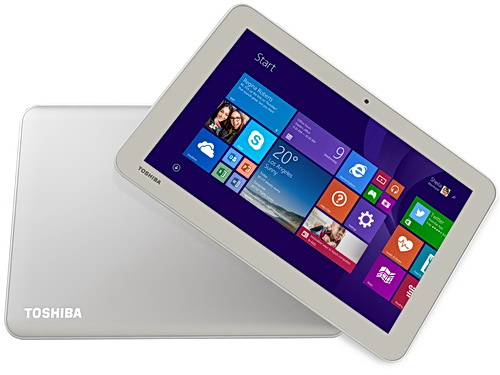
I work for a Toshiba distributor so every now and then they let me put my hands on something new … or sometimes something that isn’t coming out for quite a while. A few months ago I got to hold and play with the new Toshiba 8” and 10” Encore 2 tablets. Both were pre-production models. I just got my hands on a production version of the 8” Toshiba Encore 2 (WT8-B-102), running Windows 8.1 with April 2014 Update.

To be precise, this is running Windows With Bing, the free (to OEMs) edition of Windows that is hard coded with Bing as the search engine. The idea is that instead of OEMs paying for Windows and then taking money from another search engine to set them up as the default, the OEM gets a free copy of Windows, and this brings down the cost of the h/w for the consumer.

Capture

This is a consumer tablet. It has an Atom processor so it does not run the doomed Windows RT. It’s running a 32-bit copy of Windows 8.1. There is 1GB RAM and 32 GB of storage … don’t fret! This is the April 2014 version of Windows so it features the new magic installation that consumes a lot less space. This tablet has just over 20 GB free out of the box. That’s a big improvement over the original 32 GB Encore which I own. And 1 GB is enough for the light weight consumer stuff that you’ll do with this tablet: apps.

The tablet is slimmer than the Encore 1 and has a smooth back. It is grey instead of “gold”. Also, the Windows button has moved to the top edge, instead of a capacitive button on the front-bottom; I guess that reduces costs.

image

The Micro-HDMI port of the Encore 1 is gone – cost savings for the masses, I guess. It’s not a big deal; Windows 8.1 defaults to portrait mode on 8” devices and that’s incompatible with a TV. There is an audio jack on the top and an open Micro-SD port on the side for easy access. On the base there is actually a place to tie a wrist cord if you should want one.

There is a normal micro-USB 2.0 port, unlike the dodgy one you get in a Dell Venue 8, which breaks if you do plug in a normal USB cable “upside down” – which the Dell unfortunately allows you to do. One teeny design thing I don’t like: the included power chord is angled and obstructs easy access to the Windows button. You can use any old (Windows or Android) phone charger cable and that solves the issue. The box also includes a USB dongle; with this you can plug in your USB stick/drive into the tablet and it also has an additional micro-USB port so you can continue to power the tablet while using a USB device.

The cameras are 1.2 MP on the front and 5 MP on the back. There is no 3G/LTE option – the thinking here is that people already have mobile phone plans and can enable a hotspot. There is no stylus (above you see a normal pen for a sense of scale) – this is a consumer machine.

I am told that the retail price in Ireland will be around €220 – I only see our buy price as distributors. I have seen this tablet for sale for under €250 on Irish online stores. Amazon.com has it on sale for under $240. Amazon UK has it for under £180. It’s not on Amazon.de yet.

It’s a nice tablet at an affordable price, and has made form factor improvements over the first version. The biggest improvement, though, is the additional free storage capacity in the 32 GB model, thanks to Windows 8.1 April 2014 Update. The only real concern is apps – which is outside of Toshiba’s (Lenovo, Dell, Asus, etc) control, and it’s something that Microsoft must do a better job at sorting out. Either the apps suck (Kindle reader for Windows) or don’t exist, and there are still too many cra-apps in the hard-to-navigate Windows Store.

I hopefully will get to play with the new 10” Encore 2 (under $270 on Amazon.com) in the near future.

Technorati Tags: ,

My New Work Laptop – A Toshiba KIRAbook Ultrabook

My work laptop for the last 3 years has been a modified HP EliteBook 8740w. It’s usefulness shrank pretty quickly as System Center grew bigger and my Hyper-V demos started to require more and more machines, 10 Gbps networking and JBODs. A lab has been built and I routinely access it remotely – and I’ve been known to record some demos using Camtasia when Internet access is dodgy.

image

An opportunity arose to replace my work laptop – I could move from “the best” to an Ultrabook. This would kill a few birds with one stone:

  • Use a brand of machine in work presentations that my employers actually distribute (Toshiba)
  • Use a lighter machine
  • Donate “the beast” to the lap where it can be reused as a host, maybe as an NVGRE gateway host.

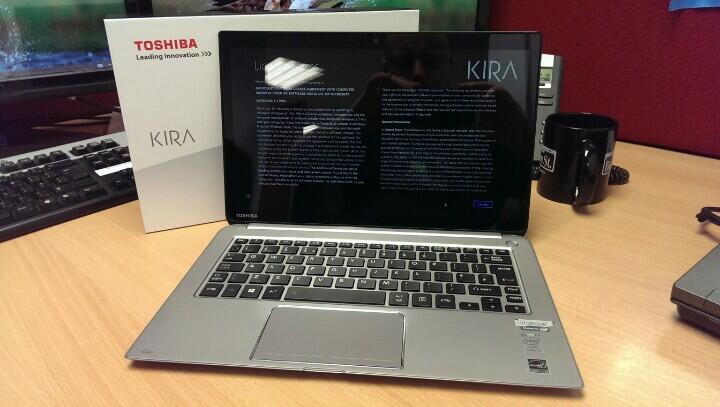
We ordered in some Toshiba KIRAbooks, Toshiba’s premium consumer ultrabook. This is a mad laptop; i7-4550U, 8 GB RAMM, 256 GB SSD, and …. a screen running at 2560 x 1440. It’s unusable without Windows 8.1 screen scaling.

image

First impressions: Very nice (touch) display. Nice functional build. It looks nice on the desk. Good keyboard. Nice big mouse pad. Slim. Obviously lighter than “the beast”. It has 3 x USB, 1 x SD, and 1 x full sized HDMI. Battery is listed at 9.16 hours (probably by using the custom ECO power profile). It came with Windows 8.1 Pro with the April 2014 update. There is no stylus. And yes, I had to uninstall some crapware from MuckAfee, Spotify, and others. I will have to get USB/VGA and RJ45 dongles (I already use those for my personal Lenovo Yoga).

Price-wise, this seems to come in at $1,699,99 on Amazon.com. It’s just started shipping in Europe, and I didn’t see it on Amazon UK or Germany. AFAIK, Toshiba are selling to consumers via exclusive retailers.

I’ll write up a bit more when I have had time to work with it.

Technorati Tags: ,

Today Is April 8th 2014 – The Day That Windows XP Died

There are those who are negligent. There are those who tried to think Microsoft would never let this happen (some would say these deniers are also negligent). Today is the day that we finally reach the end of support for Windows XP.

Think about it; Windows XP was released in 2001. That is 13 years ago! How computers and usage has changed since then. Battery life wasn’t an issue. Attacks on security were different. Touch was a thing you did with a loved one (I hope that’s not your phone!). Roaming was when your phone bill rocketed (OK, that hasn’t changed much).

And Windows XP was also greeted with much derision. People were going to cling to Windows NT 4.0 with their cold dead hands. XP was even called “Windows Telly Tubbies” (after the default wallpaper) and “Windows Fischer Price” (FP instead of XP). Admins hated that things had move around. “Oh! imagine the amount of user training that will be required”. Sound familiar? It took the eventual end of support for NT 4.0 to force people to upgrade, eventually to Windows XP. And in the end, the world kept turning, the earth didn’t swallow us whole, and businesses kept ticking along. Hell, I did a project in 2003 where we blasted away Windows NT 4.0 & Office 97 with Windows XP & Office XP (before Office 2003 was out) and we did very little in the way of user training.

So, bye bye Windows XP … except for you laggards who are clinging to this now dead OS in your career graves.

And no, I don’t care to hear sob stories about “I must use XP”.

And while we’re at it, we’re also bye bye also to a range of other products:

  • Office 2003, and all the sub-components
  • Content Management Server 2002
  • Exchange Server 2003
  • InterConnect 2004 Standard (no idea what it is!)
  • InfoPath 2003
  • FrontPage 2003
  • Project Server 2003
  • SharePoint Portal Server 2003
  • Virtual PC 2004
  • Visio 2003
  • Windows Services for UNIX 3.5
  • And yeah, Windows XP Tablet PC Edition. Yah suckahs … tell me that Apple invented the tablet!!! Jean Luc Picard was getting all touchy feely long before Apple copied the tablet concept (admittedly making is actually useful).
  •  

    Technorati Tags:

    HP Determined To Commit Ritual Suicide

    Remember when HP announced that they were considering selling their PC division? They felt the market was weak and they should focus more on servers & storage. That killed PC sales for HP, ensure Lenovo was the number one choice in business, and fired yet another HP CEO. Eventually the non-decision was reversed but at what we can only guess was a huge cost.

    Meg Whitman, the current CEO, seems determined to kill off HP’s enterprise business completely. If you follow me on Twitter then you would have read a tweet I sent out on Feb 7th (while on vacation):

    image

    HP formally announced (we read rumours over a month ago) that they would be restricting access to firmware updates. You would need to maintain an active support contract on your hardware (a la Cisco) to have the right to download firmware for your servers and storage.

    Huh!?!? Sure, HP, this firmware is your “intellectual property” as you asserted in the announcement. But I’m sure that people who bought the hardware with 3 years support expect, you know, support for 3 years. With new Linux variants out every few months, vSphere updated annually, and Windows versions appearing every 12-18 months, we kind of need those firmware updates for a stable platform. If HP doesn’t want to offer me stability, then why the hell would I consider using their out-of-date hardware? Seriously?!?!

    It appears that Mary McCoy of HP felt like she needed to defend the boneheaded decision. There is no defence. This is about as stupid as changing the licensing of a virtualization product to be based on maximum VM RAM – and we saw how quickly that course got reversed.

    image

    HP is truly a Blackberry in the making, but just bigger. Ineptitude is the central quality you need to sit on the board or to be an executive. Cluelessness and a disconnection from reality are desirable skills. In my non-guru hands, 3Par underperforms against Dell Compellent (and much better people than me have proven this) and the Gen8 servers are now doomed.

    I used to be a HP advocate. Their server hardware was my first choice every time for a decade. But that all changed with the release of WS2012 when I saw how Dell had taken the lead – or was it that HP stopped competing? And now HP wants to commit Seppuku at the hands of the samurais at the top. Bye bye HP.

    In other recent news, Lenovo bought the X series server business from IBM. I HATE IBM’s products and support. But I do love what Lenovo has done to the IBM PC business. I wonder how or if they’ll repair the IBM server business to give Dell some competition that HP evidently doesn’t want to offer?

    2 Months + Christmas – How The Nokia Lumia 1020 Windows Phone Has Fared

    I’ve been pleasantly surprised how well the Lumia 1020 has fared, reviewing it here and on the Petri IT Knowledgebase. How has the phone continued to work over time?

    It’s not all been smooth sailing. There are times when there’s an app that I want to use that just is not there. I like to get my news with a sense of humour, and TheJournal.ie does sadly not have a Windows Phone app. That has me reaching for the browser or for my Lenovo Yoga 8 Android tablet where there is an app. I’ve also been doing some travel booking and there’s a distinct shortage of those apps on Windows Phone.

    Over the holidays I did quite a bit of driving. And I like to drive safe, so I have a third-party Bluetooth hands free kit (Parrot CTK 3100) with recently upgraded firmware. Strictly speaking, the kit does not support the Lumia 1020, but it does support the 925 and 52x handsets. The experience was working well, but something went wrong over the holiday – I could make/answer calls but the audio failed to go over the kit. I did a little digging and eventually reset the phone. No joy. Then I “reset” the kit by removing all paired phones and that’s when I noticed something: My phone was registered twice, once under the default “Windows Phone” name and again with the unique name I had recently entered in the Windows Phone app. I made sure both entries were gone and I re-paired and tested. Everything was fine once again. Phew – I’d had to resort to using my HTC One for a couple of days so I could drive safely but now I am back on the Lumia 1020.

    The real test for this phone was communications, especially on Christmas day. I was celebrating the day with family. My girlfriend was with her family and I have friends scattered all over. Windows Phone was designed from the ground up for social media integration. And that’s what I got … in one app. Facebook, LinkedIn, and Twitter are all added as accounts in the Windows Phone settings. That means I get integrated chat in the Messaging app, not just SMS texting. I was texting and Facebook IMing in one place on the phone. It worked really well, able to stay in contact, and I didn’t have to app switch.

    There was some driving to be done too and Nokia’s Here Maps worked perfectly, even correcting me when I encountered a wrong road sign on New Years Eve!

    The big feature (figuratively and literally) of the Lumia 1020 is the camera. Christmas means low light and the camera did get used. Microsoft got the physical reference interface of Windows Phone right: the dedicated camera button is so handy. I took photos in low light both with and without flash. Obviously the flash-less photos suffer with motion blur and/or camera shake and some grain, but what the Lumia produces beats what any compact camera might offer in the same circumstances, at least in my experience!

    The other thing I’ve been doing is using the phone for music: be it while travelling or doing stuff around the house. The speaker quality is nowhere near what the HTC One offers (which might be best in class, including tablets) so I acquired a Creative (remember them!!!) portable Airwave HD Bluetooth/NFC speaker. Adding music to the phone is a breeze, and adding playlists from Windows Media Player is much easier than it is for Android. Tap the phone, pair, and music is playing via the speaker with volume control on the speaker and one the phone.  Nice!

    41XLcw1GMqL[1]

    The Creative Airwave HD is available from:

    So Windows Phone 8 on the Nokia Lumia 1020 has had a real world, real user test and it’s passed, although there are still questions remaining about app availability.

    Technorati Tags: ,

    First Impressions: Lenovo ThinkPad Yoga S1

    I ordered this Ultrabook from Lenovo to replace my 2-year-old (how time flies!) Asus UX31E.  The machine arrived in the office yesterday and I got my mitts on it this morning.

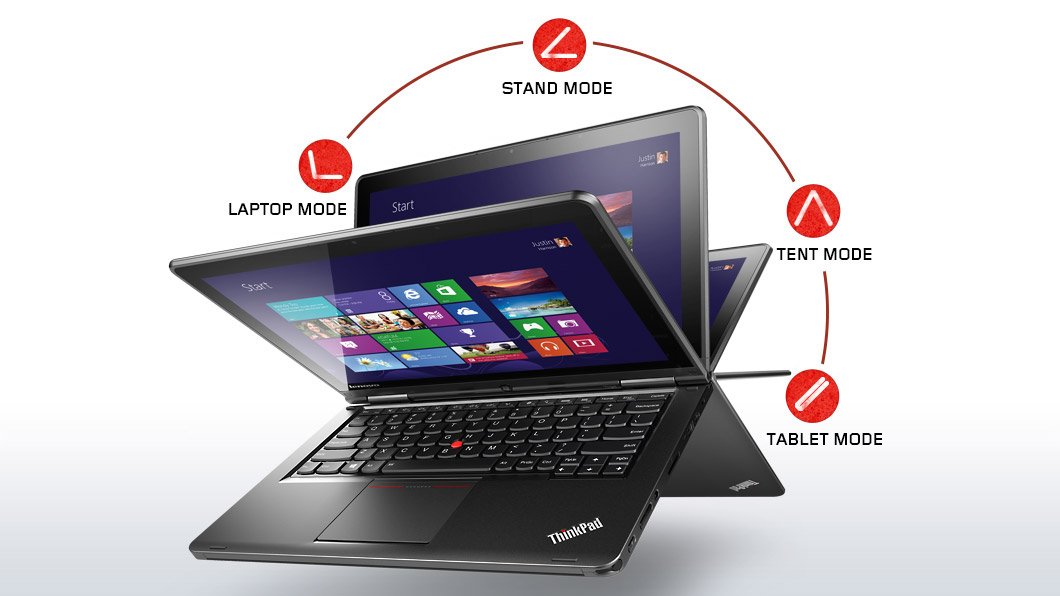
    The major trick of the Yoga is that it is a touch-enabled Ultrabook first, with the normally great ThinkPad keyboard.  But push that screen back and the stiff double hinges allow it to go back into “stand mode” for drawing/touching on a table, “tent mode” for watching video, or “tablet mode” where you can hand hold the device.  The keyboard rises up to avoid accidental touch when the screen reaches a certain point.  I will probably use this machine as a laptop 99.99% of the time.  The Yoga just so happened to offer the best mix of features that I required in my next Ultrabook.

    No, this device is not a tablet.  Anyone who reviews the Yoga Ultrabook as a tablet is a moron.  It’s a laptop that happens to offer some use options.  My Windows laptop is a Toshiba Encore and my Android machine for long distance entertainment is a Lenovo Yoga 8.  They are tablets and only a moron would review them as laptops.

    The custom spec I went with is:

    • Intel Core i5-4200U Processor (3MB Cache, up to 2.60GHz)
    • Windows 8.1 64
    • Touch & Pen, FHD (1920 x 1080)
    • Intel HD Graphics 4400
    • 8GB PC3-12800 DDR3L on MB
    • ClickPad without NFC antenna & module
    • 720p HD Camera
    • 1TB Hard Disk Drive, 5400rpm
    • 16GB M.2 Solid State Drive Double
    • Battery (LiPolymer 47Wh)
    • Intel Dual Band Wireless 7260AC with Bluetooth 4.0

    I wanted a digitizer pen.  In early tests, it works well with the Shared Whiteboard app.  That’s my alternative to using whiteboards or flipcharts, and it’s handy in OneNote for grabbing diagrams where a photo just won’t do.  The pen is one of the thin ones, allowing it to dock in the front-right corner of the Ultrabook’s base.  You hear that Surface, Sony, Toshiba, and a hell of a lot of others?

    I upgraded the RAM to 8 GB so I could run Photoshop reliably.  That’s also why I switched from SSD to a 1 TB HDD with 16 GB SSD cache.  Now I have room to store photos while on a vacation, meaning that a USB 3.0 drive is there only as backup.

    Port-wise, there is an SD card reader (nice for photography), Mini-HDMI (more reliable than micro-HDMI), and a pair of USB 3.0 ports.  There is also a Lenovo OneLink port for the OneLink dock.  There is no VGA port.  I have a USB – VGA adapter so that will continue to be used when connecting to projectors.

    The power and volume buttons are on the side, cleverly placed if you go into “tablet mode”.  You’ll also find a Windows button on the base of the screen.

    Touch works and works smoothly.  The build quality is solid.  I deliberately went with ThinkPad to get build quality to last for years.  The screen is nice and stuff, something that other touch Ultrabooks have gotten badly wrong by having too much wobble after being touched.

    There’s not too much crapware onboard.  Some Lenovo stuff and Norton 30-day trial.  I was sad to see that the system update tool requires Adobe Air.  That is a mortal sin in my books.  I guess the Chinese military still wants easy access to everyone’s computers.

    No review yet – I’ll need some time with the machine, and I’ll probably post something on the Petri IT Knowledgebase in the new year.

    Technorati Tags: ,

    Toshiba Encore Windows 8.1 8” Tablet – Initial Impression

    After the Dell Venue 8 Pro tablet debacle, I was hesitant about getting another Windows 8.1 mini tablet.  But I do need something for work (I’d be murderfied if I used the Android-powered Lenovo Yoga 8 at a MSFT event – not kidding!), so I decided to get the Toshiba Encore 32 GB 8” tablet, running Windows 8.1 (the consumer product, not RT).  Note: I work for a Toshiba distributor, and I was lucky enough to get one of the very limited stock.

    Encore Series Tablets

    Available from:

    Appearance

    The tablet is just over 10mm thick.  That’s thinker than an iPad mini, but not unreasonable.  The portrait mode works and feels natural, but more on that later.  The back is a tough plastic of some kind, not the Samsung shiny/bendy/slippery kind, but a pleasant & textured kind.

    Screen

    It’s a 1280 * 800 IPS display.  It seems to do the trick.  Don’t get overly caught up on pixel counts.  The original iPad mini has a lower screen resolution.  It’s all about pixels per inch (PPI).  You don’t see those pixels with the normal human eye on a screen this size.  It would be very different on a 10” device.  Multitouch support is there as you would expect.  Note that Windows 8.1 defaults to portrait mode.

    Controls

    You get a capacitive Windows button at the front of base of the tablet.  It has a reassuring buzz response like you get on most Windows phones.  The power button and volume rocker are on the top right edge, slightly protruding.  I’d like them flush to avoid accidental pushes, but it’s not a big deal.

    Performance

    You get the new Intel “Bay Trail” quad core Atom CPU, with 8 logical processors.  This is noticeably better than the previous generation “Clover Trail” CPU.  The tablet is responsive and plays games like Hills Of Glory very well.  Browsing was good.  Video play is good.

    Battery

    I’ve not done any formal test but I think I’d get 7 hours from the battery.  I’d like more, but this is a consumption device.  You pick it up and use it lightly for short periods of time.

    Expansion

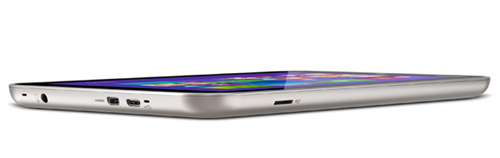
    You get the expected Micro-SD slot, found uncovered on the top-left edge.  This allows up to 64 GB of expansion.  You’ll need this slot if you go with the 32 GB, which has just 10 GB free out of the box.  I think most people should go for the 64 GB model once it appears.  The price point of the 32 GB 8” tablets (all brands) will draw consumers to that size.
    image

    The device is powered via Micro-USB at the top.  There is the usual audio jack on the top.

    This tablet has something that I have not seen in others, and is definitely not in the Dell Venue 8 Pro.  There is a Micro-HDMI port for connecting another display.  That will be useful for PowerPoint.  However, I have not found it useful for video.  When you play a video it plays on the main display (the tablet).  Without a Bluetooth mouse, there is no way to project the video to another display.  This is a flaw in the Windows 8.1 video app rather than in the tablet itself.   A way around will be Miracast, but that has challenges all of it’s own.

    There is no support for a digitizer.  You can use one of those tablet pens – not as good, but this is primarily a consumer device where stylus support is not required.  Yes, the Dell Venue 8 Pro has a stylus option, but it sucks the big one.

    Software

    You get some of the usual Toshiba bits, including manuals (uninstalled), Toshiba Today (or something), McAfee 30 day trial (uninstalled), and a third-party cra-app store (uninstalled).

    Part of the cost of the tablet is a full OEM edition of Office 2013 Home & Student.  Who really wants to work on Office on an 8” device?  Maybe you want to view some stuff or make a quick edit?  It’ll do that.  But maybe you want to try use a Bluetooth keyboard and mouse and connect a monitor via Micro-HDMI?  Then you have a lightweight productivity solution.  I haven’t tried it, but I used my Clover Trail tablet for a lot of Office stuff, so with the right peripherals, the Toshiba Encore might do a good job.

    On the App side, Windows is still lagging way behind.  I have maybe 3-4 times more apps installed on my Lenovo Yoga 8 (Android 4.2).

    Experience

    I used the tablet quite a bit over the weekend after getting it on Thursday.  Social media was the main thing, and a little browsing and surfing.  In other words, just as it is meant to be used.  It worked very well, especially when I was using it to keep up with other games while watching the NFL action last night.

    Satellite S50 Series

    Summary

    This is a very nice device, and it’s working out much better than the questionable quality Dell Venue 8 Pro.  The Lenovo Yoga 8 will continue to be my entertainment device, but the Toshiba Encore will be my work tablet.  I’ll post more when I have a chance to push the tablet a bit.

    Technorati Tags: ,

    And My Next Ultrabook Is …

    I recently posted what I wanted in a new ultrabook to replace my nearly 2 year old, non-touch, Asus UX31E.  I’ve waited, watched the market, and even considered buying in the USA when I was over there.  But even a month after Windows 8.1 GA, the same disappointing spec and overpriced machines are all that are on the market.  If you want a non-touch Ultrabook, it appears that the MacBook Air is the most economical option, even if you upgrade the RAM and SSD.

    The family of devices that has caught my attention is the Lenovo Yoga series.  In fact, it was when researching them that I found out about the (Android) Yoga Tablet 8.  I was going to hold out for the Lenovo Yoga 2 Pro but two things happened:

    • There is no supply anywhere of this convertible ultrabook.
    • I discovered the ThinkPad S1 Yoga

    ThinkPad are more business oriented machines, built to last.  Sounds ideal for lugging around in a camera bag through airports.  The Yoga is also available in this family.  I customized the spec, meaning it will take an additional 1-2 weeks to build and ship:

    • Intel Core i5-4200U Processor (3MB Cache, up to 2.60GHz)
    • Intel HD Graphics 4400
    • 8GB PC3-12800 DDR3L on MB
    • Windows 8.1 64
    • Touch & Pen, FHD (1920 x 1080)
    • Backlit keyboard
    • ClickPad without NFC antenna & module
    • 1TB Hard Disk Drive, 5400rpm with 16GB M.2 Solid State Drive Double

    I thought about going with the 256 GB SSD.  But then I considered that I’m tired of lugging around USB 3.0 caddies when I go on photo trips.  The capacity of a 1 TB drive is going to be useful to me, and that little bit of cache will boost performance a bit.

    I went with the touch/pen option because I really do use a stylus.  I use a whiteboard app quite a bit when I’m teaching.  It’s a hell of a lot easier to explain Hyper-V Replica or SOFS data flow via a “white board” on the projector than on a “small” flipchart or animated PowerPoint slide.

    I ordered this ultrabook on Friday night and should have it sometime before Christmas.  It’s not a perfect machine and I’ve had to make compromises.  I’ll not get the battery life promised by Haswell.  I’ll still have to carry a USB-VGA dongle.  But it does have Miracast (I hope to blog my experience soon).

    FYI, I did consider:

    • A customized MacBook Air because of the battery but there’s no touch
    • An Asus or Samsung but they focus too much on uselessly high screen resolutions that increase price with undersized disks
    • Toshiba ultrabook but they don’t do touch on the new 13/14 inch models

    I’ll let you know how the Lenovo goes once I have it and have had the chance to spend some time on it.

    Technorati Tags: ,

    Nokia Lumia 1020 – First Impressions

    Uh oh!  Someone in Microsoft just shat themselves; Aidan has gone and started blogging about Windows Phone again.  FYI – it led to *ahem* interesting emails the last time around.

    I had some credit on the Amazon.com store so I figured I’d use it to buy the Dell 8” tablet.  That all fell apart – it’s a longer story but suffice to say, Amazon didn’t have stock.  So I looked at the 1020, loved the pictures that I saw people posting, I’m a big photography enthusiast and I thought “that might be the hardware for me”.   In the end, it cost me very little to get a grey market model from Amazon.com while I stayed in Bellevue near MSFT HQ.

    The phone was delivered on Wednesday afternoon.  It had a little bit of charge and it made it through to after midnight while I was out and about and constantly playing with the phone.

    First off, the camera is as advertised.  I haven’t had too much opportunity to play – photography is justifiably banned on Microsoft campuses and that’s where I’ve spent most of my time this week.  Some test shots in low light reveal very high quality images, that even a compact camera don’t appear to rival – I need to spend more time testing and comparing on a full sized monitor rather than on small LCD screens.

    image

    The start of the Xbox One queues at Microsoft Store, Bellevue, WA, USA

    This is not just a point and click camera phone.  When you see real camera controls such as ISO then you know that this is a serious camera that needs to be learned.  I’ve been living in the Canon DLSR world for years so I know my manual controls inside-out and they’re second nature to me when in the field.  I’ll need to learn the controls interface on this camera to make the most of it.

    It’s a Nokia Lumia so the build and screen are superb.  They got that stuff very right in their re-invention process.  I like the button layout, with the power button being right under my finger when I hold the phone in my left hand.  The form factor is a little odd with the bulge.  This phone isn’t for everyone, but photography enthusiasts will accept it for wheat they get from the unusually large phone camera and 41 MP sensor.

    The large camera requires a bulge on the back

    The only hiccup that I’ve experienced has been surprising.  When connecting to my Office 365 account (P1 plan) the thing won’t just connect.  I’ve had to hack around with settings just as if it was an Android phone.  I got my email configured but Office 365 isn’t set up.

    Edit: I connected to Office 365 with no problems a few days later.  Remember the Azure/DNS issue last week?  That probably affected me at the time.

    The normal apps are mostly all there.  I’ve yet to dig into the edge stuff like scheduled do not disturb and so on.  Podcasts … that will decide if this phone becomes something I use just on travel or if it becomes my mainstream phone.  Right now, the HTC One rules.  Dogcatcher makes podcasting pretty easy (it’s not perfect) on Android.  The stupid policies of Microsoft hamper the podcast experience of Windows Phone users outside the big countries – – but Microsoft seem to use The Curse Of Zune to needlessly ruin lots of products.

    Let’s see how I’m feeling in a few week’s time.

    And in the meantime, if anyone in Microsoft wants to reach out then you can find my contact details pretty easily.  This is your opportunity to try shape my opinion.  I’d hate for you to go whining around on internal mail lists afterwards – yeah, I know all about it.

    Technorati Tags: