Azure Compute: New Features & Roadmap

Speaker: Corey Sanders, Director of Compute, Azure, Microsoft

Lots of stuff that hasn’t been talked about yet.

Compute Through The Ages

Some old PCs, aa rack, a video of Monkey Boy doing developers developers developers, tablets, the cloud, and an alien (Quantum Computing).

Digital Transformation

Drink!

  • Engage customers
  • Transform products
  • Empower employees
  • Optimize operations

What’s Important to You?

  • Security
  • Availability
  • Cost savings
  • Automation
  • Infrastructure – sounds like a dev audience based on the boos.
  • Application PaaS
  • Management

VM – Compute

  • ND (new) and NCv2 (next few weeks) have launched with P100 and P40 GPUs.
  • Partial Core Alternatives for SQL/Oracle. You can reduce the number of cores that you can see/use in large VMs to get the other features of that VM, e.g. lots of RAM.
  • B-Series burstable VMs with a baseline low CPU capacity. Earn credits by using under the baseline, and burn those credits by getting more CPU capacity.
  • SAP system has 20 TB of RAM, 960 CPUs, 60 TB multi-node, bare-metal performance because these are bare metal machines.

VM Scale Sets

Up to 1000 VMs in a single manageable unit. Adding auto-OS update by the end of the year. IPv6 load balancer support. Zone redundant VMSS (availability zone automation).

Managed Disks

Abstract away the underlying storage. Data always encrypted at rest. Coming:

  • Incremental snapshots
  • Larger disk sizes
  • Cross-subscription/region sharing
  • Private repository

Security

  • Unified visibility and control
  • Adaptive threat detection
  • Intelligent threat detection and response
  • Investigation into security risks

Announcements:

Missed all this because of speaker speed.

Demo:

An alert of a suspicious process being executed. We can run a playbook from a list. They’re logic apps under the covers. The playbook designer looks like Office Flow. Example shows message being posted in Teams and a ticket being posted in ServiceNow in the event of a high priority alert. He shows that he could post a message in Slack.

Accouncements

Confidential computing which uses Intel silicon to run bits of processes with secure data. This is built on WS2016 Hyper-V technology. This should be small bits of code because you cannot debug it because it’s … secure.

Governance and Management

Lock down who/what/when.

New policy management is announced this week. JSON policy is a lot easier now. CloudDyn is free in Azure.

  • Azure Policy Center
  • Management groups
  • Managed Apps GA
  • Update and Configuration Management
  • Azure Policy Center

Policy Center is in the Azure Portal. under Policy – Compliance. You can do things like “Deny Hybrid Use Benefit” or control VM extensions, control managed disk usage, restrict image creation, etc.

Sample JSON policies are shard in GitHub.

Management Groups

Organizational alignment for Azure subscriptions. Targeted resource policy, access control and budgets. Compliance, security, and reporting by team.

Update, Configuration, And Change Tracking

Windows and Linux, Azure and non-Azure.

Collect and search inventory. Track changes to each system. Autocorrect configuration.

Schedule patching and check compliance.

Application Service Catalog GA

Turnkey for managed workloads. Sealed for simplified usage. Managed by central IT.

Availability

Different tiers: single VM, availability sets, availability zones, and DR.

Availability Zones

PowerShell in the Cloud Shell

Azure Automation with Python.

Availability Zones

Physically separated unlike fault domains. Still in a single region. A zone is one or more data centres. Redundant power, network, and cooling. Reduce single points of failure in the platform. At GA, will offer 99.99% SLA over the 99.95% SLA with availability sets, or 99.9% SLA on single VMs with Premium-only storage.

And then there is DR, to give you replication of VMs using Azure Site Recovery to another region.

Cosmos DB, MySQL/SQL/PostGres, Blob storage, and VMs all have inter-region DR solutions.

Backup and DR

Backup in a single click with VMs. DR with Azure-to-Azure Site Recovery. Recovery Plans, with Automation, offer single-click orchestrated failover.

Maintenance

Currently it typically takes under 30 seconds to do maintenance on hosts in Azure – warm reboot of Hyper-V called in-place migration. They actually replace the entire host OS during patching!

On-demand maintenance. 2-4 week notice window. You can do the reboot on your own schedule. Full reboot updates only. Demo.

A notice appears (also email) to say a VM will be rebooted for host maintenance. You can click Start Maintenance, to move (reboot) the VM to a host that is already updated. It’s in preview in West Central US.

Cost Savings

  • Track usage and cost trends (CloudDyn)
  • Detect spending anomalies
  • Allocate usage to business units
  • Reduce cost of services

Batch:

  • Reserved instances on the way.
  • B-Series VMs
  • Batch VMs – all sizes in all regions, and mixe low and high priority VMs
  • Pre-emptible VMs with up to 80% fixed – for non-critical VMs where MS can take resources back from you.

Future: Serial Console

This is experimental at the moment. A Serial Console is connected to a VM (RHEL). This is an interactive console, not just the screenshot of Diagnostics today. He is logged into RHEL in the VM. He then runs a reboot and watches the entire process, which we wouldn’t have seen via SSH.

This is Linux focused, but they’re working with Windows to find a solution.

Containers & Microservices

Azure Container Instances (ACI) are on the same level as VMs in Azure. Service Fabric and Kubernetes sit above them in management layer. Containers with Kubernetes are “managed containers”.

Announcing: ACI on Windows and ACI on Service Fabric.

40% of Service Fabric customers today are also deploying on-prem, and containers are the perfect compatible solution.

He does a demo to deploy IIS on Nano Server in an ACI (normal Windows container) with a public IP address.

Now a demo of ACI in service fabric. There’s a JSON that specifies the container spec. He’s using a tool called Service Fabric Explorer. He deploys a Linux container in the Service Fabric.

Service Fabric Ga for Linux

You can deploy Linux service plans. You can orchestrate on Linux or Windows. Run a million containers on a single cluster.

Azure Container Service for Kubernetes

You can provision Kubernetes very quickly and easily on Windows and Linux.

Some investments on tooling – an acquisition of a company that sounds like Deus.

Lots of partner solutions from the likes of Dicker Enterprise to manage on-prem and in the cloud with one experience. RedHat OpenShift to manage Kubernetes & RHEL ACI hosts. Pivotal is designed to lift and shift Java applications to containers – Azure, on-prem, and other clouds.

App Services and Serverless

This is a layer above Service Fabric and Kubernetes. We can do this cluster-less (App Services) and server-less (Functions) or Logic Apps.

Web Apps and Linux Containers are GA. You can integrate with Docker Hub and VSTS, and SSH into them.

Azure Event Grid

Treat events as first class objects. Things like Logic Apps and Functions start because of events. Many platforms don’t treat events as first class. As first-class, the events can go anywhere, e.g. from Azure Storage to AWS Lambda. Your apps can listen for events, e.g. WebHooks, Azure Automation, Logic Apps, Functions.

When an event happens, it goes into Event Grid. Then it can be directed to one of the above 4 services in Azure.  From Logic Apps, you can integrate into lots of things like Twitter, Slack, SalesForce, etc, via Logic Apps’ ability to do workflows.

This is “event-driven computing”.

More Announcements

  • Cosmos DB Trigger
  • Microsoft Graph Bindings
  • MacOS and Linus Local Development
  • App Insights GA

WatchGuard Now Supported by Azure for Dynamic/Route-Based VPN

Microsoft now supports WatchGuard’s firewalls with the 11.12 firmware (fireware) for dynamic or route-based VPN.

There are two kinds of VPN gateway in Azure:

  • Static / policy-based: 1:1  connections, don’t support point-to-site VPN, or VNet-to-VNet VPN, website-to-VNet VPN, and really only good for the simplest of designs.
  • Dynamic / route-based: Multiple simultaneous connections, supports all of Azure’s VPN features, and enables complicated designs.

I always prefer route-based VPNs, because they don’t restrict what I can do in Azure. Up to recently, though, that caused a complication for me at work. My employer distributes WatchGuard’s Firebox (XTM) unified threat management firewall devices, and those devices were restricted to policy-based VPN. Good news!

  • WatchGuard released 11.12 of their software (which works on all devices) and this added policy-based (aka Dynamic) VPN support.
  • Microsoft just listed WatchGuard’s devices as being supported by Azure for route-based VPN.

You can find WatchGuard’s instructions for configuring a route-based VPN here.

FYI, the notable devices that still don’t have route-based support are:

  • Cisco ASA (!!!)
  • Barracuda NextGen Firewall X-series
  • Brocade Vyatta 5400 vRouter
  • Citrix NetScaler MPX, SDX, VPX

I guess you can get fired for buying Cisco after all!

Technorati Tags: ,,

Ignite 2016 – Discover Shielded VMs And Learn About Real World Deployments

This post is my set of notes from the Azure Backup session recording (original here) from Microsoft Ignite 2016. The presenters were:

  • Dean Wells, Principal Program Manager, Microsoft
  • Terry Storey, Enterprise Technologist, Dell
  • Kenny Lowe, Head of Emerging Technologies, Brightsolid

This is a “how to” presentation, apparently. It actually turned out to be high level information, instead of a Level 300 session, with about 30 minutes of advertising in it. There was some good information (some nice insider stuff by Dean), but it wasn’t a Level 300 or “how to” session.

When The Heck Is A Shielded VM?

A new tech to protect VMs from the infrastructure and administrators. Maybe there’s a rogue admin, or maybe an admin has had their credentials compromised by malware. And a rogue admin can easily copy/mount VM disks.

Shielded VMs:

  • Virtual TPM & BitLocker: The customer/tenant can encrypt the disks of a VM, and the key is secured in a virtual TPM. The host admin has no access/control. This prevents non-customers from mounting a VHD/X. Optionally, we can secure the VM RAM while running or migrating.
  • Host Guardian Service: The HGS is a small dedicated cluster/domain that controls which hosts a VM can run on. A small subset of trusted admins run the HGS. This prevents anyone from trying to run a VM on a non-authorized host.
  • Trusted architecture: The host architecture is secure and trusted. UEFI is required for secure boot.

Shielded VM Requirements

image

Guarded Hosts

image

WS2016 Datacenter edition hosts only. A host must be trusted to get the OK from the HGS to start a shielded VM.

The Host Guardian Service (HGS)

image


A HA service that runs, ideally, in a 3-node cluster – this is not a solution for a small business! In production, this should use a HSM to store secrets. For PoC or demo/testing, you can run an “admin trusted” model without a HSM. The HGS gives keys to known/trusted/healthy hosts for starting shielded VMs.

Two Types of Shielding

image

  • Shielded: Fully protected. The VM is a complete black box to the admin unless the tenant gives the admin guest credentials for remote desktop/SSH.
  • Encryption Supported: Some level of protection – it does allow Hyper-V Console and PowerShell Direct.

Optionally

  • Deploy & manage the HGS and the solution using SCVMM 2016 – You can build/manage HGS using PowerShell. OpenStack supports shielded virtual machines.
  • Azure Pack can be used.
  • Active Directory is not required, but you can use it – required for some configurations.

Kenny (a customer) takes over. He talks for 10 minutes about his company. Terry (Dell) takes over – this is a 9 minute long Dell advert. Back to Kenny again.

Changes to Backup

The infrastructure admins cannot do guest-level backups – they can only backup VMs – and they cannot restore files from those backed up VMs. If you need file/application level backup, then the tenant/customer needs to deploy backup in the guest OS. IMO, a  secure cloud-based backup solution with cloud-based management would be ideal – this backup should be to another cloud because backing up to the local cloud makes no sense in this scenario where we don’t trust the local cloud admins.

The HGS

This is a critical piece infrastructure – Kenny runs it on a 4-node stretch cluster. If your hosting cloud grows, re-evaluate the scale of your HGS.

Dean kicks in here: There isn’t that much traffic going on, but that all depends on your host numbers:

  • A host goes through attestation when it starts to verify health. That health certificate lasts for 8 hours.
  • The host presents the health cert to the HGS when it needs a key to start a shielded VM.
  • Live Migration will require the destination host to present it’s health cert to the HGS to get a key for an incoming shielded VM.

MSFT doesn’t have at-scale production numbers for HGS (few have deployed HGS in production at this time) but he thinks a 3 node cluster (I guess 3 to still have HA during a maintenance cycle – this is a critical infrastructure) will struggle at scale.

Back to Kenny. You can deploy the HGS into an existing domain or a new one. It needs to be a highly trusted and secured domain, with very little admin access. Best practice: you deploy the HGS into it’s own tiny forest, with very few admins. I like that Kenny did this on a stretch cluster – it’s a critical resource.

Get-HGSTrace is a handy cmdlet to run during deployment to help you troubleshoot the deployment.

Disable SMB1 in the HGS infrastructure.

Customer Education

Very good points here. The customer won’t understand the implications of the security you are giving them.

  • BitLocker: They need to protect the key (cloud admin cannot) – consider MBAM.
  • Backup: The cloud admin cannot/should not backup files/databases/etc from the guest OS. The customer should back to elsewhere if they want this level of granularity.

Repair Garage

Concept here is that you don’t throw away a “broken” fully shielded VM. Instead, you move the VM into another shielded VM (owned by the customer) that is running nested Hyper-V, reduce the shielding to encryption supported, console into the VM and do your work.

image

Dean: There are a series of scripts. The owner key of the VM (which only the customer has) is the only thing that can be used to reduce the shielding level of the VM. Otherwise, you download the shielding policy, use the key (on premises) to reduce the shielding, and upload/apply it to the VM.

Dean: Microsoft is working on adding support for shielded VMs to Azure.

There’s a video to advertise Kenny’s company. Terry from Dell does another 10 minutes of advertising.

Back to Dean to summarize and wrap up.

Webinar Recording: Defending Today’s Threats With Tomorrow’s Security By Microsoft

MicroWarehouse has posted the recording of our last webinar, which explained why the security solutions of the 1990s that some companies are still relying on, are being easily defeated by attackers today.

The post explains what is happening now, based on 2015 survey information from multiple sources. And I explain how a number of cloud-based security services from Microsoft can protect both your on-premises and cloud infrastructures from these modern attack methods, that your firewall and anti-malware scanning will let pass right through or never see.

In fact, I just saw a support request on a security issue that 2 of the solutions in this webinar would have prevented.

image

We have also shared the slides and a hand-out with some follow-up reading/watching.

Webinar: Defending Today’s Threats With Tomorrow’s Security By Microsoft

I am presenting another webinar on July 21st at 2PM Irish/UK time, 3PM CET, 9AM Eastern, hosted by my employer, MicroWarehouse. The focus of this webinar will be security solutions … and I’m not talking old style stuff like AV scanning or proxy/firewalls. No, I’m talking about modern security solutions that are designed to deal with the sorts of threats that your yellow box scanners and Cisco/SonicWall firewalls are letting right through to trash your business.

image

You can register here.

Webinar Recording – An Introduction to Enterprise Mobility + Security (EMS)

I recently presented a webinar, hosted by my employer MicroWarehouse, on an introduction to Microsoft EMS. The timing worked out pretty sweetly – Microsoft had just announced:

  • The renaming of EMS from Enterprise Mobility Suite to Enterprise Mobility + Security, emphasising that security is most of what EMS does.
  • The new E5 EMS bundle that will be released in Q4 of 2016.

image

We have posted the recording of the session on learn.mwh.ie, along with the PowerPoint deck, and some follow up links for reading and learning. EMS is a great suite to learn about, and a great package to consider adopting for securing the endpoints (devices and users) against attack. And you’d be amazed how often the elements of EMS are the answers to security questions.

Speaking of security, our next webinar is coming on July 21st at 2PM UK/Irish time, 3PM CET or 9AM Eastern:

Technorati Tags: ,,,

RunAsRadio Podcast – Hyper-V in Server 2016

I recently recorded an episode of the RunAsRadio podcast with Richard Campbell on the topic of Windows Server 2016 (WS2016) Hyper-V. We covered a number of areas, including containers, nested virtualization, networking, security, and PowerShell.

image

Webinar: Introduction to EMS

A recording of this webinar can be viewed here, along with the slides and follow up reading/learning.

I am presenting a webinar on Microsoft’s Enterprise Mobility Suite (EMS) on Friday at 2pm UK/Irish time, 3PM Central European, and 9am EST.

My job has many threads. Sometimes I am down-deep in the weeds on techie stuff. Sometimes I’m delivering training. Part of what I do is raise awareness. This webinar falls into that category; the target audience is sales and technical staff that know little-to-nothing about EMS and what Microsoft can do for device/application management, identity and security from the cloud.

image

So if you want to find out what EMS can add, then tune in for this 1 hour webinar.

Block Dodgy Admins, BotNets, and Data Leakage on Azure VMs

In this post I will explain how you can use Azure Network Security Groups (NSGs) to prevent unwanted or dangerous traffic from leaving your Azure virtual machines.

Have you a written policy that prevents administrators from browsing the Internet from servers? Have you found that they find creative ways to bypass your policies? Are you worried that some malware will encrypt the data on your file or database servers? Or worse; is there a chance that some hacker will download sensitive data from your machines in the cloud?

I have a solution for you: Network Security Groups, aka NSGs. An NSG is a policy that contains a number of distributed firewall rules that either allow or block traffic. The rules (featuring stateful inspection) are simple enough:

  • Source address/location/ and port range.
  • Destination address/location and port range.
  • Allow or block.

Using a priority value (low is high, and high is low), we can stack rules to create a granular policy. For example, a low priority rule can block all inbound traffic and a high priority rule can allow TCP 3389 (remote desktop aka RDP) in.

The below rule allows HTTP traffic into a virtual subnet.

image

We can associate an NSG with:

  • A virtual machine (Azure V1 / Service Management / Classic)
  • A virtual machine NIC (Azure V2 / Azure Resource Manager / ARM / CSP)
  • A subnet in a virtual network

The preferred option is to enforce the rule at the subnet level, therefore a subnet is a security boundary and all machines in a subnet should have the same rules. If you need different rules for different machines, then add subnets. The stated best practice by Microsoft is to associate an NSG with a subnet.

An NSG contains a collection of default rules. For example:

  • All inbound traffic from the Internet is blocked, via stacking of inbound rules.
  • All traffic to the Internet is allowed.

It’s that last rule that I’m concerned with in this post. You can see the rule with a priority of 65001 below; it allows all traffic, from anywhere, to route via Azure to the Internet.

image

What does that mean?

  • Traffic can leave my Azure virtual machines and go to the Internet.
  • If I have ExpressRoute or a VPN, traffic could (if routing is enabled) route via that site-to-site connection from my office to the Internet (through Azure).

That worries me. And here’s why:

  • Admins can log into my Azure machines and browse the Internet. I don’t want that. My machines have no need to connect directly to the net; I’m going to proxy/inspect everything or I’m running an ultra-secure environment, WSUS will provide my updates, or I’ll download/upload anything I need via my PC.
  • Malware can talk to it’s controller to receive activation orders.
  • A hacker that gets onto my servers can initiate a download from my servers.

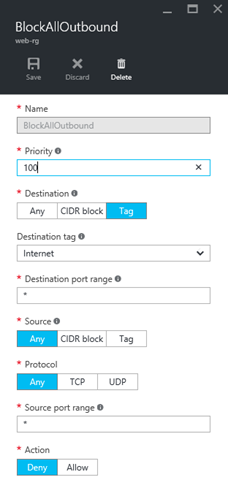
There’s one great big hammer you can swing to stop all of the above. Warning: this is a hammer and should be evaluated and tested. I can put an additional outbound NSG rule to block all outbound traffic that sources from anywhere and routes to the Internet. This rule has a higher priority (lower number) than the default rules so it will override the “allow all outbound” rule and lock down my environment.

image

A variation on this approach would be to use a much higher priority, such as 4000, for this new rule, and create other higher priority rules to allow very specific outbound access from the virtual network.

Thanks to stateful inspection, my inbound application traffic can still function via the inbound rules in the NSG, but the above rule denies all traffic from leaving this subnet for the Internet. Me 1, dodgy stuff 0.

A Word of Warning

I did compare the above to a hammer, and hammers can break things. If you follow the above, you will … break things 🙂 Azure requires that Azure VMs have the ability to reach the “Internet” zone to get updates from … Azure IP addresses (which are regarded as “Internet” by NSGs). The real solution is actually a lot more complex requiring a lot of rules to allow a lot of Azure IP ranges. Microsoft’s Keith Mayer has a solution for identifying these IP addresses (documented by Microsoft) and creating filtered outbound access to just those IP addresses using PowerShell.

Technorati Tags: ,,

Webinar – What’s New In Windows Server 2016 Hyper-V

I’ll be joining fellow Cloud and Datacenter Management (Hyper-V) MVP Andy Syrewicze for a webcast by Altaro on June 14th at 3PM UK/Irish time, 4PM CET, and 10AM Eastern. The topic: What’s new in Windows Server 2016 Hyper-V (and related technologies). There’s quite a bit to cover in this new OS that we expect to be release during Microsoft Ignite 2015. I hope to see you there!

image