Samsung ATIV Smart PC 500T Windows Tablet & Keyboard

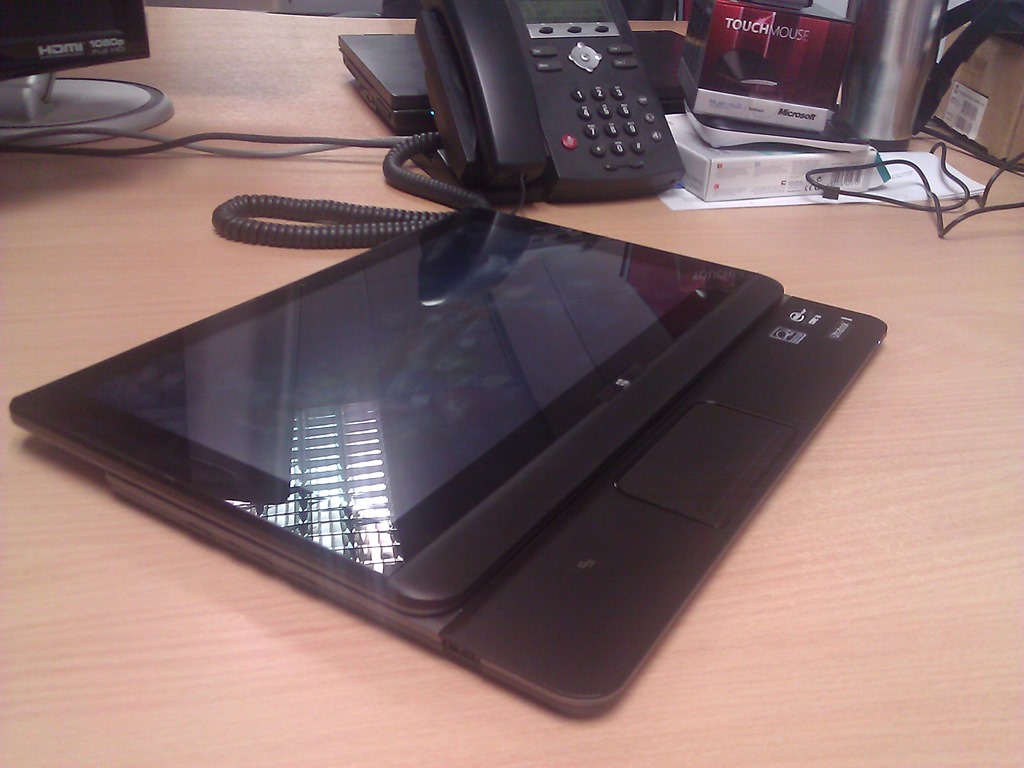
On Friday I took delivery of my new Samsung ATIV Smart PC 500T.  This is an Intel Z2760 powered Windows 8 Pro tablet; it’s not Windows RT like in the Surface.  I wanted something that I could install Visio, VLC, codecs, etc, on.

The Review

The device has an 16:9 ratio 11.1” screen, making it bigger than the Surface or an iPad.  But, it’s lighter than a Surface because it has a plastic back instead of VaporMG.  It feels smoother in the hand than a Surface to me.  The processor is an Intel, but it’s not a Core i processor.  Instead, it’s been saddled with the awful Atom brand.  It is not the Atom of old.  It’s Intel’s answer to ARM.  And that’s why there are no vents, no fans, and the body has no heat, even after 6 hours of usage.  There is 2 GB RAM which is enough for Windows Store apps and for my Office 2013 usage.  If you need more, then look at the “pro” tablets with Core i CPUs and 4 GB RAM (much shorter battery life).

The screen has 5 point multi-touch and stylus support.  The stylus comes with the tablet and slides into the back.  It’s moulded in such a way that is hidden in the body of the tablet (9.9 mm at the thickest point).  You’ll hear Apple say that a stylus is not required for a modern tablet.  I say it is useful; I spent this morning in a briefing taking hand written notes on a lined page in OneNote 2013 on my tablet without any concern over battery, knowing that my note will be synced onto SkyDrive when next online.

I also bought the optional keyboard.  The tablet docks into the keyboard giving you a work and travel friendly ultrabook experience, something that the Surface floppy hinged keyboard can only do on a flat surface such as a table.  The keyboard also gives you an extra battery.  The life of my device listed at 14 hours, or 10 hours video play.  I used it most of Saturday and Sunday to watch video, read Kindle, surf, play games, etc, and it lived up to the promise that was made.  Docking the tablet is a process of pushing it down (after removing the sticky “feet” from the slots in the tablet), and waiting for the audible plug and play response.  A big button gives a click to release the tablet from the two locks.

The touch pad is a gesture pad with Windows 8 support.  Unusually for a touchpad, it is not sensitive to accidental touch.  In fact, it’s the opposite, requiring a more forceful touch than I’m used to.  Being an 11.1” screen device, the keyboard is an OK size, not much different than I’m used to.  You get an extra 2 USB ports on the keyboard.

The speakers are shit.  You’ll need that audio jack on the top.  There’s a USB port on the tablet, as well as a MicroSD port to extend your storage.  Devices with a modem can take advantage of the SIM slot on the top.  And there’s a micro-HDMI port on the left hand side under the audio control.  Unlike the Surface, there is also a handy auto-rotate disable/enable button. 

The screen quality is good.  I give the Surface the edge; it’s hard not to because the Surface’s screen is one of the best around – we photographers value contrast and “pop” rather than pixel counts (as in retina).

As a device, I’m very happy.  I expect this to become my primary device, unless I’m in photography mode and I want something with more RAM and CPU for Photoshop.  I’ve ordered a 64 Gb MicroSD card to extend the storage so I can sync SkyDrive, another thing you can’t do with Windows RT.

My Experience

I bought the device from Misco.ie (also trading as Misco.co.uk).  I prefer to buy from a brick shop in case big ticket items have a problem, but these were the only guys I could find with stock.  The device arrived on Friday afternoon in the office.  And it would not power up.  OK, maybe the battery was flat.  I charged it for about 90 minutes and still nothing.  So I was left to think it was Dead on Arrival (DOA).  I called Misco.ie and part way through a call, I was hung up on.  I called back, was put through to a non-English speaking person in Samsung’s support desk who had never heard of the device, and was hung up on again.  Now I was angry.  I called Misco (they are in England) again and the support desk person had a real attitude, a real “innit” geezer.  I was promised he’d called Samsung, arrange a collection, and call me today.  So far, nothing.  I don’t expect a call from them.

But as you’ve figured out by now, I got the device working.  I brought it home from the office and sat it on the charger from 18:00 until 22:45.  I was about to give up: I picked it up (still charging) and was tapping the power button.  Nothing.  I looked up at the TV, kept tapping (inpatiently), and noticed a blue light.  The power LED came on.  I pulled the power and it still ran.  I shut it down, powered it up, restarted, etc.  I can’t be sure what was wrong, but it appears to me that the tablet was resting on the power button during shipping and drained the battery.  Maybe it wouldn’t start until it was 100% charged!?!?!?!  3 days later and it’s working perfectly.

But my advice:  Don’t buy from Misco.  Ever.  Seriously: Never.

By the way, the price of the tablet is approximately 69% more expensive in Europe than you can get it in the USA on Amazon.com.  That is pure robbery, Samsung.

Technorati Tags: ,

Toshiba u920t Windows 8 Convertible Ultrabook

The final of the demo machines to arrive on my desk is the U920T slider ultrabook from Toshiba. This is a machine that looks like a big tablet one moment, and a classic ultrabook the next. 

When closed, the screen is facing outwards instead of in.  This is a tough, touch screen, supporting 5 touch points.  The material on the case reminds me of the grip on a DSLR camera.  It’s a kind of textured  tough rubberized plastic.  It feels nice to hold, and you feel safe that the ultrabook won’t slip from your hands when using it in “tablet mode” (it’s not a tablet).

WP_000050

The screen slide forward, pushing from the base.  There’s a notch when the trackpad is revealed.  The idea here is that you are in tablet mode, but you can access the trackpad.  The trackpad is smallish compared to ultrabooks, and does not have Windows 8 gesture support.

WP_000051

The next stopping point is when the screen is fully extended.

WP_000053

Now you can tilt the screen up.  There’s no fixed angles; you just rotate the screen until it’s at the angle you want or until it reaches the max, somewhere around 80 degrees (90 being straight up).  Here it is with the screen as vertical as it goes.  BTW, there are both front and back cameras on either side of the screen.

WP_000054

I had 2 worries about the screen tilt mechanism:

  1. How far would it rotate.  Every photo I’d seen showed it at around 70 degrees.  That’s useless for watching Netflix, TV, etc, when you’re in a hotel room.  The angle it reaches is acceptable as long as there is no overhead light.
  2. I was worried about the mechanism.  Would it be strong?  The photos I’d seen made the hinges look flimsy.  Would the screen be rigid or flapping about and rattling?

The hinges are actually nice thick looking steel.  They work with a silent ratchet to keep the screen rigid so it doesn’t bounce when you touch it.

WP_000055

The machine we got has an i3, 4GB RAM (max of 8), 128 GB SSD.  There are 2 USB 3.0 ports, SD card, and  full sized HDMI.  There is no RJ45 (use something like a Dynadock docking station) or VGA (use a HDMI to VGA converter).

There was a bit more Toshiba installed software to uninstall from this machine.  They have their own store (Toshiba Places) on there, some game store (also on the Sony T13), and a bunch of support stuff.  There were more default apps from the Windows Store too … and McAfee (uninstalled immediately).

My impressions?  This is a quality build.  It feels solid, capable of being carried about by a sales person for 3 years.  I don’t think there is a TPM chip.  The battery life is advertised as 4 hours.

I personally would like this type of machine as a presentation platform when coupled with a VGA adapter.  I’m wondering what’s going to happen to it when our run of Windows 8 presentations is over Winking smile

This machine caused quite a bit of interest in the office, even more than the Surface to be honest.  Even our Apple people had to admit it was a nice machine.

Technorati Tags: ,

I’m Getting All Touchy Feely With Windows 8

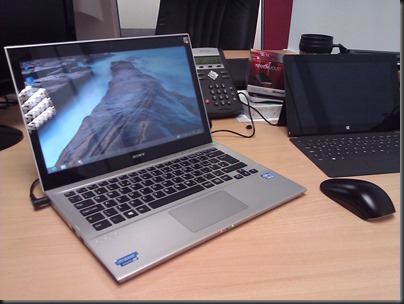
Here’s my desk as it is right now:

image

From left to right:

  • My work PC: HP Elite MicroTower with Viewsonic 22” touch monitor
  • Microsoft Surface RT 32 GB with Touch keyboard/cover
  • Sony T13 touch ultrabook
  • Toshiba u920t convertible (slider) touch ultrabook

It’s a tough job but somebody has to do it.

Technorati Tags: ,

Sony T Series 13.3” Windows 8 Touch Ultrabook

A Sony VAIO T (T13) Series SVT13124CXS 13.3-Inch Touch Ultrabook (Silver) just arrived on my desk as part of our Windows 8 demo kit. It’s a nice ultrabook.

WP_000048

The model we got has a quad core i5-3317U CPU, 4GB RAM, 10-touch point display (not just the minimum of 5), and a 500 GB hybrid drive (32 GB of which is SSD).

What I love about this machine:

  • USB 2.0 and USB 3.0
  • Full size HDMI port
  • Full size RJ45 networking port
  • Full size VGA port
  • 10 touch points which future proofs the touch
  • It’s not cluttered with default apps/programs.  There are some Sony add-ons, mainly the care stuff to maintain the machine, which is perfectly fine. And those Sony apps do update through the app store too.

Sony have sacrificed thinness to get those full size ports in there. It’s not as thin as a UX31 but it’s still ultrabook thin.  Someone who presents a lot like me will be OK with that.  That’s because there are no dongles required to connect to the typical hotel/office projector that only supports VGA … no dongles … no converters …. nothing to leave behind or lose.

Important apps like Skype and Skydrive are pre-installed. 

The touchpad supports Windows 8 gestures.  The keypad is pretty nice.  My test is to type the most common string of text that I use when working: “Windows Server 2012 Hyper-V” surprisingly enough Winking smile The keyboard is pretty nice, better than the one on my UX31 (I think most things are).

Negatives:

  • McAfee is preinstalled, but that disappeared quickly to be replaced by the default Windows Defender.
  • There isn’t TPM chip. This target market is not business, but I can see work people who travel a lot liking this machine.  It’s attractive and has that dongle-less approach which is all-too rare in the ultrabook market.
  • I’d like the screen hinge to be a tiny bit stiffer.

Overall, a nice machine IMO.  It’s got a nice spec, and comes in at a competitive price as an ultrabook.  Another machine arrive while I was setting up the Sony.  More on that later when I can pry it out of the hands of my colleagues.

Technorati Tags: ,

Smartglass Won’t Play Video To Your XBox From Windows 8

You’ve probably heard about Smartglass or seen the video.  You’ve followed the instructions (log in with common Live/Xbox ID on Xbox and Windows 8 device, install & configure the app), started playing a video, swiped up, hit Play To, and there’s no option for your Xbox.  Then you start searching and find the same result I did, and wonder if your Surface is broken. 

I verified that it wasn’t just the Surface, by recreating the scenario from a pristine virtual machine.

So what was wrong?  It appears that Microsoft missed an instruction:

  1. Hit Charms – Settings – PC Settings
  2. Go to Devices
  3. Add A Device, let it search.
  4. Add Xbox 360 (Digital media server)
  5. Wait for it to add & install

Now start a video on your Windows 8 machine, open the app bar (bottom), hit Play To –> XBox 360

Technorati Tags: ,

Microsoft Surface RT Arrives 2 Days After Order

On Monday morning, we (the company) ordered a 32 GB Surface RT (ARM processor) with touch keyboard, and an optional mini-HDMI to full HDMI adapter. Almost 48 hours later it arrived – and we didn’t expect it until next Monday.

First impressions – it’s heavier than I expected (everyone’s reaction so far – we distribute a certain market leading tablet) after handling the Samsung and Asus RT tablets. I am left to guess that the VaporMG casing is partly responsible. The device feels well in the hand, but I wouldn’t give it an edge over the other RT tablets that I’ve tried.  The kickstand is solid, but (in my opinion) doesn’t have that luxury European sound when closing, as was promoted. The screen contrast is superb, as early reviews highlighted.  Photos do look well on the device.  The keyboard does have a solid click and lock – first thing I did was wave the tablet by the keyboard to the shock of my co-workers Smile

The touch keyboard is different but it works … on a table.  I give this keyboard concept a fail in the actual on-the-lap experience (see the transformer type tablets such as Asus Vivo, HP Envy x2, Dell XPS 10, or Samsung ATIV).  That’s just my opinion.  Others disagree and prefer the non-transformer tablet approach of the Surface. The great thing is that we do have device and CPU choices with Windows 8/RT and we can still share a common app platform.

An issue is that the touch cover doesn’t close flush with the edges of the tablet; it’s a matter of time until the edges fray as the tablet is put into a bag and pulled out again.  The touch keyboard is not magnetically held closed to the tablet when you close it over. You have to hold the cover to the tablet.

As was reported elsewhere, the power cable locks on magnetically; it’s a little fiddly. There is a very dim light (not visible from angles) that indicates a solid lock and charging activity.

photo

Setup was painless. My colleague and myself set up user accounts.  Importantly, the device is snappy to use.  I installed Guns 4 Hire and it played well.

I kicked off a reset from Settings.  It’s been running 15 minutes and is stuck at 1%. Ah … just as I typed that % it switched to 2% progress Smile

One nice thing to see: finally MSFT is shipping a product that is not encased in inordinate amounts of solid, waste plastic.  The packaging was almost entirely cardboard, as you get with the iPad or Kindle. Bravo!  However, Amazon still keeps the lead there by using recycled materials for the packaging. I really don’t care what a box looks like when its destiny is to end up in my recycle bin.

The first person to set it up was one of our MSFT licensing experts. He logged in with his Microsoft (Live) ID and was well impressed that his contacts, photos, and social media stuff was waiting for him to use.  That’s such a winner for Windows 8/RT.

Edit: After the reset I started updating and installing. Lots of apps were installed, including one by the GAA and some rugby (6 nations and IRFU news) apps. Lots of good games on there, some work stuff like a whiteboard and Citrix receiver. And of course, Office RT was upgraded to RTM (remember that you need to “upgrade” that to Pro for business usage).

As I said, it feels nice in the hand, it ran well in my quick test (don’t bother asking me specifics because it was a quick test), and it is the Surface, the flagship device for Windows 8, and probably the first of many versions to come.

For us, it’s a demo machine. We have to promote Windows 8 as a concept and devices such as tablets are central to that.  None of the manufacturers that we distribute have launched Windows 8 tablets so we needed something that wasn’t going to promote brands run by other distributors.  Hence we bought the Surface as a demo device.

Technorati Tags: ,

Even The Company That Allegedly Killed Metro Has Poor Selection Of Windows 8 Stock

I blogged just over a week ago about my disappointing experience in Irish retailers on the opening day for Windows 8. In summary, the manufacturers did not supply stock and missed a huge opportunity. And Surface is available in the UK (and some other countries too), but only to those who pay from UK addresses.  So there was no Windows 8 tablet for me!

I was speaking at E2EVC in Hamburg, Germany, and a few of us nerdy types decided to go over to Saturn, a very large electronics chain, that is similar to Currys in the UK. Oh, Saturn is a part of the Metro family. the brand that some allege is responsible for the death of the Metro brand in Windows 8 and Windows phone.

The basement was where all the computers were.  Dozens and dozens of laptops, apparently in any old random order.  Most of them running Windows 7.  A few ran Windows 8 but none had touch that we could find.  A few (not many) had gesture pads.  And then we found a helpful sales assistant who showed us an Asus Vivo RT tablet.  We had a go.  To me, it seemed thinner than lighter than the old-new iPad (v3).  The price? 729 Euros including the battery/keyboard.  That’s $1,000 USD.  They only had a few in stock.  In fact, a delegate to E2EVC bought their last one.  This is it in my hands:

image

The keyboard was much nicer than I expected, similar to the Toshiba or Samsung ultrabooks, and much better than the Asus UX31 keyboard.  Note that Misco.ie (and UK) and Alternate.nl appeared to have stock of this tablet (not sure about keyboard SKU) when last I looked.

Myself: I ordered the Samsung ATIV Smart PC.  When it came down to it I had to have a transformer type as above where the tablet detaches.  I decided that Windows RT is not for me.  I watch a lot of video while travelling and the inability to install Silverlight or codecs would kill it for me.  When names like NFL Gamepass and VLC join Netflix then maybe … but not for a few years because my Samsung should arrive in the office on the 16th.

For work, we needed a tablet to demo.  None of the manufacturers that we distribute have produced a Windows 8 tablet of any kind.  An Asus was out of the option.  So were Samsung (and too late for an event we’re going).  Microsoft Surface would be inoffensive because no one distributes them.  But where to get one?

Thomas Maurer (MVP) to the rescue.  He lives in Switzerland and ordered one from MSFT Germany’s store.  In fact, it was delivered today, 7 days after ordering it.  We checked at the office and we ordered one this morning.  Two things:

  • German keyboards are different to UK/IE (I think Dutch is similar to ours) ones.  They swap their Y and Z and therefore are QWERTZ instead of QWERTY.
  • You allegedly can change the language of Windows 8 and Windows RT.  In fact I think you’re asked what language you want when you run the mini-setup wizard on the first boot up or reset.

We won’t care too much about the keyboard.  This is a demo machine.

So that’s the story.  You can get a Windows 8 tablet but it’s not as easy as it should be.  And the company that allegedly killed Metro has sweet FA Windows 8 stock on their messy shelves.  That same company sells iPads via vending machines in airports too (559 Euros for the new-old 16GB Retina model).

IMG_0706

Technorati Tags: ,

It’s Clear Now Why Microsoft Released Surface

September 2011: Microsoft announced Windows 8 at the Build conference, with the intended audience being software developers and hardware manufacturers. Software developers were a little slow at getting on board, but the flow of apps in the Windows Store has increased. There might be an unfortunate number of Pong and Hangman games, but there are a few gems in there too. I suspect that Build was not the first time that the major OEMs saw Windows 8. Correction: I know it wasn’t Winking smile

So why on earth is there no Windows 8 tablet (Windows RT or Windows 8) stock from any Microsoft hardware partner out there to be found?  Amazon (USA/UK) has nothing.  Best Buy appears to have nothing.  Laptops Direct isn’t shipping stock until November 27th, a full month after GA/announcement. Dell isn’t shipping the XPS 10 until December 5th.

You can buy Windows 8 online or in a store. You can buy nice big chunky Windows 7 laptops in stores that are Windows 8 logo/installed.  Only Sony appears to have a touch Ultrabook in the shops at the moment. There are no shortage of AiOs in the stores but people want tablets and light laptops now.

Where the hell are the devices that people want (tablets)? After all, Microsoft is a devices and services company now.

The market thinks that maybe Microsoft came up with the Surface to be a flagship product, something to show the OEMs that devices could be designed and be different from the normal Android device.  I used to think that too.  I suspect that Microsoft saw the OEMs dragging their knuckles last year and decided to act so they would have a product on the market when Windows 8 was launched. 

Imagine: Windows 8 launches as a device OS and there are no devices on the market. And that’s exactly what’s happened for most of the world because Surface is only available to purchase in a few countries (not that different to Apple’s original release of the iPad) – you have to be able to pay with a credit card addresses in those countries.

Meanwhile, Apple are releasing new ranges of iPad on Friday I believe. Sure, there might be the usual shortage of supply, but they’ll still have devices out there across the world, and they’ll sell bucket loads of the iPad Mini while the Microsoft partner stock will be somewhere on a steamboat between “here” and Taiwan/China.  Microsoft did a great job in building up momentum, but the hardware partners have completely let the side down, letting customers walk into stores looking for Windows 8 devices and only finding Android or iPad.

Note: Microsoft subsidiary staff really need to stop talking and selling the Surface. It just isn’t available in the majority of the countries where it is being promoted, and they’re wasting oxygen because the partner stock isn’t there either. Save your powder until there is something to sell.

Technorati Tags: ,

Windows 8 – You Can’t Have Your Cake And Eat It

I took a tour of retail outlets in Ireland this morning to see what splash Windows 8 had made.  And when I got back to the office, I found that Microsoft had sent us a batch of cup cakes to celebrate:

photo (1)

So what sort of splash has Windows 8 made?  I visited 4 outlets, 2 from ChainA and 2 from ChainB.  The two chains always build in the same business parks so that made it easy.

In my local retail park, ChainA got me really down.  They had 20-30 laptops there, almost all being big classic Windows 7 devices, the stereo typical thing that the iPad and Macbook have been crushing lately.  They had 3 Windows 8 models on sale: 2 Lenovos and a Tosh ultrabook.  None had touch at all. 

Next door, ChainB was stocking mostly Windows 8 product.  Any remaining Windows 7 product was marked for clearance.  They’d been clever, pricing their product to clear so they would be competitive after the GA of Windows 8.  The Lenovo 27” AiO was there *drools*.  Forget the Dell One AiO.  The Lenovo is beautiful and impressive.  You have not live until you have done a 27” pinch zoom in Maps to go from continent level to neighbourhood detail. 

They also had a Sony T13 Ultrabook with touch.  I’m considering this as my Asus UX31 replacement … cos we are Sony distributors and I can buy from stock Smile  The Sony slider was there too. 

Here I chatted with a part-time trainee sales guy who was a student.  I showed him how, using Windows 8 devices he could take notes in OneNote and run the camera app to record a lecture in class.  His eyes opened and that’s when he revealed that he has Dyslexia and has trouble taking notes.  Windows 8 side-by-side apps to the rescue – and I am not doing hyperbole here.  I wonder if MSFT considered this when they demonstrated the student scenario at the Surface launch.

Off to Dublin to visit 2 headline outlets for ChainA and Chain B where Microsoft Ireland had brought the press this morning.  There was a Microsoft presence here to do customer demonstrations.

In ChainB, they continued to have lots of Windows 8 stock as in the rural outlet.  They also had a mix of classic laptops (no touch) running Windows 8 in all sizes, some of which had the larger gesture (touch) pads with Windows 8 gesture support.  Asus and Samsung ultrabooks on hand did not have touch/gesture support.  The funny moment was when a customer came in and asked a sales guy if they had sold out of Surfaces; Surface is only in Microsoft stores (they only exist in the USA at the moment) and in select Microsoft Online Stores. The UK online store will not accept Irish billing addresses – we tried in the office.

EDIT: This outlet of ChainB opened for 2 hours at midnight last night.  They did a full day’s business in those 2 hours and considered it worthwhile.  I was surprised but happy.

Back in ChainA, and about 25% of this headline outlet’s stock was Windows 8, but not one of them was touch enabled. 

Who’s to blame?  It appears that the manufacturer’s let the side down.  I know that certain stock has not made it to Ireland, and I’ve just heard that even the UK (considered one of the major Microsoft markets) is undersupplied.  The demand is there – the shops were active when they opened the doors and I can hear our sales people on the floor dealing with retail outlets around the country.  Windows 8 is trending on Twitter.  The online media are talking about Microsoft and Windows 8 devices.  The radio in Ireland is talking about Microsoft, Windows 8, new devices, and their 27th anniversary on this island (including that part of Windows 8 was developed a few KMs from where I’m sitting).  And some big names in Ireland, such as the GAA (our biggest sports organisation with a very nice multimedia app), the Irish Times, etc, had apps published in the store in the last few days.

Here is the most depressing thing: there is not one Windows 8 tablet for sale in the country.  So Time Square might have been buzzing last night, but in my personal opinion (and I am not speaking for my employers), the manufacturers let the side down and missed out on a lot of momentum this morning.  That’s what I heard from them – and I know we can’t blame the channel.

Maybe stock will start coming in next week, maybe next month.  I’ll post something when it does.

On a positive note: go find a Lenovo 27” AiO and do a 27 inch pinch zoom on a Windows 8 app Smile

EDIT: Dell Ireland is accepting orders for the XPS 10 Windows RT tablet – my preferred option because of the rigid keyboard. 

Technorati Tags: ,

Surface Launch

People are delighted, and they’re snap dancing around the world … apparently  Surface is a “stage of Windows 8”.  There are more stages … Surfaces … to come?

The 10.6 inches diagonal screen is what Windows was designed to work on (side by side apps).  The display is Cleartype.  The panel was designed from the ground up by MSFT.  The tablet was designed from the inside out, with weight distribution in mind.  It has to feel “great” … light and balanced.  Weight distribution reduces stress on the wrists. 

The MicroSD (up to 64 GB) is under the kick stand.  You could swap cards for those long journeys, archiving lots of photos on a vacation, etc.  Speaker says he watched movies on a 10 hour flight to china without charging.  In a layover, he nearly did a 100% charge.

There are 2 wireless antennas for signal quality.  Speaker claims he connected to hotel wifi when staff said he wouldn’t be able to at the hotel roof pool.

He talks about the screen contrast and lack of reflectivity (how the screen is bonded).  Independent reviews call this out.  As a photographer, I understand the importance of this.  Using SmartGlass, he throws the movie that is playing to an Xbox and the projected screen.  He repeats with music to stress how you can take advantage of your surround sound system for music.

Hydro Thunder is up.  I miss it from the beta.  Very good 3D graphics

He drops one from held up position to prove a point.  The build is SOLID and he picks it up to use it.  They then show the “surface keyboard” (d not do this) when Sinofsky rode one.  Speak of the devil … he comes out to reclaim it. 

Clever usage of side-by-side with angled back camera.  With the kickstand open, he records the audience and writes, just like a student could record a lecture and take notes at the same time.  Very very nice.  Beat that iPad.

Steven SInofsky comes on stage to plug in a DSLR directly into a Surface via the USB port to upload some pictures into a blog post in Word.  iPad, can you do that?  Dongle what now?

And in-store sales start at 00:01 on the 26th in the USA.

That’s a wrap!

Technorati Tags: ,